
Introdución
This manual provides essential information for the setup, operation, and maintenance of your MUSTAR 61 Key Piano Keyboard. Designed for beginners, this electric keyboard features light-up keys and a smart learning system to facilitate musical development. Please read this manual thoroughly before using the product to ensure proper function and longevity.
O que hai na caixa
- 1x Keyboard Piano
- 1x micrófono
- Auriculares 1x
- 1x Piano Stool
- 1x Keyboard Stand
- 1x Music Stand
- 2x Keyboard Stickers
- 1 x adaptador de alimentación

The complete MUSTAR 61-key electronic keyboard set, including the keyboard, adjustable stand, padded stool, headphones, microphone, music stand, and key stickers.
Configuración
- Montar o soporte do teclado: Unfold the keyboard stand and adjust its height to one of the three available levels (25.4-30.1 inches) for comfortable playing. Ensure it is stable before placing the keyboard.
- Coloca o teclado: Carefully place the 61-key piano keyboard onto the assembled stand.
- Fixar o atril: Insira o atril na ranura designada do teclado.
- Conectar enerxía: Power the keyboard using the included power adapter by plugging it into the DC 9V port on the back of the keyboard and a wall outlet. Alternatively, the keyboard can be powered by 6 AA batteries (not included) for portable use.
- Accesorios de conexión: Plug in the microphone and headphones into their respective jacks on the back of the keyboard.
- Apply Key Stickers: For beginners, apply the provided keyboard stickers to the keys to aid in learning note identification.

Diagram illustrating the dimensions of the keyboard, stand, and stool, highlighting the adjustable height of the stand.

The keyboard can be powered by the included power adapter or 6 AA batteries (not included), offering flexible usage.
Instrucións de funcionamento
Controis básicos
- Potencia: Press the 'Power' button to turn the keyboard on/off.
- Volume: Adjust the master volume using the dedicated volume controls.
- Tempo: Modify the playback speed of rhythms and demo songs.
- Transpoñer: Change the pitch of the keyboard up or down.
Tones & Rhythms
The keyboard offers 255 different tones (voices) and 255 rhythms. Use the 'Tone' and 'Rhythm' selection buttons and the numeric keypad to choose your desired sound or beat. Refer to the manual's appendix for a complete list of available tones and rhythms.
Cancións de demostración
Explore 50 pre-programmed demo songs. Press 'Demo One' to play a single demo or 'Demo All' to cycle through all available songs.
Gravación e reprodución
Utilize the 'Record' function to capture your performances and 'Play' to listen back. The keyboard also supports rhythm programming for custom beats.
Sustain & Vibrato
Enhance your sound with 'Sustain' to prolong notes and 'Vibrato' for a wavering effect.
Metrónomo
Activate the 'Metronome' for precise timing practice.
Split-Tone / Dual-Keyboard Play
The split-tone feature allows the keyboard to be divided into two sections, each with a different tone, enabling two players to perform simultaneously.

A young girl enjoying the keyboard, illustrating its 3 teaching modes, 50 demo songs, 255 tones, and 255 rhythms.

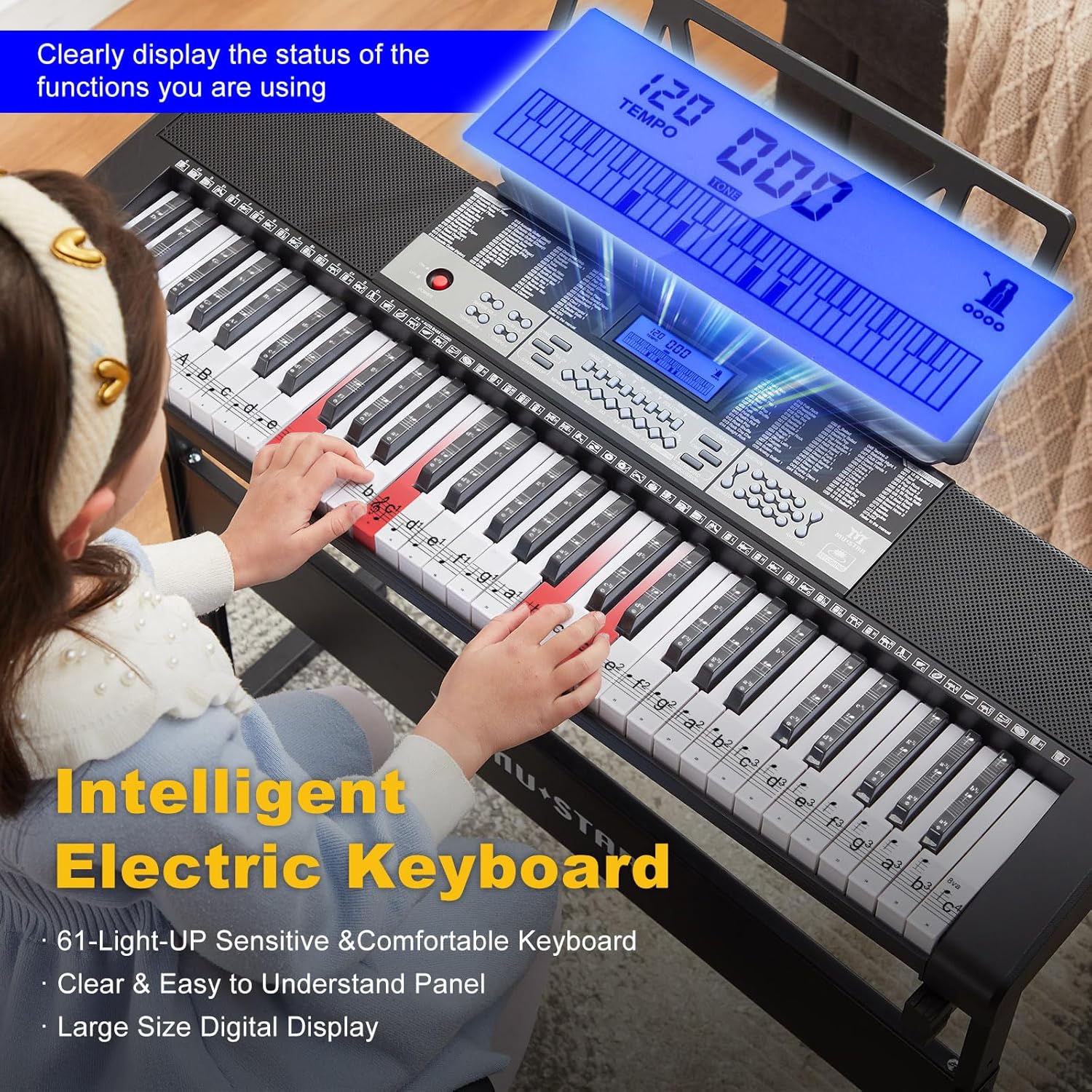
Detallado view of the keyboard's control panel with a large digital display and illuminated keys, indicating its intelligent learning features.
A visual representation of the keyboard's high-fidelity stereo speakers, emphasizing its rich and vibrant sound quality.
This video demonstrates the various functions and display features of the 61-key keyboard, including rhythms and tones.
Un máisview presentación de vídeoasing the 61-key electric keyboard piano, its light-up keys, and included accessories like headphones and microphone.
Sistema de aprendizaxe intelixente
The keyboard features a 3-step learning system designed to guide beginners:
- Single Key Mode: Learn notes one by one.
- Modo Seguimento: O teclado agarda a que toques a nota correcta antes de continuar.
- Modo conxunto: Toca coa melodía, centrándote no ritmo e na sincronización.
You can save your progress with 4 memory settings (M1-M4) to track your improvement.
A brief video demonstrating the keyboard's learning capabilities, ideal for beginners.
Conectividade
The MUSTAR 61 Key Piano Keyboard offers versatile connectivity options:
- Entrada/Saída de audio: Connect external audio devices or output sound to amplevantadores.
- Tomas para auriculares: Practice privately without disturbing others.
- Conectividade do micrófono: Sing along while you play.
- Bluetooth: Conéctate sen fíos a dispositivos compatibles.
- USB: Connect to computers or other MIDI-compatible devices.

Un detallado view of the keyboard's rear panel, showing ports for audio input, microphone, headphones/output, and 9V power.
Opcións de enerxía
O teclado pódese alimentar de dúas maneiras:
- Eléctrico con cable: Use the included power adapter for continuous play.
- Alimentado por batería: For portability, insert 6 AA batteries (not included) into the battery compartment.
Especificacións
| Característica | Detalle |
|---|---|
| Marca | MOSTRA |
| Nome do modelo | U6010200800 |
| Número de modelo do artigo | MEKS-800 |
| Número de chaves | 61 |
| Dimensións | 10.39" D x 32.5" W x 30.1" H |
| Peso do elemento | 21.4 libras (9.73 quilogramos) |
| Tipo de material | Plástico |
| Cor | Negro |
| Tecnoloxía de conectividade | Bluetooth, USB |
| Fonte de enerxía | Corded Electric/Battery Powered |
| Características especiais | Built-In Speaker, Digital Display, Headphone Jack, Lighted Keys, Microphone Input |
Mantemento
- Limpeza: Use a soft, dry cloth to wipe the surface of the keyboard. Avoid using abrasive cleaners or solvents.
- Almacenamento: Garda o teclado nun lugar fresco e seco, lonxe da luz solar directa e de temperaturas extremas.
- Manexo: Handle the keyboard with care to prevent damage to keys or internal components.
Resolución de problemas
- Sen son: Ensure the power adapter is securely connected or batteries are correctly inserted. Check the master volume level and ensure headphones are not fully muted if connected.
- As teclas non se iluminan: Verify that the light-up key feature is enabled in the learning mode settings.
- Son distorsionado: Check the volume levels of both the keyboard and any connected external devices.
Garantía e Soporte
MUSTAR is committed to providing excellent after-sales service. If you encounter any issues or have questions regarding your 61 Key Piano Keyboard, please do not hesitate to contact our support team. We are dedicated to providing a satisfactory resolution.