
1. Introdución
This manual provides essential information for the safe and efficient operation, maintenance, and troubleshooting of your Dapper Supply DP-RAFS1205 Battery Powered Ride-On Commercial Floor Scrubber Machine. Please read this manual thoroughly before operating the machine to ensure proper usage and to prevent injury or damage.
1.1. Información de seguridade
- Always wear appropriate personal protective equipment (PPE) during operation and maintenance.
- Asegúrese de que a máquina estea apagada e desconectada da corrente antes de realizar calquera mantemento ou axuste.
- Operate the machine only on surfaces designed for its use.
- Do not operate the machine in hazardous environments or near flammable materials.
- Manteña as mans, os pés e a roupa solta lonxe das pezas móbiles.
- Familiarícese con todos os controis e os procedementos de parada de emerxencia.
2. Produto rematadoview
The Dapper Supply DP-RAFS1205 is a battery-powered ride-on commercial floor scrubber designed for efficient cleaning of large floor areas. It features a 22-inch brush width, a 31.5-inch squeegee width, and a dual-tank system for clean and recovery water.

Figura 2.1: Lateral view of the Dapper Supply DP-RAFS1205 Ride-On Commercial Floor Scrubber Machine.
2.1. Compoñentes clave
- Volante: Para control direccional.
- Operator Seat: Provides comfortable seating for the user.
- Panel de control: Contains power switch, brush controls, solution flow, and battery indicator.
- Tanque de solución: Holds clean water and cleaning solution (18.5-gallon capacity).
- Tanque de recuperación: Collects dirty water (19.8-gallon capacity).
- Scrub Brush: 22-inch diameter brush for scrubbing floors.
- Montaxe de raspadores: 31.5-inch wide squeegee for water and debris collection.
- Front & Back Lights: For improved visibility in dimly lit areas.
- Alarma de respaldo: Enhances safety during reverse operation.

Imaxe 2.2: Primeiro plano view of the control panel area, showing the key ignition and brush control.
3. Configuración
3.1. Desembalaxe e montaxe
- Retire con coidado a máquina da súa embalaxe. Inspeccione se hai algún dano durante o envío.
- Asegúrese de que estean presentes todos os compoñentes listados na lista de embalaxe.
- Attach any unattached components, such as the squeegee assembly, following the diagrams provided in the separate assembly guide (if applicable).
3.2. Carga inicial da batería
Before first use, fully charge the machine's battery. The battery system requires 7-8 hours for a full charge.
- Locate the charging port on the machine.
- Connect the provided charger to the machine and then to a standard 110V AC power outlet.
- Monitor the charging indicator lights. Disconnect the charger once charging is complete.
3.3. Filling the Solution Tank
- Open the lid of the clean water (solution) tank.
- Fill the tank with clean water and an appropriate, manufacturer-approved cleaning solution according to the solution manufacturer's instructions. Do not overfill.
- Securely close the tank lid.
4. Instrucións de funcionamento
4.1. Lista de verificación previa á operación
- Comprobe o nivel de carga da batería.
- Ensure solution tank is filled and recovery tank is empty.
- Verify brush and squeegee are properly installed and free of obstructions.
- Clear the area to be cleaned of any large debris or obstacles.
4.2. Iniciando a máquina
- Sit comfortably in the operator's seat.
- Introduza a chave no contacto e xire á posición "ON".
- Engage the main power switch on the control panel.
4.3. Procedemento de limpeza
- Lower the scrub brush using the brush control lever/button.
- Lower the squeegee assembly using its respective lever/button.
- Activate the solution flow.
- Begin driving the machine at a consistent, moderate speed. Overlapping passes slightly will ensure thorough cleaning.
- The machine will scrub the floor, dispense solution, and then recover the dirty water through the squeegee into the recovery tank.
- Utilize the front and back lights for enhanced visibility in low-light conditions. The backup alarm will sound when reversing.

Figure 4.1: An operator demonstrating the use of the Dapper Supply Ride-On Floor Scrubber.
4.4. Despois da operación
- Raise the scrub brush and squeegee.
- Turn off the solution flow.
- Turn off the main power switch and remove the key.
- Empty and rinse the recovery tank.
- Rinse the solution tank if using cleaning chemicals.
- Clean the squeegee blades and brush.
5. Mantemento
Regular maintenance ensures optimal performance and extends the lifespan of your machine.
5.1. Mantemento diario
- Empty and rinse both solution and recovery tanks thoroughly.
- Clean the squeegee blades and check for wear. Replace if damaged.
- Inspect the scrub brush for debris and wear. Remove any tangled materials.
- Wipe down the exterior of the machine.
- Check battery charge and recharge as needed.
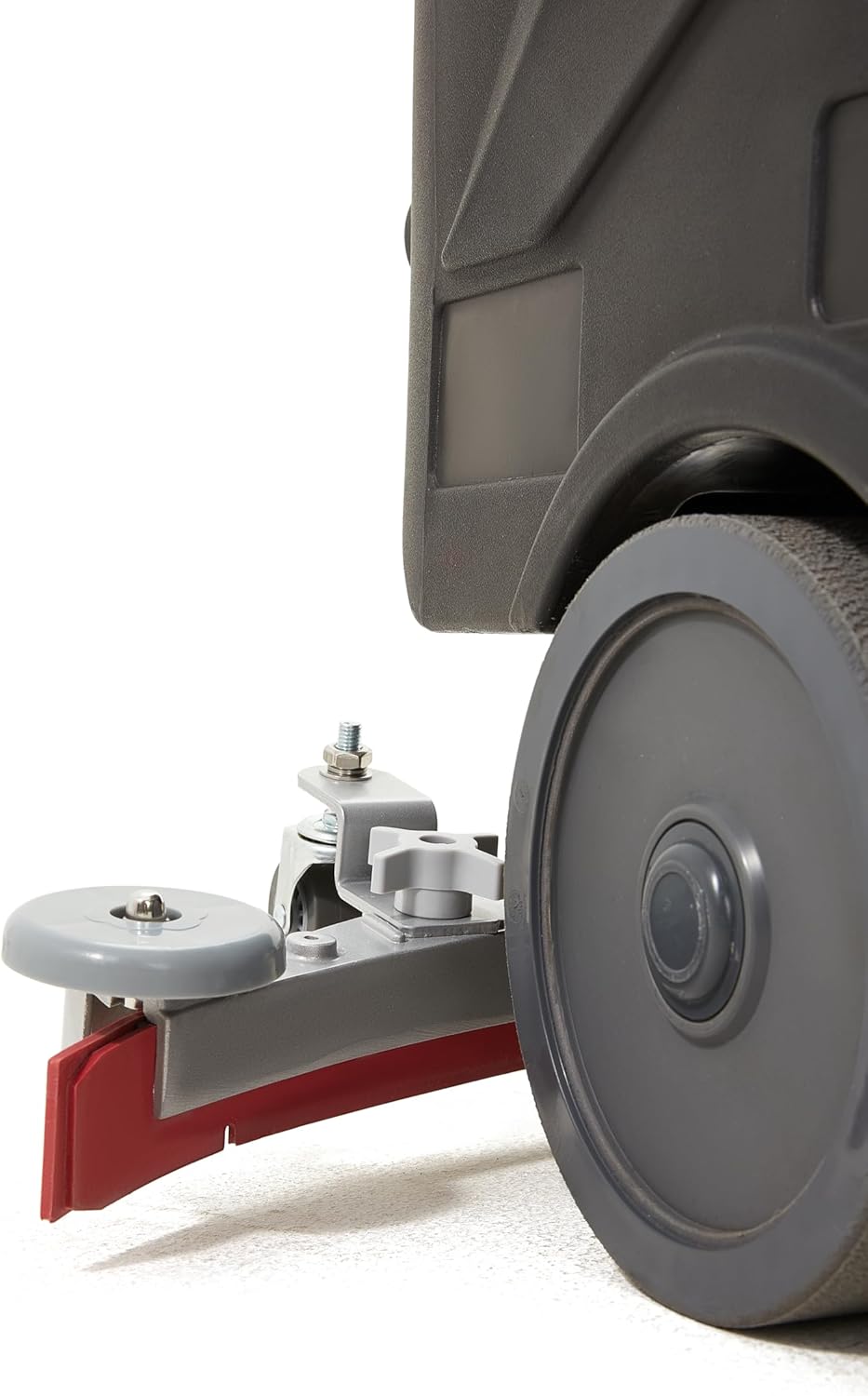
Figura 5.1: detallada view of the squeegee assembly, showing the blade and adjustment knob.
5.2. Mantemento semanal
- Inspeccione todas as mangueiras e conexións en busca de fugas ou danos.
- Check the condition of the wheels and casters.
- Clean the vacuum filter (if applicable).

Figura 5.2: Parte inferior view showing the scrub brush, which should be regularly inspected and cleaned.
5.3. Coidado da batería
- Always recharge the battery after each use, even if not fully depleted.
- Evita descargar completamente a batería, xa que isto pode reducir a súa vida útil.
- Store the machine in a cool, dry place when not in use, ensuring the battery is charged.
6 Solución de problemas
Esta sección ofrece solucións para problemas operativos comúns. Para problemas que non aparecen na lista, póñase en contacto co servizo de atención ao cliente.
| Problema | Causa posible | Solución |
|---|---|---|
| A máquina non arranca | Battery discharged; Key not in 'ON' position; Main power switch off. | Charge battery; Turn key to 'ON'; Engage main power switch. |
| Baixo rendemento de fregado | Worn brush; Incorrect brush type; Insufficient solution flow. | Replace brush; Use correct brush for floor type; Check solution tank level and flow settings. |
| Water not recovering properly | Worn or damaged squeegee blades; Recovery tank full; Clogged vacuum hose. | Replace squeegee blades; Empty recovery tank; Clear vacuum hose. |
| Machine loses power quickly | Batería non cargada completamente; Batería envellecida. | Ensure full charge before use; Consider battery replacement if performance continues to degrade. |
7. Especificacións
Technical specifications for the Dapper Supply DP-RAFS1205.
| Característica | Especificación |
|---|---|
| Número de modelo | DP-RAFS1205 |
| Fonte de enerxía | Alimentado por batería |
| Ancho de limpeza | 22 polgadas |
| Ancho da raspadora | 31.5 polgadas |
| Capacidade do tanque de solución | 18.5 litros |
| Capacidade do tanque de recuperación | 19.8 litros |
| Tempo de uso continuo | 3-4 horas |
| Tempo de carga | 7-8 horas |
| Eficiencia da limpeza | Up to 48,400 sq. ft/hour |
| Velocidade do cepillo | 200 RPM |
| Nivel de ruído operativo | 60 dB |
| Peso do elemento | 242 libras |
| Dimensións do produto (L x W x H) | 49 x 24 x 43 polgadas |
| Voltage | 110 voltios (CA) |
| Material | Aluminio |
| Compoñentes incluídos | Hard Brush for Hard Floors |
8. Garantía e soporte
8.1. Garantía do fabricante
The Dapper Supply DP-RAFS1205 Ride-On Commercial Floor Scrubber Machine is covered by a 1 anos de garantía do fabricante. This warranty covers defects in materials and workmanship under normal use. Please retain your proof of purchase for warranty claims. The warranty does not cover damage due to misuse, neglect, or unauthorized modifications.
8.2. Atención ao cliente
For technical assistance, parts, or warranty inquiries, please contact Dapper Supply customer support. You can find contact information on the official Dapper Supply websitio web ou a través da túa plataforma de compra.
For more information about Dapper Supply products and support, visit the official Dapper Supply Store.