
1. Introdución
This manual provides detailed instructions for the setup, operation, maintenance, and troubleshooting of your Ledagic Led Light Bar. Please read this manual thoroughly before using the product to ensure proper function and safety.
2. Información de seguridade
- Ensure the power source is 5 Volts DC.
- This product is designed for indoor use only. It is not waterproof.
- Non desmonte nin modifique o dispositivo.
- Manter lonxe da auga e de ambientes con alta humidade.
- Evite a exposición directa dos ollos á luz LED durante períodos prolongados.
3. Contido do paquete
Verifica que todos os elementos estean presentes no paquete:
- 2 x RGB Light Bars
- 1 x Mando a distancia (pilas AAA non incluídas)
- 1 x Dual-Head USB-C Charging Cable
- 1 x Manual de instrucións (este documento)
- 2 x Base Brackets

Image: Contents of the Ledagic Led Light Bar package.
4. Configuración
- Assemble the Light Bars: Attach each LED light bar to its respective base bracket. Ensure a secure fit.
- Position the Light Bars: Place the light bars in your desired location, such as next to a TV, PC monitor, or on a desk.
- Conectar enerxía: Use the provided dual-head USB-C charging cable to connect both light bars to a USB power source. The light bars are USB powered and can be connected to a TV USB interface, PC mainframe, power bank, or USB charger. The 60-inch cord provides flexibility for placement.
- Inserir as pilas do mando a distancia: Open the battery compartment of the remote control and insert two AAA batteries (not included), observing correct polarity.

Image: Illustration of USB power connection and control methods.
5. Instrucións de funcionamento
5.1 Métodos de control
The Ledagic Led Light Bar can be controlled using three methods:
- Control remoto: Use the included 24-button multifunction remote to adjust settings.
- Aplicación móbil: Download and use the "LotusLamp X" app for comprehensive control.
- Line Control Switch: A button on the USB power port allows basic control.
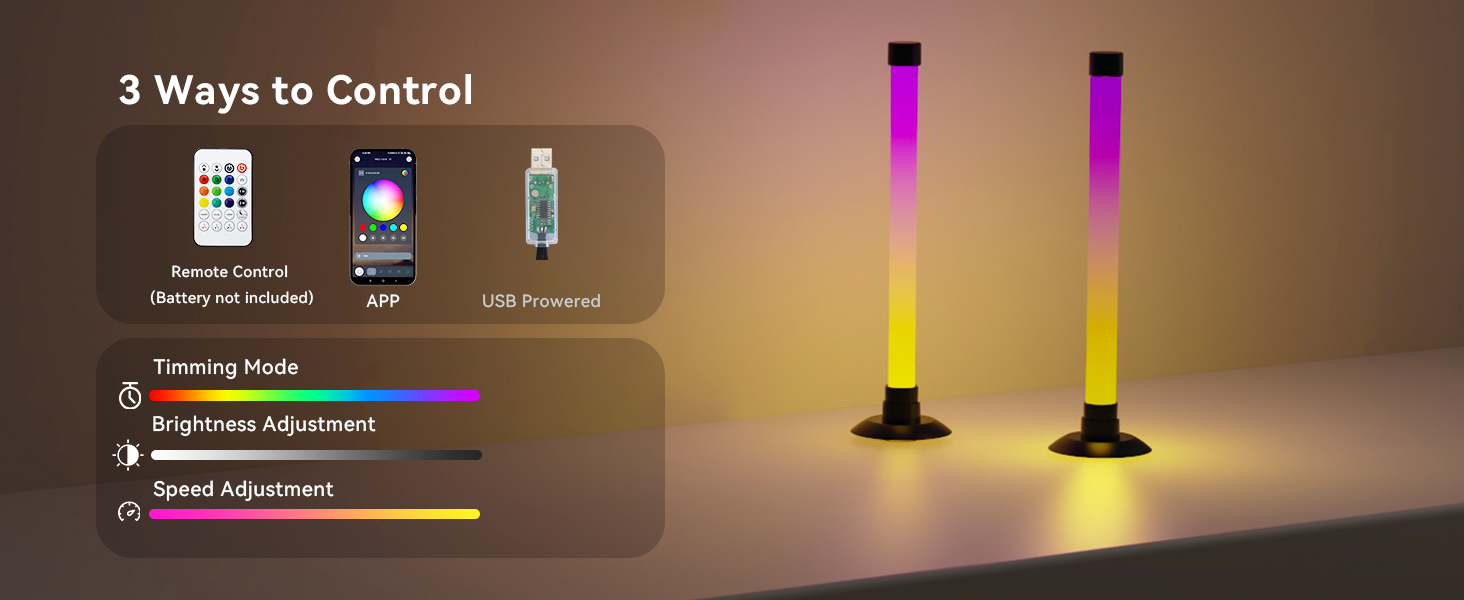
Imaxe: Máis deview of the three control options for the light bars.
5.2 Basic Operation (Line Control Switch)
- Activar: Short press the button on the USB power port.
- Modo de axuste: After turning on, short press the button to cycle through available lighting modes.
- Desactivar: Mantén presionado o botón.
5.3 Remote Control & App Functions
The remote control and "LotusLamp X" app offer extensive features:
- Cambio de cor: Access 16 million colors and various IC+RGB & W effects. Switch between IC+RGB for dynamic atmospheres and white lighting for illumination.
- Axuste de brillo: Axusta o brillo do 1 % ao 100 %.
- Sincronización de música: The built-in high-sensitivity music sensor allows lights to react to music, film, and game audio. This feature can use the phone's microphone, audio source within the phone, or the built-in microphone in the light's controller.
- Modos de iluminación: Choose from 64+ patterns including strobe, illusion, jump, energy, gradient, running, chasing, and fluttering modes. Each mode can be applied to different scenes.
- Función de temporizador: Set schedules for automatic on/off times. Use as a light alarm clock to wake up or sleep with soft light.

Image: Brightness and color adjustment capabilities.

Image: Methods for music synchronization.

Imaxe: Example of scheduled on/off function via the app.
6. Mantemento
- Limpeza: Wipe the light bars with a soft, dry cloth. Do not use abrasive cleaners or solvents.
- Almacenamento: When not in use for extended periods, store the light bars in a cool, dry place.
- Potencia: Always disconnect power before cleaning or moving the light bars.
7 Solución de problemas
| Problema | Causa posible | Solución |
|---|---|---|
| Light bars do not turn on. | Sen electricidade ou conexión solta. | Ensure USB cable is securely connected to both light bars and a working USB power source. Check if the power source is active. |
| O control remoto non funciona. | Baterías descargadas ou obstrución. | Replace AAA batteries in the remote. Ensure there are no obstructions between the remote and the light bars. |
| Problemas de control de aplicacións. | App not connected or software glitch. | Ensure Bluetooth is enabled on your device and the app is connected to the light bars. Restart the app or your device. |
| Music sync not responsive. | Microphone sensitivity or audio source issue. | Adjust microphone sensitivity in the app. Ensure the audio source is clear and loud enough for detection. Check the selected music sync method in the app. |
8. Especificacións
| Característica | Detalle |
|---|---|
| Número de modelo | LedBar001-1 |
| Marca | Ledagic |
| Dimensions (each bar) | 3.6" de profundidade x 3.6" de ancho x 12.8" de alto (9 cm de profundidade x 9 cm de ancho x 32.6 cm de alto) |
| Peso do elemento | 0.3 libras (aprox. 4.8 onzas) |
| Tipo de fonte de luz | LED (30 light sources) |
| Cor clara | RGB (16 million colors), IC+RGB & W effects |
| Fonte de enerxía | DC 5 Volts (USB Powered) |
| Métodos de control | App Control ("LotusLamp X"), Remote Control, Line Control Switch |
| Características especiais | Music Sync, Color Changing, Dimmable (1%-100%), Timer, Automatic On-Off |
| Material | Cobre, plástico |
| Uso interior/exterior | Só interior |
| Nivel de resistencia á auga | Non resistente á auga |

Image: Product dimensions and cable length.
9. Garantía e soporte
Ledagic products undergo strict quality inspection. If you encounter any problems or have questions regarding your Ledagic Led Light Bar, please contact our customer support team. Our expert technical team is available to provide assistance and support.
Consulta a documentación da túa compra para obter as condicións específicas da garantía e a información de contacto.