
1. Produto rematadoview
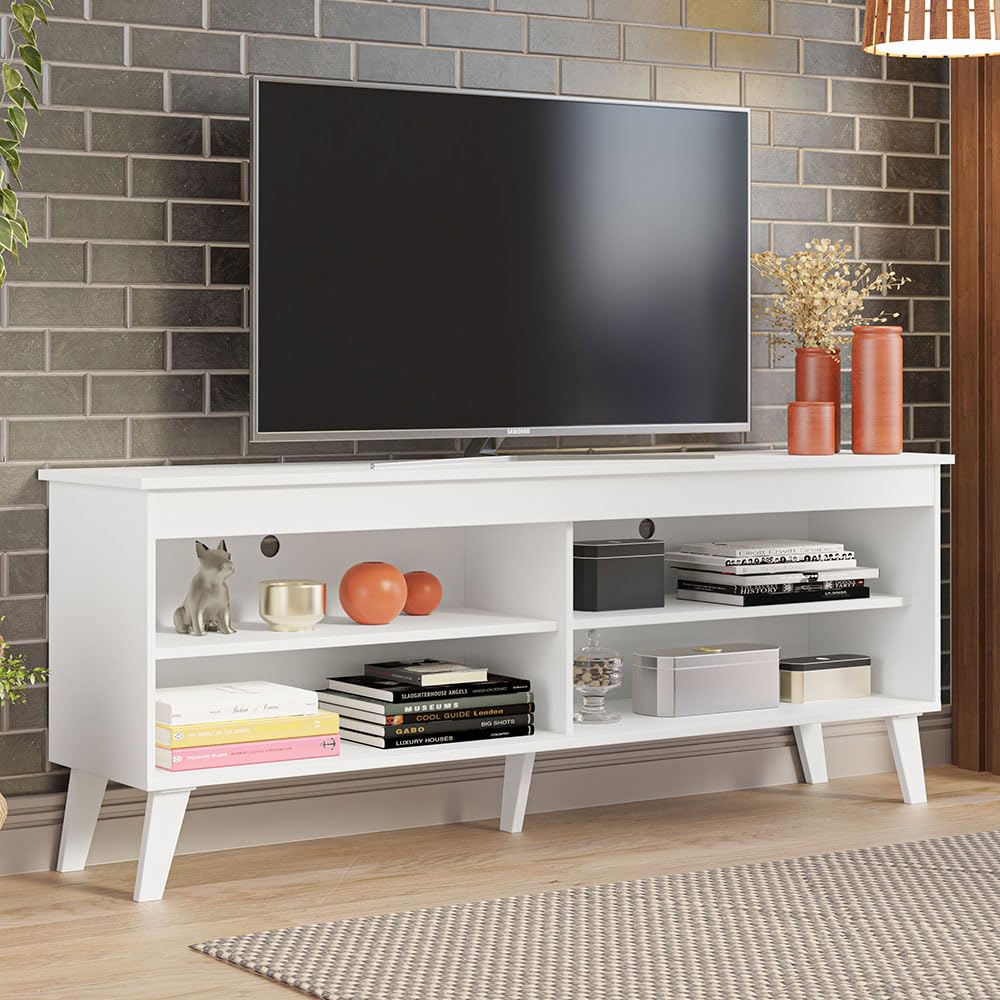
This manual provides comprehensive instructions for the assembly, operation, and maintenance of your Madesa TV Stand Unit, Model XA6997. Designed for televisions up to 65 inches, this unit offers practical storage and cable management solutions for your living space.
Características principais:
- Spacious design suitable for televisions up to 65 inches.
- Four open shelves provide ample storage for media devices, gaming consoles, and decorative items.
- Integrated cable management system helps organize and conceal wires.
- Constructed from high-quality, renewable wood particle board for durability.
- Sturdy, angled feet ensure stability and a modern aesthetic.
2. Información importante de seguridade
Please read and understand all safety warnings and instructions before assembling or using this product. Failure to follow these guidelines may result in injury or product damage.
- Capacidade de peso: Do not exceed the maximum weight limits. The tabletop supports up to 66 lbs (30 kg). Each individual shelf supports up to 11 lbs (5 kg).
- Estabilidade: Always place the TV stand on a level, stable surface. Uneven surfaces can cause the unit to tip.
- Seguridade dos nenos: Do not allow children to climb, stand, or hang on the TV stand. This can lead to serious injury. Keep small assembly parts away from children.
- Hardware: Use only the hardware provided with the unit. Substituting hardware may compromise the stand's structural integrity.
- Mantemento: Periodically inspect all connections and fasteners to ensure they remain tight. Loose connections can affect stability.
- Ventilación: Ensure adequate ventilation around electronic devices placed on the shelves to prevent overheating.
3. Configuración e montaxe
Assembly of the Madesa TV Stand Unit requires basic tools (not included) such as a screwdriver. It is recommended to assemble the unit with two people.
Antes de comezar:
- Despexa unha zona ampla e limpa para a montaxe.
- Unpack all components and verify against the parts list provided in your physical instruction booklet.
- Ensure all hardware is present and undamaged.
- For detailed, step-by-step illustrated instructions and a video guide, please refer to the physical manual included in your package and scan the QR code provided there.
Pasos da Asemblea Xeral:
- Identify and separate all wooden panels and hardware.
- Attach the four angled feet to the base panel using the specified screws.
- Connect the side panels and central dividers to the base panel.
- Slide the adjustable shelves into their designated slots.
- Secure the top panel to the assembled structure.
- Tighten all screws and fasteners to ensure the unit is stable and secure.

4. Instrucións de funcionamento
Once assembled, your Madesa TV Stand Unit is ready for use. Follow these guidelines for optimal functionality.
Placing Your Television:
- Carefully place your television on the top surface of the stand.
- Ensure the TV's base fits securely within the stand's dimensions (59.05 inches wide).
- This stand is designed to accommodate most flat-panel televisions up to 65 inches.
Organizing Media Devices:
- Utilize the four open shelves to store media players, gaming consoles, soundbars, and other electronic accessories.
- Distribute weight evenly across the shelves to maintain balance and stability.
Xestión de cables
- Route power and signal cables for your devices through the designated cable management holes located on the back panel of the stand.
- This helps to keep cables tidy, prevent tangling, and maintain a clean aesthetic.

5. Mantemento e coidados
Proper care will extend the life and appearance of your Madesa TV Stand Unit.
- Limpeza: Limpar as superficies cun pano suave e lixeiramenteamp pano. Evite o uso de produtos químicos agresivos, produtos de limpeza abrasivos ou abrillantadores que poidan danar o acabado.
- Verquidos: Immediately wipe up any liquid spills to prevent staining or damage to the wood particle board.
- Ambiente: Keep the unit away from direct sunlight, extreme temperatures, and excessive humidity to prevent warping or discoloration.
- Fixadores: Periodically check all screws and fasteners and tighten them as needed to ensure the stand remains stable and secure.
6 Solución de problemas
Consulta esta sección para obter solucións a problemas comúns.
O soporte está inestable:
- Ensure the TV stand is placed on a completely level surface.
- Check all assembly screws and fasteners. Tighten any that are loose.
- Verify that all feet are making even contact with the floor.
Pezas que faltan ou danadas:
- If any parts are missing or damaged upon delivery, do not proceed with assembly.
- Contact Madesa customer support immediately for assistance and replacement parts.
7. Especificacións
| Atributo | Especificación |
|---|---|
| Fabricante | Madesa |
| Número de modelo | XA6997 |
| Dimensións do produto (L x P x A) | 59.05 x 13.77 x 23.22 polgadas (150 x 35 x 59 cm) |
| Peso do elemento | 46.1 libras (20.9 kg) |
| Capacidade de peso da mesa | 66 libras (30 kg) |
| Capacidade de peso do estante | 11 libras (5 kg) por estante |
| Cor | Branco |
| Material | High-quality Particle Board |
| Estilo | Moderno |
8. Garantía e soporte
Información da garantía:
For specific details regarding the product warranty, including coverage and duration, please refer to the warranty documentation included with your purchase or visit the official Madesa websitio.
Atención ao cliente:
Should you have any questions, require technical assistance, or need to report missing or damaged parts, please contact Madesa customer support. Our team is available to help you.
You can find more information and contact details by visiting the Madesa Official Store: