
1. Introdución
This manual provides detailed instructions for the installation, operation, and maintenance of your PGST A107F-EU-A Wireless Home Alarm System. This intelligent security system offers comprehensive protection for your home or property, featuring 4G connectivity, Tuya App integration, and compatibility with smart assistants like Alexa and Google Assistant. Please read this manual thoroughly before using the system to ensure proper functionality and safety.
2. Contido do paquete
Carefully unpack the box and verify that all the following components are included:
- 1 x PGST A107F Main Control Panel
- 1 adaptador de corrente (5 V 2 A)
- 2 x Mandos a distancia
- 2 x RFID Tags
- 1 x Wireless Door/Window Sensor
- 1 x Wireless PIR Motion Sensor
- 1 x Wireless Siren
- Ferraxes de montaxe (parafusos, ancoraxes)
- Manual de usuario (este documento)
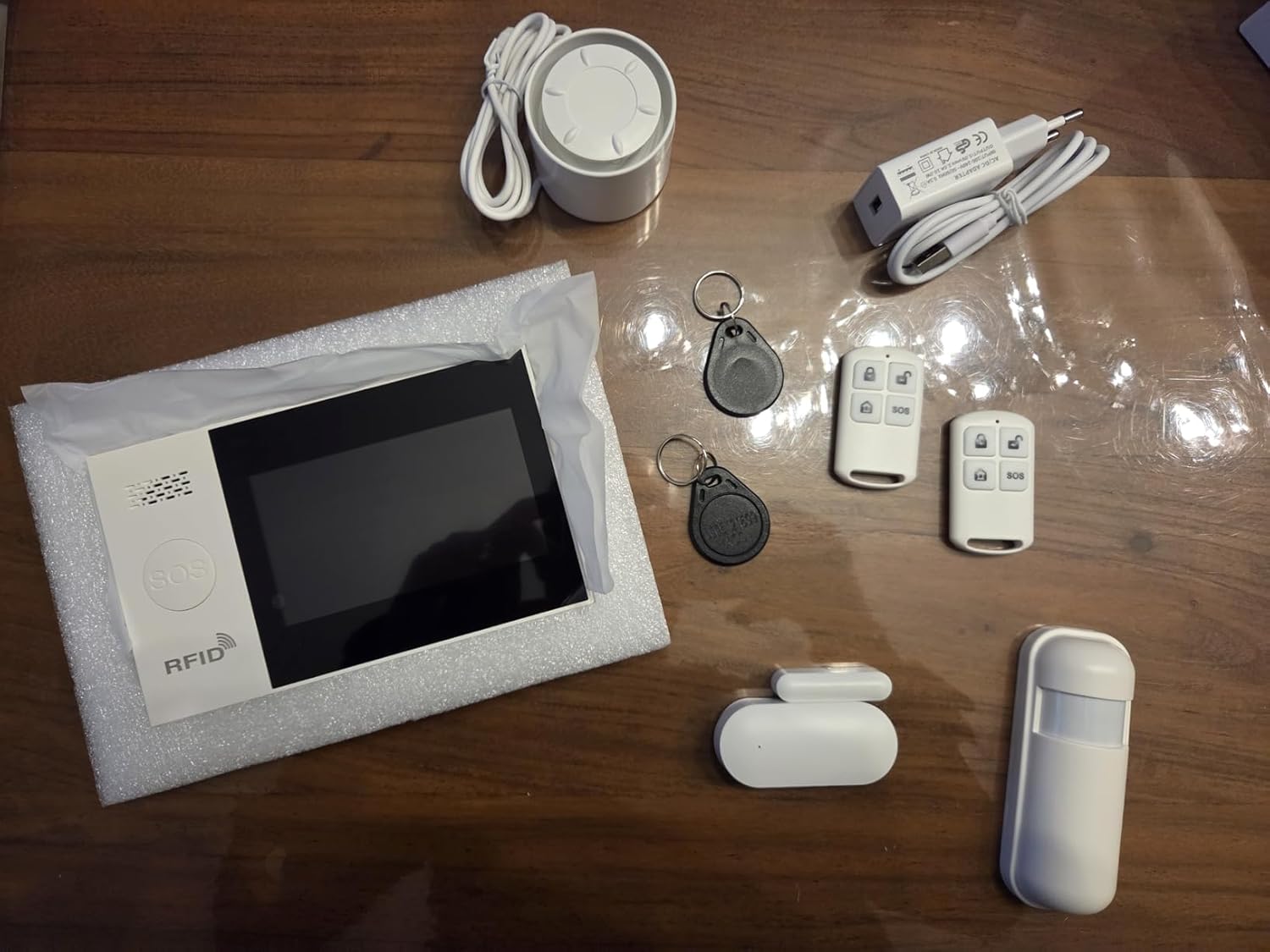
Imaxe 2.1: Acabadoview of the PGST A107F-EU-A Wireless Home Alarm System components, including the main panel, remote controls, RFID tags, siren, power adapter, door/window sensor, and motion sensor.
3. Produto rematadoview
The PGST A107F-EU-A system consists of a central control panel and various wireless sensors and accessories. The main panel acts as the brain of the system, processing signals from sensors and communicating alerts via 4G, SMS, or the Tuya App.
3.1 Panel de control principal
The main control panel features a display, touch keypad, SOS button, and RFID reader. It houses the SIM card slot for 4G communication and connects to your home Wi-Fi network for app control.

Imaxe 3.1: Fronte view of the PGST A107F-EU-A Main Control Panel, showing the display, keypad, SOS button, and RFID reader.

Imaxe 3.2: Lateral view of the PGST A107F-EU-A Main Control Panel, illustrating its slim profile.
3.2 SIM Card Slot and Connections
The back of the main panel provides access to the SIM card slot and power input. Ensure the SIM card is inserted correctly for 4G functionality.

Imaxe 3.3: Costas view of the PGST A107F-EU-A Main Control Panel with the cover removed, showing the SIM card slot and internal components. The IMEI number is visible: 863957076386736.
4. Configuración
4.1 Acendido inicial
- Connect the provided power adapter to the main control panel and plug it into a power outlet.
- The panel will power on and initiate its startup sequence.
4.2 SIM Card Installation (for 4G functionality)
- Asegúrate de que o panel principal estea apagado.
- Locate the SIM card slot on the back of the main panel (refer to Image 3.3).
- Insert a standard 4G SIM card into the slot, ensuring correct orientation.
- Replace the cover and power on the panel. The system will attempt to connect to the 4G network.
4.3 Tuya App Integration
- Descarga a aplicación "Tuya Smart" ou "Smart Life" desde a tenda de aplicacións do teu teléfono intelixente (iOS ou Android).
- Rexístrate para obter unha nova conta ou inicia sesión se xa tes unha.
- On the app, tap "Add Device" or the "+" icon.
- Select "Security & Video Surveillance" > "Alarm (Wi-Fi)" or search for "Alarm System".
- Follow the on-screen instructions to connect the alarm panel to your home Wi-Fi network. This typically involves putting the panel into pairing mode (refer to the panel's display for instructions) and entering your Wi-Fi credentials in the app.
4.4 Emparellamento de sensores
The system comes with pre-paired sensors. If you need to add new sensors or re-pair existing ones:
- On the main panel, navigate to the "Sensor Management" or "Add Sensor" menu.
- Select the type of sensor you wish to add (e.g., Door Sensor, Motion Sensor).
- Activate the sensor (e.g., separate the two parts of a door sensor, or trigger a motion sensor). The panel will detect the sensor and prompt you to confirm pairing.
- Assign the sensor to a specific zone (e.g., "Main Door," "Living Room").
4.5 Remote Control and RFID Tag Emparejamento
Remote controls and RFID tags are typically pre-paired. To add new ones:
- On the main panel, navigate to the "Remote Control Management" or "RFID Tag Management" menu.
- Follow the on-screen instructions to put the panel into pairing mode.
- For remote controls, press any button on the remote. For RFID tags, toque tag against the RFID reader on the main panel.
- Confirm the pairing on the panel.
5. Operación do sistema
5.1 Armado e desarmado
The system can be armed or disarmed using the main panel, remote controls, RFID tags, or the Tuya App.
- Armado (Modo Ausente): Activates all sensors. Any triggered sensor will set off the alarm.
- Home Arm (Stay Mode): Activates perimeter sensors (e.g., door/window sensors) while allowing free movement within the property (e.g., motion sensors are disarmed).
- Desarmar: Deactivates all sensors, allowing free entry and exit without triggering the alarm.
5.2 Función SOS
In an emergency, press the SOS button on the main panel or the remote control. The system will immediately trigger the alarm and send emergency notifications to pre-configured contacts via 4G call, SMS, and Tuya App alerts.
5.3 Xestión da Zona
Each sensor is assigned to a zone. You can customize zone types (e.g., 24-hour zone, delay zone, home arm zone) through the main panel settings or the Tuya App to suit your security needs.
5.4 Voice Control with Alexa & Google Assistant
After integrating the Tuya App with Amazon Alexa or Google Assistant, you can use voice commands to control your alarm system. Exampos inclúen:
- "Alexa, arm the alarm."
- "Hey Google, disarm the alarm."
- "Alexa, what is the status of the alarm?"
Refer to the Tuya App's integration guide for specific voice commands and setup instructions.
5.5 Instant Notifications
Upon an alarm trigger, the system will send instant alerts:
- 4G Call: Dials pre-set emergency numbers.
- SMS: Sends text messages to pre-set numbers.
- Aplicación Tuya: Pushes real-time notifications to your smartphone.
6. Mantemento
6.1 Substitución da batería
Wireless sensors (door/window, motion) are powered by batteries. The main panel will indicate low battery status for individual sensors. Replace batteries promptly to ensure continuous protection.
- Duración da batería do sensor: Approximately 2 years (varies with usage).
- Refer to the specific sensor's compartment for battery type (e.g., CR2032 for small sensors, AA/AAA for larger ones).
6.2 Limpeza
Wipe the main panel and sensors with a soft, dry cloth. Avoid using abrasive cleaners or solvents, as they may damage the surfaces.
7 Solución de problemas
- O sistema non se acende: Ensure the power adapter is securely connected to both the panel and a working power outlet.
- Sen sinal 4G: Check if the SIM card is correctly inserted and activated. Verify that your area has 4G coverage.
- Os sensores non activan a alarma: Check sensor battery levels. Ensure sensors are within range of the main panel and correctly paired. Verify zone settings in the app or on the panel.
- Tuya App connection issues: Ensure the main panel is connected to your Wi-Fi network. Check your Wi-Fi signal strength. Restart the app and the main panel.
- Falsas alarmas: Check sensor placement to avoid environmental triggers (e.g., direct sunlight on motion sensors, loose doors/windows). Adjust sensor sensitivity if applicable.
8. Especificacións
| Característica | Especificación |
|---|---|
| Número de modelo | A107F |
| Marca | PGST |
| Tecnoloxía de conectividade | Wireless, 4G, Wi-Fi |
| Dispositivos compatibles | Smartphone (Tuya App), Alexa, Google Assistant |
| Power Source (Main Panel) | AC Power Adapter (5V 2A) |
| Dimensións do artigo (LxWxH) | 22 x 15 x 10 cm |
| Tipo de alarma | Entrada |
| Average Battery Life (Sensors) | 2 Anos |
| Método de instalación | Enroscar |
| UPC / GTIN | 704444493779 |
9. Garantía e soporte
9.1 Garantía do fabricante
The PGST A107F-EU-A Wireless Home Alarm System is covered by a 1 anos de garantía do fabricante desde a data de compra. Esta garantía cobre defectos de materiais e fabricación en condicións de uso normal.
9.2 Atención ao cliente
For any questions, technical assistance, or warranty claims, please contact PGST customer support. Refer to the product packaging or the PGST official websitio para información de contacto.