
1. Introdución
Thank you for choosing the RAPIQUE R110 Bluetooth Wireless Mouse. This manual provides detailed instructions for setting up, operating, and maintaining your new mouse. The R110 features Bluetooth 5.1 and 2.4G dual connectivity, a rechargeable USB-C battery, silent click buttons, and an ergonomic 6-button design for enhanced productivity and comfort across various operating systems.
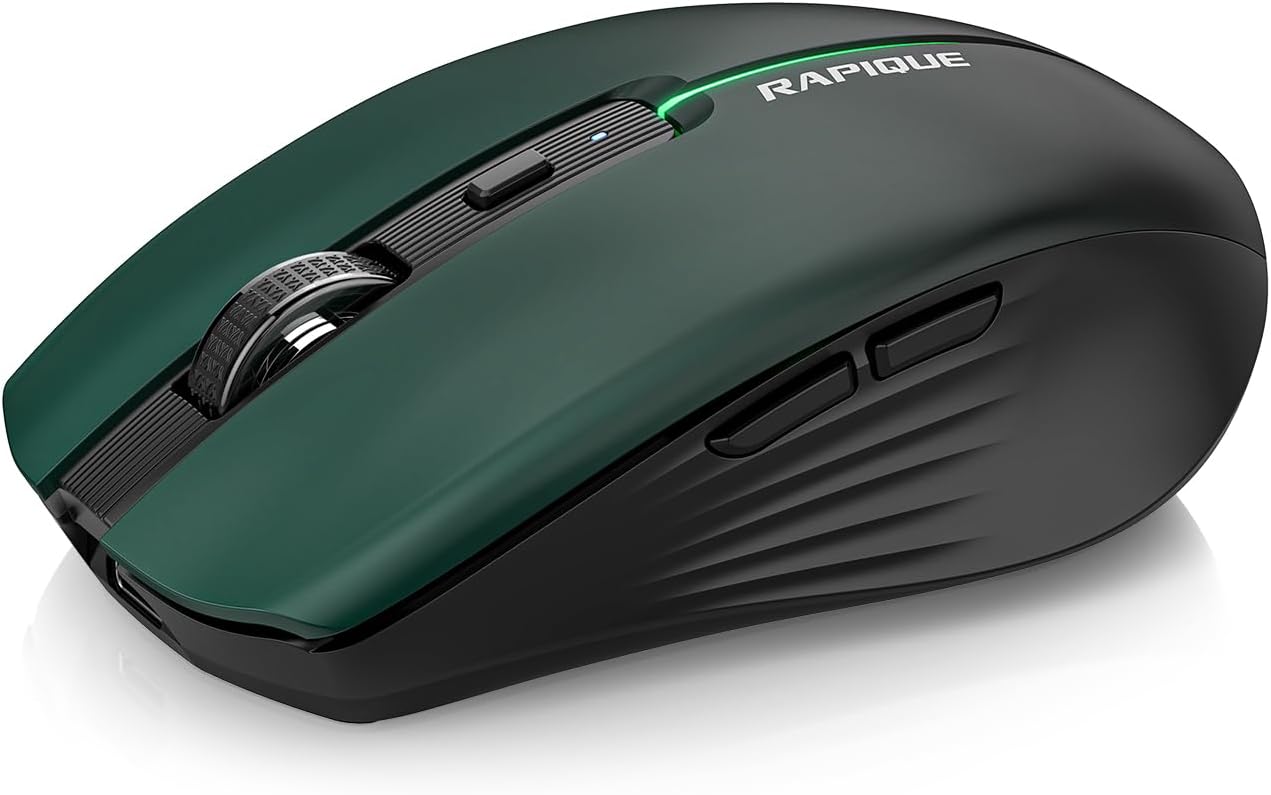
Image 1.1: The RAPIQUE R110 Bluetooth Wireless Mouse, showcasing its green gradient design.
2. Que hai na caixa
Verifique que todos os elementos estean presentes no seu paquete:
- Bluetooth Wireless Mouse (R110) x 1
- Cable de carga USB-C x 1
- Manual de usuario x 1
3. Produto rematadoview
3.1 Características principais
- Premium Deep Green-to-Black Design: Features a gradient finish with a sleek black middle and bottom shell.
- Triple-Mode Wireless Connectivity: Supports Bluetooth 5.1 (BT1 & BT2) and 2.4GHz USB receiver for seamless switching between up to three devices.
- Fast USB-C Charging & Auto Sleep: Equipped with a 650mAh rechargeable battery, charges via USB-C, and enters auto-sleep after 90 seconds of inactivity to conserve power.
- Silent Clicks & Adjustable DPI: Reduces clicking and scrolling noise by up to 90% and offers adjustable DPI settings (800/1200/1600) for precise control.
- Ergonomic & Durable Build: Contoured shape with six responsive buttons, including forward/back side keys, designed for comfort and tested for over 5 million clicks.
- Ampla compatibilidade: Compatible with Windows 8/10/11, Android, and macOS via Bluetooth 5.1, and non-Bluetooth devices via 2.4G USB receiver. Supports iOS 14 or later for iPhones and iPads.
3.2 Identificación de compoñentes

Imaxe 3.1: Explosión view illustrating the gradient coating, primers, and ABS material of the mouse shell.
The R110 mouse features a gradient coating and UV coating for enhanced comfort. Its construction includes durable ABS material.

Imaxe 3.2: Detallada view of the mouse highlighting anti-slip texture, colorful breathing light, DPI adjustment button, and the mode indicator on the underside.
- Botóns de clic esquerdo/dereito: Silent click design.
- Roda de desprazamento: Para desprazamento vertical.
- Botón DPI: Adjusts mouse sensitivity (800/1200/1600 DPI). Long-press to toggle decorative LED light.
- Botóns Adiante/Atrás: Located on the side for navigation.
- Porto de carga USB-C: Located at the front of the mouse.
- Botón de cambio de modo: Located on the bottom, cycles between 2.4G, BT1, and BT2 modes.
- Mode Indicators (LEDs): Lights on the bottom indicate current connection mode (Red for 2.4G, Green for BT1, Blue for BT2).
- Almacenamento do receptor USB: Compartment on the bottom for the 2.4G USB receiver.
4. Configuración
4.1 Cargar o rato
Before first use, fully charge the mouse. Connect the supplied USB-C cable to the mouse's charging port and the other end to a USB power source (e.g., computer USB port, USB wall adapter). The charging indicator light will illuminate during charging and automatically extinguish when fully charged.

Image 4.1: The USB-C charging port and the charging indicator light on the RAPIQUE R110 mouse.
4.2 Conexión do rato
The R110 mouse offers three connection modes: 2.4G USB and two Bluetooth 5.1 channels (BT1, BT2). You can connect to up to three different devices simultaneously and switch between them.

Image 4.2: Visual guide for connecting the mouse in 2.4G, BT1, and BT2 modes.
4.2.1 2.4G USB Connection (Plug & Play)
- Localiza o receptor USB gardado no compartimento da parte inferior do rato.
- Insira o receptor USB nun porto USB dispoñible do seu ordenador ou dispositivo.
- Slide the mode switch on the bottom of the mouse to the "2.4G" position (indicated by a red LED).
- O rato conectarase automaticamente ao teu dispositivo.
4.2.2 Conexión Bluetooth (BT1 / BT2)
- Slide the mode switch on the bottom of the mouse to either the "BT1" (green LED) or "BT2" (blue LED) position.
- Press and hold the mode button on the bottom of the mouse for 3-5 seconds until the corresponding LED (green for BT1, blue for BT2) flashes rapidly. This indicates the mouse is in pairing mode.
- On your device (computer, tablet, phone), open Bluetooth settings.
- Busca new devices and select "RAPIQUE R110" (or similar name) from the list.
- Once paired, the LED will stop flashing and remain solid, indicating a successful connection.
Note: For iOS devices, Bluetooth 5.1 support requires iOS 14 or later.
5. Instrucións de funcionamento
5.1 Cambio entre dispositivos conectados
To switch between devices connected via 2.4G, BT1, or BT2, simply slide the mode switch on the bottom of the mouse to the desired connection mode. The corresponding LED will light up.
5.2 Axustar a sensibilidade dos DPI
The mouse has three adjustable DPI settings: 800, 1200, and 1600. Press the DPI button located behind the scroll wheel to cycle through these settings. Each press will change the sensitivity, allowing you to find your preferred cursor speed.

Image 5.1: Illustration of DPI adjustment and the silent click mechanism.
5.3 Control da luz LED
The R110 mouse features a decorative LED light. To toggle this light on or off, long-press the DPI button.
5.4 Auto Sleep Function
To conserve battery life, the mouse will automatically enter sleep mode after 90 seconds of inactivity. To wake the mouse, simply click any button or move the mouse.
6. Mantemento
- Limpeza: Usa un pano suave e seco para limpar o rato. Para a sucidade persistente, dórao lixeiramenteampEnxágüe o pano con auga. Evite o uso de produtos químicos agresivos ou materiais abrasivos.
- Almacenamento: When not in use for extended periods, store the mouse in a cool, dry place. Ensure the mouse is turned off to preserve battery life.
- Coidado da batería: Recharge the mouse when the battery is low. Avoid fully discharging the battery frequently to prolong its lifespan.
- Receptor USB: When transporting the mouse, store the 2.4G USB receiver in its dedicated compartment on the bottom of the mouse to prevent loss.
7 Solución de problemas
| Problema | Causa posible | Solución |
|---|---|---|
| O rato non responde. | Low battery; Incorrect connection mode; USB receiver not properly inserted (2.4G mode); Bluetooth not paired. | Charge the mouse. Ensure the mode switch is set correctly (2.4G, BT1, or BT2). For 2.4G, re-insert the USB receiver. For Bluetooth, re-pair the mouse with your device. |
| O movemento do cursor é errático ou lento. | Low DPI setting; Dirty optical sensor; Uneven surface. | Press the DPI button to increase sensitivity. Clean the optical sensor on the bottom of the mouse. Use the mouse on a clean, flat surface or mouse pad. |
| Non se pode conectar por Bluetooth. | Mouse not in pairing mode; Device Bluetooth off; Interference. | Ensure the mouse is in BT1 or BT2 mode and the LED is flashing rapidly (pairing mode). Turn on Bluetooth on your device. Move closer to the device or away from other wireless devices. |
| Mouse frequently disconnects. | Low battery; Too far from receiver/device; Interference. | Charge the mouse. Ensure the mouse is within the effective range (up to 10m/33ft). Reduce interference from other wireless devices. |
8. Especificacións
| Característica | Detalle |
|---|---|
| Número de modelo | R110 |
| Conectividade | Bluetooth 5.1 (BT1, BT2), 2.4G Wireless (USB Receiver) |
| Configuración de DPI | 800/1200/1600 DPI |
| Tipo de batería | Rechargeable Lithium Polymer (650mAh) |
| Porto de carga | USB-C |
| Duración do clic | Over 5 million clicks |
| Clic silencioso | Si (redución do ruído do 90%) |
| Auto Sleep | Despois de 90 segundos de inactividade |
| Compatibilidade | Windows 8/10/11, Android, macOS, iOS 14+ (for iPhones/iPads) |
| Dimensións | 102 mm (4.17 polgadas) x 64 mm (2.51 polgadas) x 35 mm (1.37 polgadas) |
| Peso do elemento | 3.84 onzas |

Image 8.1: Dimensions of the RAPIQUE R110 mouse and its compact size when held in hand.
9. Garantía e soporte
RAPIQUE products are designed for reliability and performance. For warranty information and technical support, please refer to the official RAPIQUE websitio web ou póñase en contacto directamente co servizo de atención ao cliente. Garde o recibo da compra como proba de compra para reclamacións de garantía.
Para obter máis axuda, pode visitar o RAPIQUE Store on Amazon.