
Introdución
Grazas pola compraasing the Sigma 50mm F2 DG Contemporary lens. This manual provides essential information for the safe and effective use of your new lens. Please read it thoroughly before using the product and keep it for future reference.
Precaucións de seguridade
- Do not look at the sun or other strong light sources through the lens, as this can cause permanent vision damage.
- Manteña a lente lonxe da luz solar directa cando non a estea en uso para evitar riscos de incendio.
- Avoid exposing the lens to extreme temperatures, humidity, or dust.
- Non intente desmontar nin modificar a lente. As reparacións só deben ser realizadas por persoal de servizo autorizado.
- Manter fóra do alcance dos nenos.
Contido do paquete
Verifica que todos os elementos estean presentes no teu paquete:
- Sigma 50mm F2 DG Contemporary Lens
- Lens Hood (LH633-02S)
- Tapón de lente dianteira
- Tapa de lente traseira
- Manual de instrucións (este documento)
Partes da lente
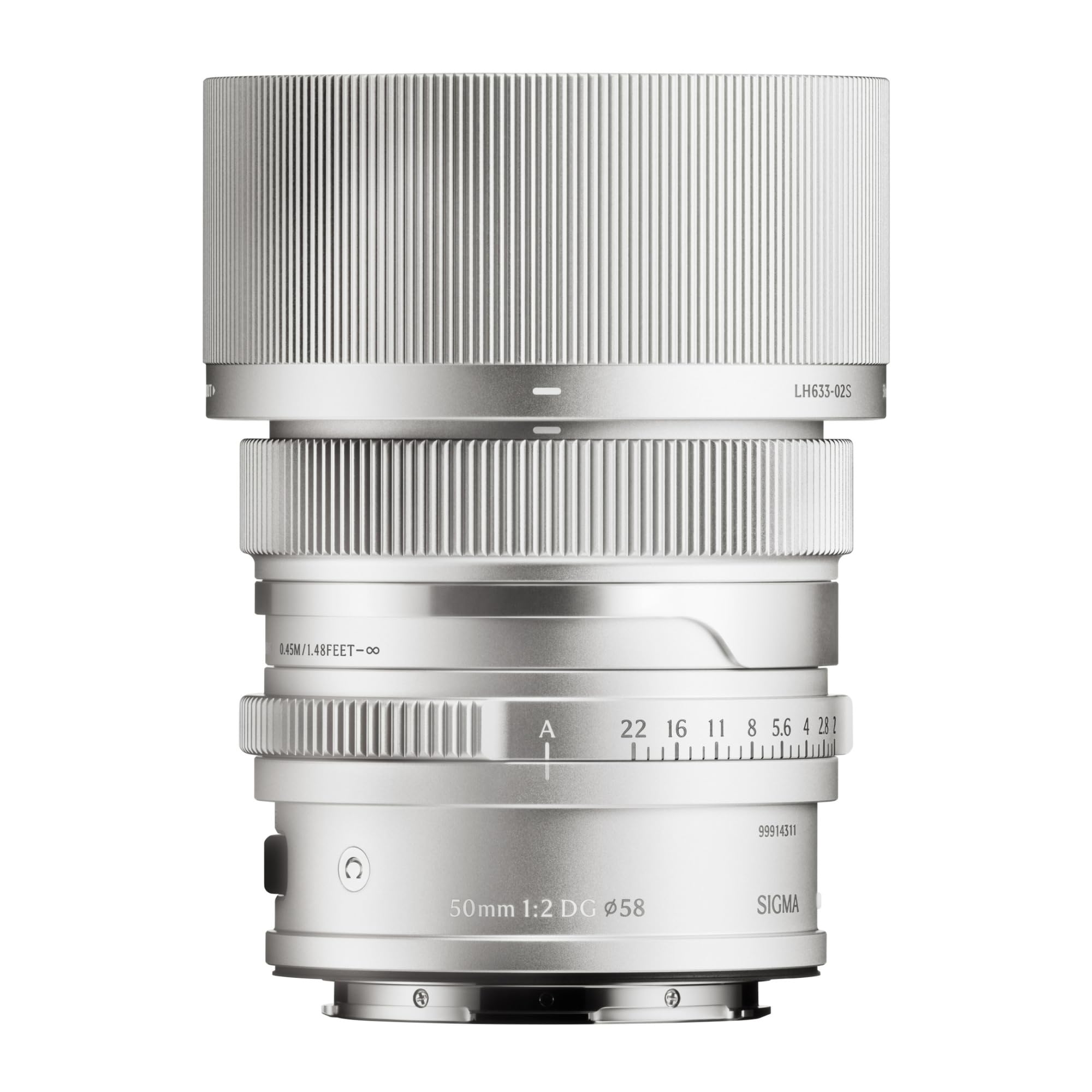
This image displays the Sigma 50mm F2 DG Contemporary lens, a prime lens designed for L-mount cameras. It features a sleek silver finish and a compact design, suitable for various photographic applications.
The Sigma 50mm F2 DG Contemporary lens features several key components:
- Anel de enfoque: Usado para o enfoque manual.
- Anel de apertura: Allows direct control over the lens aperture.
- Montaxe da lente: Connects the lens to the camera body (L-Mount).
- Lens Hood Attachment Point: Where the dedicated lens hood is secured.

The image shows the LH633-02S lens hood, a cylindrical accessory with a ribbed exterior, designed to attach to the Sigma 50mm F2 DG Contemporary lens. It helps to prevent stray light from entering the lens, reducing flare and ghosting, and offers protection to the front element.
Configuración
Colocación da lente
- Asegúrate de que tanto a cámara como a lente estean apagadas.
- Retire a tapa traseira da lente e a tapa do corpo da cámara.
- Aliñe o índice de montaxe da lente co índice de montaxe do corpo da cámara.
- Insira a lente na montura da cámara e xire no sentido das agullas do reloxo ata que encaixe no seu lugar. Non force a lente.
Attaching the Lens Hood (LH633-02S)
- Aliña o punto vermello da tapa da lente co punto vermello da parte frontal da lente.
- Rotate the lens hood clockwise until it locks securely into position.
- To remove, press the release button on the lens hood and rotate counter-clockwise.
En funcionamento
Focalización
This lens supports both autofocus (AF) and manual focus (MF).
- Enfoque automático: Set your camera's focus mode to AF. The lens will automatically focus when the shutter button is half-pressed.
- Enfoque manual: Set your camera's focus mode to MF. Rotate the focus ring on the lens to adjust focus manually. Use your camera's focus peaking or magnification features for precise focusing.
Control de apertura
The lens features an aperture ring for direct control over the aperture setting. You can also control the aperture through your camera body, depending on your camera's settings and mode.
Cámaras compatibles
This lens is designed for L-Mount cameras, including models such as Leica SL, Leica TL2, and Leica CL.
Mantemento
Limpeza da lente
- Use un cepillo soprador para eliminar o po da superficie da lente.
- For smudges or fingerprints, use a clean, soft microfiber cloth specifically designed for optical lenses. Apply a small amount of lens cleaning solution to the cloth, not directly to the lens.
- Never use abrasive materials, solvents, or harsh chemicals to clean the lens.
Almacenamento
- When not in use, attach both the front and rear lens caps.
- Store the lens in a cool, dry place, away from direct sunlight and high humidity.
- If storing for an extended period, consider using a desiccant to prevent mold growth.
Resolución de problemas
- Lente non recoñecida pola cámara: Ensure the lens is securely attached to the camera body. Power off and restart the camera. Check for any firmware updates for both the lens and camera.
- O enfoque automático non funciona: Verify the camera's focus mode is set to AF. Ensure there is sufficient light and contrast in the scene for the autofocus system to operate effectively.
- As imaxes están borrosas: Check that the lens is properly focused. Ensure the shutter speed is fast enough to prevent camera shake, especially in low light. Clean the lens elements if smudges are present.
- Lens hood difficult to attach/remove: Ensure proper alignment of the red dots. Do not force the hood; it should click into place smoothly.
Especificacións
| Nome do modelo | 31S969 |
| Distancia focal | 50 mm |
| Apertura máxima | F2 |
| Apertura mínima | F2 |
| Tipo de lente | Lente Prime |
| Montaxes compatibles | Leica L. |
| Tipo de foco | Enfoque automático |
| Estabilización da imaxe | Sen estabilización de imaxe |
| Nivel de resistencia á auga | Non resistente á auga |
| Peso do elemento | 2 libras |
Garantía e Soporte
Información da garantía
Este produto vén cun 9 ano de garantía. Please retain your proof of purchase for warranty claims. The warranty covers manufacturing defects under normal use. It does not cover damage caused by misuse, accidents, unauthorized repairs, or normal wear and tear.
Atención ao cliente
For technical assistance, service, or warranty inquiries, please contact Sigma customer support through their official website or the retailer where you purchased the product. Have your model number (31S969) and proof of purchase ready when contacting support.


