
1. Introdución
This manual provides essential information for setting up, operating, and maintaining your Hisense 65E7Q PRO 65-inch QLED 4K 144Hz Smart TV. Please read these instructions carefully before using your television to ensure proper functionality and safety. Keep this manual for future reference.
2. Que hai na caixa
Verifique que todos os seguintes compoñentes estean incluídos no seu paquete:
- Televisión
- Cable de alimentación
- Control remoto
- Manual de usuario
3. Configuración
3.1 Instalación física
Carefully unpack the television. You can install the TV on its included stand or mount it on a wall (wall mount sold separately). Ensure the TV is placed on a stable, level surface or securely mounted according to the wall mount instructions.

Fronte view of the Hisense TV with its stand, illustrating the display and bezel design.

Lado profile of the Hisense TV, showing its slim design.
3.2 Conexión de enerxía
Connect the power cable to the TV's power input and then to a wall outlet. Do not plug in the TV until all other connections are made.
3.3 Asistente de configuración inicial
Upon first power-on, the TV will guide you through an initial setup process. This includes language selection, network connection (Wi-Fi or Ethernet), channel scanning, and acceptance of terms and conditions for smart features.
4. Instrucións de funcionamento
4.1 Funcións de control remoto
The included remote control allows you to navigate the TV's menus, adjust settings, and access smart features. Familiarize yourself with the button layout for optimal use.
The Hisense TV remote control, highlighting dedicated buttons for popular streaming services and voice control.
4.2 Smart TV Interface (VIDAA U8)
Your Hisense TV features the VIDAA U8 operating system, providing access to a wide range of internet applications such as Netflix, Prime Video, Disney+, YouTube, and more. Navigate using the remote control's directional pad and OK button.

Screenshot of the Hisense VIDAA U8 Smart TV interface, showing various applications and content recommendations, along with icons for Apple HomeKit, AirPlay, Alexa Built-in, and VIDAA Voice.
4.3 Control por voz
The TV supports voice control through Alexa Built-in and VIDAA Voice. Use the dedicated voice button on your remote to issue commands for searching content, controlling playback, and managing smart home devices.
5. Características clave
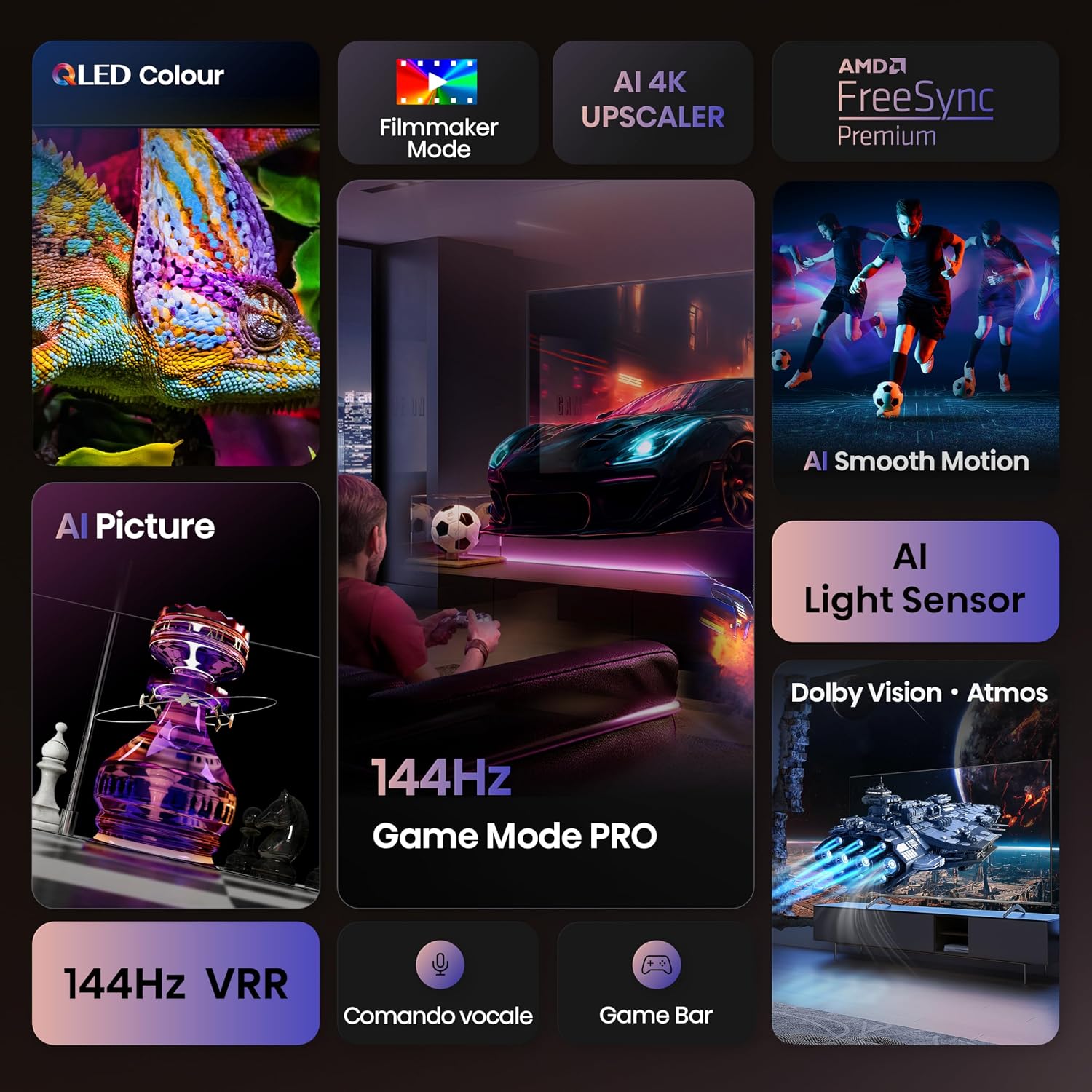
Tecnoloxía de pantalla QLED 5.1
Experience over a billion shades of color with the QLED display technology, delivering vibrant and lifelike images with enhanced brightness and contrast.

Close-up image of a chameleon on the Hisense QLED display, demonstrating the vibrant and rich color reproduction.
Modo de xogo PRO de 5.2 144 Hz
Designed for gamers, the 144Hz Game Mode PRO offers a native 144Hz Variable Refresh Rate (VRR), ensuring ultra-smooth gameplay with minimal input lag and screen tearing. This feature is ideal for high-performance gaming consoles and PCs.

Image depicting a person playing a racing video game on the Hisense TV, emphasizing the 144Hz Game Mode PRO for smooth gaming.
5.3 Dolby Vision IQ, HDR 10+ Adaptive & Dolby Atmos
Enjoy a cinematic experience with support for Dolby Vision IQ and HDR 10+ Adaptive, which optimize picture quality based on content and ambient light. Dolby Atmos provides immersive, multi-dimensional audio that flows around you.

Image showing a spaceship scene on the Hisense TV, illustrating the immersive visual and audio experience with Dolby Vision IQ and Dolby Atmos.
5.4 Escalador 4K con IA
The AI 4K Upscaler intelligently analyzes and enhances lower-resolution content to near 4K quality, ensuring a sharp and detailed viewing experience regardless of the source.

Diagram illustrating the AI 4K Upscaler technology, showing how lower-resolution images are enhanced to near 4K quality, with a tiger's eye as an example.
5.5 AI Smooth Motion
AI Smooth Motion technology reduces motion blur and judder in fast-moving scenes, providing a clearer and more fluid picture, especially beneficial for sports and action movies.

Image of soccer players in motion on the Hisense TV, demonstrating the AI Smooth Motion feature for clear, blur-free fast-paced scenes.
6. Conectividade
The Hisense 65E7Q PRO offers a variety of connectivity options for your devices:
- Portos HDMI 2.1: 4 ports for connecting gaming consoles, Blu-ray players, and other high-definition devices.
- Portos USB: 2 ports for connecting USB flash drives for media playback.
- Ethernet (LAN): Para unha conexión estable a internet por cable.
- Wi-Fi: Conectividade sen fíos integrada para acceso a internet.
- Bluetooth: For connecting wireless headphones, soundbars, and other compatible devices.
- Saída de audio dixital: Para conectar sistemas de son externos.
- Entrada AV: Para conectar dispositivos antigos.
- Jack para auriculares: Para escoita privada.
- Ranura para tarxeta CI: Para módulos de acceso condicional.
- ANT (Antenna) Inputs: For DVB-T2/S2 broadcast systems.

Detallado view of the Hisense TV's rear panel, showing various input and output ports including USB, CI Card Slot, HDMI 2.1, Ethernet, Digital Audio Out, AV Input, and Headphone jack.
7. Mantemento
7.1 Limpeza do televisor
Para limpar a pantalla, limpe con coidado cun pano suave e sen pelusa. Para manchas difíciles, límpeaa lixeiramenteampen the cloth with water or a screen-cleaning solution. Avoid using harsh chemicals or abrasive materials. Clean the TV body with a soft, dry cloth.
7.2 Actualizacións de software
Your TV may receive software updates to improve performance and add new features. Ensure your TV is connected to the internet and check for updates periodically through the settings menu. It is recommended to allow automatic updates.
8 Solución de problemas
Se tes problemas co teu televisor, consulta as seguintes solucións habituais:
- Sen enerxía: Asegúrate de que o cable de alimentación estea conectado correctamente tanto ao televisor como á toma de corrente. Tenta conectar outro dispositivo á mesma toma de corrente para confirmar que funciona.
- Sen imaxe/son: Check that the correct input source is selected. Verify all HDMI or other input cables are securely connected.
- O control remoto non funciona: Substitúa as pilas. Asegúrese de que non haxa obstrucións entre o mando a distancia e o sensor de infravermellos do televisor.
- Problemas de conexión á rede: For Wi-Fi, check your router and ensure the TV is within range. For Ethernet, ensure the cable is connected and your router is functioning. Try restarting both the TV and your router.
- Mala calidade de imaxe: Adjust picture settings (brightness, contrast, sharpness, color). Ensure the input source is providing a high-quality signal.
For more detailed troubleshooting, consult the full user manual PDF or contact Hisense customer support.
9. Especificacións
| Característica | Especificación |
|---|---|
| Marca | Hisense |
| Nome do modelo | Hisense 65E7Q PRO |
| Número de modelo | 65E7Q PRO |
| Tamaño da pantalla | 65 polgadas |
| Tecnoloxía de pantalla | QLED |
| Resolución | 4K (3840x2160) |
| Taxa de actualización | 144 Hz |
| Maximum Display Brightness | 1000 NIT Coating |
| Supported HDR Format | Dolby Vision |
| Image Quality Enhancement Technology | QLED Colour, Dolby Vision, Smooth Motion AI |
| Integrated Surround Sound Format | Dolby Atmos |
| Potencia máxima de saída do altofalante | 20 vatios |
| Número de canles de audio | 5.1 |
| Sistemas operativos | VIDAA U |
| Total de portos HDMI | 4 |
| Total de portos USB | 2 |
| Tecnoloxía de conectividade | Bluetooth, Ethernet, HDMI, USB, Wi-Fi |
| Estándar de montaxe VESA | 400 x 400 mm |
| Peso do elemento | 15.2 quilogramos |
| Dimensións do produto (PxWxH) | 30P x 145.3L x 89.7H cm |
| País de Orixe | China |
Información enerxética

The EU Energy Label for the Hisense 65E7Q PRO TV.
Folla de información do produto

Page 1 of the Hisense 65E7Q PRO product information sheet.

Page 2 of the Hisense 65E7Q PRO product information sheet.
Para obter máis información, visite a base de datos oficial de EPREL: https://eprel.ec.europa.eu/qr/2171187
10. Garantía e soporte
10.1 Garantía do produto
The Hisense 65E7Q PRO TV comes with a Garantía limitada do fabricante dun ano. Please retain your proof of purchase for warranty claims. The warranty covers manufacturing defects under normal use. For specific terms and conditions, refer to the warranty documentation included with your product.
10.2 Recursos adicionais
For a comprehensive guide and further assistance, you can download the official User Manual in PDF format:
- Descargar o manual de usuario (PDF)
- Download Data Transparency Declaration (PDF)
- Descargar información de seguridade (PDF)
Note: No official product videos with 'Seller' creator type and m3u8 format were found in the provided data to embed.