
Introdución
Thank you for choosing the zelotes T80 Ergonomic Gaming Mouse. This wired optical mouse is designed for both gaming and office use, offering adjustable DPI, customizable LED lighting, and a comfortable ergonomic design for extended use. Please read this manual carefully to ensure proper setup and operation of your new mouse.
Características do produto
- 7 Buttons & Quick Fire Button: Includes forward, backward, and a rapid fire (double click) button for enhanced control in gaming and productivity.
- 5 niveis de DPI axustables: Easily switch between 1000/1600/2400/3200/7200 DPI to match your speed and precision needs.
- 7 LED Backlit Modes: Personalize your setup with various lighting effects.
- Deseño ergonómico: Crafted for comfort with skin-friendly material, sweat-resistant, and anti-slip features to prevent fatigue during long sessions.
- Ampla compatibilidade: Compatible with Windows 11/10/8/7 and Mac OS, suitable for various applications including MMD, FPS games, and office tasks.
Contido do paquete
- 1 x zelotes T80 Wired Gaming Mouse
- 1 x manual de instrucións
Configuración
- Desempaquetar: Carefully remove the mouse and its accessories from the packaging.
- Eliminar a película protectora: Before use, please remove the protective film from the mouse's foot pads.
- Conectar: Plug the USB cable of the zelotes T80 Gaming Mouse into an available USB port on your computer (PC or Laptop).
- Instalación de controladores: The mouse is plug-and-play. Your operating system will automatically detect and install the necessary drivers. No additional software installation is typically required for basic functionality.
Instrucións de funcionamento
Explicacións dos botóns
The zelotes T80 mouse features 7 buttons for versatile control:
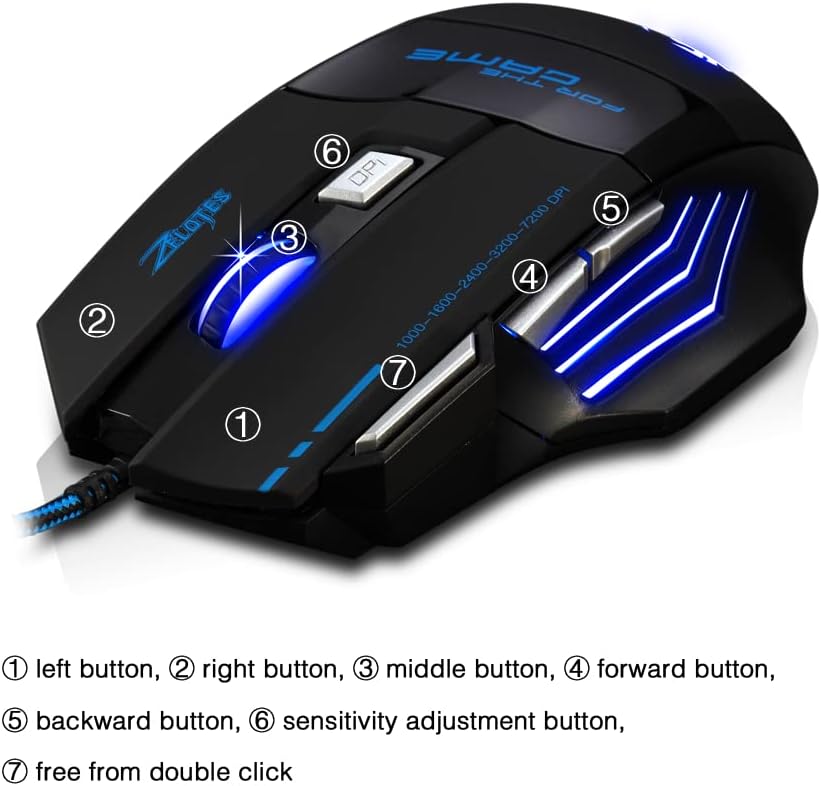
- Left Button (1): Función estándar do clic esquerdo.
- Right Button (2): Función estándar do clic dereito.
- Middle Button / Scroll Wheel (3): Scrolls up/down. Pressing it acts as a middle-click.
- Forward Button (4): Navega cara adiante web navegadores ou file exploradores.
- Backward Button (5): Navega cara atrás en web navegadores ou file exploradores.
- Botón DPI (6): Adjusts mouse sensitivity (DPI) and changes LED colors.
- Rapid Fire Button (7): Functions as a double-click of the left button, useful for continuous firing in games.
Axuste de DPI
The mouse offers 5 adjustable DPI levels to suit different tasks and preferences:
- 1000 DPI
- 1600 DPI
- 2400 DPI
- 3200 DPI
- 7200 DPI
Preme o Botón DPI (6) to cycle through these sensitivity levels. Each change will be indicated by a corresponding LED color change.
Control de iluminación LED
The mouse features 7 LED lighting modes. To change the LED color, long press the DPI button (6). The LED will flash rapidly 7 times and then remain constant on the selected color.

Mantemento
- Limpeza: Usa un pano suave e seco para limpar a superficie do rato. Para a sucidade persistente, usa un pano lixeiramente seco.amp pódese usar un pano, garantindo que non entre líquido no rato.
- Coidado do cable: Evite dobrar bruscamente ou tirar demasiado do cable USB para evitar danos.
- Almacenamento: Garda o rato nun lugar seco e fresco, lonxe da luz solar directa e de temperaturas extremas.
Resolución de problemas
O rato non responde
- Asegúrate de que o cable USB estea conectado correctamente a un porto USB que funcione.
- Tenta conectar o rato a un porto USB diferente do teu ordenador.
- Proba o rato noutro ordenador para determinar se o problema é do rato ou do ordenador.
LED Lights Not Working/Changing
- Verify the mouse is properly connected to the computer.
- Ensure you are long-pressing the DPI button to cycle through colors. A short press changes DPI.
DPI sen cambios
- Ensure you are short-pressing the DPI button to cycle through DPI levels.
- If the issue persists, try reconnecting the mouse.
Especificacións
| Característica | Detalle |
|---|---|
| Número de modelo | T80 |
| Botóns | 7 (with scroll wheel) |
| DPI axustable | 1000/1600/2400/3200/7200 DPI |
| Iluminación LED | 7 modos de iluminación |
| Conectividade | USB con cable |
| Sistema de seguimento | Óptica |
| Deseño Ergonómico | Si |
| Cambiar vida | 5 millóns de ciclos |
| Dimensións | 130 x 105 x 45 mm |
| Peso | 160 ± 5 g |
| Lonxitude do cable USB | 1.5 m |
| Compatibilidade | Win11, Win10, Win8, Win7, Mac OS |
Garantía e Soporte
For warranty information and technical support, please refer to the product packaging or contact zelotes customer service through the retailer where the product was purchased. Keep your purchase receipt for warranty claims.


