
Introdución
Thank you for choosing the GGSTOPWATER XG99PRO Open Ear Headphones. These wireless Bluetooth 5.4 earbuds are designed for comfort and stability, featuring an open-ear design, earhooks, and IPX5 water resistance. This manual provides detailed instructions to help you set up, operate, and maintain your headphones for optimal performance.
The ergonomic design ensures a firm fit, preventing slippage during activities. With multi-point support, the weight is evenly distributed for comfortable long-term wear. Bluetooth 5.4 technology provides a stable and fast connection. The open-ear design helps prevent pressure and irritation to the ear canal and eardrum, promoting extended comfortable use.
Contido do paquete
- GGSTOPWATER XG99PRO Open Ear Headphones (Left and Right)
- Estuche de carga sen fíos
- Cable de carga USB
- Manual de usuario (este documento)
Produto rematadoview
Familiarize yourself with the components of your GGSTOPWATER XG99PRO Open Ear Headphones.
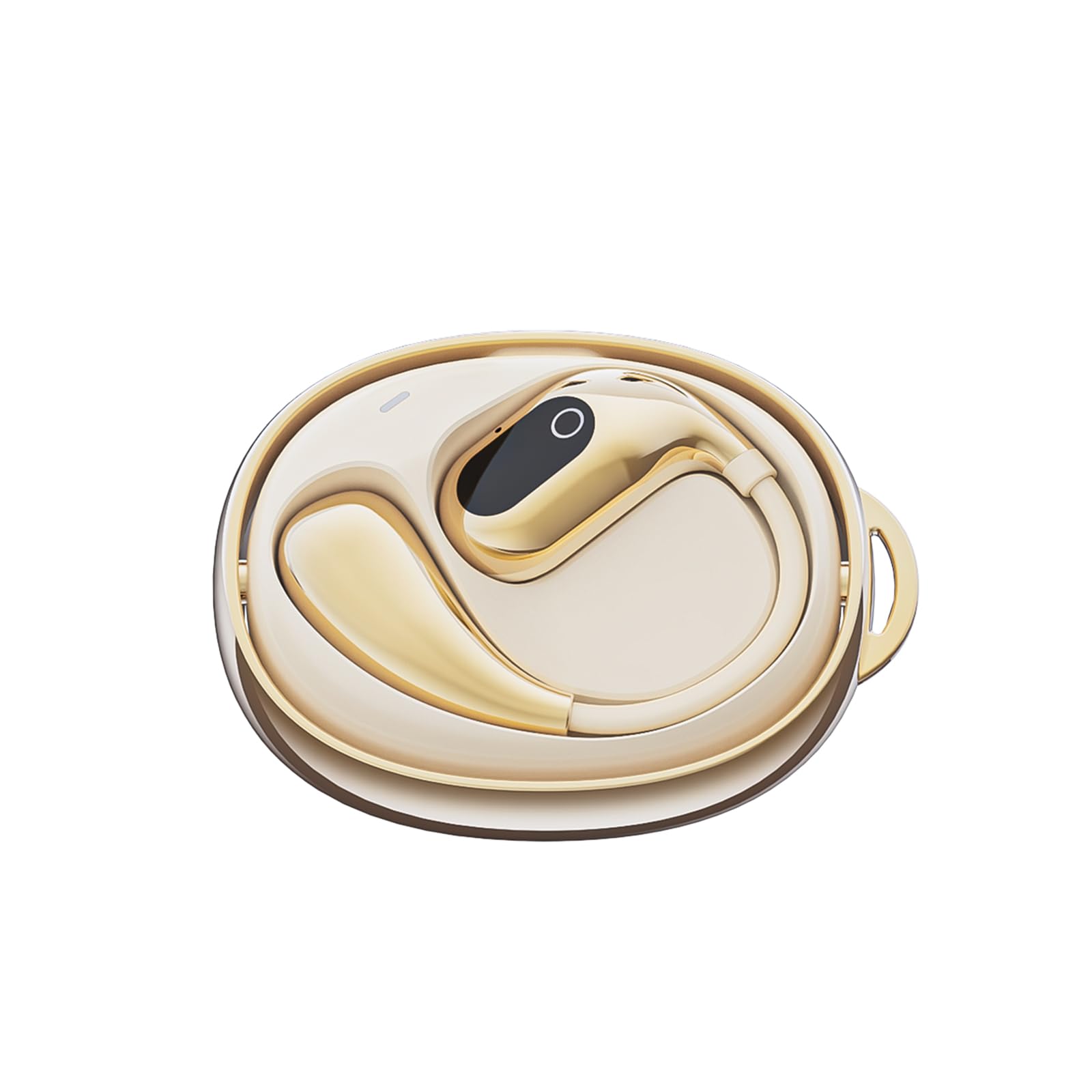
Figura 1: The GGSTOPWATER XG99PRO wireless charging case. This compact case protects and charges your earbuds.

Figura 2: The XG99PRO earbuds securely placed within their charging case. The case ensures the earbuds are charged and ready for use.

Figura 3: An XG99PRO earbud worn on the ear, demonstrating its open-ear design and secure earhook fit. This design allows for situational awareness while listening.
Configuración
1. Carga dos auriculares
- Coloca os dous auriculares na caixa de carga. Asegúrate de que estean correctamente asentados.
- Conecta o cable de carga USB ao porto de carga da carcasa e a unha fonte de alimentación (por exemplo, un adaptador de parede USB, un porto USB do ordenador).
- The indicator light on the charging case will show the charging status. A full charge for the case and earbuds typically takes approximately 1.5-2 hours.
- The earbuds provide up to 6 hours of listening time on a single charge, and the charging case extends the total battery life to up to 60 hours.
2. Emparejamento cun dispositivo Bluetooth
- Asegúrate de que os auriculares estean cargados.
- Abre a caixa de carga. Os auriculares entrarán automaticamente no modo de emparellamento, o que se indicará cunha luz LED intermitente nos auriculares.
- No teu dispositivo (teléfono intelixente, tableta, ordenador), activa o Bluetooth.
- Busca available Bluetooth devices. Select "XG99PRO"da lista.
- Unha vez conectados, o indicador LED dos auriculares deixará de parpadear e escoitarás un ton de confirmación.
- Os auriculares volverán conectarse automaticamente ao último dispositivo emparellado ao sacalos da funda, se o Bluetooth está activado no dispositivo.
Instrucións de funcionamento
The XG99PRO headphones feature touch controls for easy management of audio and calls.
Encendido/apagado
- Encendido: Open the charging case, and the earbuds will power on automatically. Alternatively, press and hold the touch control area on both earbuds for 3 seconds.
- Apagado: Place the earbuds back into the charging case and close the lid. They will power off automatically. Alternatively, press and hold the touch control area on both earbuds for 5 seconds.
Control de música
- Reproducir/Pausa: Toca unha vez a área de control táctil en calquera dos auriculares.
- Próxima pista: Double tap the touch control area on the right earbud.
- Pista anterior: Double tap the touch control area on the left earbud.
- Subir volume: Triple tap the touch control area on the right earbud.
- Baixar volume: Triple tap the touch control area on the left earbud.
Control de chamadas
- Responder/Finalizar chamada: Toca unha vez a área de control táctil en calquera dos auriculares.
- Rexeitar a chamada: Manteña premida a área de control táctil de calquera dos auriculares durante 2 segundos.
Asistente de voz
- Activar o asistente de voz: Mantén premida a área de control táctil de calquera dos auriculares durante 3 segundos (cando non esteas nunha chamada).
Mantemento
Un mantemento axeitado garante a lonxevidade e o rendemento óptimo dos teus auriculares.
Limpeza
- Limpe con coidado os auriculares e a funda de carga cun pano suave, seco e sen fiapos.
- Non empregue produtos de limpeza abrasivos, solventes nin aerosois en aerosol.
- Avoid getting moisture into any openings. The earbuds are IPX5 water-resistant, meaning they can withstand splashes and sweat, but are not designed for submersion.
Almacenamento
- Cando non estean en uso, garde sempre os auriculares no seu estoxo de carga para protexelos e mantelos cargados.
- Gardar nun lugar fresco e seco, lonxe de temperaturas extremas e da luz solar directa.
Resolución de problemas
Se tes algún problema, consulta os seguintes problemas e solucións comúns:
| Problema | Solución |
|---|---|
| Os auriculares non se emparellan co dispositivo. |
|
| Non se escoita son dun ou dos dous auriculares. |
|
| A caixa de carga non carga. |
|
Especificacións
| Característica | Detalle |
|---|---|
| Nome do modelo | XG99PRO |
| Marca | GGSTOPAUGA |
| Tecnoloxía de conectividade | Sen fíos (Bluetooth 5.4) |
| Colocación do oído | On Ear (Open Ear Design) |
| Factor de forma | Na Orella |
| Resistencia á auga | IPX5 |
| Impedancia | 40 ohmios |
| Peso do elemento | 2 onzas |
| Baterías | Require 2 pila C (incluídas) |
| Compoñentes incluídos | Estuche de carga sen fíos |
Información da garantía
GGSTOPWATER products are covered by a limited warranty from the date of purchase. Please retain your proof of purchase for warranty claims. This warranty covers manufacturing defects and does not cover damage caused by misuse, accidents, unauthorized modifications, or normal wear and tear. For specific warranty terms and conditions, please refer to the warranty card included with your product or contact customer support.
Atención ao cliente
If you have any questions, require technical assistance, or need further support, please contact our customer service team. You can find contact information on our official websitio web ou a través do vendedor onde adquiriu o produto.
Soporte en liña: Visit the GGSTOPWATER official websitio web con preguntas frecuentes e recursos de asistencia.
Soporte por correo electrónico: [Placeholder for Support Email Address]