
1. Introdución
The Varstrom EKD01 2.4" TFT Ebike Display is designed for electric bicycles equipped with Bafang CAN protocol mid-drive motor systems. This manual provides essential information for the proper installation, operation, and maintenance of your EKD01 display to ensure a safe and efficient riding experience.
Nota importante sobre compatibilidade: This display operates using the CAN protocol. It is not compatible with UART protocol motors, which typically feature a 5-pin circular connector. Attempting to use adapter cables or modifying connectors will not resolve compatibility issues. Always verify your motor's connector type before installation.
2. Produto rematadoview

Figure 2.1: The Varstrom EKD01 Ebike Display mounted on a handlebar, showing its compact design and clear screen interface.
The EKD01 features a vibrant 2.4-inch TFT color screen, offering clear visibility in various lighting conditions. It integrates essential ebike data and controls into a user-friendly interface. Key features include:
- 2.4-inch TFT Color Screen with 4-level backlight adjustment.
- IP67 waterproof rating for robust outdoor performance.
- Universal compatibility with 24V/36V/48V/52V Bafang CAN protocol mid-drive motors.
- Fits 22.2mm and 25.4mm handlebars.
- Integrated Type-C charging port (5V1A) for external devices.
- Bluetooth 4.0+ BLE for smart app connectivity and data tracking.
- Multi-language support (9 languages).
3. Configuración e instalación
3.1 Comprobación de compatibilidade
Before installation, confirm that your ebike motor uses the Bafang CAN protocol. The EKD01 display is specifically designed for Bafang M200, M300, M400, M410, M420, M500, M560, M510, M600, M620, M800, and M820 CAN Version mid-motor systems. The required connector for your 1T4 cable should be a 5-pin female triangle connector.
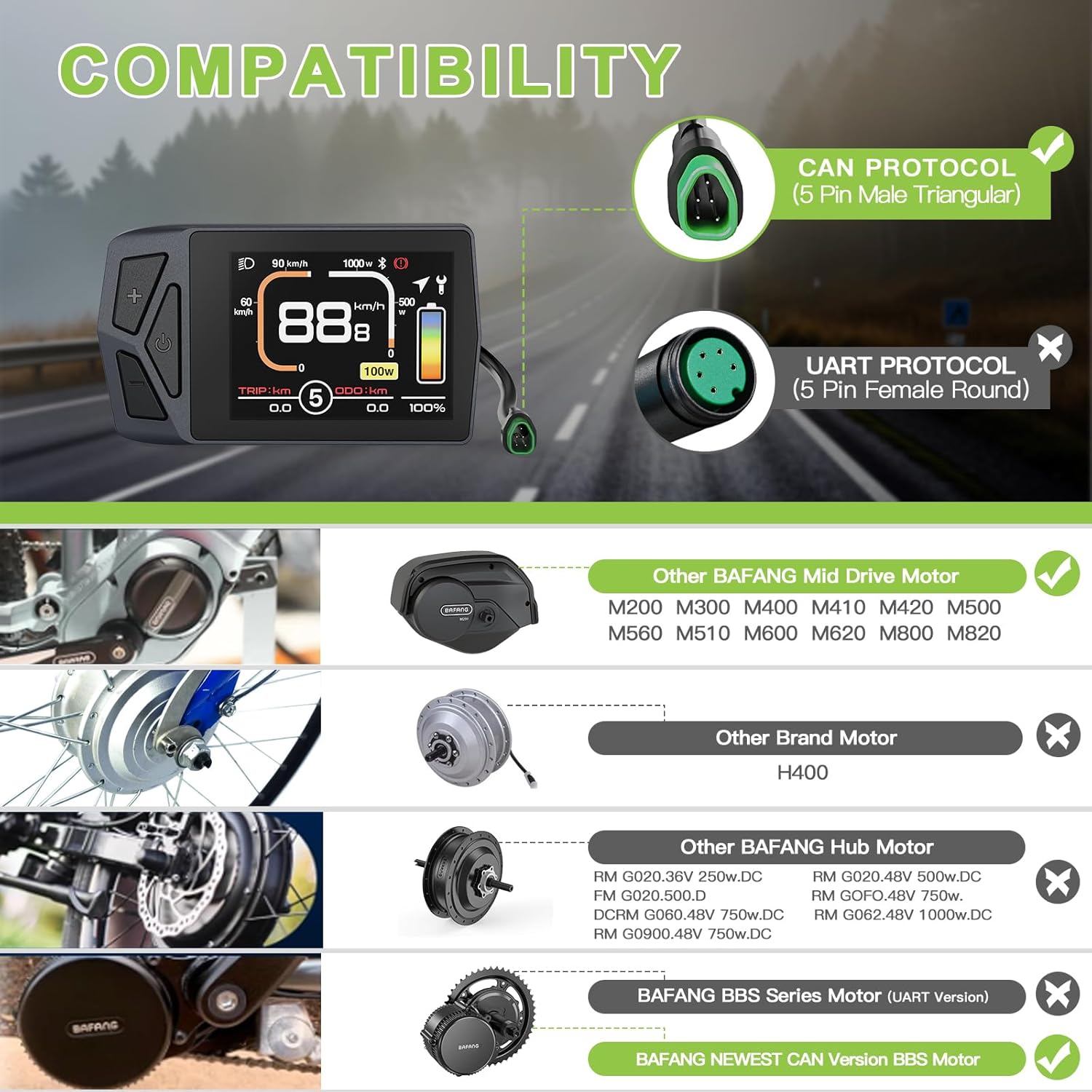
Figure 3.1: Visual guide for motor compatibility, distinguishing between CAN and UART protocols and listing compatible Bafang mid-drive motors.
3.2 Montaxe do manillar
The EKD01 display is designed to fit handlebars with diameters of 22.2mm or 25.4mm. Ensure the mounting bracket is securely fastened to your handlebar in a position that allows for clear visibility and easy access to the control buttons.

Figure 3.2: Illustration of handlebar compatibility, showing the display's adjustable mount for 22.2mm and 25.4mm handlebars.
3.3 Diagrama de cableado
Connect the display to your ebike's 1T4 cable. The display connector is a Male 5-pin type. Verify that the wiring diagram matches your motor's cable to ensure proper functionality. Incorrect wiring can prevent the display from operating.

Figure 3.3: Detailed wiring diagram illustrating the pin configuration for connecting the EKD01 display to the ebike's 1T4 cable.
4. Instrucións de funcionamento
4.1 Interface de visualizaciónview
The EKD01 display provides comprehensive information about your ride. Familiarize yourself with the various indicators and data points shown on the screen.

Figure 4.1: An annotated diagram of the EKD01 display, highlighting all key indicators and their functions.
- Real-time Speed: Velocidade actual de condución.
- Nivel PAS: Nivel do sistema de asistencia ao pedaleo (0-9).
- Nivel de batería: Graphic and percentage indication of remaining battery.
- Odómetro (ODO): Distancia total percorrida.
- Distancia da viaxe (TRIP): Distance for the current ride.
- Indicador de faro: Shows if headlights are active.
- Indicador Bluetooth: Mostra o estado da conexión Bluetooth.
- Consellos de mantemento: Alerts for service or issues.
- Porto de carga tipo C: Para cargar dispositivos externos.
4.2 Operacións básicas
- Encendido/apagado: Press and hold the power button (usually indicated by a power symbol) to turn the display on or off.
- Axustar o nivel de PAS: Use os botóns "+" e "-" para aumentar ou diminuír o nivel de asistencia ao pedaleo (0-9).
- Cambiar modos de visualización: Short press the 'M' button (or similar) to cycle through different display modes (e.g., Trip, ODO, Max Speed, Average Speed).
- Control de faro: Long press the '+' button (or specific light button) to turn the ebike's headlights on or off.
- Axuste da retroiluminación: Access settings menu to adjust the 4-level backlight brightness.
- Speed Unit Change: Within settings, switch between kilometers per hour (km/h) and miles per hour (mi/h).
- Wheel Size Calibration: Calibrate the wheel size in the settings menu for accurate speed and distance readings.
- Axuste do límite de velocidade: Adjust the maximum speed limit (1-99 km/h) in the settings.
4.3 Smart App Integration
The EKD01 display supports Bluetooth 4.0+ BLE connectivity, allowing you to sync with a smartphone app for enhanced functionality. Busca "BIKEGO" in your device's app store.

Figure 4.2: Screenshots of the BIKEGO smartphone application, demonstrating its features for tracking ride data and managing bike settings.
A través da aplicación, podes:
- Track real-time speed, distance, and battery life.
- Access navigation features.
- Customize display settings.
- Review ride history and data.
4.4 portos de carga tipo C
The integrated 5V1A Type-C port allows you to charge compatible electronic devices, such as smartphones or portable speakers, directly from your ebike display during rides.
5. Mantemento
- Limpeza: Limpe a pantalla e o corpo cun pano suave eamp pano. Evite usar produtos de limpeza abrasivos ou solventes que poidan danar a pantalla ou aasing.
- Exposición á auga: While the EKD01 is IP67 waterproof, prolonged submersion is not recommended. Ensure the Type-C port cover is securely closed when not in use, especially in wet conditions.
- Temperatura: Operate and store the display within its specified operating temperature range of -20°C to 70°C. Extreme temperatures can affect performance and lifespan.
- Inspección de cables: Periodically check all cables and connectors for signs of wear, damage, or loose connections.
6 Solución de problemas
| Problema | Causa posible | Solución |
|---|---|---|
| A pantalla non se acende. |
|
|
| Incorrect speed or distance readings. |
|
|
| Problemas de conexión Bluetooth. |
|
|
| Type-C charging port not working. |
|
|
7. Especificacións

Figure 7.1: Detailed product specifications including physical dimensions and technical parameters.
| Característica | Detalle |
|---|---|
| Nome do modelo | EKD01 |
| Conector | Male 5 PIN |
| Protocolo | PODE |
| Tipo de pantalla | 2.4" TFT Color Screen |
| Voltage Compatibilidade | 24V/36V/48V/52V |
| Niveis PAS | 3, 5, 9 (Optional) |
| Speed Limit Range | 1 km/h ~ 99 km/h |
| Configuración de brillo | 30 %, 50 %, 75 %, 100 % |
| Manillar Clamp Diámetro | Ø22.2mm / 25.4mm |
| Versión Bluetooth | 4.0+ BLE |
| Clasificación impermeable | IP67 |
| Porto de carga | Tipo C (5V1A) |
| Peso | 67 g |
| Función de apagado automático | Si |
| Temperatura de funcionamento | -20 °C ~ 70 °C |
| Lonxitude do cable | 230 mm (9.06") |
| Material | PC |
8. Garantía e soporte
Varstrom provides the following support for the EKD01 Ebike Display:
- Devolución de 30 días: Pódese devolver nos 30 días posteriores á compra.
- 90 Days Replacement: Product replacement available within 90 days for manufacturing defects.
- Lifetime Technical Guidance: Access to technical support and guidance for the lifetime of the product.
For further assistance or technical inquiries, please contact Varstrom customer support through their official channels.