
1. Introdución
Thank you for choosing the UNITOPSCI 7086W Double Din Car Stereo. This advanced multimedia system is designed to enhance your driving experience with its 6.9-inch IPS touchscreen, wireless Apple CarPlay, Android Auto, Bluetooth 5.2, and a range of connectivity options. This manual provides essential information for installation, operation, and maintenance to ensure optimal performance and safety.

Image 1.1: UNITOPSCI 7086W Double Din Car Stereo and accessories.
2. Información de seguridade
- Always consult a professional for installation to prevent damage to the unit or your vehicle.
- Non operes a unidade dun xeito que te distraia da condución. Prioriza sempre a seguridade viaria.
- Ensure all wiring is correctly connected to avoid short circuits or electrical hazards.
- Manteña a unidade lonxe da auga e da humidade excesiva.
- Non intente reparar a unidade vostede mesmo. Consulte persoal de servizo cualificado.
- Use only the specified power supply (DC 12V).
3. Contido do paquete
Verifica que todos os elementos estean presentes no paquete:
- 1 x Car MP5 Player (UNITOPSCI 7086W)
- 1 x cable de alimentación
- 1 x cable de altofalante
- 1 x Microphone (MIC)
- 1 x Steering Wheel Control (Battery Not Included)
- 1 x Manual de usuario
- 1 x D-BUS Cable
- 1 x cámara de respaldo
- 1 x Remote Control (Battery Not Included)
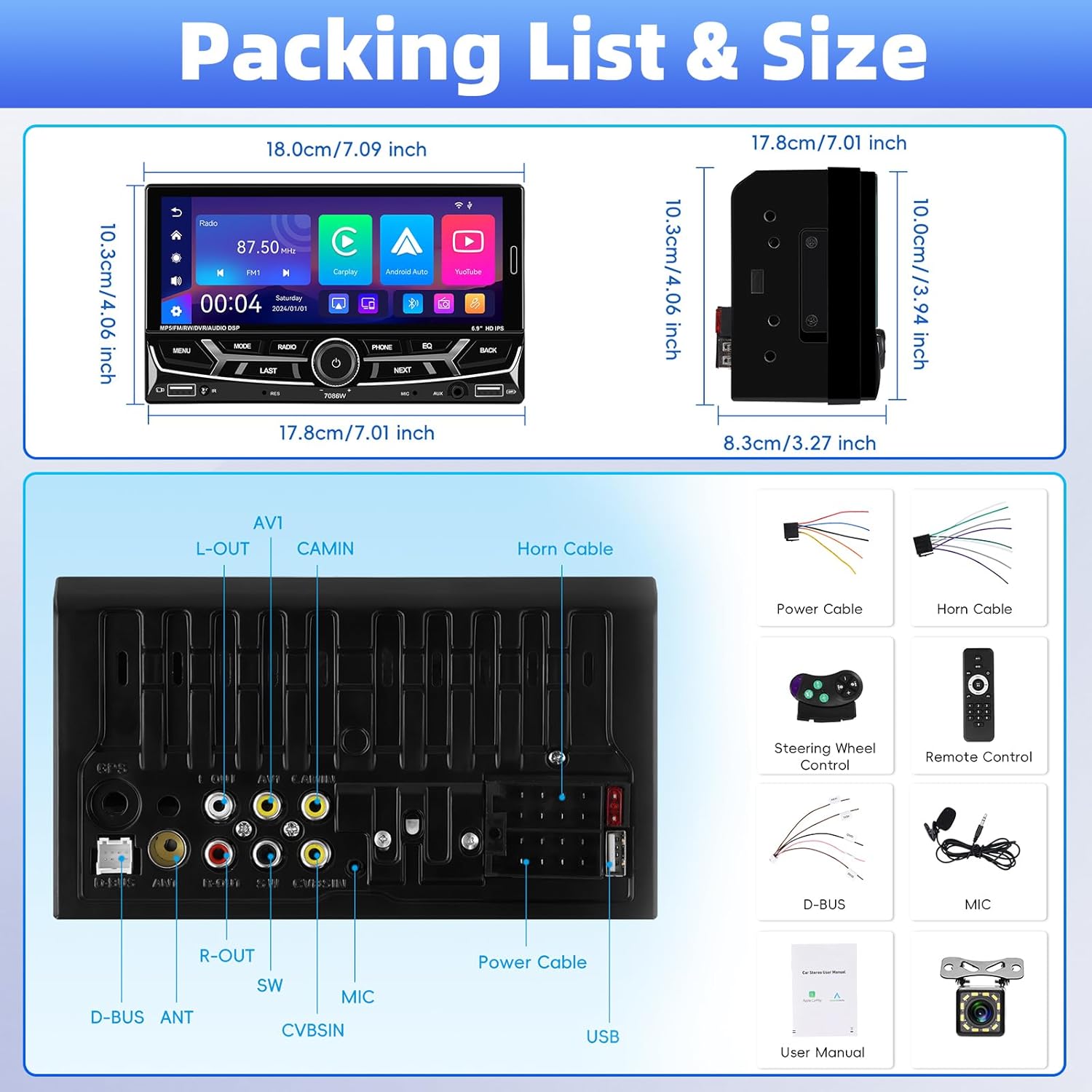
Imaxe 3.1: Detallada view of package contents and wiring diagram.
4. Especificacións
| Característica | Especificación |
|---|---|
| Modelo | 7086 W |
| Material da pantalla | IPS |
| Voltage | DC 12 V |
| CPU Chip | 2900 |
| Tamaño da pantalla | 6.9 polgadas |
| Resolución de pantalla | 1280*480 |
| Mirror Link | Support (iOS up to 13.4, Android up to 10.1) |
| Banda de Radio | FM/AM/RDS |
| Chip de radio | QN8035 |
| Potencia de saída | 45W*4 (Max 180 Watts) |
| Temperatura de traballo | -10 ~ 60 ℃ |
| Versión Bluetooth | 5.2 |
| Retroiluminación colorida | Support (7 colors) |
| Entrada de inversión | AHD720/CVBS |
| Poder Ampchip lifier | TDA7388 |
| Radiofrecuencia | FM: 87.5-108 MHz, AM: 530-1710 kHz |
| Formato de audio | MP3 / WMA / WAV / APE / FLAC |
| Formato de vídeo | RM/RMVB/AVI/MP4/MKV/3GP |
| Formato de imaxe | JPG BMP PNG |
| Dimensións do produto | 4.37 x 7 x 4.01 polgadas |
| Peso do elemento | 2.64 libras |
5. Configuración e instalación
Proper installation is crucial for the performance and safety of your car stereo. It is highly recommended to have the unit installed by a qualified professional.
5.1 Conexións de cableado
Refer to the detailed wiring diagram provided in Image 3.1 (Packing List & Size) and the included user manual for specific connection points. Key connections include:
- Cable de alimentación: Connect to vehicle's power supply (constant 12V, accessory 12V, and ground).
- Cable de altofalante: Connect to your vehicle's speakers. Ensure correct polarity.
- Backup Camera Input (CVBSIN): Connect the included backup camera for automatic rear view visualización.
- Micrófono (MIC): Connect the external microphone for improved hands-free calling.
- Control do volante (SWC): Connect to your vehicle's steering wheel control wires for integrated control.
- Portos USB: Two USB ports are available for media playback, charging, and DVR input.
- Entrada AUX: Para conectar dispositivos de audio externos.
Asegúrese de que todas as conexións estean seguras e illadas para evitar curtocircuítos.
6. Instrucións de funcionamento
6.1 Acendido/apagado e controis básicos
The unit powers on automatically with the vehicle's ignition. Use the physical knob and buttons on the front panel for basic operations like volume control, mode selection, and track skipping.
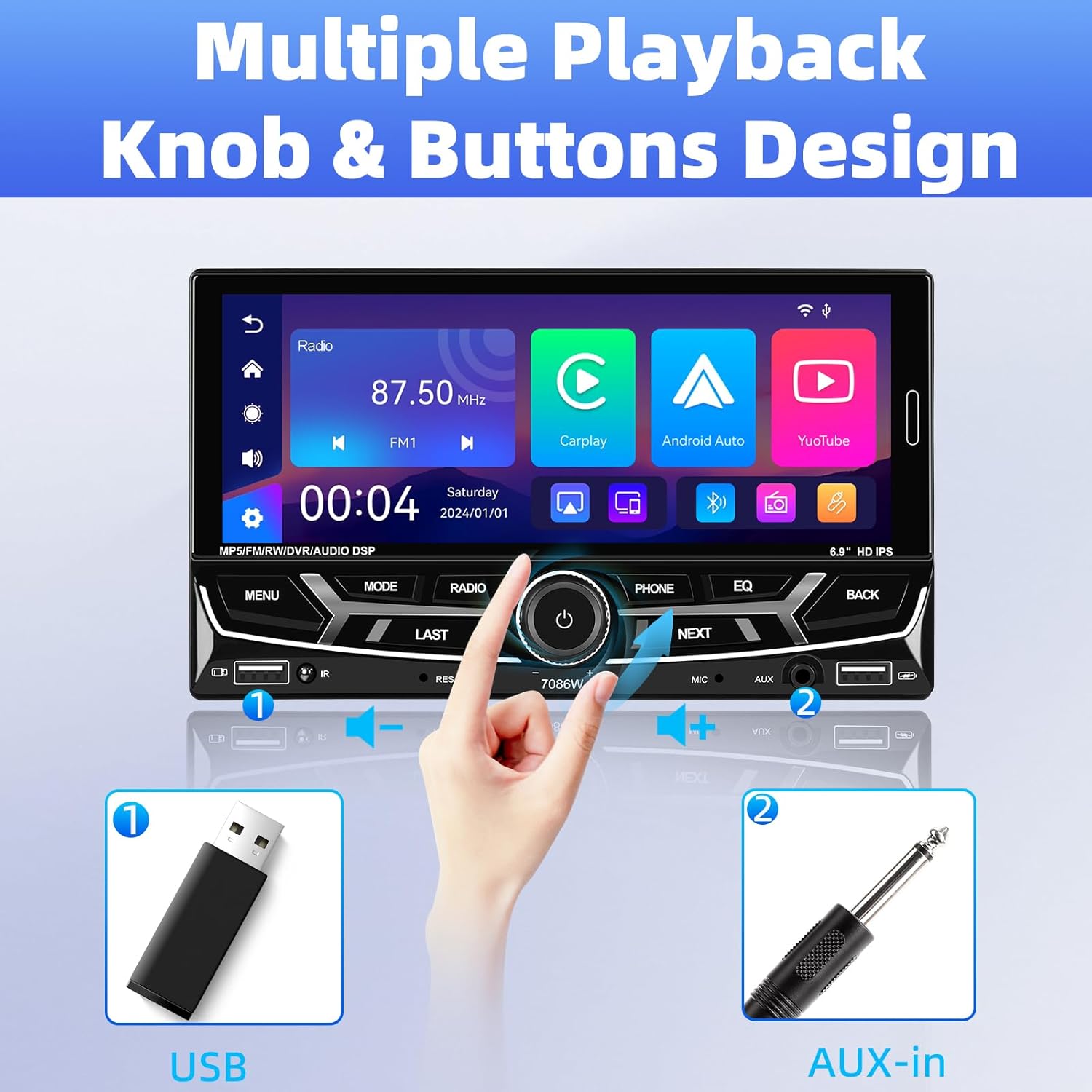
Image 6.1: Front panel controls and connectivity options.
Apple CarPlay e Android Auto sen fíos 6.2
Connect your smartphone wirelessly via Bluetooth to access Apple CarPlay or Android Auto. This allows you to use navigation, make calls, send messages, and listen to music directly from your phone's interface displayed on the stereo screen.
- Asegúrate de que o Bluetooth estea activado no teu smartphone.
- On the car stereo, navigate to the Bluetooth settings and pair with your phone.
- Once paired, select the CarPlay or Android Auto icon on the stereo's main menu.
- Follow any on-screen prompts on your phone to grant necessary permissions.

Image 6.2: Wireless Apple CarPlay and Android Auto interfaces.
6.3 Bluetooth 5.2 Hands-free Calling and Audio Streaming
The built-in Bluetooth 5.2 module allows for stable hands-free calling and high-quality audio streaming.
- Emparejamento: Go to the Bluetooth menu on the stereo, search for your phone, and pair.
- Chamadas mans libres: Once paired, you can dial numbers, answer, or end calls directly from the stereo's touchscreen or via voice commands (e.g., Siri). The external microphone ensures clear communication.
- Transmisión de audio: Play music from your phone through the car's speakers via Bluetooth.

Image 6.3: Bluetooth 5.2 hands-free and audio features.
6.4 Función de ligazón de espello
The Mirror Link function allows you to display your smartphone's screen directly onto the car stereo. This is compatible with iOS devices up to version 13.4 and Android devices up to version 10.1.
- Connect your smartphone to the stereo via a USB cable.
- Select the 'Mirror Link' option on the stereo.
- Follow the on-screen instructions to establish the connection.
Radio 6.5 FM/AM/RDS
Access local radio stations with the built-in FM/AM/RDS tuner.
- Afinación: Use the touchscreen to scan for stations or manually tune to a specific frequency.
- Estacións predefinidas: Save up to 30 of your favorite stations for quick access.
- RDS (Sistema de datos de radio): Displays station information such as song title or program type where available.
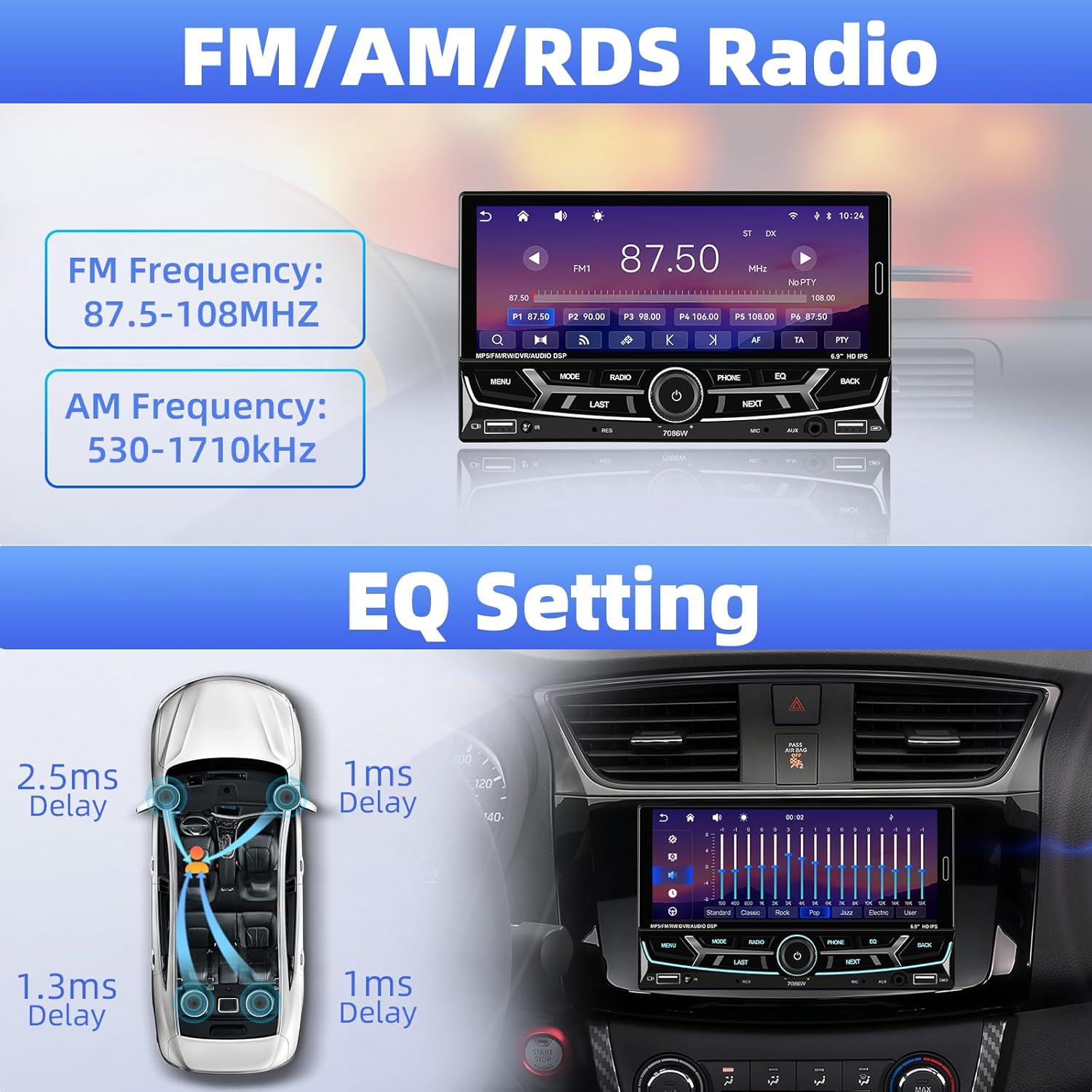
Image 6.4: FM/AM/RDS Radio interface and EQ settings.
6.6 DSP/EQ Audio Setting
Customize your audio experience with the Digital Sound Processor (DSP) and Equalizer (EQ) settings. Choose from preset sound styles like Pop, Rock, Classic, Jazz, or create your own custom profile.
6.7 USB Playback and Charging / Auxiliary Audio Input
- USB: Insert a USB drive into one of the USB ports for media playback (audio/video/pictures) or to charge your devices.
- AUX: Connect external audio devices (e.g., MP3 players) to the 3.5mm AUX input on the front panel.
6.8 Traseira View Cámara
When the vehicle is shifted into reverse gear, the stereo automatically displays the feed from the connected backup camera. The included camera features 12 LEDs, a 170° wide angle, and night vision for clear visibility, along with parking guidelines.

Imaxe 6.5: Traseira view camera display and features.
6.9 Control do volante (SWC)
If your vehicle supports steering wheel controls, connect the SWC wires to the stereo. This allows you to control functions like volume, track skipping, and mode switching directly from your steering wheel for convenience and safety.
Image 6.6: Steering wheel control functionality.
6.10 6.9-Inch IPS Touchscreen and 7-Color Backlight Display
The high-definition IPS touchscreen offers clear visuals and responsive touch control. You can customize the backlight color of the physical buttons to match your vehicle's interior or personal preference, choosing from 7 available colors.

Image 6.7: IPS Touchscreen and 7-color backlight display.
7. Mantemento
- Limpeza da pantalla: Usa un pano suave e sen fiapos para limpar con coidado a pantalla táctil. Non empregues produtos de limpeza abrasivos nin disolventes.
- Limpeza xeral: Keep the unit free from dust and debris. Use a soft, dry cloth for cleaning the exterior.
- Evita temperaturas extremas: Do not expose the unit to prolonged direct sunlight or extreme cold, as this can affect performance and lifespan.
8 Solución de problemas
| Problema | Causa posible | Solución |
|---|---|---|
| Sen poder | Cableado incorrecto; fusible fundido | Check power cable connections; Inspect and replace fuse if necessary. |
| Sen son | Speaker wires disconnected; Volume too low; Incorrect audio source | Verify speaker connections; Increase volume; Select correct audio input. |
| Bluetooth non se conecta | Bluetooth off on phone/stereo; Incorrect pairing process | Ensure Bluetooth is active on both devices; Re-attempt pairing process. |
| CarPlay/Android Auto not starting | Phone not compatible; Incorrect connection; App issues | Check phone compatibility; Ensure proper Bluetooth connection; Restart phone and stereo. |
| Backup camera not displaying | Camera wiring incorrect; Reverse trigger wire not connected | Check camera power and video signal cables; Ensure reverse trigger wire is connected to vehicle's reverse light. |
| Steering Wheel Control not working | SWC wires not connected; Incorrect configuration | Verify SWC wiring; Refer to vehicle-specific instructions for SWC setup. |
Se os problemas persisten, póñase en contacto co servizo de atención ao cliente.
9. Garantía e soporte
UNITOPSCI is committed to providing high-quality products and customer satisfaction.
- Substitución: Replacement available within 24 months of purchase.
- Devolucións: 60-day no-worry return policy.
- Soporte técnico: Lifetime after-sales consultation and technical support.
- Tempo de resposta: Quick response to inquiries within 16 hours.
Para obter asistencia, póñase en contacto connosco en: UNITOPSCI@126.com


