
Introdución
Thank you for choosing the Micool Mini Sleep Earbuds Wireless. These earbuds are designed for ultimate comfort and discretion, especially for sensitive sleepers. Featuring IPX5 waterproofing, Bluetooth 5.3 connectivity, and a lightweight, invisible design, they provide a peaceful audio experience for relaxation, sleep, or discreet listening.

Image: Micool Mini Sleep Earbuds in their charging case.
Contido do paquete
- Micool Mini Sleep Earbuds (Left and Right)
- Estuche de carga
- Cable de carga USB-C
- Manual de usuario
Configuración
1. Carga inicial
- Coloque os dous auriculares no estoxo de carga.
- Connect the USB-C charging cable to the port on the charging case and to a power source.
- A pantalla dixital da caixa de carga mostrará a porcentaxe da bateríatage. Ensure the earbuds are fully charged before first use.
2. Emparellamento Bluetooth
- Abre a caixa de carga. Os auriculares entrarán automaticamente no modo de emparellamento.
- No teu dispositivo (por exemplo, teléfono intelixente, tableta, portátil), activa o Bluetooth.
- Busca available Bluetooth devices and select "Micool Q26" (or similar name) from the list.
- Unha vez conectados, escoitarás un aviso sonoro e os auriculares estarán listos para usar.
Instrucións de funcionamento
Usando os auriculares
The Micool Mini Sleep Earbuds are designed to fit snugly and discreetly within your ear, making them ideal for side sleepers. Gently insert each earbud into your ear canal until it feels secure and comfortable. The soft silicone ear tips adapt to your ear shape, minimizing pressure for extended wear.
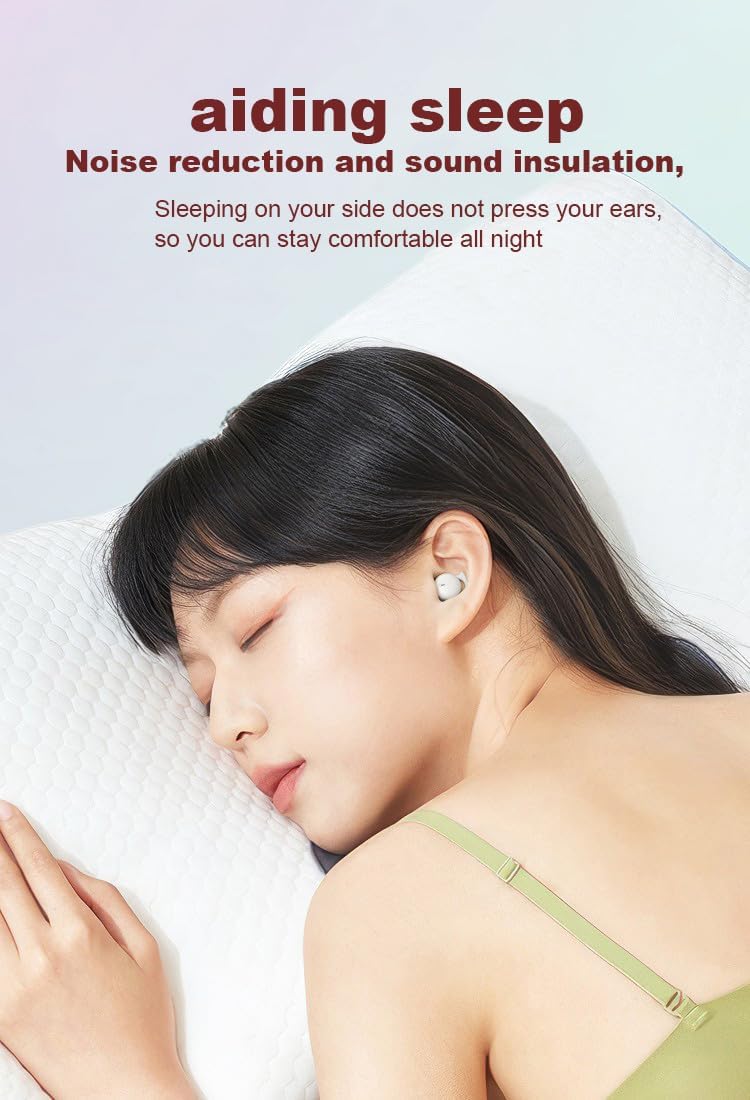
Image: Earbud worn discreetly for sleep.
Controis táctiles
Each earbud features a touch-sensitive button for easy control of your audio and calls.

Image: Touch button controls diagram.
- Reproducir/Pausa: Toca un só auricular en calquera dos auriculares.
- Responder/colgar chamada: Toque unha vez en calquera dos auriculares durante unha chamada entrante ou activa.
- Próxima canción: Toca dúas veces no auricular dereito.
- Canción anterior: Toca dúas veces no auricular esquerdo.
- Rexeitar a chamada: Manteña premido calquera dos auriculares durante 2 segundos durante unha chamada entrante.
- Activar o asistente de voz: Toca tres veces en calquera dos auriculares.
Uso independente de auriculares
Both earbuds can be used independently. You can use one earbud while the other charges in the case, effectively extending your listening time. Simply remove one earbud from the case to use it in mono mode.
Resistencia á auga (IPX5)
The earbuds are rated IPX5 water-resistant, meaning they can withstand splashes of water and sweat. They are suitable for use during light rain or workouts, but should not be submerged in water.
Mantemento
- Limpa regularmente os auriculares e a caixa de carga cun pano suave e seco.
- Evite o uso de limpadores abrasivos ou disolventes.
- Manteña limpos os contactos de carga tanto dos auriculares como da funda para garantir unha carga axeitada.
- Garda os auriculares no seu estoxo de carga cando non os uses para protexelos e manter a duración da batería.
Resolución de problemas
Os auriculares non se emparejan
- Asegúrate de que os dous auriculares estean completamente cargados.
- Desactiva o Bluetooth no teu dispositivo e volve activalo.
- Forget/delete "Micool Q26" from your device's Bluetooth list and attempt to pair again.
- Volva colocar os auriculares na funda, peche a tapa, agarde uns segundos e logo ábraa para reiniciar o modo de emparellamento.
Sen son ou volume baixo
- Comproba os niveis de volume tanto no teu dispositivo como nos auriculares.
- Asegúrate de que os auriculares estean correctamente asentados nas orellas.
- Volve conectar os auriculares ao teu dispositivo.
Problemas de carga
- Verifica que o cable USB-C estea conectado correctamente tanto á carcasa como á fonte de alimentación.
- Asegúrate de que os contactos de carga dos auriculares e do interior da funda estean limpos e libres de residuos.
- Proba a usar un cable USB-C ou un adaptador de alimentación diferente.
Especificacións
| Nome do modelo | Q26 |
| Marca | Micool |
| Tecnoloxía de conectividade | Sen fíos (Bluetooth 5.3) |
| Resistencia á auga | IPX5 |
| Colocación do oído | En Orella |
| Factor de forma | En Orella |
| Material | Plástico |
| Compoñentes incluídos | Cable, Manual de usuario |
| UPC | 770029329733 |
| Fabricante | MICOOL |
| Data de primeira dispoñibilidade | 12 de xuño de 2023 |
Garantía e Soporte
Specific warranty information for the Micool Mini Sleep Earbuds (Model Q26) is not provided in the product details. Please refer to the warranty card included in your package or contact Micool customer support for detailed warranty terms and conditions.
For further assistance, technical support, or inquiries, please visit the official Micool website or contact their customer service department. Contact information can typically be found in the included user manual or on the product packaging.