1. Introdución
This manual provides comprehensive instructions for the installation, operation, and maintenance of your Tuya Smart WiFi Video Doorbell. Please read this manual thoroughly before using the product to ensure proper functionality and safety.
The Tuya Smart WiFi Video Doorbell is designed to enhance your home security with features such as 1080P/3MP video, two-way audio, PIR motion detection, and remote access via smartphone applications.
2. Características do produto
- 4.3-inch high-definition LCD screen for clear indoor viewing.
- 1080P (2MP) or 3MP (2304×1296 Pixels) video resolution options.
- Built-in 5000mAh rechargeable lithium battery for extended standby time (up to 6 months).
- PIR motion detection with automatic capture and alarm notifications.
- Two-way audio communication with noise cancellation.
- Infrared (IR) LEDs for clear night vision.
- Support for multiple mobile applications: Tuya, Smart Life, YCC365 Plus, iCam365.
- Local storage via TF card (up to 128GB, FAT32 format required) and cloud storage function.
- Quick access via app, waking up within 3 seconds and responding within 1 second.
- Easy installation with WiFi connection, no complex wiring required.
3. Contido do paquete
Verifique que todos os elementos que se indican a continuación estean incluídos no seu paquete. Se falta algún elemento ou está danado, póñase en contacto co servizo de atención ao cliente.
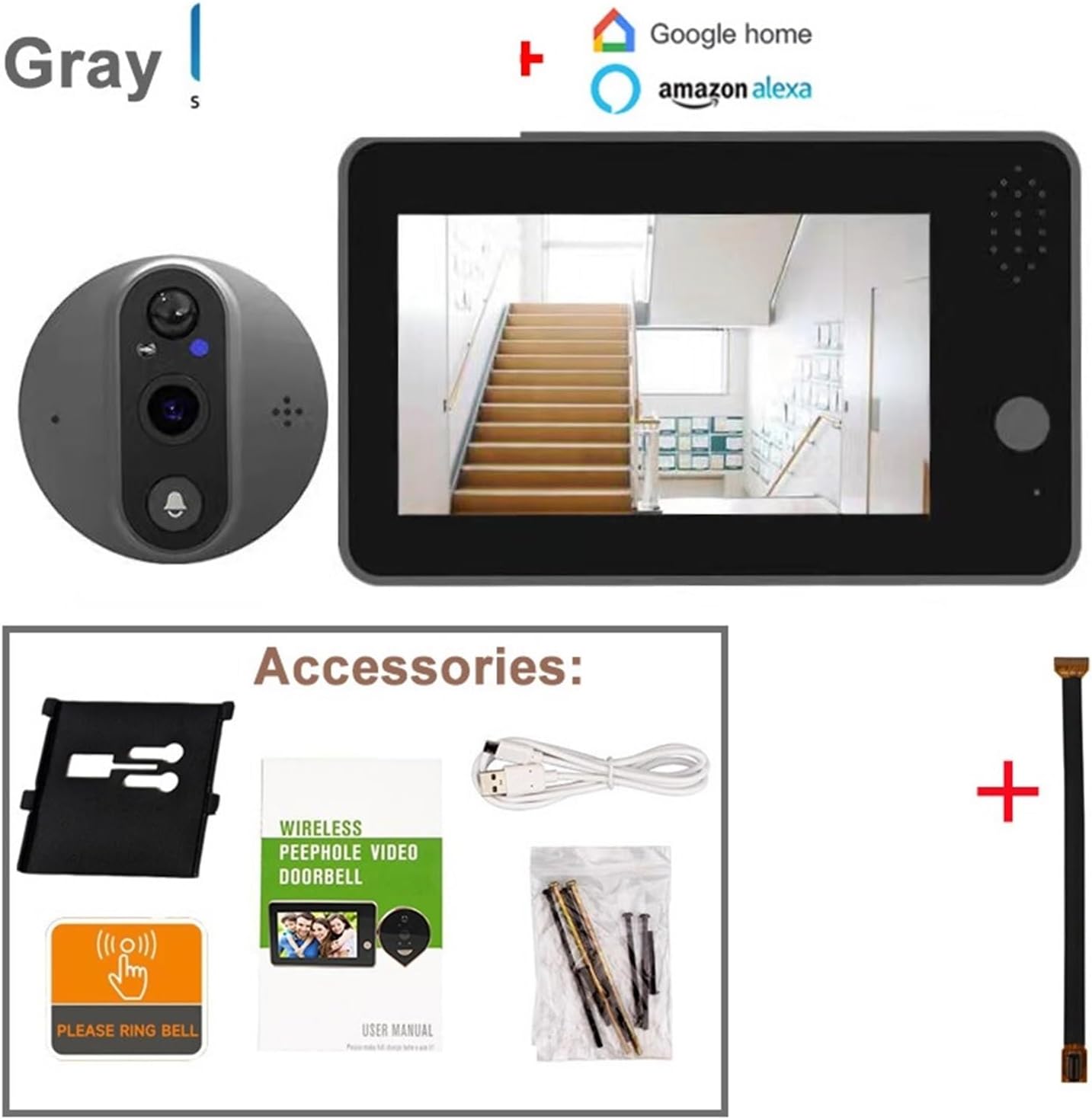
Image: The package includes the indoor monitor, outdoor doorbell unit, mounting bracket, USB charging cable, screws, a 'Please Ring Bell' sticker, and the user manual. An extension cable is also shown.
- Indoor Monitor Unit (with 4.3-inch LCD)
- Outdoor Doorbell Unit (Peephole Camera)
- Soporte de montaxe
- Cable de carga USB
- Parafusos e ancoraxes de montaxe
- "Please Ring Bell" Sticker
- Manual de usuario
- Extension Cable (for connecting indoor and outdoor units)
4. Produto rematadoview e Dimensións
Familiarize yourself with the components and dimensions of your video doorbell system.

Image: This diagram shows the indoor monitor with its screen, button, and speaker. The outdoor unit displays the PIR motion detector, speaker, microphone, IR lamp, and doorbell button. Dimensions for both units are provided, indicating the indoor monitor is approximately 137mm x 84mm x 20mm, and the outdoor unit is 67mm x 67mm x 15mm with a 55mm peephole extension.
Indoor Monitor Unit:
- 4.3 inch LED Screen: Mostra en directo view e comida gravadatage.
- Screen Button: Para a navegación e a selección.
- Relator: For two-way audio and alerts.
- Micro SD / TF Card Slot: For local video storage (supports up to 128GB, FAT32 format).
- Porto micro USB: For charging the built-in battery.
- Interruptor de encendido/apagado: Para acender ou apagar o dispositivo.
Outdoor Doorbell Unit:
- PIR Motion Detect Sensor: Detects human movement.
- Relator: Para audio bidireccional.
- MIC (Micrófono): Para audio bidireccional.
- IR Lamp: Luces infravermellas para visión nocturna.
- Botón do timbre: Activates the doorbell and initiates a call.
5. Guía de instalación
Follow these steps carefully to install your Tuya Smart WiFi Video Doorbell.
5.1 Comprobación de compatibilidade
- The doorbell is suitable for door thicknesses between 40 mm e 120 mm.
- The peephole diameter should be between 16 mm e 50 mm.
- The cable installation length is 11 cm.
- Non apto para: double doors, doors with small windows or steel mesh, soft-packed doors, or doors without existing peepholes (a peephole must be drilled if none exists).
5.2 Instalación física
- Eliminar a mirilla existente: Carefully unscrew and remove your current peephole viewdende a porta.
- Insert Outdoor Unit: Insert the cable of the outdoor doorbell unit through the peephole hole from the outside of the door. Ensure the unit is flush against the door.
- Fixar o soporte de montaxe: From the inside of the door, thread the mounting bracket onto the cable. Secure it with the provided screws, ensuring it is tight and stable.
- Conectar o monitor interior: Connect the cable from the outdoor unit to the corresponding port on the back of the indoor monitor.
- Montar o monitor de interior: Slide the indoor monitor onto the mounting bracket until it clicks securely into place.
5.3 Initial Power Up and Charging

Image: This image highlights the built-in 5000mAh rechargeable lithium battery, emphasizing its low power consumption and power-saving design, allowing for a standby time of approximately 3 months on a single charge.
The device comes with a built-in 5000mAh lithium battery. Before first use, fully charge the device using the provided USB cable and a standard USB power adapter (not included).
- Connect the USB cable to the Micro USB port on the indoor monitor.
- Conecte o outro extremo a unha fonte de alimentación USB.
- O indicador de carga mostrará o estado de carga.
- A full charge can last up to 6 months under normal usage conditions.
6. App Setup and WiFi Connection
To utilize the smart features, you need to connect the doorbell to your home WiFi network and set it up with a compatible mobile application.

Image: This graphic illustrates the doorbell's compatibility with various mobile applications including YCC365 Plus, Tuya, iCam365, and Smart Life. It also visually represents the two-way audio feature, allowing users to communicate with visitors remotely.
- Descarga a aplicación: Download and install one of the compatible applications: Tuya Smart, Vida intelixente, YCC365Plus, ou iCam365 desde a tenda de aplicacións do teu teléfono intelixente (Google Play Store para Android, Apple App Store para iOS).
- Rexistrarse/Iniciar sesión: Abre a aplicación e rexistra unha nova conta ou inicia sesión se xa tes unha.
- Engadir dispositivo: Follow the in-app instructions to add a new device. Select "Video Doorbell" or "Smart Camera" category.
- Conexión WiFi:
- The doorbell only supports Redes WiFi de 2.4 GHz. It is not compatible with 5GHz WiFi.
- If your router broadcasts both 2.4GHz and 5GHz networks, temporarily disable the 5GHz network during the initial setup process.
- Enter your 2.4GHz WiFi network name (SSID) and password when prompted by the app.
- The app will guide you through connecting the doorbell to WiFi, often involving scanning a QR code displayed on your phone screen with the doorbell camera.
- Configuración completa: Once connected, you can name your device and configure additional settings within the app. You can re-enable your 5GHz WiFi network after successful connection.
7. Instrucións de funcionamento
7.1 En directo View e audio bidireccional

Image: This image displays the complete video doorbell system, featuring the outdoor peephole camera unit and the indoor monitor. The monitor's screen shows a live feed, demonstrating its function as a door viewer.
- Monitor de interior: Press the screen button on the indoor monitor to view a transmisión en directo da cámara exterior.
- Aplicación móbil: Open the connected app on your smartphone. Select your doorbell device to access the live view.
- Audio bidireccional: Mentres está en directo view or during a doorbell call, use the microphone icon in the app or on the indoor monitor (if available) to speak with the visitor. The doorbell's built-in speaker will transmit your voice, and its microphone will capture the visitor's response.
7.2 Doorbell Call Function
- When a visitor presses the doorbell button on the outdoor unit, the indoor monitor will ring and display the live view.
- Simultaneously, a notification will be sent to your connected smartphone app.
- You can answer the call from either the indoor monitor or your smartphone to engage in two-way communication.
7.3 Detección de movemento PIR

Image: This image details the Smart PIR Motion Detection feature, showing detection ranges (low sensitivity at 0.5m, middle at 1.5m, high at 3m). It also highlights the HD Night Vision with 3 high-power IR LED lights and the 3MP HD camera resolution.
- The built-in PIR sensor detects human movement near your door.
- Upon detection, the doorbell will automatically capture a picture or record a video clip.
- An alarm notification will be pushed to your mobile phone.
- You can adjust the sensitivity of the PIR detection (low, middle, high) within the app settings to minimize false alarms.
7.4 Visión nocturna
- The doorbell is equipped with 2 or 3 high-power IR LEDs and a built-in IR-CUT filter.
- It automatically switches between day and night modes, providing clear visibility even in low-light or dark conditions.
8. Almacenamento e reprodución

Image: This graphic illustrates the two primary storage options: Micro TF Card for local video data and Cloud Storage Service. It notes that the Micro TF card needs to be purchased separately and that recorded videos can be viewed on the mobile app or exported to a computer, but not directly on the device's screen.
8.1 TF Card Storage (Local)
- The device supports a Micro TF card up to 128GB (not included).
- Importante: The TF card must be formatted to FAT32. For cards above 64GB, you may need to convert the format on your computer.
- Insert the TF card into the designated slot on the indoor monitor.
- Recorded videos (from doorbell presses or motion detection) will be saved to the TF card.
- TF card videos can be played back directly on the mobile app or exported to a computer for viewing. They cannot be played back on the device's screen.
8.2 Cloud Storage (Optional)
- The doorbell supports cloud storage functionality. This service typically requires a subscription through the app.
- Cloud storage provides a secure backup of your video recordings.
- Tuya app supports 30-day cycle storage of cloud image messages. YCC365 Plus/iCam365 typically support 3 days of cloud storage.
- Cloud videos can be played back directly from the app.
8.3 Reprodución
- Access recorded videos through the "Playback" or "History" section within your chosen mobile application.
- Podes view historical records and abnormal situation captures at any time.
9. Mantemento e coidados
- Limpeza: Empregue un pano suave e seco para limpar o monitor interior e a unidade exterior. Non empregue produtos de limpeza abrasivos nin disolventes.
- Batería: Recharge the battery when the low battery indicator appears. Avoid completely draining the battery frequently to prolong its lifespan.
- Actualizacións de firmware: Periodically check the app for firmware updates for your doorbell. Updates can improve performance and add new features.
- Temperatura de funcionamento: Ensure the device operates within its specified temperature range to prevent damage.
10 Solución de problemas
| Problema | Causa posible | Solución |
|---|---|---|
| O dispositivo non se acende. | A batería está esgotada. | Cargue o dispositivo usando o cable USB. |
| Non se pode conectar ao wifi. | Incorrect WiFi band (5GHz). Contrasinal wifi incorrecto. Sinal WiFi débil. | Ensure you are connecting to a 2.4GHz WiFi network. Temporarily disable 5GHz on your router during setup. Double-check password. Move router closer or use a WiFi extender. |
| No notifications on phone. | Notificacións da aplicación desactivadas. App not running in background. Problemas de rede. | Check app notification settings on your phone. Ensure app has necessary permissions. Verify internet connection. |
| PIR motion detection is too sensitive/not sensitive enough. | Configuración de sensibilidade PIR. | Adjust PIR sensitivity (low, middle, high) in the app settings. |
| TF card not recognized or recording. | Incorrect format. Card full or faulty. | Ensure TF card is FAT32 formatted. Try reformatting or using a different card. |
| Poca calidade de vídeo. | Lens obstruction. Condicións de pouca luz. Network bandwidth. | Clean the camera lens. Ensure IR LEDs are not obstructed. Check your internet speed. |
11. Especificacións
| Característica | Detalle |
|---|---|
| Tamaño de pantalla LCD | 4.3 polgadas |
| Image Sensor Solution | OV9712 CMOS Sensor + Hi3518E SoC |
| Distancia focal | 1.7 mm |
| Ángulo de View | Gran angular de 120 graos |
| Audio | Built-in microphone & speaker, 2-way audio with noise cancellation |
| Compresión de vídeo | H.265 |
| Resolución | 1920*1080P@25fps (2MP) or 2304x1296 (3MP) depending on model variant |
| Fluxo | Double stream |
| Batería | Batería de litio de 5000 mAh incorporada |
| Almacenamento | Max 128GB TF card (FAT32 format), Cloud storage |
| WiFi | Só 2.4 GHz |
| Compatibilidade do grosor da porta | 40-120 mm |
| Compatibilidade do diámetro da mirilla | 16-50 mm |
| Fabricante | YUD5DAS |
| País de Orixe | China |
12. Garantía e soporte
Para obter información sobre a garantía e asistencia técnica, consulte os datos de contacto proporcionados polo seu vendedor ou o representante oficial do fabricante. websitio. Garde o recibo da compra como xustificante da mesma.
Manufacturer: YUD5DAS


