
1. Instrucións de seguridade importantes
Lea atentamente todas as instrucións antes de usar esta cinta de correr. Garde este manual para futuras consultas.
- Coloque sempre a cinta de correr sobre unha superficie plana e estable.
- Asegúrate de que haxa unha separación suficiente arredor da cinta de correr (polo menos 2 metros por detrás e 0.6 metros a cada lado).
- Manteña os nenos e as mascotas lonxe da fita durante a operación.
- Usar calzado e roupa deportiva axeitados.
- Non fagas funcionar a cinta de correr se ten o cable ou a clavija danados ou se non funciona correctamente.
- Capacidade máxima de peso do usuario: 130 kg.
- Always use the safety key. Attach it to your clothing before starting your workout.
2. Produto rematadoview
The TOPUTURE 2-in-1 Treadmill is designed for both walking and light running, offering a versatile fitness solution for home or office use. It features a powerful yet quiet motor, manual incline adjustment, and smart app connectivity.

Image: Two individuals demonstrating the TOPUTURE 2-in-1 Treadmill in use, highlighting its dual functionality for walking while working and running.
3. Configuración e montaxe
This TOPUTURE 2-in-1 Treadmill features a space-saving design that requires minimal assembly. It is ready for use almost immediately out of the box.
3.1 Desembalaxe
- Retire con coidado a cinta de correr da súa embalaxe.
- Check all components against the packing list to ensure everything is present.
3.2 Colocación
- Place the treadmill on a firm, level surface.
- Asegúrate de que o cable de alimentación sexa facilmente accesible e non estea obstruído.
3.3 Axuste manual da inclinación
The treadmill offers manual incline settings to increase workout intensity. The original incline is 2°, and can be adjusted to 4.7° (9% incline rate).
- Locate the incline adjustment bolts at the rear of the treadmill.
- Pull out the bolt and turn the slope block to the desired position.
- Insert the bolt into the upper hole to secure the incline.

Image: A visual guide illustrating the two-step process for manually adjusting the treadmill's incline.
4. Instrucións de funcionamento
Your treadmill can be controlled via its LED display, remote control, or a smart application.
4.1 Encendido/apagado
- Conecte o cable de alimentación a unha toma adecuada.
- Flip the main power switch located on the treadmill base to the 'ON' position.
- To turn off, flip the main power switch to 'OFF' and unplug the unit.
4.2 Using the LED Display and Remote Control
The multi-functional LED display shows real-time data including speed, distance, time, and calories burned. The remote control allows for easy adjustment of speed and modes.

Image: The treadmill's clear LED display provides real-time workout metrics, complemented by a convenient remote control for adjustments.
- Inicio/Parada: Press the 'Start' button on the display or remote to begin. Press 'Stop' to pause or end your workout.
- Axuste de velocidade: Use the '+' and '-' buttons on the remote or display to increase or decrease speed (1-10 km/h).
- Programas: Select from 12 preset programs for varied workout routines.
- Pausa temporal: Use the 'Pause' button to temporarily stop your workout without losing data.
4.3 Conectividade de aplicacións intelixentes
Connect your treadmill to fitness apps like 'FITSHOW' via Bluetooth (Bluetooth name: TP3) for enhanced training courses and data tracking.
- Asegúrate de que o Bluetooth estea activado no teu dispositivo móbil.
- Open the 'FITSHOW' app (or compatible app) and search for 'TP3'.
- Pair your device with the treadmill.
- Follow the app's instructions to access various training courses and monitor your progress.

Image: The treadmill connects to fitness apps, allowing users to engage with virtual training courses and track their performance.
5. Mantemento
Un mantemento regular garante a lonxevidade e o rendemento óptimo da súa cinta de correr.
5.1 Limpeza
- Unplug the treadmill before cleaning.
- Wipe down the display and exterior surfaces with a damp pano. Evite produtos de limpeza abrasivos.
- Regularly vacuum under the treadmill to prevent dust buildup.
5.2 Lubricación da correa
The running belt requires periodic lubrication to reduce friction and extend its lifespan. Use silicone-based treadmill lubricant.
- Levanta o bordo da cinta de correr.
- Apply a small amount of lubricant to the center of the deck, underneath the belt.
- Fai funcionar a cinta de correr a baixa velocidade durante uns minutos para distribuír o lubricante uniformemente.
- Refer to the lubricant manufacturer's instructions for frequency, typically every 3-6 months depending on usage.
5.3 Axuste do cinto
If the running belt shifts to one side or slips, it may need adjustment.
- Consult the detailed instructions in the full product manual for specific belt tension and alignment procedures.
6 Solución de problemas
If you encounter issues with your treadmill, refer to the following common problems and solutions.
| Problema | Causa posible | Solución |
|---|---|---|
| A cinta de correr non se acende. | Power cord not plugged in, main switch off, safety key not in place. | Check power connection, ensure main switch is ON, insert safety key. |
| Correr correr desliza. | Belt too loose, insufficient lubrication. | Adjust belt tension (refer to full manual), lubricate the belt. |
| Ruído inusual durante o funcionamento. | Loose parts, belt friction, motor issue. | Check for loose bolts, lubricate belt, contact customer support if motor noise persists. |
| Fallo de conexión á aplicación. | Bluetooth off, app not updated, incorrect pairing. | Ensure Bluetooth is on, update app, re-pair with 'TP3'. |
If the problem persists after attempting these solutions, please contact TOPUTURE customer support.
7. Especificacións
| Característica | Especificación |
|---|---|
| Marca | TOPUTURA |
| Potencia do motor | 2.5 HP (Peak 3.0 HP) |
| Rango de velocidade | 1 - 10 km/h |
| Inclinada | Manual (0%, 5%, 10% equivalent to 2° and 4.7°/9%) |
| Superficie de carreira | 1000 x 400 mm (aprox. 39.4 x 15.7 polgadas) |
| Peso máximo do usuario | 130 kg (aprox. 286 lbs) |
| Nivel de ruído | < 45 dB |
| Dimensións do produto | 120.8 x 52.6 x 12.5 cm (aprox. 47.6 x 20.7 x 4.9 polgadas) |
| Peso do produto | 21.69 kg (aprox. 47.8 lbs) |
| Conectividade | Bluetooth (TP3) for APP control |
| Programas | 12 programas predefinidos |
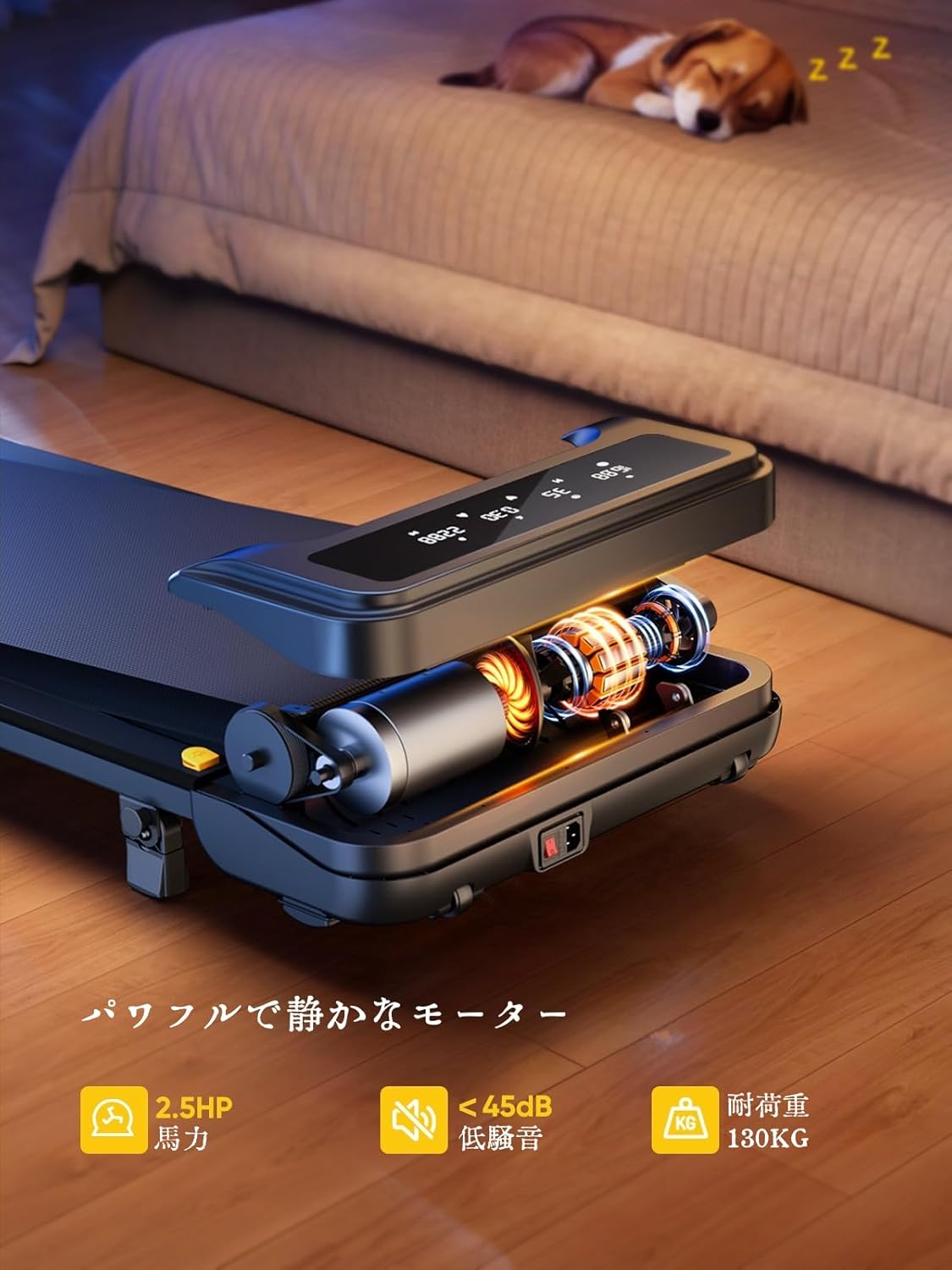
Image: The treadmill features a powerful 2.5 HP motor, operates quietly below 45dB, and supports users up to 130 kg.

Image: The compact design of the treadmill, highlighting its running surface dimensions for space efficiency.
8. Almacenamento e portabilidade
The TOPUTURE 2-in-1 Treadmill is designed for easy storage and portability, making it ideal for small spaces.
- The treadmill is lightweight (18.5 kg / 40.7 lbs) and features built-in wheels for effortless movement.
- It can be stored upright or flat under a bed or sofa when not in use, saving valuable space.
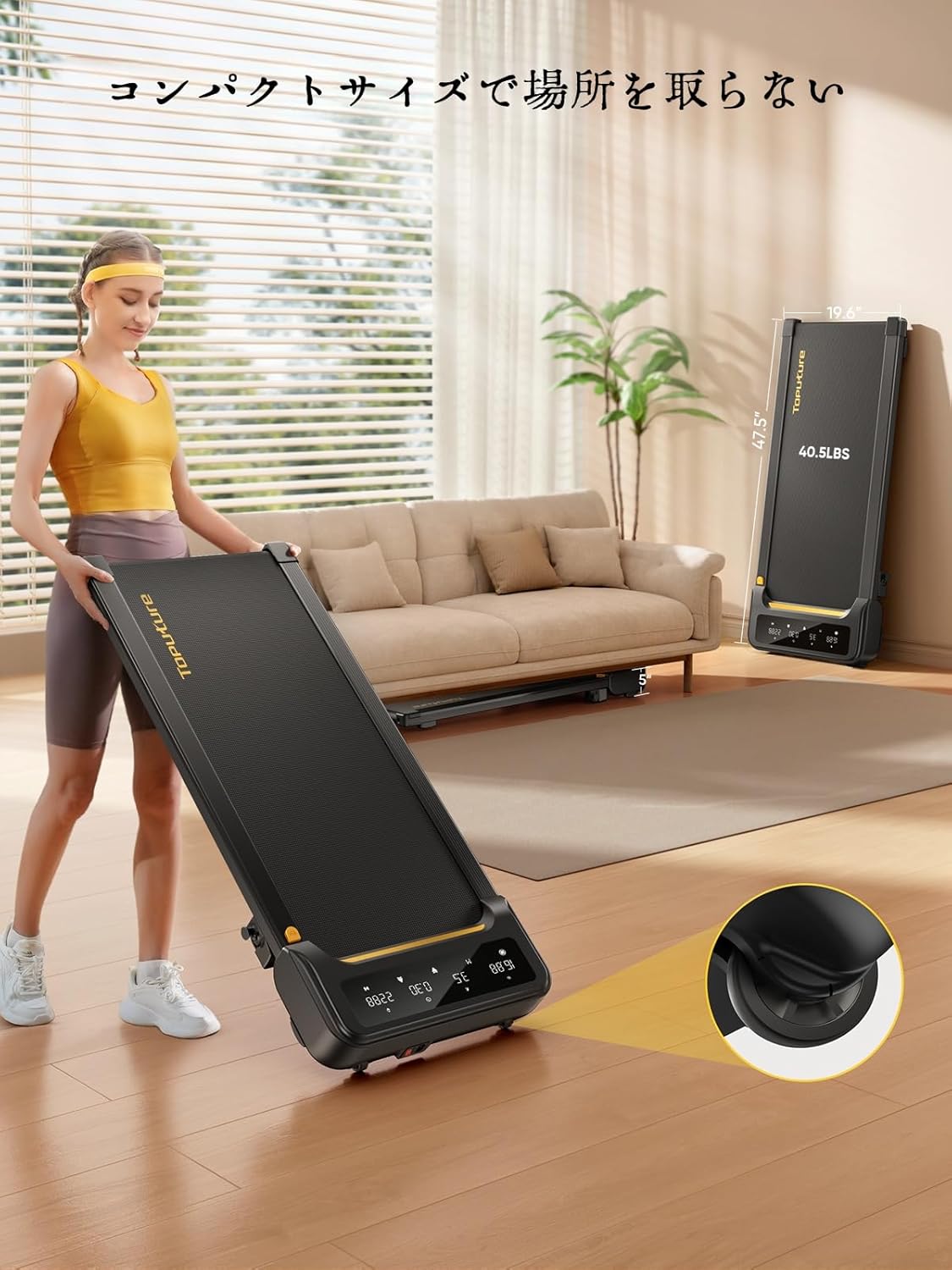
Image: A woman demonstrates the ease of moving the treadmill, highlighting its portability with integrated wheels.
9. Garantía e soporte
TOPUTURE provides a warranty for this product. Please refer to your purchase documentation for specific warranty terms and conditions.
9.1 Atención ao cliente
For any questions, technical assistance, or warranty claims, please contact TOPUTURE customer support through the retailer where you purchased the product or visit the official TOPUTURE websitio.
- Soporte en liña: Visit the TOPUTURE brand store on Amazon or the official websitio web con preguntas frecuentes e información de contacto.
- Soporte por correo electrónico: Consulta a embalaxe do produto ou a tarxeta de garantía para obter o enderezo de correo electrónico do servizo de atención ao cliente.