
SEMIER SM-136
SEMIER SM-136 Cassette Player & Digital Converter User Manual
Modelo: SM-136
Introdución
Grazas pola compraasing the SEMIER SM-136 Cassette Player & Digital Converter. This versatile device allows you to play and record audio cassettes, play music from an SD card, and convert your cherished cassette tapes into digital MP3 files, either directly to an SD card or to your computer using the included software. Please read this manual carefully to ensure proper operation and to maximize your enjoyment of this product.
O que hai na caixa
- Cassette Recorder Converter x 1
- 16GB SD Card x 1
- USB Reader x 1
- Software CD-ROM x 1
- Manual de usuario x 1
- Type-C Charging and Data Cable x 1

Imaxe: Todos os elementos incluídos no paquete do produto.
Configuración
Alimentando o dispositivo
The SEMIER SM-136 can be powered by two methods:
- Cable USB-C: Connect the included USB-C cable to the device's USB-C port and the other end to a USB power adapter (not included) or a computer's USB port.
- Pilas AA: Open the battery compartment on the back of the device and insert four (4) AA batteries (not included), ensuring correct polarity.
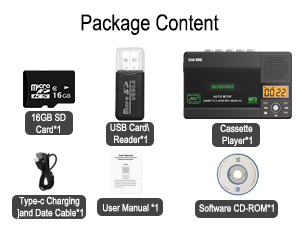
Image: Illustration of inserting AA batteries into the device.
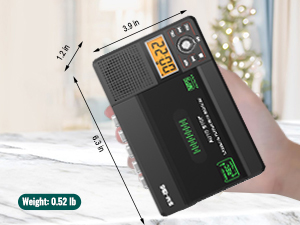
Image: Connecting the USB-C power cable to the device.
Inserción dunha cinta de casete
Gently open the cassette compartment door. Insert your cassette tape with the open edge facing upwards and the tape side facing the device. Close the door firmly until it clicks.

Image: Proper insertion of a cassette tape into the player.
Insertando unha tarxeta SD
Locate the SD card slot on the side of the device. Insert the included 16GB SD card (or another compatible SD card, up to 32GB) into the slot until it clicks into place. Ensure the card is inserted in the correct orientation.

Image: Proper insertion of an SD card into the device's dedicated slot.
Instrucións de funcionamento
Playing Cassette Tapes
- Ensure a cassette tape is inserted.
- Slide the "TAPE/OFF/Micro SD" switch to the "TAPE" position.
- Preme o XOGAR botón (►) para comezar a reprodución.
- Axuste o volume empregando o VOL botón.
- Para deter a reprodución, prema o botón PARA botón (■).
- Usa o FWD (►►) e REW (◄◄) buttons for fast-forward and rewind.
Reproducir música desde unha tarxeta SD
- Ensure an SD card with MP3 fileInsírese s.
- Slide the "TAPE/OFF/Micro SD" switch to the "Micro SD" position. The LCD display will show "SD" and the current track time.
- Preme o REPRODUCIR/PAUSA botón (►⏺) para iniciar ou pausar a reprodución.
- Usa o PREV (◄◄) e SEGUINTE (►►) buttons to navigate between tracks.
- Preme o REP botón para repetir a pista actual ou todas as pistas.
- Preme o DEL button to delete the current track.
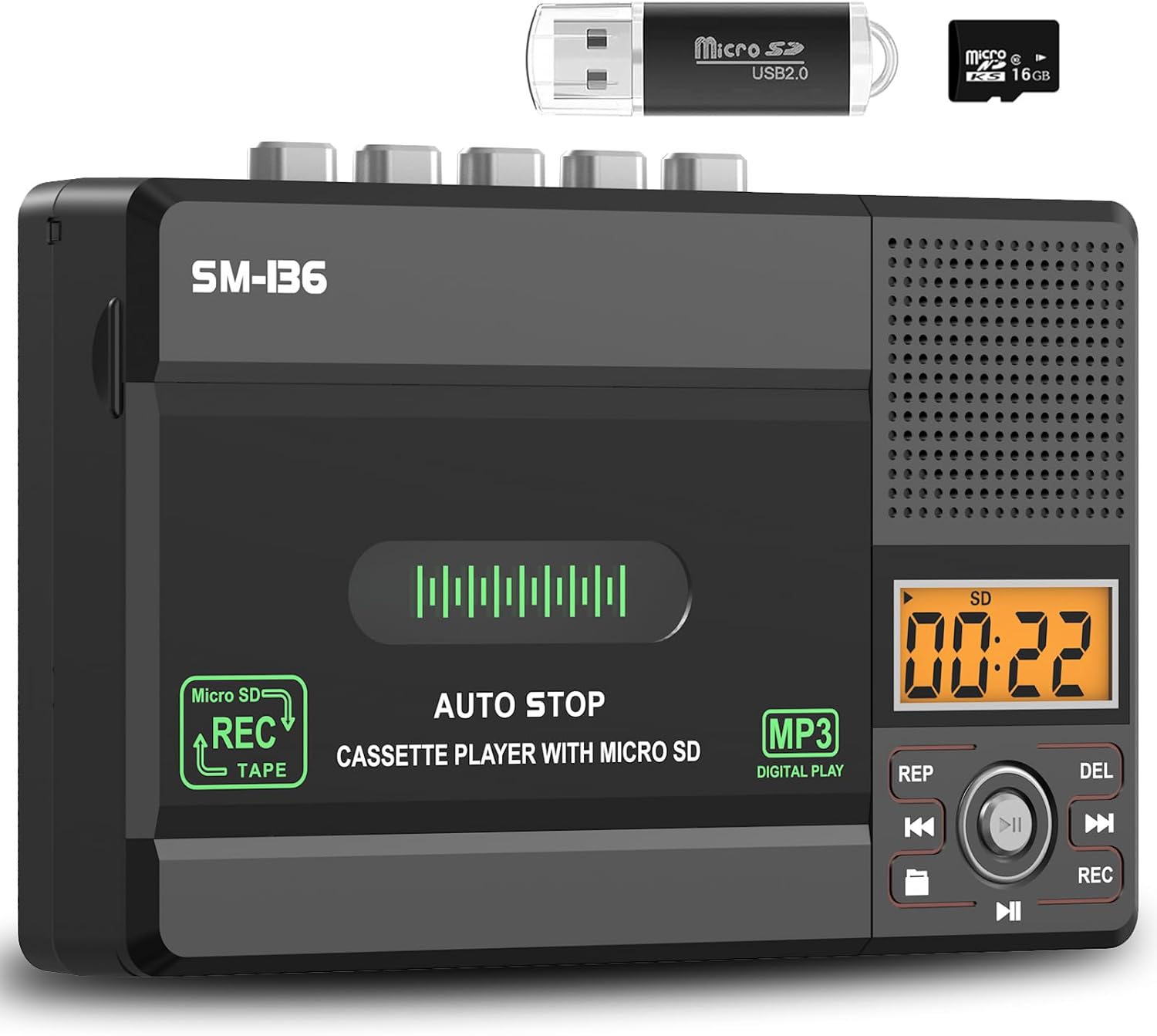
Imaxe: Máis deview of the device's control panel and LCD screen.
Recording to Cassette Tape (from built-in microphone)
- Insert a blank or recordable cassette tape.
- Slide the "TAPE/OFF/Micro SD" switch to the "TAPE" position.
- Preme o REC button (red button) to begin recording from the built-in microphone.
- Para deixar de gravar, prema o botón PARA botón (■).

Image: Demonstrates recording audio to a cassette tape using the built-in microphone.
Converting Cassette to MP3 (to SD Card)
This method allows direct conversion without a computer.
- Insert the cassette tape you wish to convert.
- Insert the 16GB SD card (or another compatible SD card) into the SD card slot.
- Slide the "TAPE/OFF/Micro SD" switch to the "TAPE" position.
- Preme o XOGAR botón (►) on the cassette player.
- While the tape is playing, press and hold the REC button (red button) on the digital control panel until the LCD display shows "REC". This will start recording the cassette audio directly to the SD card as an MP3 file.
- Para deixar de gravar, prema o botón REC de novo ou prema o botón PARA botón (■) on the cassette player.
- The converted MP3 files will be saved on the SD card. You can then play them back on the device by switching to "Micro SD" mode or transfer them to a computer using the included USB reader.

Image: Visual steps for direct cassette to SD card MP3 conversion.
Converting Cassette to MP3 (to Computer via Audacity)
This method requires a computer and the included Audacity software.
- Install Audacity: Insert the included Software CD-ROM into your computer's CD drive and follow the installation instructions for Audacity. Alternatively, you can download the latest version of Audacity from its official websitio.
- Conectar dispositivo: Connect the SEMIER SM-136 to your computer using the included USB-C data cable.
- Prepare Audacity: Open Audacity. Ensure the correct input device (usually "USB Audio CODEC" or similar) is selected in Audacity's audio settings.
- Comezar a gravar: Insert the cassette tape you wish to convert into the player. Press the XOGAR botón (►) on the cassette player. Then, click the Gravar button in Audacity to begin capturing the audio.
- Monitor and Stop: Monitor the audio levels in Audacity. Once the tape has finished playing, click the Pare button in Audacity and the PARA botón (■) on the cassette player.
- Export MP3: In Audacity, you can edit the recorded audio (e.g., trim silence, remove noise). Once satisfied, go to File > Export > Export as MP3 to save your digital audio file.

Image: Illustrates connecting the device to a computer and using Audacity for digital conversion.
Mantemento
- Limpeza: Usa un pano suave e seco para limpar o exterior do dispositivo. Non empregues produtos de limpeza líquidos nin materiais abrasivos.
- Tape Head Cleaning: Limpe periodicamente os cabezales da cinta e os rolos de presión cun hisopo de algodón lixeiramente dampEnriquecido con alcohol isopropílico para garantir unha calidade de son óptima e evitar danos na cinta.
- Almacenamento: Garde o dispositivo nun lugar fresco e seco, lonxe da luz solar directa e de temperaturas extremas.
- Eliminación da batería: If the device will not be used for an extended period, remove the AA batteries to prevent leakage.
Resolución de problemas
| Problema | Causa posible | Solución |
|---|---|---|
| O dispositivo non se acende. | No power source; batteries dead or incorrectly inserted; USB-C cable not connected properly. | Check battery polarity and charge; ensure USB-C cable is securely connected to a working power source. |
| No sound during cassette playback. | Volume too low; "TAPE/OFF/Micro SD" switch in wrong position; tape head dirty. | Increase volume; ensure switch is on "TAPE"; clean tape head. |
| Mala calidade de son durante a reprodución/gravación. | Cabezais de cinta sucios; cinta gastada; batería baixa. | Clean tape heads; try a different tape; replace batteries or use USB-C power. |
| SD card not recognized or "No SD" message. | SD card incorrectly inserted; unsupported SD card format/size; faulty SD card. | Reinsert SD card; ensure it's formatted to FAT32 and is 32GB or less; try a different SD card. |
| Cannot record to SD card. | SD card full; SD card write-protected; incorrect recording procedure. | Eliminar files from SD card; check SD card's physical write-protect switch; follow "Converting Cassette to MP3 (to SD Card)" steps carefully. |
| Audacity not detecting device for conversion. | USB-C cable issue; incorrect audio input selected in Audacity; driver issue. | Try a different USB port/cable; ensure "USB Audio CODEC" is selected in Audacity; restart computer and device. |
Especificacións
- Modelo: SM-136
- Funcións: Cassette Player, Cassette Recorder (via Mic), SD Card MP3 Player, Cassette to MP3 Converter (to SD Card / PC)
- Fonte de enerxía: DC 5V (USB-C) or 4 x AA Batteries
- Saída do altofalante: 2W
- Jack para auriculares: Estéreo de 3.5 mm
- Soporte para tarxetas SD: Ata 32 GB, formato FAT32
- Dimensións: 6.3 x 3.9 x 1.2 polgadas (16 x 9.9 x 3 cm)
- Peso: 0.52 libras (0.24 kg)

Image: Detailed dimensions and weight of the product.
Garantía e Soporte
SEMIER products are designed for reliability and performance. This product comes with a standard manufacturer's warranty. For detailed warranty information, technical support, or customer service inquiries, please refer to the contact information provided on the product packaging or visit the official SEMIER website. Our dedicated customer support team is available to assist you with any questions or concerns.
Tamén podes visitar o SEMIER Store on Amazon para obter máis información e recursos de apoio.
Ask a question about this manual
Ask about setup, troubleshooting, compatibility, parts, safety, or missing instructions. Manuals+ will review the question and use this page’s manual context to help answer it.