
1. Introdución
This manual provides detailed instructions for the installation, operation, and maintenance of your Leadfan Car Radio. This unit is designed for BMW 3 Series E90, E91, E92, and E93 models manufactured between 2005 and 2011. It features a 9-inch touch screen with Wireless CarPlay, Android Auto, GPS navigation, Bluetooth 5.1, and other advanced functionalities.
Lea este manual detidamente antes da instalación e o uso para garantir o seu correcto funcionamento e evitar danos na unidade ou no seu vehículo.
2. Notas importantes de compatibilidade
Before proceeding with installation, verify your vehicle's specifications:
- Harman Kardon / Logic 7 System: If your original car's audio interface includes a Harman Kardon optical fiber or is equipped with a Logic 7 system, or if it does not have 8 speaker wires, this specific model (B0F3D89N3C) is required.
- iDrive System: This radio is not compatible with vehicles that have an iDrive system and an existing LCD display.
- A/C Panels: The unit includes both manual and automatic A/C panels to match your vehicle's configuration.

Image: Compatibility chart illustrating various BMW 3 Series dashboard types, highlighting compatibility based on existing audio systems (e.g., Harman Kardon optical fiber) and speaker wire configurations. It also shows options for manual and automatic air conditioning panels.
3. Contido do paquete
Verifique que todos os elementos que se indican a continuación estean presentes no seu paquete:
- 9-inch IPS Touchscreen Android Radio Headunit
- Frame for BMW 328i 335i 325i (2005-2010) with Harman Kardon Optical Fiber support
- Cámara de marcha atrás
- Reversing Camera Input Cable
- Decodificador CanBus
- Antena GPS
- WiFi & Bluetooth Signal Booster Cable
- Plug and Play Power Harness
- Micrófono externo
- Manual de usuario
- Cables USB (2)
- Cabo RCA
- Screw Cap (2) & Clip (2)
- Automatic Air Conditioning Bracket
- Manual Air Conditioning Bracket
- Soporte de montaxe
- Cable de fibra óptica
- Fiber Optic Box

Image: A visual representation of the main head unit with its dimensions and a detailed list of all components included in the package, such as power cords, RCA cables, USB ports, GPS antenna, and the backup camera.
4. Configuración e instalación
Recoméndase a instalación por parte dun profesional. Asegúrese de que a batería do vehículo estea desconectada antes de comezar a instalación.
4.1. Comprobacións previas á instalación
- Confirm vehicle compatibility as per Section 2.
- Identify your vehicle's A/C panel type (manual or automatic) to select the correct bracket.
4.2. Cableado e conexións
The system is designed for plug-and-play installation. Connect the provided power harness to the vehicle's wiring. If your vehicle has a Harman Kardon optical fiber system, connect the included fiber optic box and cable as instructed.

Image: Illustrates the simplicity of the Leadfan product's plug-and-play wiring harness compared to the more complex and numerous wires typically found in traditional aftermarket installations.
4.3. Instalación da cámara de marcha atrás
Connect the included AHD rear view camera to the 'Reverse Input' port on the head unit using the provided cable. Ensure the camera's power and signal wires are correctly connected to the vehicle's reverse light circuit for automatic activation.

Image: A detailed diagram showing how to connect the reversing camera, including the video signal cable and the power connection to the vehicle's reverse light circuit.
4.4. Configuración do control do volante (SWC)
After installation, access the system settings to configure the steering wheel controls. Follow the on-screen prompts to map your vehicle's steering wheel buttons to the corresponding functions on the radio (e.g., volume, track change, call answer/end).

Image: The radio's interface displaying the steering wheel control setup menu, where users can assign functions to their vehicle's steering wheel buttons for convenient operation.
4.5. Final Installation Effect

Image: A comparison demonstrating the integrated appearance of the Leadfan product when installed, contrasting it with the less fitted look of generic universal models.
5. Instrucións de funcionamento
5.1. Wireless Apple CarPlay & Android Auto
Connect your smartphone wirelessly to access navigation, music, calls, and messages directly on the car radio display. This feature eliminates the need for a USB cable connection for primary functions.

Image: The radio's screen displaying the user interfaces for both Wireless Apple CarPlay and Android Auto, showing common applications and voice command prompts.
5.2. GPS Navigation & WiFi Connection
The unit has a built-in GPS receiver. Connect to a WiFi network or your phone's hotspot to download offline maps or use online navigation applications. This also enables access to other internet-based applications.

Image: The radio's display showing GPS navigation in use and the WiFi hotspot settings interface, along with icons for various online applications.
5.3. Bluetooth 5.1 (Hands-Free Calling & Music)
Pair your mobile phone via Bluetooth 5.1 for hands-free calling, address book synchronization, and wireless music playback. The unit includes a clear built-in microphone and supports an external microphone.

Image: The radio's screen demonstrating Bluetooth music playback and a split-screen view, indicating support for hands-free communication.
5.4. Enlace de espello
Mirrorlink functionality allows you to display your phone's screen on the car radio. iOS devices support wireless connection, while Android devices support both wireless and wired connections (via USB/Hotspot).
5.5. Radio FM
Access FM radio stations. The unit supports a frequency range of 85MHz to 108MHz. You can scan for stations and save your preferred frequencies.
5.6. DSP EQ Settings
Adjust the audio output using the Digital Sound Processor (DSP) and Equalizer (EQ) settings. This allows for customization of sound profiles and subwoofer output.
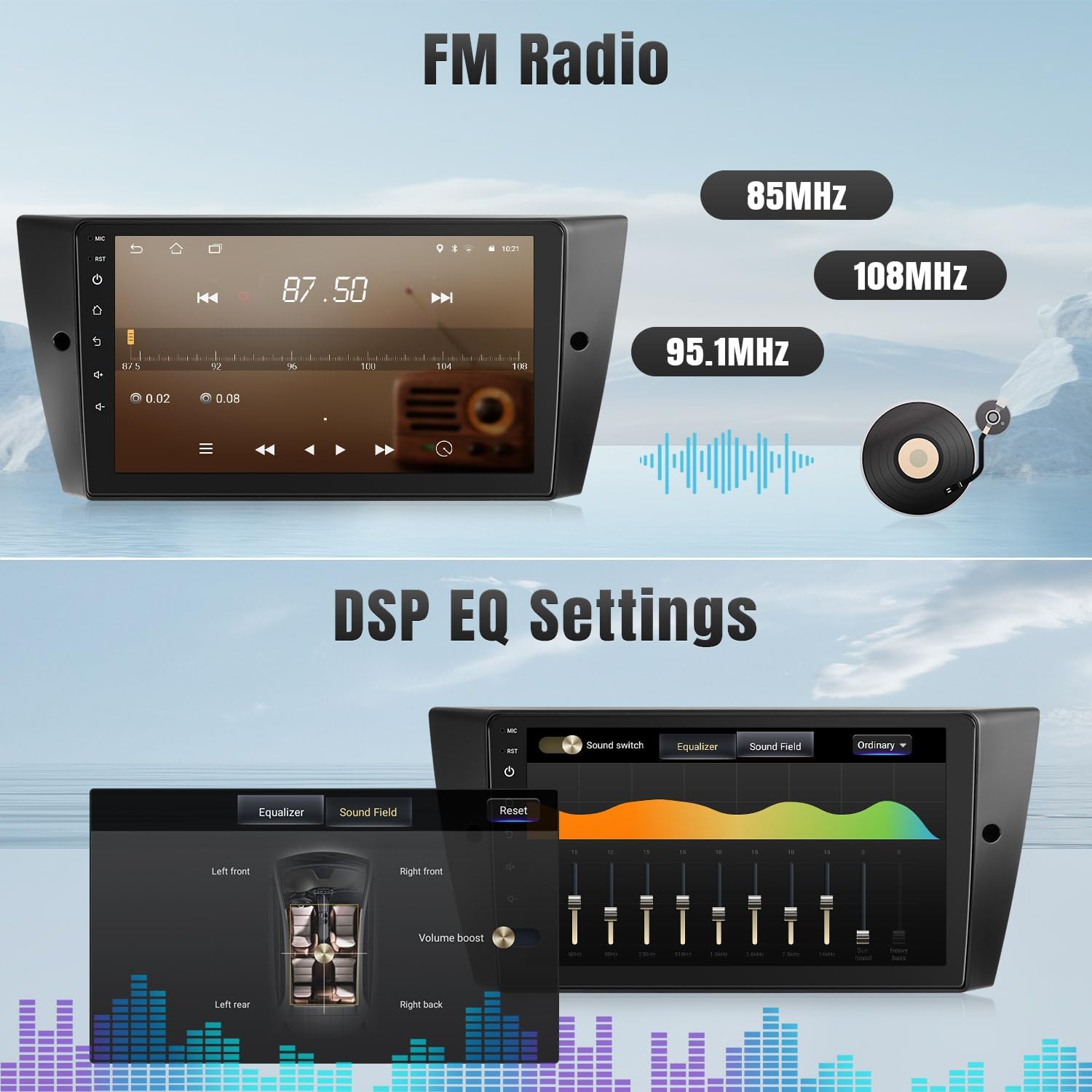
Image: The radio's interface displaying the FM radio tuner and the detailed DSP Equalizer settings for audio adjustment.
5.7. Funcionalidade de pantalla dividida
The split-screen feature allows you to run two applications simultaneously on the 9-inch display, such as navigation and music playback.
5.8. Función inversa
When the vehicle is shifted into reverse gear, the display automatically switches to the backup camera view, providing visual assistance for parking and maneuvering.
6. Mantemento
Para garantir a lonxevidade e o rendemento óptimo da radio do teu coche, segue estas pautas de mantemento:
- Limpeza: Usa un pano suave e seco para limpar a pantalla e o exterior. Evita produtos de limpeza abrasivos ou solventes.
- Actualizacións de software: Periodically check for available software updates through the system settings to ensure you have the latest features and performance enhancements.
- Condicións ambientais: Evite expoñer a unidade a temperaturas extremas ou á luz solar directa durante períodos prolongados.
7 Solución de problemas
If you encounter issues with your Leadfan Car Radio, refer to the following common troubleshooting steps:
- Sen enerxía: Check all power connections and fuses. Ensure the vehicle's battery is charged.
- Sen son: Verify speaker connections. Check volume levels and DSP EQ settings. Ensure the correct audio source is selected.
- Problemas co sinal GPS: Asegúrese de que a antena GPS estea instalada correctamente e teña unha visión clara view of the sky. Check for obstructions.
- Bluetooth/WiFi Connectivity Problems: Ensure Bluetooth/WiFi is enabled on both the radio and your device. Try re-pairing or reconnecting.
- Pantalla sen resposta: Perform a system reset (refer to the device's reset button location, usually a small pinhole).
For persistent issues or complex problems, please contact Leadfan technical support.
8. Especificacións
| Característica | Detalle |
|---|---|
| Tamaño de visualización | Pantalla táctil IPS de 9 polgadas |
| Sistema Operativo | Android 11 |
| Procesador | 4 núcleos |
| RAM | 2 GB |
| ROM | 32 GB |
| Conectividade | Wireless CarPlay, Wireless Android Auto, Mirrorlink, Bluetooth 5.1, 5G WiFi, GPS |
| Funcións de audio | FM Radio, DSP, EQ, Subwoofer Output |
| Entradas | AHD Backup Camera, 2x USB |
| Características especiais | Steering Wheel Control (SWC), Split Screen |
| Dimensións do paquete | 11.81 x 11.02 x 3.74 polgadas |
| Peso do elemento | 2.86 libras (1.3 quilogramos) |

Image: A visual comparison highlighting the larger 9-inch display area of the Leadfan unit compared to a standard 7-inch car stereo display.
9. Garantía e soporte
Leadfan provides comprehensive support for its products:
- Soporte técnico de por vida: Contact Leadfan for any technical assistance or questions regarding your product.
- 1-Year Quality Assurance: The product is covered by a 1-year quality assurance period.
- Política de devolución de 30 días: Hai dispoñible unha política de devolución de 30 días para este produto.
To contact support, click on "sold by Leedfan" on the product page and then "ask a question."