
RSH Android Smart Tag
RSH Android Smart Tag Manual de usuario
Model: Android Smart Tag
Marca: RSH
Introdución
The RSH Android Smart Tag is a compact and efficient device designed to help you locate your valuable items using the Google Find My Device app. This manual provides comprehensive instructions to ensure you get the most out of your Smart Tag.

Image: Four RSH Android Smart Tags, mostrarasing their design and quantity in the pack.
Configuración
1. Acendido e apagado
The RSH Android Smart Tag features a function button for basic operations. Refer to the diagram below for the button's location.
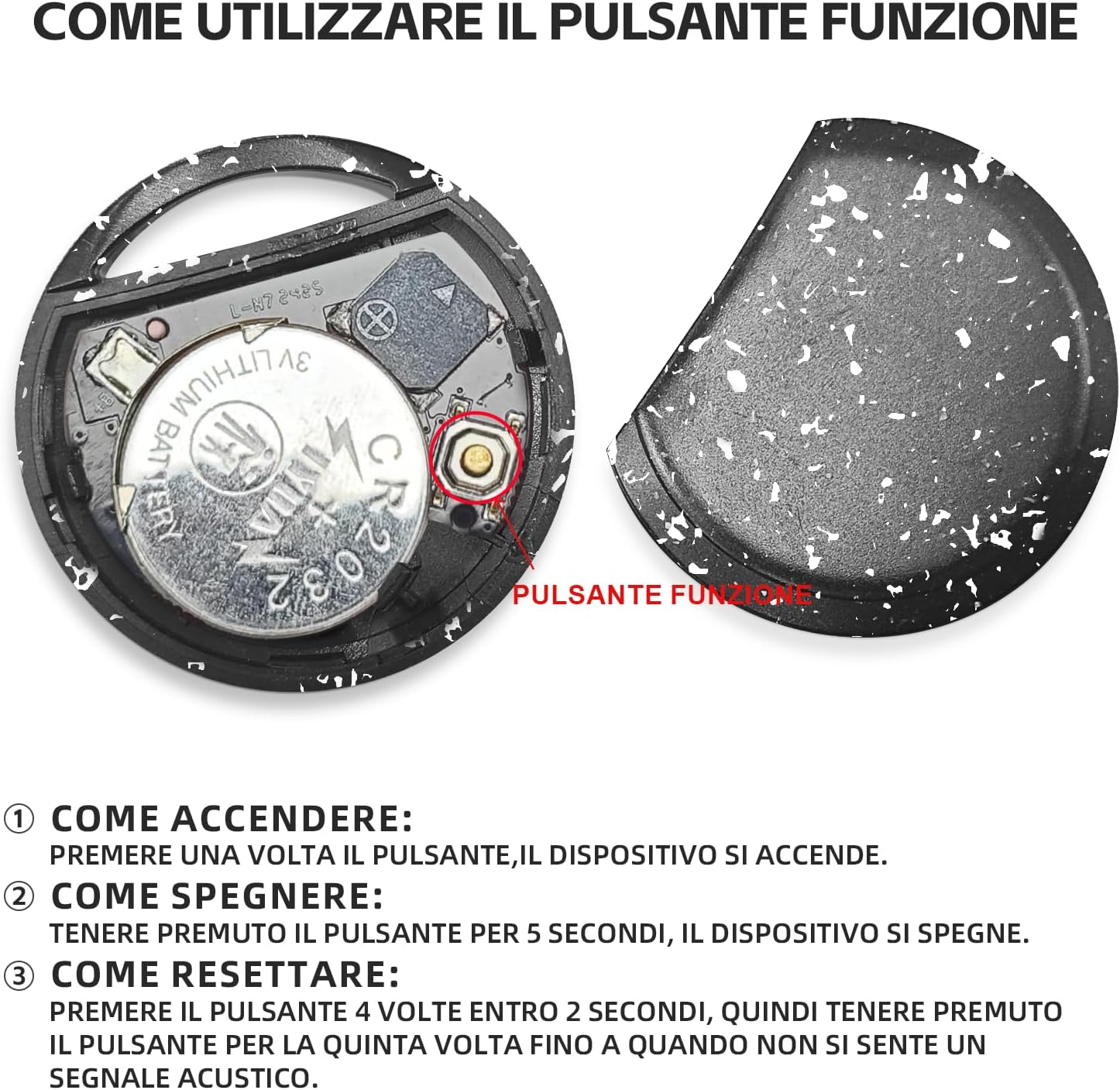
Imaxe: Interna view do Smart Tag, illustrating the battery and function button.
- Como activar: Press the function button once. The device will turn on.
- Como desactivar: Press and hold the function button for 5 seconds. The device will turn off.
2. Fast Pairing with Android Devices
O intelixente Tag is designed for quick and seamless pairing with your Android smartphone.
- Asegúrate de que o Bluetooth do teu teléfono Android estea activado.
- Bring the RSH Android Smart Tag preto do teu teléfono.
- A connection invitation will automatically appear on your phone's screen. Follow the on-screen prompts to complete the pairing process.

Image: Visual representation of the Smart Tag's compatibility with a wide range of Android devices.
Instrucións de funcionamento
1. Tracking and Item Search
Utilize the Google Find My Device app to locate your RSH Android Smart Tag.
- Within Bluetooth Range: Open the Google Find My Device app. If the tag is within Bluetooth range, you can activate its built-in speaker to emit an audible signal, helping you pinpoint its exact location.
- Out of Bluetooth Range: Se o tag is outside Bluetooth range, the app will display its last known location on a map, leveraging the Google Find My Device network.

Image: Demonstration of the 'Play sound' feature within the Google Find My Device app.

Image: The Smart Tag attached to a backpack, illustrating its use for tracking items.

Image: The Smart Tag attached to luggage, emphasizing its utility for travel.
2. Loss Mode
Activate Loss Mode in the Google Find My Device app if your item is missing. This feature leverages the vast network of billions of Android devices to help locate your lost item.
3. Sharing Items
You can share access to your Smart Tag with others through the Google Find My Device app. This allows multiple users to view the item's location on the map.

Image: Various use cases for the Smart Tag, demonstrating its versatility for tracking different items.
Mantemento
1. Substitución da batería
The RSH Android Smart Tag uses a replaceable CR2032 battery, which typically lasts up to 1 year. To replace the battery:
- Abra con coidado o Smart Tag casing.
- Retire a antiga batería CR2032.
- Insira unha nova batería CR2032, asegurándose da polaridade correcta.
- Pecha o casing de forma segura.
2. Resistencia á auga
The MiTag tracker is IP67 certified, meaning it is protected from dust and can withstand immersion in 1 meter of water for up to 30 minutes. While it is water-resistant, it is not recommended for prolonged submersion or use during swimming.
Resolución de problemas
Restablecer o dispositivo
If you experience connectivity issues or unusual behavior, you may need to reset your RSH Android Smart Tag:
- Press the function button 4 times within 2 seconds.
- Immediately after the fourth press, press and hold the function button for the fifth time until you hear an audible signal. This indicates the device has been reset.
Especificacións
| Característica | Detalle |
|---|---|
| Marca | RSH |
| Material | Plástico |
| Dimensións do produto | 36L x 36W x 8Th millimetres |
| Peso do elemento | 7.6 gramos |
| Dispositivos compatibles | Smartphone (Android Only) |
| Método de control | App (Google Find My Device) |
| Tipo de batería | 1 CR2032 (included, replaceable) |
| Resistencia á auga | Certificado IP67 |
Garantía e Soporte
Information regarding product warranty and customer support is not provided in the available data. Please refer to the product packaging or the seller's websitio web para obter detalles sobre a cobertura da garantía e como contactar co servizo de atención ao cliente.
Ask a question about this manual
Ask about setup, troubleshooting, compatibility, parts, safety, or missing instructions. Manuals+ will review the question and use this page’s manual context to help answer it.