
1. Introdución
The iDIGMALL HT05 is a versatile Bluetooth 5.4 transmitter designed to provide wireless audio from various 3.5mm output devices to your Bluetooth headphones or earbuds. It supports aptX-Adaptive and aptX-Low Latency for high-quality audio with minimal delay, and allows for dual connection to two Bluetooth headphones simultaneously. This manual provides detailed instructions for setup, operation, and maintenance of your device.
2. Que hai na caixa
- HT05 Bluetooth Transmitter
- Cable de carga USB-C
- Manual de usuario
3. Diagrama do produto
Familiarize yourself with the components and controls of your iDIGMALL HT05 Bluetooth Transmitter.
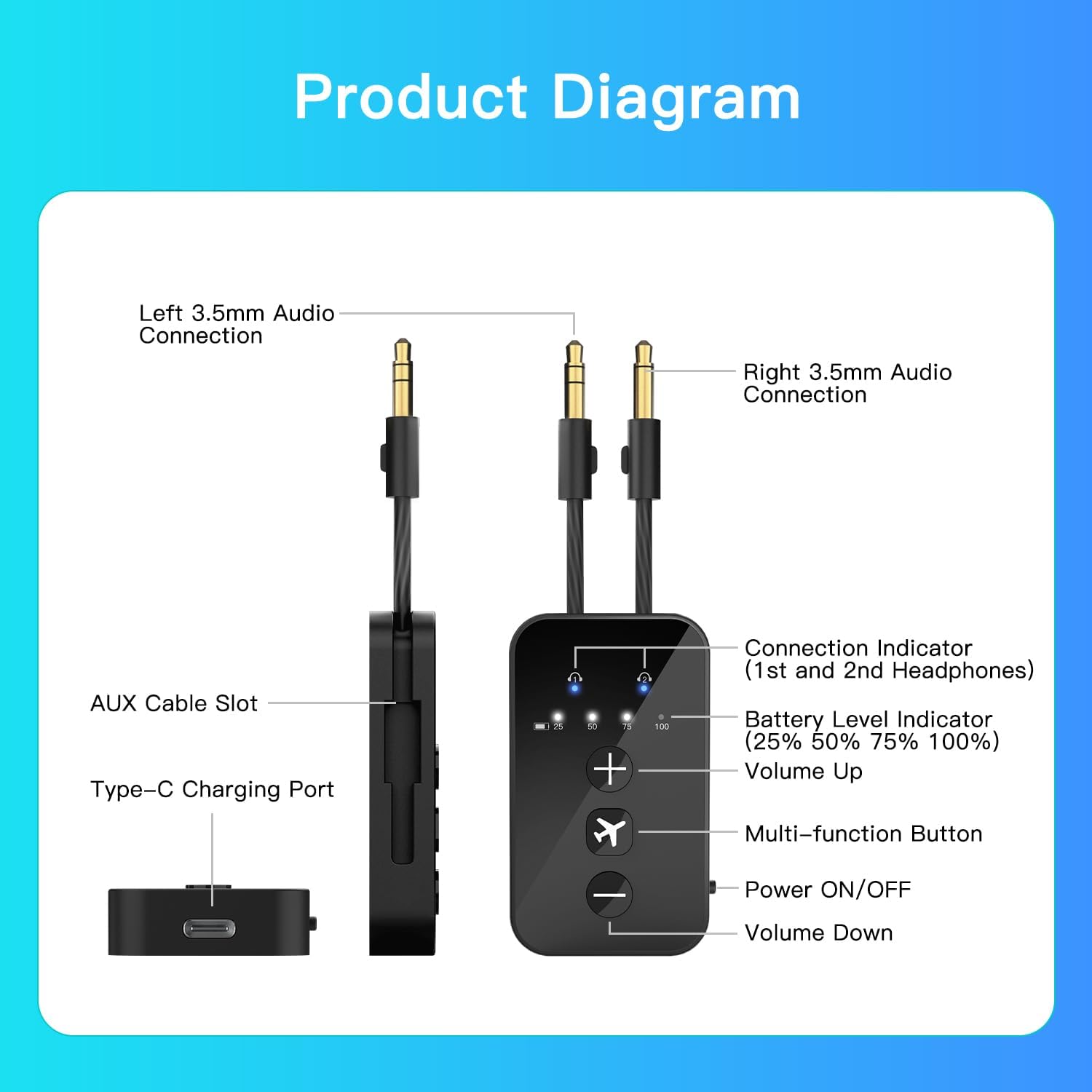
Figura 3.1: HT05 Bluetooth Transmitter with labeled components.
- Left/Right 3.5mm Audio Connection: Used to connect to audio sources.
- AUX Cable Slot: Storage for the integrated 3.5mm audio cables.
- Porto de carga tipo C: Para cargar o dispositivo.
- Connection Indicator (1st and 2nd Headphones): LEDs indicating connected headphones.
- Indicador de nivel de batería: LEDs showing 25%, 50%, 75%, 100% battery status.
- Subir volume (+): Aumenta o volume de audio.
- Botón multifunción: Used for various operations like pairing.
- Encendido/apagado: Interruptor deslizante para acender ou apagar o dispositivo.
- Baixar o volume (-): Diminúe o volume de audio.
4. Instrucións de configuración
4.1 Carga do transmisor
Before first use, fully charge the HT05 transmitter. Connect the included USB-C charging cable to the Type-C Charging Port on the device and to a 5V USB power source. The battery indicator lights will show the charging progress. A full charge takes approximately 2 hours and provides over 24 hours of playtime.
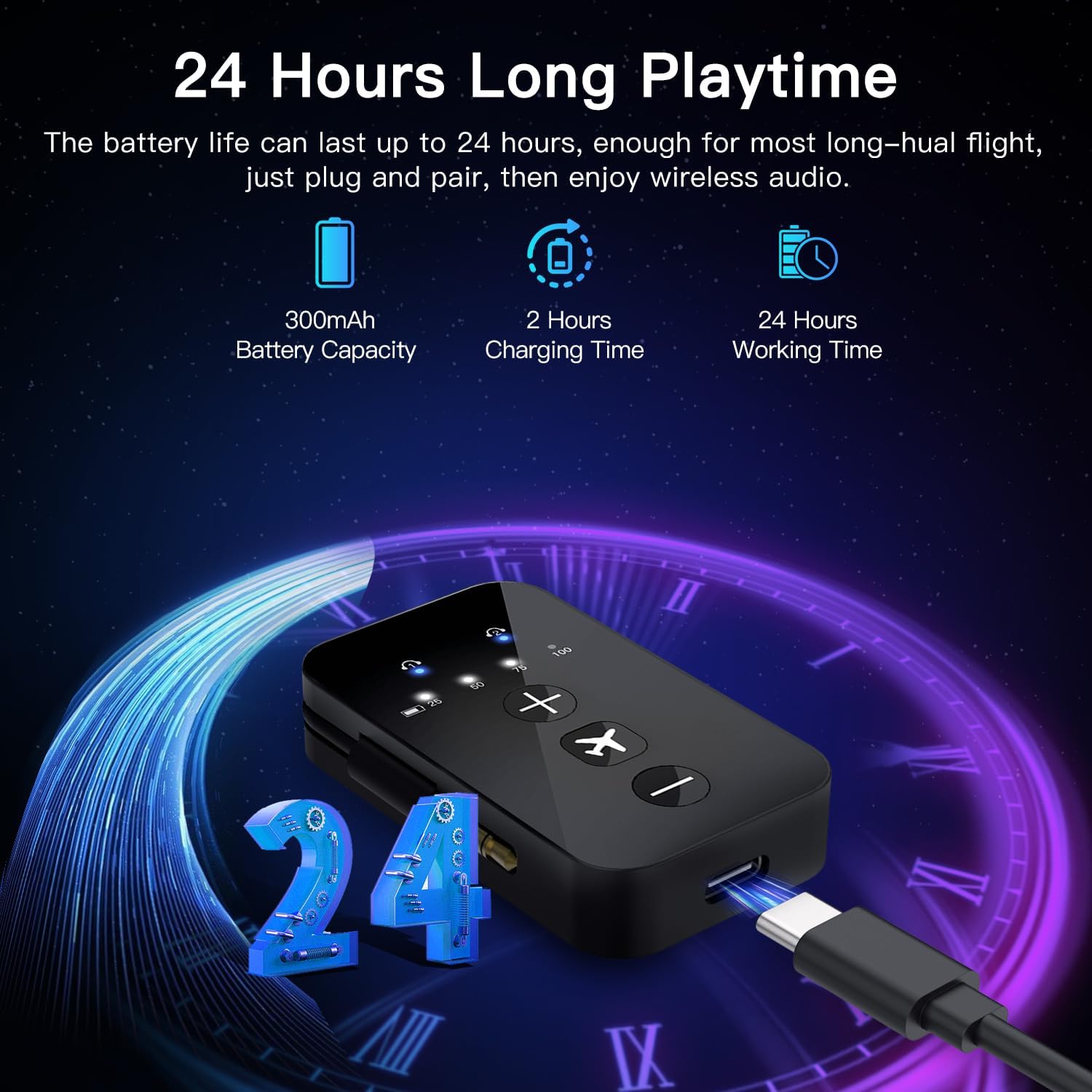
Figura 4.1: Charging the HT05 Transmitter.
4.2 Conexión a unha fonte de son
The HT05 features integrated dual 3.5mm audio jacks for wide compatibility with various audio sources, including in-flight entertainment systems, TVs, and gym equipment.
- Single 3.5mm Jack: For devices with a standard single 3.5mm audio output, simply plug one of the HT05's 3.5mm connectors into the audio jack.
- Dual 3.5mm Jack: For aircraft entertainment systems that require a dual 3.5mm connection, plug both 3.5mm connectors into the respective ports.

Figura 4.2: Connecting the HT05 to an audio source.
4.3 Acendido/Apagado
Desliza o Alimentación ON/OFF switch to turn the transmitter on or off.
5. Instrucións de funcionamento
5.1 Pairing with Bluetooth Headphones/Earbuds
For first-time use, the HT05 will automatically enter pairing mode when powered on. The connection indicator LEDs will flash.
- Ensure your Bluetooth headphones or earbuds are in pairing mode. Refer to your headphone's manual for specific instructions. (For AirPods, place them in their case and open the lid, then press and hold the button on the back of the case).
- Place the headphones close to the HT05 transmitter.
- The HT05 will automatically search for and connect to your headphones. Once connected, the corresponding connection indicator LED will turn solid.

Figura 5.1: Pairing the HT05 with AirPods on an airplane.
5.2 Dual Connection (Pairing Two Headphones)
The HT05 can connect to two Bluetooth headphones simultaneously for shared listening.
- First, pair your primary headphones as described in Section 5.1.
- To pair a second pair of headphones, press the Botón multifunción on the HT05. The second connection indicator LED will flash.
- Put your second pair of Bluetooth headphones into pairing mode and place them near the HT05.
- Once connected, the second connection indicator LED will turn solid.

Figura 5.2: Dual connection for shared audio experience.
5.3 Control de volume
Usa o + botón para aumentar o volume e o botón - button to decrease the volume on the HT05 transmitter.
5.4 Auto Reconnection
Once paired, the HT05 will automatically reconnect to previously paired devices when powered on and within range.
6. Compatibilidade
The iDIGMALL HT05 is designed for broad compatibility with 3.5mm audio output devices and Bluetooth headphones.

Figura 6.1: HT05 Compatibility Overview.
6.1 Compatible Devices (Audio Source)
- In-flight Entertainment Systems
- Televisions (with 3.5mm AUX output)
- Gym Equipment (with 3.5mm AUX output)
- Gaming Consoles (with 3.5mm AUX output)
- Tablets, iPads, PCs, MP3/MP4 Players, Portable DVD players (with 3.5mm AUX output)
6.2 Compatible Devices (Bluetooth Receiver)
- Auriculares Bluetooth
- Auriculares sen fíos
- Altofalantes Bluetooth
- Bluetooth Soundbars
6.3 Incompatible Devices/Scenarios
- Fontes de audio: Does not work with audio sources that lack a 3.5mm AUX output (e.g., those requiring RCA/Optical Audio without a converter).
- Electronic Musical Instruments: Not recommended due to potential audio latency.
- Emparejamento: Cannot pair with phones, PCs, tablets, hearing aids, or car Bluetooth stereo systems. The HT05 is a Bluetooth Transmitter ONLY, not a receiver.
7. Notas e avisos importantes
- The HT05 is a Bluetooth Transmitter ONLY. It cannot receive Bluetooth audio.
- When pairing AirPods, ensure they are placed in their case with the lid open to enter pairing mode.
- For optimal pairing on an airplane, it is recommended to turn off nearby Bluetooth devices (e.g., phones) to avoid interference.
- For true low latency, your headphones must also support aptX-Low Latency or aptX-Adaptive technology. If not, latency may be higher.
- To conserve battery life, the transmitter will automatically power off if there is no Bluetooth connection or no audio stream for over 5 minutes.
- Not compatible with hearing aids or musical instruments due to potential audio delays.
8 Solución de problemas
8.1 No Audio / Cannot Pair
- Ensure the HT05 is fully charged and powered on.
- Verify that your audio source is providing output through the 3.5mm jack.
- Confirm your headphones are in pairing mode and close to the HT05.
- Check if the HT05's connection indicator LEDs are flashing (pairing mode) or solid (connected).
- Try clearing the pairing history on the HT05 (refer to the full user manual for specific button combinations, typically a long press of the multi-function button) and re-pairing.
- Asegúrate de que ningún outro dispositivo Bluetooth estea a interferir co proceso de emparellamento.
8.2 Audio Delay (Latency)
- For minimal latency, both the HT05 and your Bluetooth headphones must support aptX-Low Latency or aptX-Adaptive codecs. Check your headphone specifications.
- Ensure the audio source is not introducing its own delay.
8.3 Device Powers Off Automatically
- This is a battery-saving feature. The device will power off if there is no Bluetooth connection or no audio stream for more than 5 minutes. Reconnect or start playing audio to prevent this.
9. Especificacións
| Característica | Especificación |
|---|---|
| Nome do modelo | HT05 Bluetooth Transmitter |
| Marca | iDIGMALL |
| Tecnoloxía de conectividade | Auxiliary, Bluetooth 5.4 |
| Estándares admitidos | Bluetooth 5.4, aptX Adaptive, aptX-Low Latency |
| Fonte de enerxía | Alimentado por batería (300 mAh) |
| Duración da batería | Ata 24 horas |
| Tempo de carga | 2 Hours (via USB-C) |
| distancia wireless | Ata 33 pés (10 m) |
| Entrada de audio | 3.5mm AUX (Dual Jack) |
| Modo de saída de audio | Estéreo |
| Conexión dual | Supports 2 Bluetooth headphones simultaneously |
| Método de control | Control de botón |
| Material | Acrilonitrilo Butadieno Estireno (ABS) |
| Peso do elemento | 23 gramos |
10. Garantía e soporte
iDIGMALL offers a 12 meses de garantía and lifetime customer service for the HT05 Bluetooth Transmitter. If you encounter any problems or have questions, please contact us through your purchase platform (e.g., "My order - Contact the Seller"). We aim to reply and resolve all your questions within 24 hours.