
1. Introdución
Thank you for choosing the Socool Portable Car Fan. This manual provides essential information for the safe and effective use of your new fan. Please read it thoroughly before operation and retain it for future reference.
This versatile fan is designed for various cooling needs, featuring a 14500mAh rechargeable battery, dual high-speed turbo motors, and multiple mounting options including clip-on for car headrests, stick-on for dashboards, and wearable options as a waist or neck fan. It also includes an emergency power supply function and an LED light.
2. Información de seguridade
- Do not disassemble, repair, or modify the fan yourself. Contact qualified service personnel for repairs.
- Keep the fan away from water, moisture, and high temperatures.
- Ensure the charging port cover is securely closed when not charging to protect against dust and water.
- Do not insert fingers or foreign objects into the fan outlets.
- Use only the provided Type-C charging cable and compatible USB power sources (5V-2A recommended).
- Manter fóra do alcance dos nenos.
- Avoid prolonged exposure to direct sunlight, especially when charging.
3. Contido do paquete
Marque a caixa para os seguintes elementos:
- Portable Car Fan
- Mat antideslizante
- C-Clamp con Base
- Acollador
- Manual de usuario
- Type-C Charging Cable (not explicitly listed in components but implied by charging method)

Figura 3.1: Contents of the Socool Portable Car Fan package, including the fan, anti-slip mat, C-clamp, and lanyard.
4. Configuración e instalación
The Socool Portable Car Fan offers multiple installation options:
4.1 Car Seat Headrest Clip-on Installation
- Coloque o C-Clamp to the fan's clip slot.
- Securely clip the C-Clamp onto the car seat headrest post.
- Adjust the fan's angle using the 360° rotation and 90° vertical tilt features for optimal airflow.

Figura 4.1: The fan securely clipped onto a car seat headrest, providing cooling to the rear cabin.
4.2 Armrest or Center Console Placement
- Place the fan on the armrest or center console.
- Use the included non-slip mat under the fan to prevent it from sliding.
4.3 Independent Use (Waist, Neck, or Desk Fan)
- Waist Fan: Remove the bracket and clip the fan directly onto your clothes, shirt, or pants.
- Abanico de pescozo: Attach the lanyard to the fan and hang it around your neck.
- Ventilador de escritorio: Utilize the integrated kickstand to prop the fan up on any flat surface.

Figura 4.2: Demonstrates the fan's versatility, including clip-on, stick-on, waist, and neck fan configurations.
5. Instrucións de funcionamento
5.1 Acendido/apagado e axuste da velocidade
- Encendido: Press the power button (usually indicated by a fan icon) to turn on the fan. The LED display will show the current battery percentage and speed setting.
- Axuste de velocidade: Repeatedly press the power button to cycle through the 4 adjustable speed levels.
- Storm Wind Mode: A dedicated button or a long press on the speed button activates the storm wind mode for maximum airflow.
- Apagado: Continue pressing the power button until the fan turns off, or long press the power button.
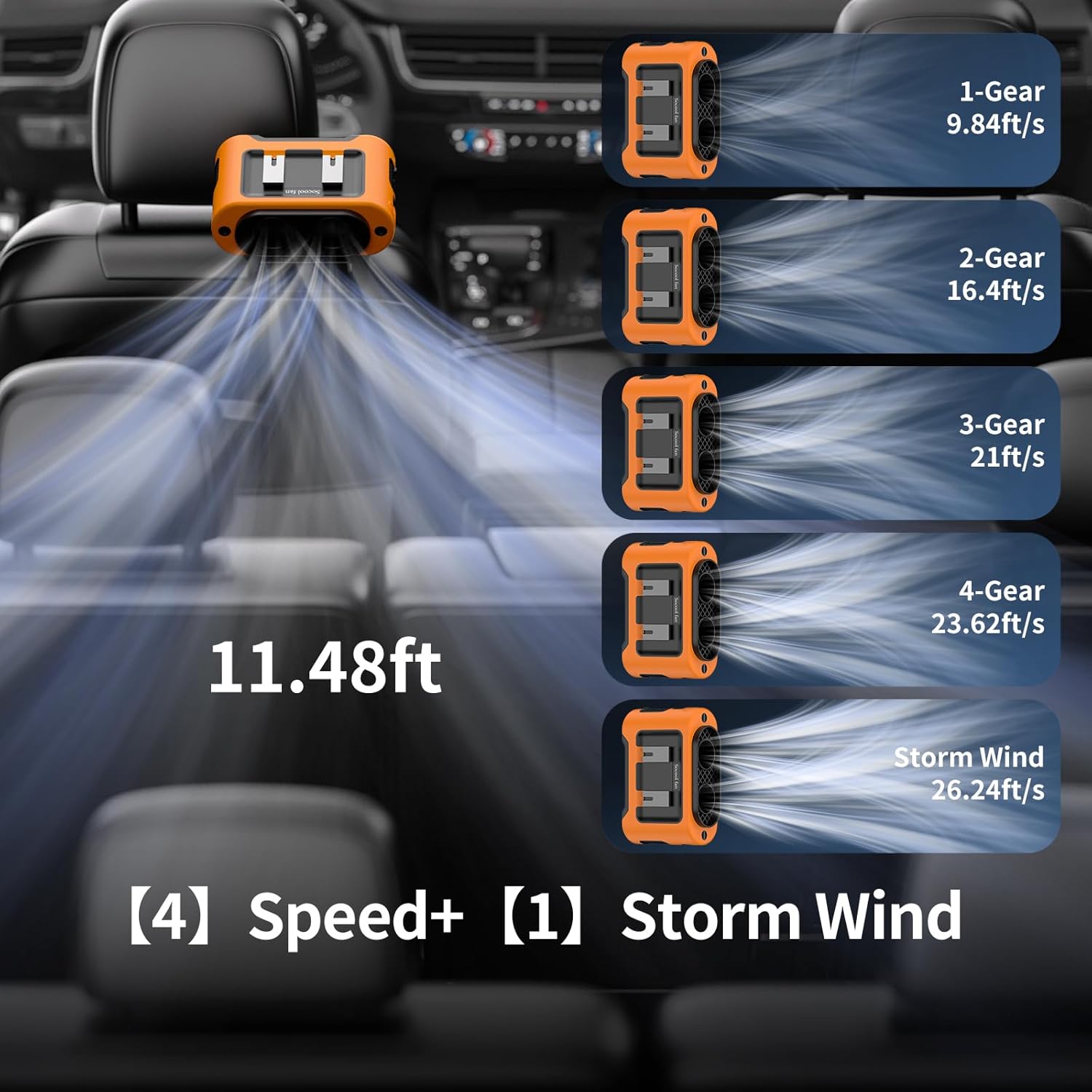
Figura 5.1: Fan speed levels and corresponding airflow, including the powerful Storm Wind mode.
5.2 Carga do ventilador
The fan is equipped with a 14500mAh rechargeable battery and supports Type-C charging.
- Connect the Type-C charging cable to the fan's charging port.
- Connect the other end of the cable to a USB power source such as a USB charger, laptop, computer, or car charger.
- A pantalla LED indicará o estado da carga. Unha carga completa tarda aproximadamente 6.5 horas.
- The fan can be used while charging.

Figura 5.2: The fan being charged via its Type-C port in a car environment.
5.3 Emergency Power Supply (Power Bank Function)
The fan features a 5V-2A USB output port to charge your mobile devices.
- Locate the USB output port on the fan.
- Conecta o cable de carga do teu dispositivo a este porto.
- Ensure the charging port cover is closed when not in use to protect it from dust and water.
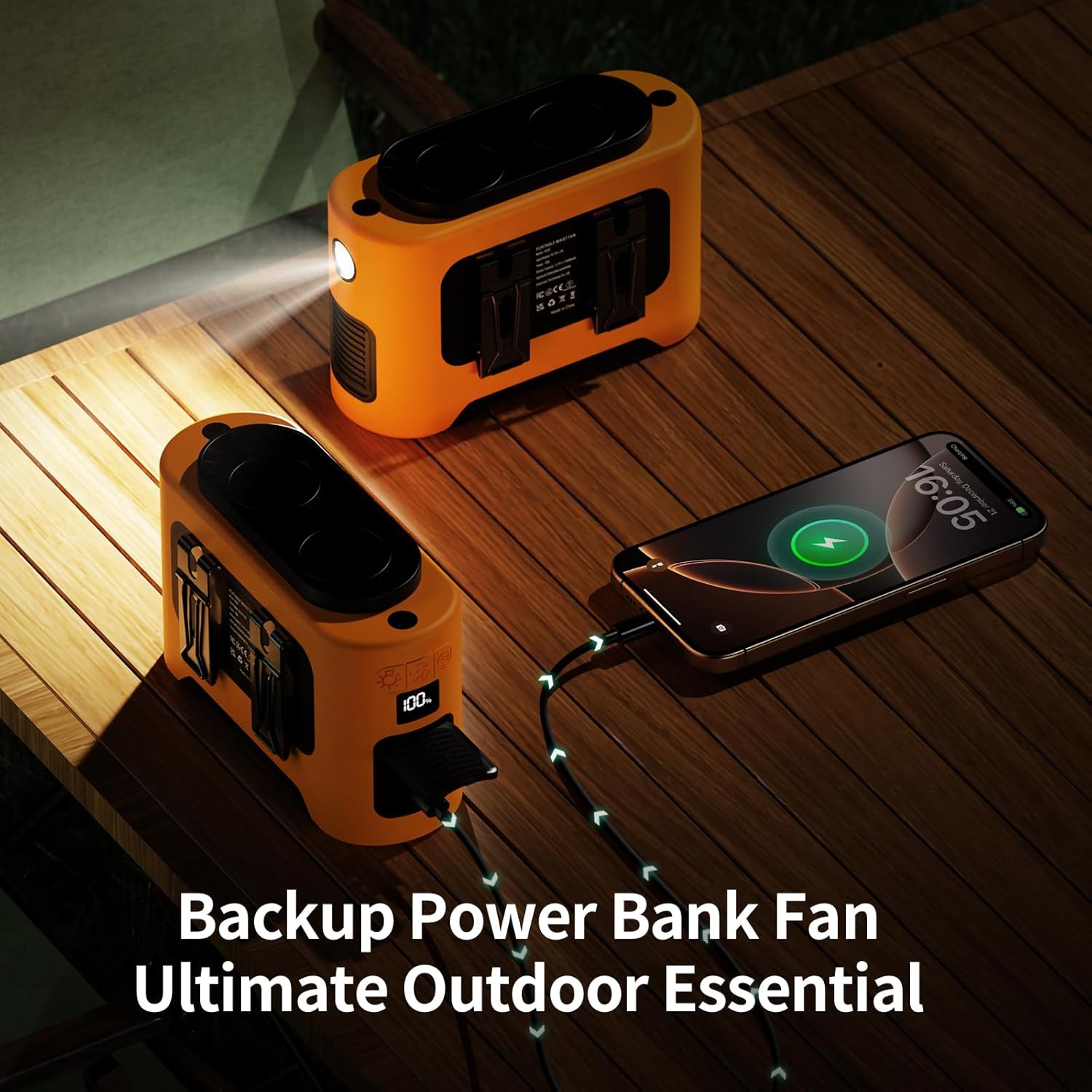
Figura 5.3: The fan's emergency power supply feature, charging a phone while its LED light is on.
5.4 LED Light and SOS Function
The fan includes a built-in LED light for illumination and an SOS function for emergencies.
- Luz LED: Long press the dedicated light button to turn the LED light on or off.
- Función SOS: While the LED light is on, single quick press the light button to activate the SOS flashing mode.

Figura 5.4: The fan's LED light with normal and SOS modes, useful for outdoor activities.
6. Mantemento
To ensure the longevity and optimal performance of your Socool Portable Car Fan, follow these maintenance guidelines:
- Limpeza: Use a soft, dry cloth to wipe the exterior of the fan. Do not use abrasive cleaners or immerse the fan in water. For dust accumulation in the air outlets, use a soft brush or compressed air.
- Almacenamento: When not in use for extended periods, store the fan in a cool, dry place, away from direct sunlight and extreme temperatures.
- Coidado da batería: To maintain battery health, fully charge the fan at least once every three months, even if not in regular use. Avoid completely draining the battery frequently.
7 Solución de problemas
If you encounter issues with your Socool Portable Car Fan, please refer to the following common problems and solutions:
| Problema | Causa posible | Solución |
|---|---|---|
| O ventilador non se acende. | A batería está esgotada. | Charge the fan using the Type-C cable. |
| Botón de acendido non premido correctamente. | Ensure a firm press on the power button. | |
| Baixo fluxo de aire. | O ventilador está a baixa velocidade. | Increase the fan speed using the speed adjustment button. |
| Air inlets/outlets are obstructed. | Clear any obstructions from the fan's air inlets and outlets. | |
| O ventilador non está a cargar. | Problema co cable ou adaptador de carga. | Try a different Type-C cable or USB power adapter. Ensure the adapter provides 5V-2A. |
| Charging port is dirty or damaged. | Gently clean the charging port. If damaged, contact support. | |
| A luz LED non funciona. | A batería está demasiado baixa. | Carga o ventilador. |
| Botón de luz non premido correctamente. | Long press the light button to activate. |
8. Especificacións
| Característica | Especificación |
|---|---|
| Marca | Ventilador de Socool |
| Nome do modelo | K380 Portable Car Fan |
| Fonte de enerxía | Alimentado por batería |
| Capacidade da batería | 14500 mAh (incluída) |
| Tipo de carga | USB Type-C (5V-2A) |
| Tempo de carga completa | Aprox. 6.5 horas |
| Working Time (Low Speed) | Ata 40 horas |
| Working Time (Max Speed) | Ata 4 horas |
| Max Speed Rotation | 14600 RPM |
| Velocidade máxima do fluxo de aire | 26.24 pés/s |
| Air Supply Distance | 11.48 pés |
| Saída (Batería externa) | USB 5V-2A |
| Dimensións do produto | 5.7" D x 2.48" W x 3.74" H |
| Peso do elemento | 1.05 libras |
| Características especiais | 360° Rotation & Tilt Adjustment, Dual Turbo Motors, LED Light, SOS Function, Versatile Usage (Clip-on, Stick-on, Waist, Neck, Desk) |
9. Garantía e soporte
For warranty information or technical support, please contact the manufacturer, Socool fan, through their official channels or the retailer where the product was purchased. Please retain your proof of purchase for any warranty claims.
Manufacturer: Shenzhen Luansheng Electronic Technology Co., Ltd.