
1. Información de seguridade
Lea e comprenda todas as instrucións antes de instalar ou operar este produto. O incumprimento destas instrucións pode provocar descargas eléctricas, incendios ou outros perigos que poderían causar danos materiais ou lesións persoais.
- Desconecte sempre a alimentación no disyuntor antes da instalación ou do mantemento.
- Consulte a un electricista cualificado se non está seguro sobre o proceso de instalación.
- Asegúrese de que todas as conexións eléctricas estean seguras e cumpran cos códigos e as ordenanzas locais.
- Do not install on a dimmer switch.
- This fixture is rated for outdoor use and is water resistant.
2. Contido do paquete
Verifique que estean presentes todos os compoñentes antes de comezar a instalación.
- LED Outdoor Flood Wall Light (1 unit)
- Ferraxes de montaxe (parafusos, conectores de cable)
- Junta
- Manual de instrucións

Figure 2.1: Product components and adjustable parts.
3. Características do produto
The Maxxima LED Outdoor Flood Wall Light is designed for reliable outdoor security and illumination.
- Iluminación potente: Delivers 950 lumens of 3000K warm white light with an energy-efficient 13W design.
- Detección avanzada de movemento: PIR motion sensor with up to a 70 ft range.
- Temporizadores axustables: Choose from 1, 5, or 10 minutes for how long the light stays on after motion detection.
- Sensor de solpor a amencer: Photocell sensor automatically operates at night and conserves energy during the day.
- Cabeza axustable: Easily direct the light beam with a 180° vertical tilt.
- Adjustable Arm and Sensor: 90° vertical arm tilt and 180° vertical tilt & horizontal swivel for the motion sensor, with 360° sensor rotation.
- Construción duradeira: Built with aluminum, rated for 50,000 lifetime hours, ETL listed.
Vídeo 3.1: Rematadoview of Maxxima LED Outdoor Flood Light features and adjustability.
4. Instalación
4.1 Montaxe do aparello
- Apague o interruptor de circuito antes de comezar a instalación.
- Remove the existing fixture (if any) and disconnect wiring.
- Attach the mounting plate to the junction box using the provided screws. Ensure the gasket is properly seated between the fixture and the mounting surface for a weather-tight seal.
- Feed the electrical wires from the junction box through the center hole of the mounting plate.
4.2 Conexións de cableado
Conecte os cables do seguinte xeito:
- Conecta o Negro cable desde o aparello ata o Negro (Live/Hot) wire from the junction box.
- Conecta o Branco cable desde o aparello ata o Branco (Neutral) wire from the junction box.
- Conecta o Verde (Ground) wire from the fixture to the Verde or bare copper (Ground) wire from the junction box.
- Secure all connections with the provided wire connectors.

Figure 4.1: Wiring connections for the flood light.
4.3 Asemblea final
- Meter coidadosamente todos os cables na caixa de conexión.
- Align the fixture with the mounting plate and secure it with the remaining screws.
- Restablecer a enerxía no interruptor automático.
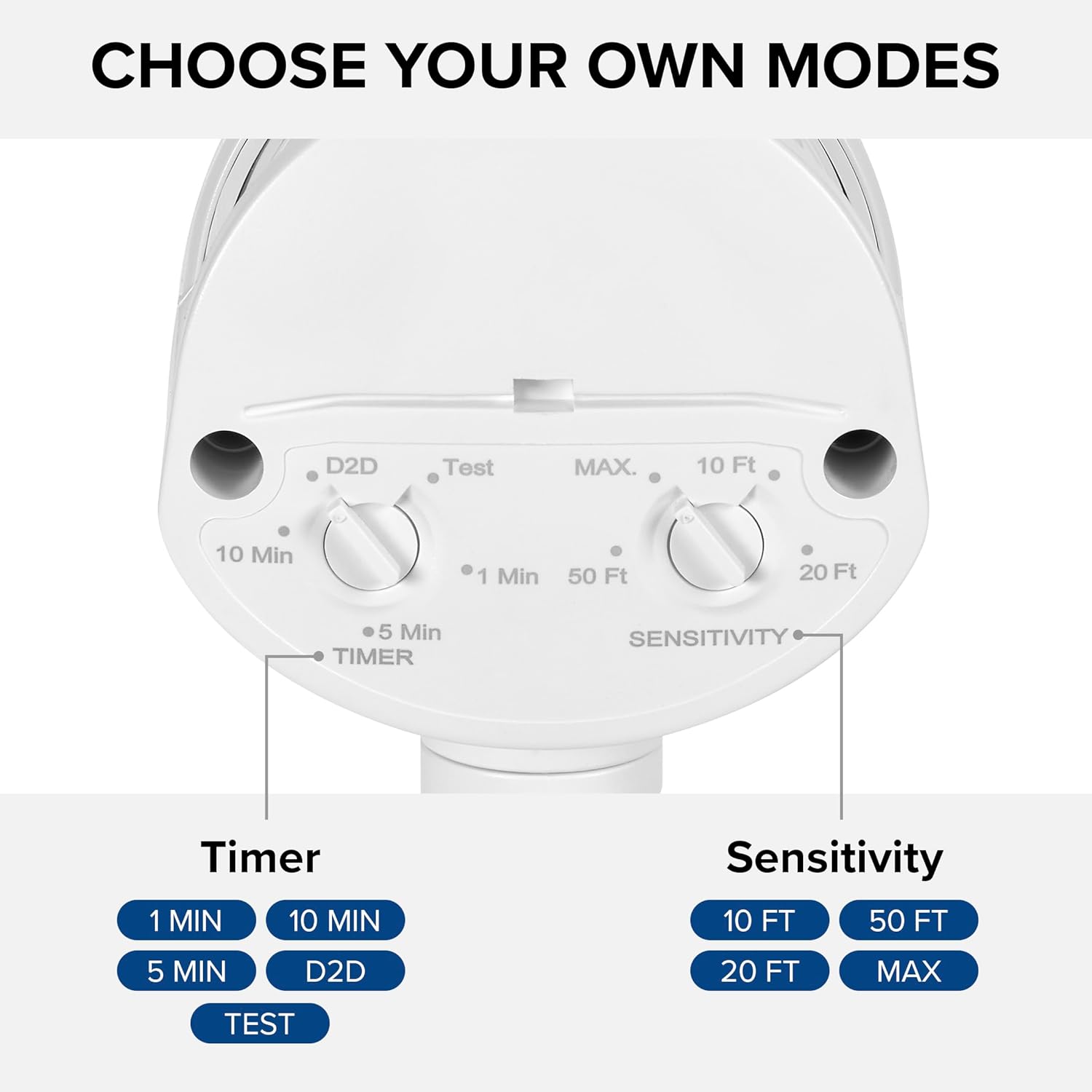
Figure 4.2: Installed flood light on an exterior wall.
5. Configuración e axustes
The flood light features adjustable settings for the motion sensor and timer.
5.1 Adjusting the Sensor and Timer
The sensor unit has two adjustable dials located on its underside:
- TIMER Dial: Controls how long the light stays on after motion is detected. Options include 1 minute, 5 minutes, 10 minutes, or Dusk-to-Dawn (D2D).
- SENSITIVITY Dial: Adjusts the motion detection range. Options include 10 ft, 20 ft, 50 ft, or MAX (up to 70 ft).
To adjust, gently rotate the dials to your desired setting. The 'Test' mode on the TIMER dial allows for quick testing of motion detection during daylight hours.
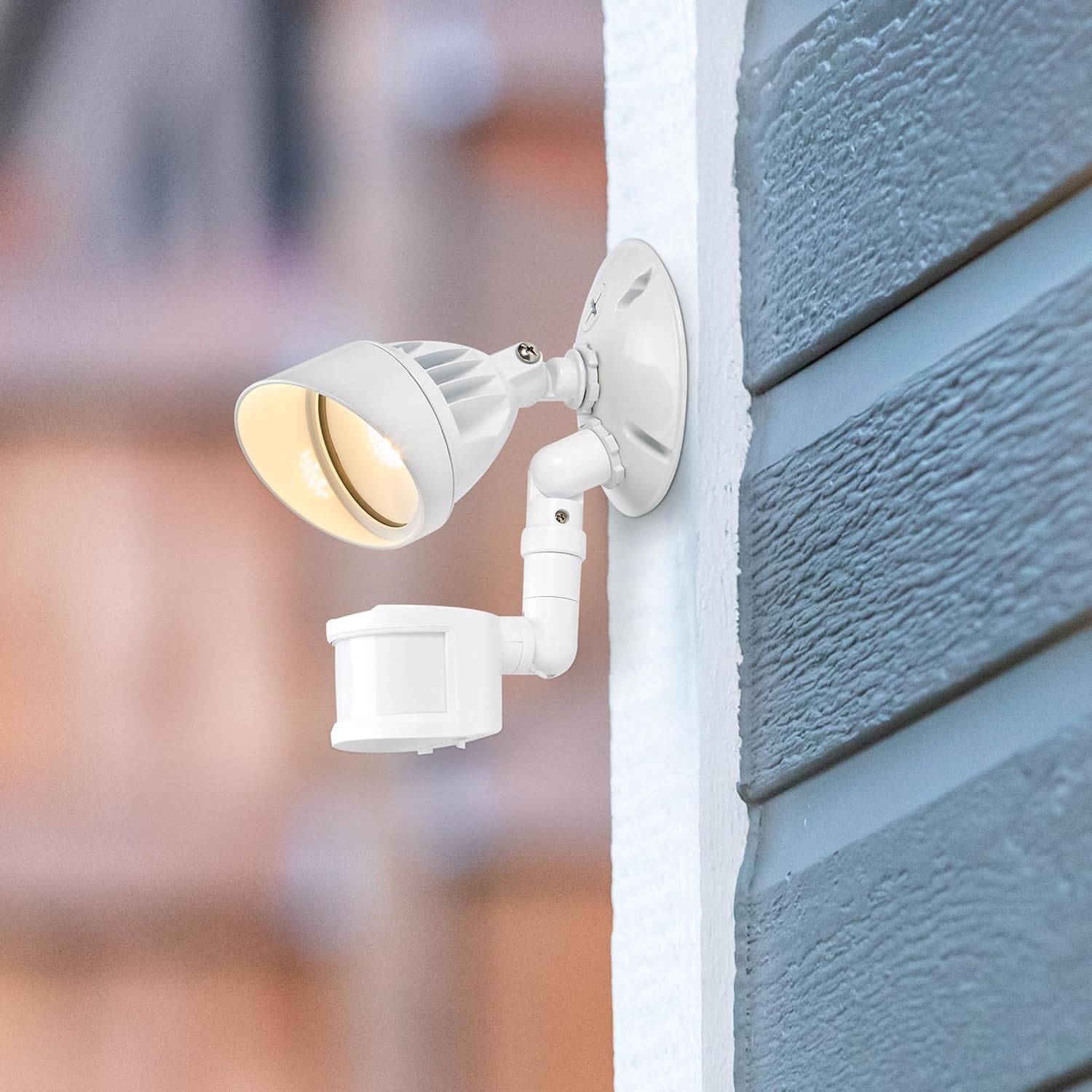
Figure 5.1: Timer and Sensitivity adjustment dials.
5.2 Adjusting Light Head and Sensor Position
The light head and motion sensor can be adjusted to cover specific areas:
- The light head can be tilted up to 180° vertically.
- The arm connecting the sensor to the base can tilt 90° vertically.
- The motion sensor itself can tilt 180° vertically and swivel 180° horizontally, with a full 360° rotation capability.

Figure 5.2: Adjustable light head and motion sensor.
6. Instrucións de funcionamento
Once installed and configured, the Maxxima LED Outdoor Flood Wall Light operates automatically based on its sensor settings.
- Modo do amencer ao anoitecer (D2D): When the TIMER dial is set to D2D, the light will automatically turn on at dusk and remain on until dawn, regardless of motion.
- Modo sensor de movemento: When the TIMER dial is set to 1, 5, or 10 minutes, the light will activate when motion is detected within the set sensitivity range and ambient light conditions (typically at night). The light will remain on for the selected duration after the last motion is detected, then turn off.
- Modo de proba: Setting the TIMER dial to 'Test' allows you to verify motion detection during daylight. The light will turn on for a few seconds when motion is detected, then turn off. This mode is useful for positioning the sensor.
7. Mantemento
This LED flood light requires minimal maintenance.
- Limpeza: Limpe periodicamente a luminaria cun pano suave eamp un pano para eliminar a sucidade e os residuos. Non empregue produtos de limpeza abrasivos nin disolventes.
- Inspección: Regularly check for any loose connections or damage to the wiring or housing.
- A fonte de luz LED integrada non é substituíble polo usuario.
8 Solución de problemas
If you experience issues with your flood light, refer to the following table for common problems and solutions.
| Problema | Causa posible | Solución |
|---|---|---|
| A luz non acende. | No power; incorrect wiring; sensor settings. | Check circuit breaker. Verify wiring connections. Adjust sensor to 'Test' mode to confirm functionality. Ensure ambient light is low enough for operation (if not in D2D). |
| A luz permanece acesa continuamente. | Sensor in D2D mode; constant motion detected; faulty sensor. | Check if TIMER dial is set to D2D. Ensure no objects are causing continuous motion detection. If problem persists, contact support. |
| Light turns on too frequently or not enough. | Sensitivity setting; sensor obstruction. | Adjust SENSITIVITY dial. Clear any obstructions from the sensor's field of view. |
| Luz parpadea. | Loose wiring; power fluctuations. | Turn off power and check all wiring connections. Consult an electrician if power fluctuations are suspected. |
9. Especificacións
| Atributo | Valor |
|---|---|
| Nome do modelo | MEL-S1013100W |
| Marca | Máxima |
| Saída de luz | 950 lúmenes |
| Wattage | 13 vatios |
| Temperatura da cor | 3000 Kelvin (Branco Cálido) |
| Voltage | 120 voltios |
| Material | Aluminio |
| Tipo de acabado | Pintado |
| Rango do sensor de movemento | Ata 70 pés |
| Extensión do feixe | 220° |
| Valoración de por vida | 50,000 horas |
| Certificación | Listado ETL |
| Dimensións do produto | 4.4 cm de longo x 6 cm de ancho x 6 cm de alto |
| Peso do elemento | 11.2 onzas (0.7 libras) |
10. Garantía
This Maxxima LED Outdoor Flood Wall Light is backed by a 3 ano de garantía desde a data de compra. Esta garantía cobre defectos de materiais e fabricación en condicións de uso normal. Conserve o comprobante de compra para reclamacións de garantía.
11. Apoio
For technical assistance, troubleshooting, or warranty inquiries, please contact Maxxima customer service.
Visit the Maxxima Store: MaxximaLEDLighting on Amazon
Maxxima is an American company with USA-based offices and customer service.