
1. Introdución
Thank you for choosing the DEDRA MC0932 Mini Laser Distance Meter. This compact and precise device is designed for quick and accurate distance measurements in various indoor applications. Please read this manual carefully before using the device to ensure safe and proper operation.
1.1 Información de seguridade
ADVERTENCIA: Radiación láser
- This device emits Class II laser radiation. Do not stare directly into the laser beam or direct it towards other people's eyes.
- Do not disassemble or modify the device. Unauthorized modifications may result in hazardous laser radiation exposure.
- Manteña o dispositivo fóra do alcance dos nenos.
- Use only specified batteries. Do not mix old and new batteries or different types of batteries.
- Retire as pilas se non vai usar o dispositivo durante un período prolongado para evitar fugas.
2. Contido do paquete
Carefully unpack the box and ensure all items listed below are present and in good condition:
- DEDRA MC0932 Mini Laser Distance Meter
- Bolsa protectora
- Correa de pulso
- Pilas AAA (2x)

Image: The DEDRA MC0932 Mini Laser Distance Meter, its protective pouch, wrist strap, and two AAA batteries.
3. Produto rematadoview
3.1 Disposición do dispositivo
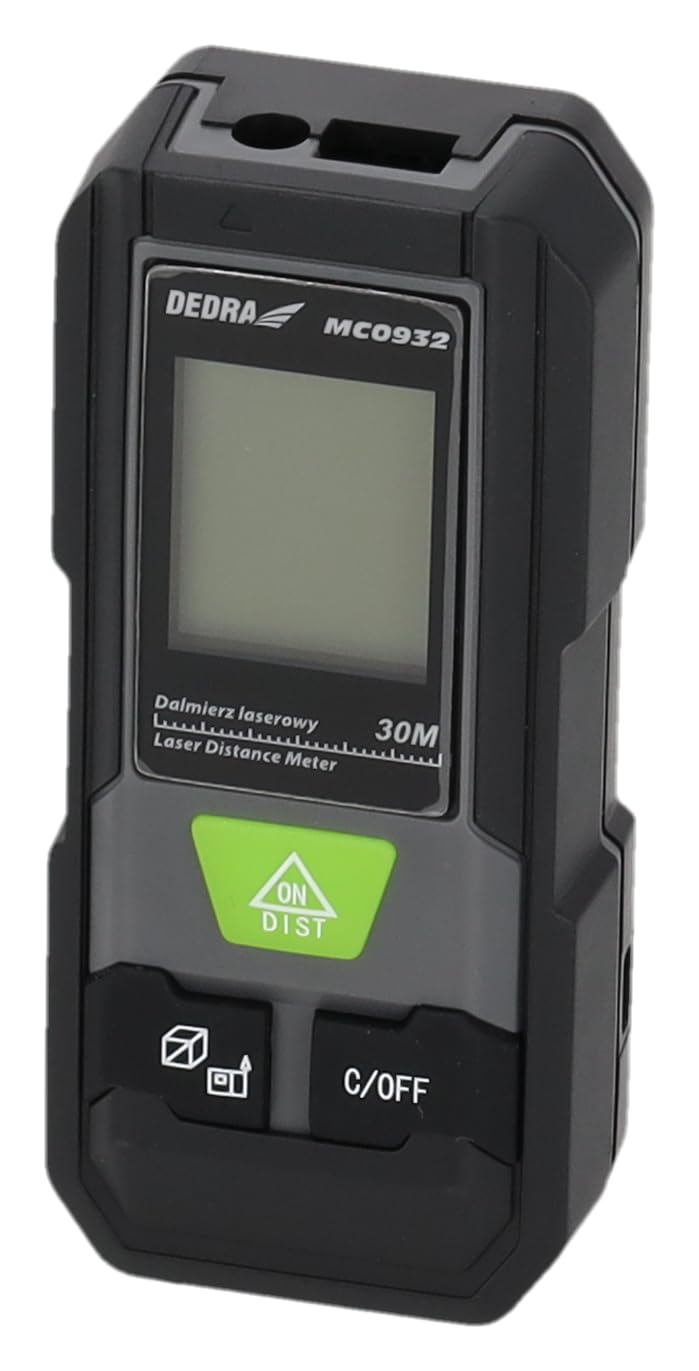
Imaxe: Fronte view of the DEDRA MC0932 showing the display and control buttons.
- Lente de emisión láser
- Lente de recepción láser
- Pantalla de visualización
- ON / DIST Button (Power On / Single Measurement / Continuous Measurement)
- C / OFF Button (Clear / Power Off)
- Function / Unit Button (Mode Selection / Unit Switching)
- Reference Point Button (Front/Rear Edge Measurement)

Imaxe: Costas view of the DEDRA MC0932, highlighting the battery compartment.
- Compartimento de batería
4. Configuración
4.1 Instalación da batería
- Localiza a tapa do compartimento da batería na parte traseira do dispositivo.
- Deslice a tapa cara abaixo para abrir o compartimento.
- Insira dúas (2) pilas AAA, asegurándose de manter a polaridade correcta (+/-) como se indica no interior do compartimento.
- Peche a tapa do compartimento da batería deslizándoa de volta ao seu lugar ata que faga clic de forma segura.
5. Instrucións de funcionamento
5.1 Encendido/apagado
- Para acender: Preme o ON/DIST button once. The laser will activate, and the display will light up.
- Para apagar: Manteña premido o C/OFF button for approximately 2 seconds. The device will also automatically power off after 180 seconds of inactivity.
5.2 Medición de distancia única
- Turn on the device by pressing ON/DIST. The laser will activate.
- Apunte o raio láser ao punto obxectivo.
- Preme o ON/DIST button again. The measurement will be taken and displayed on the screen.
5.3 Medición continua (seguimento)
- Acende o dispositivo.
- Manteña premido o ON/DIST button for approximately 2 seconds. The device will enter continuous measurement mode, displaying real-time distance as you move the device.
- To stop continuous measurement, press the C/OFF button once. The last measured value will remain on the display.
5.4 Medición da área
- Acende o dispositivo.
- Preme o Function / Unit button repeatedly until the area icon (a square with 'm²' or 'ft²') appears on the display.
- Mide o primeiro lado (por exemplo, a lonxitude) premendo ON/DIST.
- Mide o segundo lado (por exemplo, a anchura) premendo ON/DIST de novo.
- O dispositivo calculará e mostrará a área automaticamente.
5.5 Medición de volume
- Acende o dispositivo.
- Preme o Function / Unit button repeatedly until the volume icon (a cube with 'm³' or 'ft³') appears on the display.
- Mide o primeiro lado (por exemplo, a lonxitude) premendo ON/DIST.
- Mide o segundo lado (por exemplo, a anchura) premendo ON/DIST de novo.
- Measure the third side (e.g., height) by pressing ON/DIST unha terceira vez.
- O dispositivo calculará e mostrará o volume automaticamente.
5.6 Cambio de unidades
To change the measurement unit (meters, feet, inches), press and hold the Function / Unit button for approximately 2 seconds. The unit will cycle through m, ft, and in.
5.7 Reference Point Setting
The device can measure from its front edge or its rear edge. To switch the reference point, press the Punto de referencia button. An icon on the display will indicate whether the measurement is taken from the front or rear of the device.
6. Mantemento
6.1 Limpeza
- Use un suave, damp pano para limpar o dispositivo casing. Non empregue produtos de limpeza abrasivos nin disolventes.
- Gently wipe the laser lenses with a clean, lint-free cloth. Avoid touching the lenses with your fingers.
6.2 Almacenamento
- Store the device in its protective pouch in a cool, dry place, away from direct sunlight and extreme temperatures.
- Remove the batteries if the device will not be used for an extended period (e.g., more than one month) to prevent battery leakage and damage.
6.3 Substitución da batería
When the low battery indicator appears on the display, replace both AAA batteries with new ones following the instructions in Section 4.1.
7 Solución de problemas
| Problema | Causa posible | Solución |
|---|---|---|
| O dispositivo non se acende | As pilas están gastadas ou inseridas incorrectamente. | Substitúa as pilas ou comprobe a polaridade. |
| Mensaxe de "erro" na pantalla | Laser path is obstructed, target surface is too reflective/absorbent, or measurement range exceeded. | Ensure clear laser path, use a target plate if necessary, ensure target is within 0.03m-30m range. |
| Medidas inexactas | Lenses are dirty, device is unstable, or environmental interference. | Clean lenses, ensure device is stable during measurement, avoid strong light sources. |
| A pantalla está escura ou parpadea | Batería baixa. | Substitúe as pilas. |
8. Especificacións
| Rango de medición | 0.03 m - 30 m |
| Precisión de medición | ± 2 mm |
| Unidades de medida | m / pés / polgadas |
| Clase láser | Clase II |
| Tipo de láser | 635 nm, <1 mW |
| Automatic Laser Off | 30 segundos |
| Automatic Device Off | 180 segundos |
| Tipo de batería | 2 x AAA (Alkaline recommended) |
| Temperatura de funcionamento | 0 °C a 40 °C (32 °F a 104 °F) |
| Temperatura de almacenamento | -20 °C a 60 °C (-4 °F a 140 °F) |
| Dimensións (aprox.) | 100 x 35 x 20 mm (3.9 x 1.4 x 0.8 polgadas) |
| Peso (con pilas) | 200 g (7.05 onzas) |
| Clasificación IP | IP54 (protección contra po e salpicaduras) |
9. Garantía e soporte
DEDRA products are manufactured to high-quality standards. For warranty information, please refer to the warranty card included with your purchase or contact your local DEDRA dealer or the seller directly. For technical support or service inquiries, please reach out to the point of purchase or the official DEDRA customer service channels.