
Introdución
The AIWA IC-320DAB is a 1 DIN car multimedia player designed for versatility, powerful sound, and modern connectivity. This device features a detachable front panel for enhanced security, offering multiple playback options through its high-quality AM/FM and DAB+ tuner. Its LCD screen with dimmer function ensures optimal visibility in various lighting conditions. It also incorporates Bluetooth 5.1 technology for wireless music streaming and hands-free calls, along with an auxiliary input for connecting external devices. With 30 preset stations, a USB output for charging, and compatibility with steering wheel controls (SWC) in some vehicles, this player is an ideal choice for upgrading any car audio system.
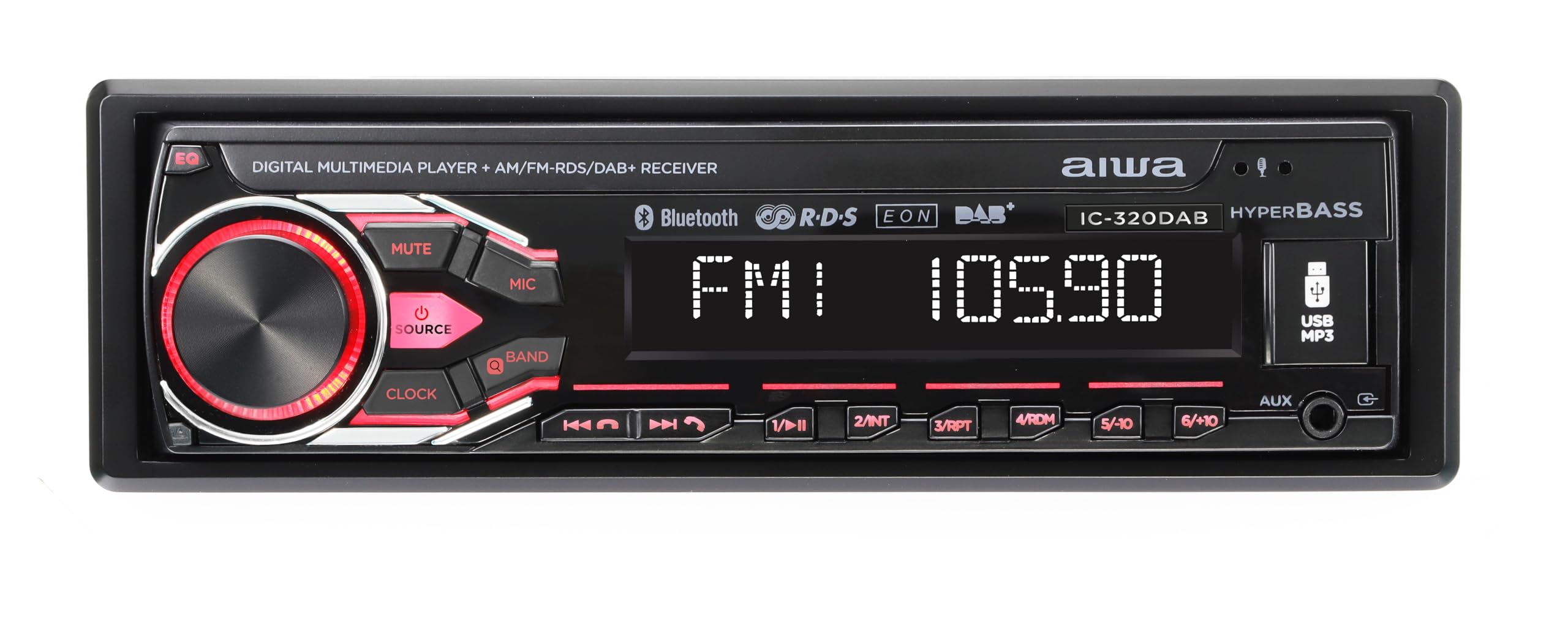
Image: AIWA IC-320DAB Car Multimedia Player. This image shows the front panel of the car multimedia player, highlighting its LCD screen and control buttons.
O que hai na caixa
- Carcasa de plástico
- Fixing and extraction tools
- Micrófono externo
Características do produto
- Potencia de saída: 4 channels of 40W each, ensuring powerful and clear audio.
- Panel desmontable: Enhanced security by allowing removal of the front panel to deter theft.
- Opcións de sintonía: AM/FM tuner with 30 preset stations. DAB+ for clearer and more stable digital reception.
- Pantalla LCD: Optimal readability, with a dimmer function to adjust to light conditions.
- Iluminación personalizable: 7 colors to match the driver's preference or vehicle interior.
- Conectividade Bluetooth 5.1: Ideal for streaming music from smartphones and making hands-free calls.
- Múltiples entradas e saídas: USB for charging and playback, Aux In for external devices, L/R audio output, and subwoofer output.
- SWC (Steering Wheel Control) Support: Allows control of the player from the steering wheel in compatible vehicles.
- Equalization Options: Bass and Treble adjustments to customize the sound experience.
- External Microphone Included: For optimal hands-free calls with high voice quality.
Configuración e instalación
Unha instalación axeitada é fundamental para un rendemento e unha seguridade óptimos. Recoméndase que a instalación sexa realizada por un profesional cualificado.
- Preparación: Disconnect the vehicle's negative battery terminal before starting any electrical work. Ensure you have all necessary tools and the included fixing/extraction tools.
- Montaxe: Insert the metal mounting sleeve into the vehicle's dashboard opening. Bend the tabs to secure it. Slide the AIWA IC-320DAB unit into the sleeve until it clicks into place.
- Cableado:
- Conecte o arnés de alimentación principal: cable amarelo a 12 V constantes, cable vermello a 12 V accesorios (conmutados), cable negro a terra.
- Connect speaker wires: Ensure correct polarity for each speaker (front left, front right, rear left, rear right).
- Connect the antenna cable (AM/FM/DAB+).
- Connect the external microphone to the designated input for hands-free calling.
- If using, connect RCA outputs for external amplificadores ou subwoofers.
- If your vehicle supports Steering Wheel Controls (SWC), connect the SWC wires according to your vehicle's wiring diagram and the player's instructions.
- Comprobacións finais: Reconnect the vehicle's negative battery terminal. Turn on the ignition and test the unit's basic functions (power, radio, volume).
- Fixar o panel frontal: Carefully attach the detachable front panel to the main unit. Ensure it is securely latched.
Instrucións de funcionamento
Operación básica
- Encendido/apagado: Preme o POTENCIA button (usually the volume knob) to turn the unit on or off.
- Control de volume: Xire o VOLUME botón para axustar o nivel do son.
- Selección da fonte: Preme o SRC or MODO button to cycle through available sources (FM, AM, DAB+, Bluetooth, USB, AUX).
- Detaching Front Panel: Preme o LANZAR button and carefully pull the front panel off. Store it safely to prevent theft.
Radio (AM/FM/DAB+)
- Selección de bandas: En modo radio, prema o botón BANDA button to switch between FM1, FM2, FM3, AM1, AM2, and DAB+ (if available).
- Sintonización automática: Manteña premido o BUSCA or SINTONIZA botóns para buscar automaticamente a seguinte emisora con boa frecuencia.
- Sintonización manual: Prema brevemente o BUSCA or SINTONIZA botóns para axustar manualmente a frecuencia paso a paso.
- Estacións predefinidas: To save a station, tune to the desired frequency, then press and hold one of the numeric preset buttons (1-6) until you hear a beep. To recall a preset, briefly press the corresponding numeric button.
Funcionamento Bluetooth
- Emparejamento:
- Seleccione Bluetooth como fonte.
- No teu dispositivo móbil, activa o Bluetooth e busca os dispositivos dispoñibles.
- Select "AIWA IC-320DAB" from the list. If prompted for a PIN, enter "0000".
- Once paired, the unit will display "Connected".
- Transmisión de audio: Play music on your paired device, and it will stream through the car's speakers. Use the player's REPRODUCIR/PAUSA, SEGUINTE, e ANTERIOR botóns para controlar a reprodución.
- Chamadas mans libres:
- Responder chamada: Preme o CHAMAR or RESPOSTA botón cando soa unha chamada entrante.
- Finalizar a chamada: Preme o FIN CONVOCATORIA botón.
- Marcación: Use your phone to dial, and the audio will route through the player.
USB and AUX Input
- Reprodución USB: Insert a USB drive into the USB port. The unit will automatically switch to USB mode and begin playing compatible audio files. Use REPRODUCIR/PAUSA, SEGUINTE, e ANTERIOR buttons for control. The USB port also provides charging for devices.
- Entrada AUX: Connect an external audio device (e.g., MP3 player) to the 3.5mm AUX input using an audio cable. Select AUX as the source. Control playback from the external device.
Configuración de son
- EQ (Ecualizador): Preme o EQ button to cycle through preset equalizer modes (e.g., Pop, Rock, Classic) or to access custom bass/treble adjustments.
- Graves/Agudos: Use the menu or dedicated buttons to adjust bass and treble levels for personalized sound.
- Reguladores: Access the system settings to adjust the display brightness (dimmer function) for comfortable viewde día ou de noite.
- Cor da iluminación: Navigate to the illumination settings to choose from 7 available colors for the button backlighting.
Mantemento
- Limpeza da unidade: Use un pano suave e seco para limpar a superficie da unidade. Para a sucidade persistente,ampen the cloth lightly with water. Avoid using abrasive cleaners, solvents, or alcohol, as these can damage the finish.
- Limpeza do panel frontal: The detachable front panel should be handled with care. Clean it gently with a soft, dry cloth. Do not apply excessive pressure to the LCD screen.
- Porto USB: Manteña o porto USB libre de po e sucidade. Evite inserir obxectos estraños.
- Storage of Detachable Panel: When removed, store the front panel in its protective case (if provided) or a soft pouch to prevent scratches and damage.
- Temperatura: Evite expoñer a unidade a temperaturas extremas, á luz solar directa durante períodos prolongados ou a alta humidade.
Resolución de problemas
| Problema | Causa posible | Solución |
|---|---|---|
| Sen poder |
|
|
| Sen son |
|
|
| Bluetooth non se conecta |
|
|
| Mala recepción de radio |
|
|
| Non se reproduce o USB |
|
|
Especificacións
| Característica | Detalle |
|---|---|
| Tipo de produto | 1 DIN Car Multimedia Player with LCD Screen, AM/FM and DAB+ |
| Marca | Aiwa |
| Número de modelo | B0F4DZWWBJ (Internal ASIN, product model is IC-320DAB) |
| Potencia de saída | 4 x 40 Watts (RMS) / 160 Watts (Peak) |
| Tecnoloxía de conectividade | Bluetooth 5.1 |
| Tipo de sintonizador | AM/FM, DAB+ |
| Mostrar | LCD with Dimmer Function |
| Iluminación | Multi-color (7 options) |
| Entradas | USB (for playback and charging), Aux In (3.5mm) |
| Saídas | L/R Audio Output, Subwoofer Output |
| Características especiais | Detachable Front Panel, External Microphone, SWC Support, Bass/Treble EQ |
| Dimensións (paquete) | 24.3 x 22.9 x 8.1 cm |
| Peso (paquete) | 1.27 kg |
| País de Orixe | China |
Garantía e Soporte
This AIWA IC-320DAB Car Multimedia Player comes with a manufacturer's warranty.
- Período de garantía: Dous anos desde a data de compra.
- Cobertura: The warranty covers defects in materials and workmanship under normal use. It does not cover damage caused by misuse, accident, unauthorized modification, or improper installation.
- Reclamación de garantía: In case of a defect, please contact your retailer or the official Aiwa customer support with your proof of purchase.
- Atención ao cliente: For technical assistance, troubleshooting, or warranty inquiries, please refer to the contact information provided with your purchase or visit the official Aiwa websitio.