
Dytole DY108
Dytole DY108 Wireless Headset User Manual
Modelo: DY108
Introdución
This manual provides detailed instructions for the proper use, setup, and maintenance of your Dytole DY108 Wireless Headset. Please read this manual thoroughly before using the product to ensure optimal performance and longevity. The Dytole DY108 is designed for professional use, offering advanced features such as AI Noise Cancelling, Bluetooth 5.3 connectivity, and extended battery life for clear communication in various work environments.
Contido do paquete
Upon unboxing your Dytole DY108 Wireless Headset, please verify that all components listed below are present:
- Wireless Headset with Mic x 1
- Dongle USB x 1
- Cable de carga USB-C x 1
- Manual de usuario x 1

Image: Contents of the Dytole DY108 Wireless Headset package, including the headset, USB dongle, USB-C charging cable, and user manual.
Produto rematadoview
Familiarize yourself with the various components and controls of your Dytole DY108 Wireless Headset.
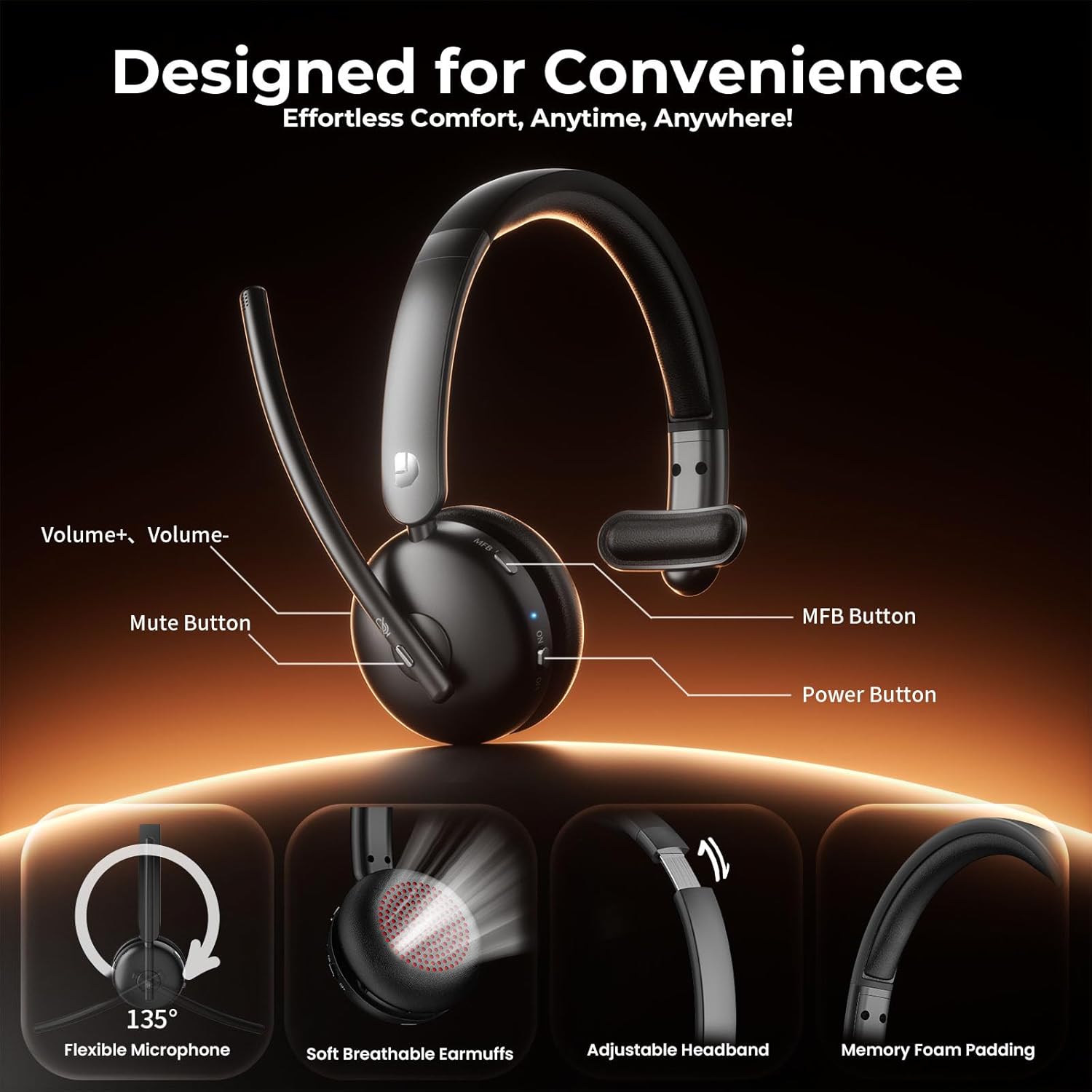
Image: Diagram illustrating the controls of the Dytole DY108 headset, including Volume+ / Volume-, Mute Button, MFB Button, Power Button, Flexible Microphone (135° adjustable), Soft Breathable Earmuffs, Adjustable Headband, and Memory Foam Padding.
- Boom do micrófono: 135° adjustable for optimal voice pickup.
- Botón de silencio: Prema para silenciar/activar o micrófono.
- Botóns de volume: Axustar o nivel de saída de son.
- Botón multifunción (MFB): Controls power, pairing, call management, and music playback.
- Botón de encendido: Activa ou desactiva os auriculares.
- Porto de carga USB-C: Para cargar a batería dos auriculares.
- Indicador LED: Mostra o estado (acendido, emparellamento, carga).
- Diadema axustable: Para un axuste cómodo e seguro.
- Soft Earcup: Deseñado para unha maior comodidade de uso.
Configuración
Cargando os auriculares
Before initial use, fully charge your headset. A full charge takes approximately 2 hours and provides up to 65 hours of talk time.
- Connect the provided USB-C charging cable to the charging port on the headset.
- Conecta o outro extremo do cable a unha fonte de alimentación USB (por exemplo, un porto USB do ordenador, un adaptador de parede).
- The LED indicator will show charging status (e.g., solid red while charging, turns off or blue when fully charged).
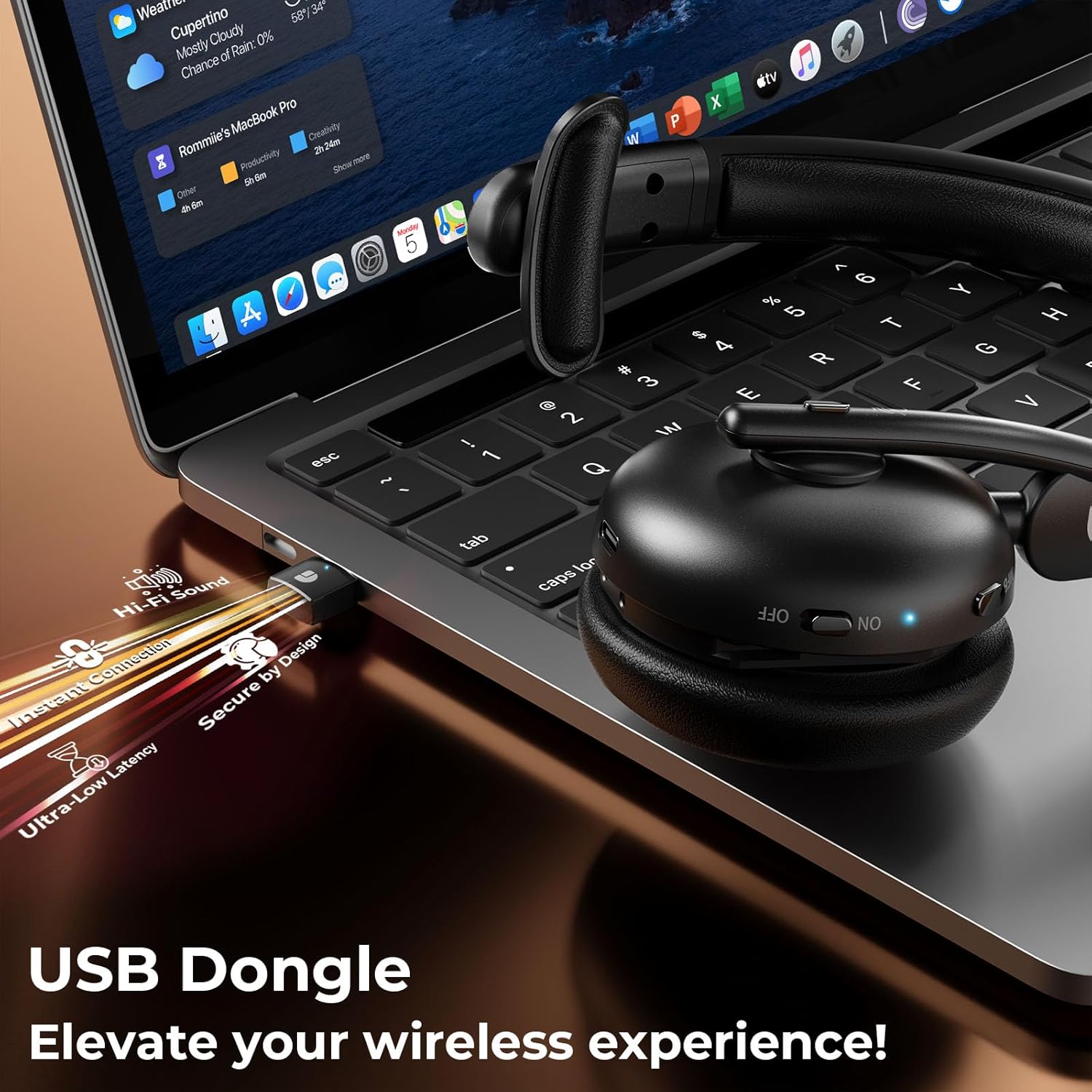
Image: The Dytole DY108 headset connected to a laptop via its USB-C charging cable, illustrating the charging process.

Imaxe: Unha interna view of the Dytole DY108 headset highlighting its long-lasting battery, indicating up to 65 hours of use on a single charge.
Conectando a Dispositivos
The Dytole DY108 headset offers two primary connection methods: via Bluetooth 5.3 or the included USB Dongle.
Bluetooth Pairing (for Smartphones, Tablets, Laptops with Bluetooth)
- Asegúrate de que os auriculares estean cargados e apagados.
- Press and hold the MFB button for approximately 5-7 seconds until the LED indicator flashes blue and red alternately, indicating pairing mode.
- No teu dispositivo, activa o Bluetooth e busca novos dispositivos.
- Select "DY108" from the list of available devices.
- Unha vez conectado, o indicador LED dos auriculares parpadeará lentamente en azul.
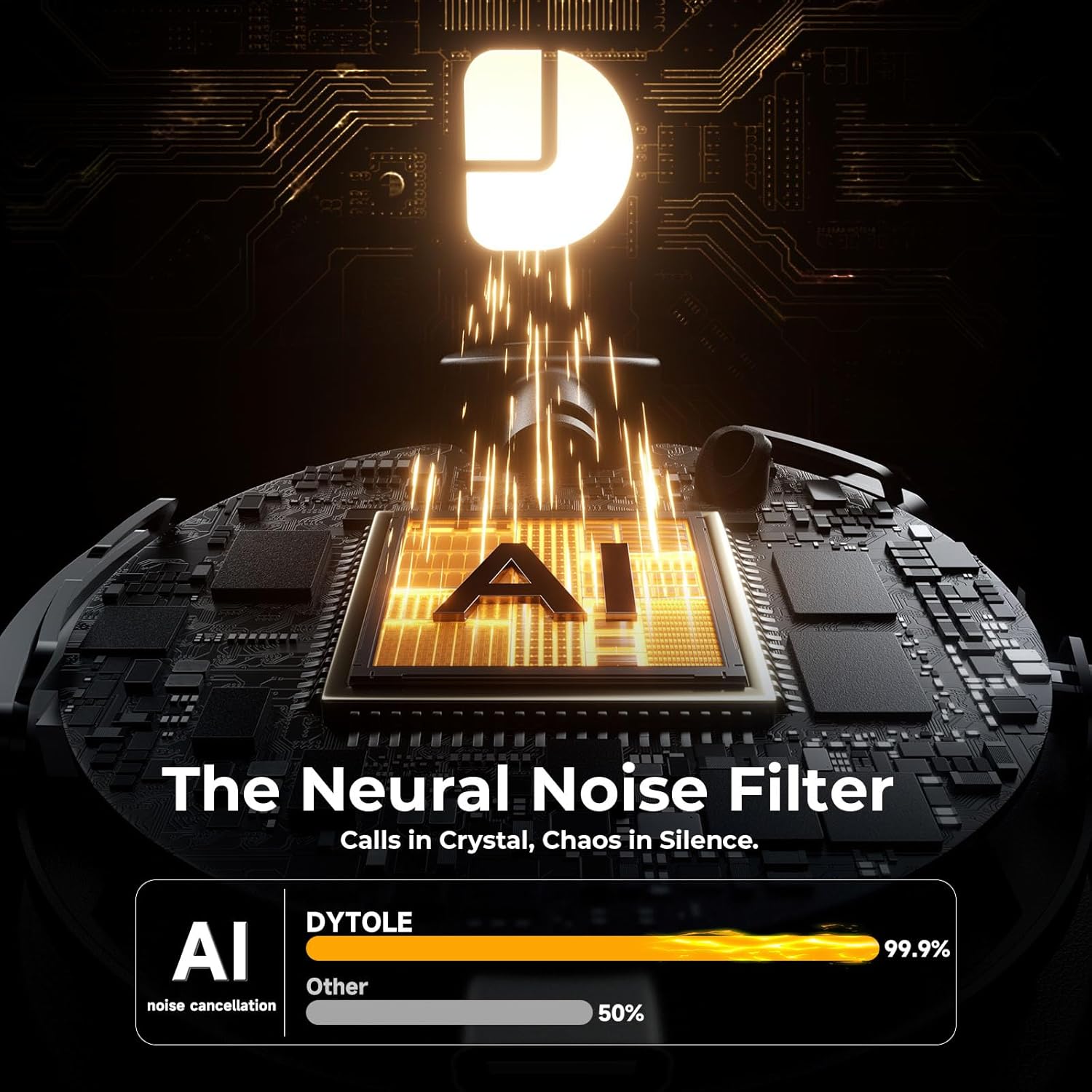
Image: The Dytole DY108 headset surrounded by various devices (smartphone, laptop, tablet), illustrating its universal compatibility and effortless Bluetooth 5.3 pairing.
USB Dongle Connection (for PC/Laptop)
The USB dongle provides a stable and low-latency connection, ideal for PC and laptop use, especially for applications like Teams, Skype, and call centers.
- Insira o dongle USB nun porto USB dispoñible do seu ordenador.
- Power on the Dytole DY108 headset. It will automatically attempt to connect to the dongle.
- The LED indicator on both the headset and the dongle will turn solid blue once connected.
- On your computer, ensure the Dytole DY108 is selected as the default audio input and output device in your sound settings.
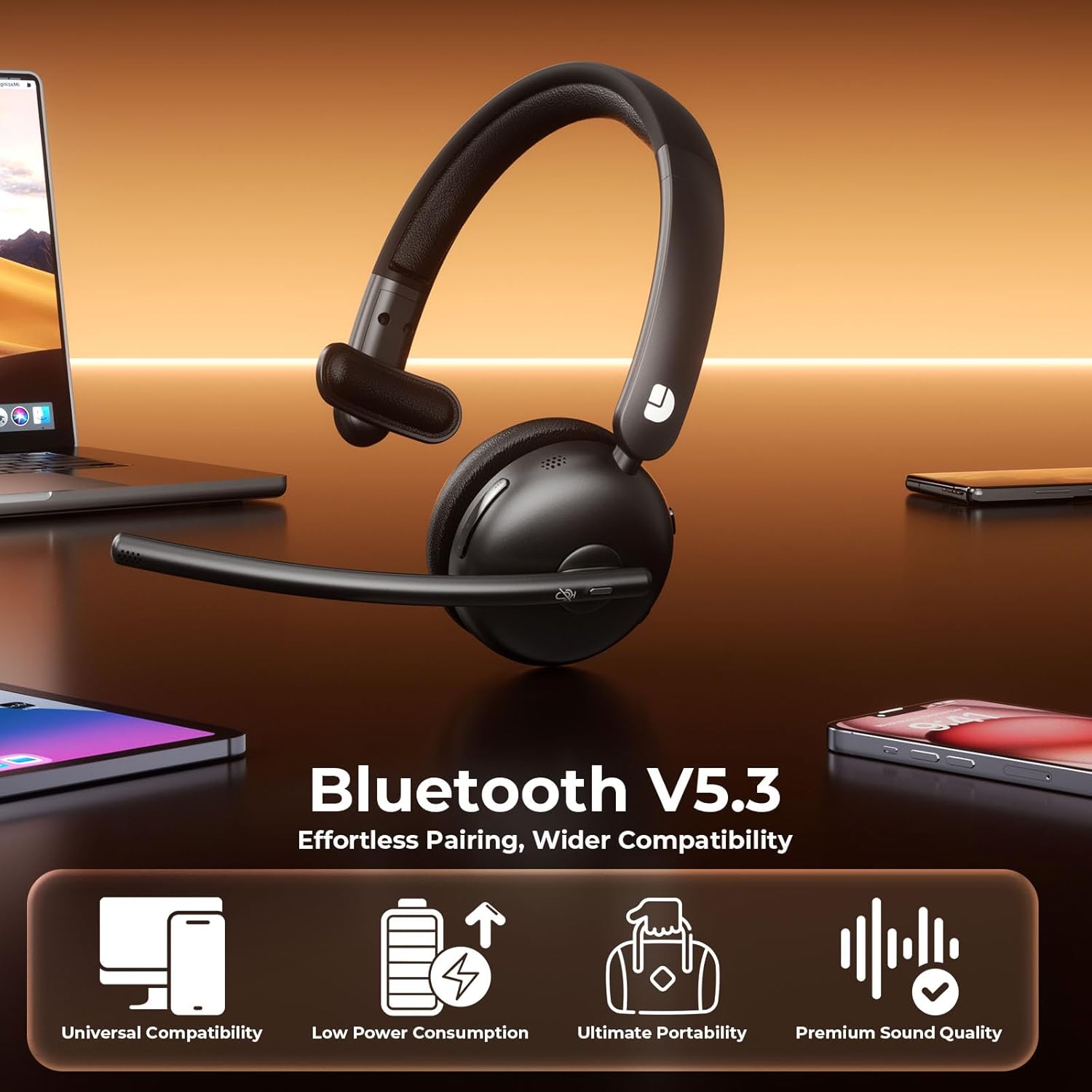
Image: The Dytole DY108 headset with its USB dongle inserted into a laptop, demonstrating the instant and secure connection for an enhanced wireless experience.
Instrucións de funcionamento
Funcións básicas
| Función | Acción | Indicator/Result |
|---|---|---|
| Encender | Deslice o interruptor de acendido á posición ON. | O LED parpadea en azul. |
| Apagado | Deslice o interruptor de acendido a OFF. | O LED apágase. |
| Responder/Finalizar chamada | Prema o botón MFB unha vez. | Call connected/disconnected. |
| Rexeitar a chamada | Manteña premido o botón MFB durante 2 segundos. | Call rejected. |
| Silenciar/Activar micrófono | Press the Mute button once. | Microphone muted/unmuted. |
| Subir volume | Press the Volume+ button. | Volume increases. |
| Baixar o volume | Press the Volume- button. | Volume decreases. |
| Reproducir/Pausa música | Prema o botón MFB unha vez. | Music playback toggled. |
| Próxima pista | Press and hold Volume+ button for 2 seconds. | Skips to next song. |
| Pista anterior | Press and hold Volume- button for 2 seconds. | Skips to previous song. |
| Activa o asistente de voz | Prema dúas veces o botón MFB. | Voice assistant activated. |
AI Noise Cancelling Feature
The Dytole DY108 headset incorporates advanced AI Noise Cancelling technology to reduce up to 99% of background noise, ensuring crystal-clear voice transmission during calls.
- This feature is automatically active when the microphone is in use.
- Ensure the microphone boom is positioned correctly, approximately 1-2 inches from your mouth, for optimal noise cancellation performance.

Image: The Dytole DY108 headset, showcasing its sleek design and the integrated USB dongle, emphasizing its AI noise-cancelling capabilities for clear communication.
Image: A conceptual diagram illustrating the "Neural Noise Filter" technology of the Dytole DY108 headset, demonstrating its ability to filter out 99.9% of background noise for crystal-clear calls.
Mantemento e coidados
Proper maintenance ensures the longevity and optimal performance of your Dytole DY108 Wireless Headset.
- Limpeza: Use a soft, dry cloth to wipe the headset. For stubborn dirt, a slightly damp cloth can be used, but ensure no moisture enters the ports or speaker grilles. Do not use harsh chemicals or abrasive cleaners.
- Almacenamento: When not in use, store the headset in a cool, dry place, away from direct sunlight and extreme temperatures.
- Coidado da batería: Para aforrar batería, evita descargar completamente os auriculares con frecuencia. Cárgaos regularmente, mesmo se non os usas constantemente.
- Manexo: Avoid dropping the headset or subjecting it to strong impacts. Do not twist or bend the microphone boom excessively beyond its intended 135° adjustment range.
Resolución de problemas
If you encounter issues with your Dytole DY108 Wireless Headset, refer to the following common problems and solutions:
| Problema | Causa posible | Solución |
|---|---|---|
| Os auriculares non se acenderán. | Batería baixa. | Cargue os auriculares completamente. |
| Non se pode emparellar por Bluetooth. | Os auriculares non están en modo de emparellamento; o Bluetooth do dispositivo está desactivado; están demasiado lonxe do dispositivo. | Asegúrate de que os auriculares estean en modo de emparellamento (azul/vermello intermitente). Activa o Bluetooth do dispositivo. Achega os auriculares ao dispositivo (a menos de 15 metros). |
| Sen son ou mala calidade de son. | Volume demasiado baixo; saída de audio incorrecta seleccionada; auriculares non conectados. | Increase headset and device volume. Select "DY108" as default audio device. Reconnect headset. |
| O micrófono non funciona. | Microphone muted; incorrect audio input selected; microphone boom not positioned correctly. | Unmute microphone. Select "DY108" as default microphone device. Adjust microphone boom closer to mouth. |
| USB Dongle not connecting. | Dongle not fully inserted; driver issue; headset not powered on. | Ensure dongle is fully inserted. Try a different USB port. Restart computer. Power on headset. |
| AI Noise Cancelling not effective. | Microphone position; extremely loud environment. | Adjust microphone closer to your mouth. While the AI NC is highly effective, extreme noise levels may still be audible. |
If the problem persists after trying these solutions, please contact Dytole customer support for further assistance.
Especificacións
| Característica | Detalle |
|---|---|
| Nome do modelo | DY108 |
| Tecnoloxía de conectividade | Bluetooth 5.3, 2.4GHz USB Dongle |
| distancia wireless | Ata 15 metros (49 pés) |
| Control de ruído | AI Environmental Noise Cancellation (ENC) |
| Duración da batería | Up to 65 hours (talk time) |
| Tempo de carga | Aproximadamente 2 horas (USB-C) |
| Micrófono | 135° Adjustable Boom Mic |
| Colocación do oído | On Ear (Single-Ear) |
| Material | Faux Leather, Stainless Steel |
| Peso | 10.2 onzas (0.29 kg) |
| Dispositivos compatibles | PC, Laptops, Macbooks, Cellphones |
| Uso recomendado | Business, Customer Service, Remote Work, Call Center, Online Meetings |
Garantía e Soporte
Dytole products are designed for reliability and performance. This product comes with a standard manufacturer's warranty. Please refer to the warranty card included in your package for specific terms and conditions.
For technical support, warranty claims, or any inquiries regarding your Dytole DY108 Wireless Headset, please contact Dytole customer service through the contact information provided on the official Dytole websitio web ou a túa plataforma de compra.
Recursos en liña: For additional support, FAQs, and product updates, visit the official Dytole store or support page: Dytole Official Store
Ask a question about this manual
Ask about setup, troubleshooting, compatibility, parts, safety, or missing instructions. Manuals+ will review the question and use this page’s manual context to help answer it.