1. Produto rematadoview
The SPYPOINT Force 24 is a non-cellular trail camera designed for capturing high-quality images and videos of wildlife and for security monitoring in areas without cellular coverage. It records 2K video with sound and captures 24-megapixel still photos. The camera features a fast 0.5-second trigger speed, a 70-foot detection range, and low-glow infrared LEDs for clear day and night captures without disturbing subjects. Footage is saved directly to an SD card, eliminating the need for data plans or subscriptions.

Figura 1: Fronte view of the SPYPOINT Force 24 Trail Camera.
2. Contido do paquete
Asegúrate de que estean presentes todos os elementos antes de continuar coa configuración:
- SPYPOINT Force 24 Trail Camera
- Correa de montaxe
- Manual de usuario (este documento)
3. Configuración
3.1. Instalación da batería
The Force 24 camera requires 8 AA batteries. For optimal performance and extended battery life, lithium or high-quality alkaline batteries are recommended. Rechargeable batteries can also be used.
- Open the camera latch on the side to access the internal compartment.
- Localiza o compartimento da batería.
- Insira 8 pilas AA, asegurándose de manter a polaridade correcta (+/-) como se indica no interior do compartimento.
- Pecha o compartimento da batería de forma segura.
3.2. Inserción da tarxeta SD
A MicroSD card (not included) is required to store photos and videos. The camera supports cards up to 32 GB.
- Coa cámara aberta, localiza a ranura para tarxetas SD.
- Insert a formatted MicroSD card into the slot until it clicks into place. Ensure the card is inserted in the correct orientation.
- It is recommended to format the SD card using the camera's menu before first use.
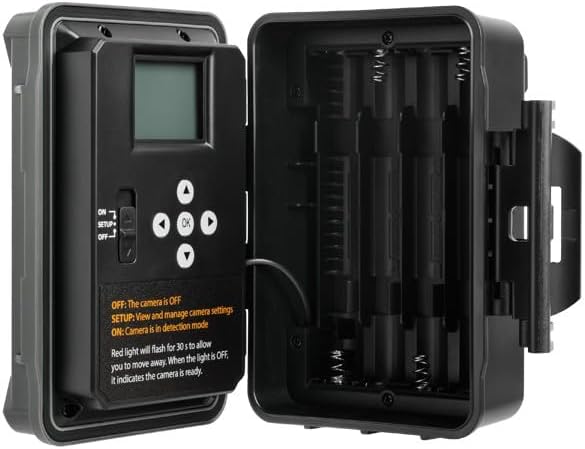
Figura 2: Interno view of the camera showing the control panel and battery compartment.
4. Modos de funcionamento
The SPYPOINT Force 24 offers four versatile operating modes:
- Modo foto: Captura imaxes fixas.
- Modo de vídeo: Records video clips with sound.
- Modo de lapso de tempo: Captura imaxes a intervalos establecidos durante un período de tempo.
- Time-Lapse Plus Mode: Combines time-lapse photography with motion-triggered captures.
4.1. Selección dun modo
Use the camera's internal control panel to navigate through the menu and select your desired operating mode. Refer to the on-screen instructions for specific settings within each mode.
4.2. Motion Detection and Trigger Speed
The camera features a 0.5-second trigger speed and a 70-foot detection range to ensure quick capture of moving subjects. The low-glow infrared LEDs provide discreet illumination for night captures.
5. Camera Interface and Controls
The camera's internal display and buttons allow for easy configuration and review of captured media.
- ON/SETUP/OFF Switch: Controls the camera's power and enters setup mode.
- Botóns de navegación: Used to move through menu options and review imaxes / vídeos.
- Botón Aceptar: Confirma as seleccións.
- Botón de menú: Accede ao menú principal de configuración.
When in SETUP mode, the red light will flash for 30 seconds, allowing you time to move away before the camera enters detection mode. When the light is OFF, the camera is ready.
6. Mantemento
- Substitución da batería: Replace batteries when the low battery indicator appears on the screen or in the app.
- Xestión da tarxeta SD: Regularly check the SD card capacity. Transfer important files to a computer and format the card periodically to maintain optimal performance.
- Limpeza: Keep the camera lens, PIR sensor, and infrared LEDs clean from dirt, dust, and debris using a soft, dry cloth.
- Protección ambiental: Ensure the camera is securely mounted and latches are closed to protect against weather elements.
7 Solución de problemas
- A cámara non se acende: Comprobe a instalación das baterías e asegúrese de que as baterías estean novas.
- No Photos/Videos Captured: Verify the SD card is inserted correctly and has sufficient space. Check motion detection settings and ensure the camera is in ON mode.
- Mala calidade da imaxe: Clean the camera lens and ensure there are no obstructions. Check the camera's position relative to the subject and lighting conditions.
- Duración da batería curta: Ensure high-quality batteries are used. Adjust camera settings such as detection delay and video length to conserve power.
8. Especificacións
- Modelo: FORZA-24
- Resolución fotográfica: 24 megapíxeles
- Resolución de vídeo: 2K with Sound
- Velocidade de disparo: 0.5 segundos
- Rango de detección: 70 pés
- Rango de flash: 70 feet (Low Glow IR)
- Fonte de enerxía: 8 pilas AA (non incluídas)
- Almacenamento: MicroSD Card (up to 32 GB, not included)
- Dimensións: 8 x 4 x 3 polgadas
- Peso do artigo: 1 libra
9. Garantía e soporte
The SPYPOINT Force 24 trail camera comes with a two-year warranty, ensuring reliable performance. For technical assistance, troubleshooting, or warranty claims, please refer to the official SPYPOINT support channels or visit their websitio.
Para obter información adicional e recursos, visite o SPYPOINT Store.