
Introdución
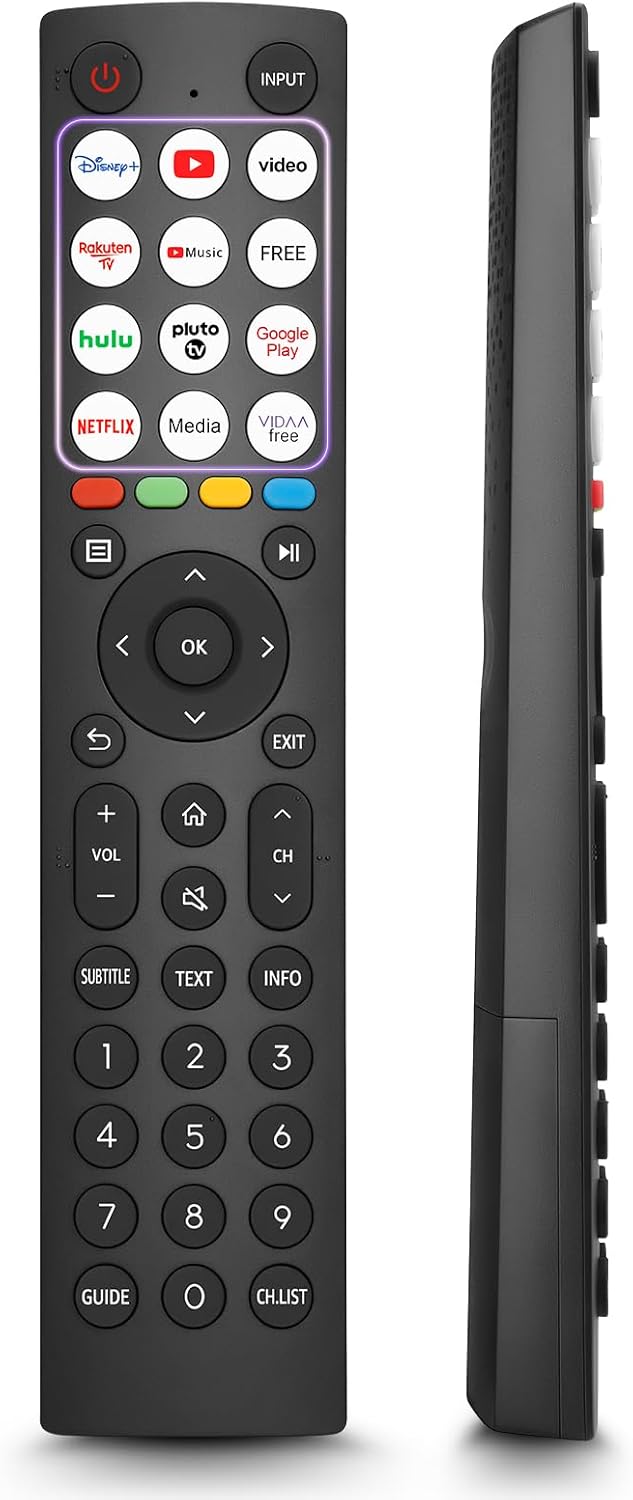
This manual provides comprehensive instructions for the OMAIC EN2Q36H replacement remote control, designed for Hisense Smart TVs. It covers essential information regarding setup, operation, and maintenance to ensure optimal performance and user experience. This remote offers a direct replacement solution without the need for complex programming.
Configuración
The OMAIC EN2Q36H remote control is designed for immediate use with compatible Hisense Smart TVs. No programming or pairing is required.
Instalación de baterías
- Localice o compartimento da batería na parte traseira do control remoto.
- Deslice a tapa da batería cara abaixo ou na dirección indicada pola frecha para abrila.
- Insert two AAA alkaline batteries (not included), ensuring the positive (+) and negative (-) terminals align correctly with the markings inside the compartment.
- Volva colocar a tapa da batería deslizándoa de volta á súa posición ata que faga clic de forma segura.
Once batteries are installed, the remote is ready to operate your Hisense Smart TV.

Instrucións de funcionamento
This remote control utilizes infrared (IR) technology for communication with your Hisense Smart TV. Ensure a clear line of sight between the remote and the TV's IR receiver for optimal performance.
Características clave
- 12 Shortcut Buttons: Quickly access popular streaming services and applications with dedicated buttons.
- Strong IR Signal: Provides a longer transmission distance and quick response without noticeable delay.
- Construción duradeira: Made from high-quality ABS and silicone materials for extended lifespan.

Funcións dos botóns
Familiarize yourself with the functions of each button on your OMAIC EN2Q36H remote control:
| Botón | Función |
|---|---|
| POTENCIA | Switches the TV on or into standby mode. |
| ENTRADA | Selecciona fontes de entrada (HDMI, AV, etc.). |
| APP Buttons | Quick access buttons for specific applications (e.g., Disney+, Netflix, YouTube). |
| MENÚ | Displays the Quick Setup menu. |
| Control de MEDIOS | Buttons for Play, Pause, Stop, Fast Forward, Rewind. |
| Navegación (Arriba/Abaixo/Esquerda/Dereita) | Navigates on-screen menus and adjusts system settings. |
| OK | Confirms selection in on-screen menus. |
| VOLVER | Volve ao menú anterior. |
| SAIR | Sae do menú actual. |
| VOL +/- | Axusta o nivel de volume. |
| FOGAR | Enters the Home screen. |
| MUTO | Silencia ou restaura o son da televisión. |
| CH ^/v | Switches channels. |
| SUBTITULO | Activates or deactivates subtitle mode. |
| TEXTO | Turns teletext function on and off. |
| INFO | Mostra a información do programa actual. |
| NUMBER Buttons (0-9) | Direct channel selection or number input. |
| GUÍA | Displays the Electronic Programme Guide (DTV input). |
| LISTA DE CH | Displays the Channel List on the screen. |

Compatible Hisense TV Models
The OMAIC EN2Q36H replacement remote control is compatible with the following Hisense VIDAA 4K HDTV Smart TV series:
- 32A4K, 40A4K, 43A4K
- 32A5KQ, 40A5KQ
- 43A6K, 50A6K, 55A6K, 58A6K, 65A6K, 70A6K, 75A6K, 85A6K
- 55U6KQ, 65U6KQ
- 43A7KQ, 50A7KQ, 55A7KQ, 65A7KQ, 75A7KQ
- 43E7KQ, 50E7KQ, 55E7KQ, 65E7KQ, 75E7KQ
Mantemento
Para garantir a lonxevidade e o correcto funcionamento do seu mando a distancia, siga estas pautas de mantemento:
- Limpeza: Use a soft, dry cloth to clean the remote. Avoid using liquid cleaners or abrasive materials, as they may damage the surface or internal components.
- Substitución da batería: Replace batteries when the remote's response becomes sluggish or stops working. Always replace both batteries at the same time with new ones of the same type (AAA alkaline).
- Almacenamento: Garde o mando a distancia nun lugar fresco e seco, lonxe da luz solar directa, de temperaturas extremas e de alta humidade.
- Evita gotas: Protexa o mando a distancia de impactos físicos, xa que as caídas poden danar os circuítos internos.
Resolución de problemas
Se tes problemas co teu mando a distancia, consulta os seguintes pasos para a súa resolución:
| Problema | Causa posible | Solución |
|---|---|---|
| O control remoto non responde | Pilas gastadas ou inseridas incorrectamente. | Substitúa as pilas por pilas alcalinas AAA novas, asegurándose de manter a polaridade correcta. |
| O control remoto non responde | Obstrución entre o mando a distancia e o televisor. | Ensure a clear line of sight to the TV's IR receiver. Remove any objects blocking the path. |
| O control remoto non responde | O mando a distancia está demasiado lonxe da televisión. | Move closer to the TV. The remote has an extended range, but extreme distances may affect performance. |
| Os botóns son pegajosos ou non responden | Suciedade ou residuos debaixo dos botóns. | Gently clean around the buttons with a soft, dry cloth. Avoid liquids. |
| Specific functions not working | TV model incompatibility (rare). | Verify your Hisense TV model is listed in the 'Compatible Hisense TV Models' section. |
Especificacións
| Característica | Detalle |
|---|---|
| Nome do modelo | EN2Q36H |
| Marca | OMAIC |
| Dispositivos compatibles | Hisense Smart TVs |
| Tecnoloxía de conectividade | Infravermello (IR) |
| Número de botóns | 48 |
| Tipo de control | Control de botón |
| Características especiais | Universal, Comfortable |
| Cor | Negro |
| Descrición da batería | AAA (Alkaline) |
| Supported Devices (Max) | 1 |
| Dimensións do produto (aprox.) | 34.7 x 24.7 x 2.2 cm |
| Peso do produto (aprox.) | 80 gramos |

Garantía e Soporte
OMAIC is committed to the quality and compatibility of its replacement remote controls. We provide professional after-sales support to ensure customer satisfaction.
If you have any questions or concerns regarding your OMAIC EN2Q36H remote control or your order, please contact us directly. Our support team aims to respond to inquiries within 12 working hours.