
1. Produto rematadoview
The Attoe AK680 is a wired mechanical gaming keyboard designed for performance and customization. It features a compact 60% layout, RGB backlighting, hot-swappable switches, and durable double-shot PBT keycaps. This manual provides essential information for setting up, operating, and maintaining your keyboard.

Figure 1: Attoe AK680 Mechanical Gaming Keyboard.
2. Contido do paquete
Verifica que todos os elementos estean presentes no paquete:
- Attoe AK680 Mechanical Gaming Keyboard
- Cable USB-C
- Tirador de chaves
- Switch Puller (often integrated with keycap puller or separate)
- Manual de usuario (este documento)
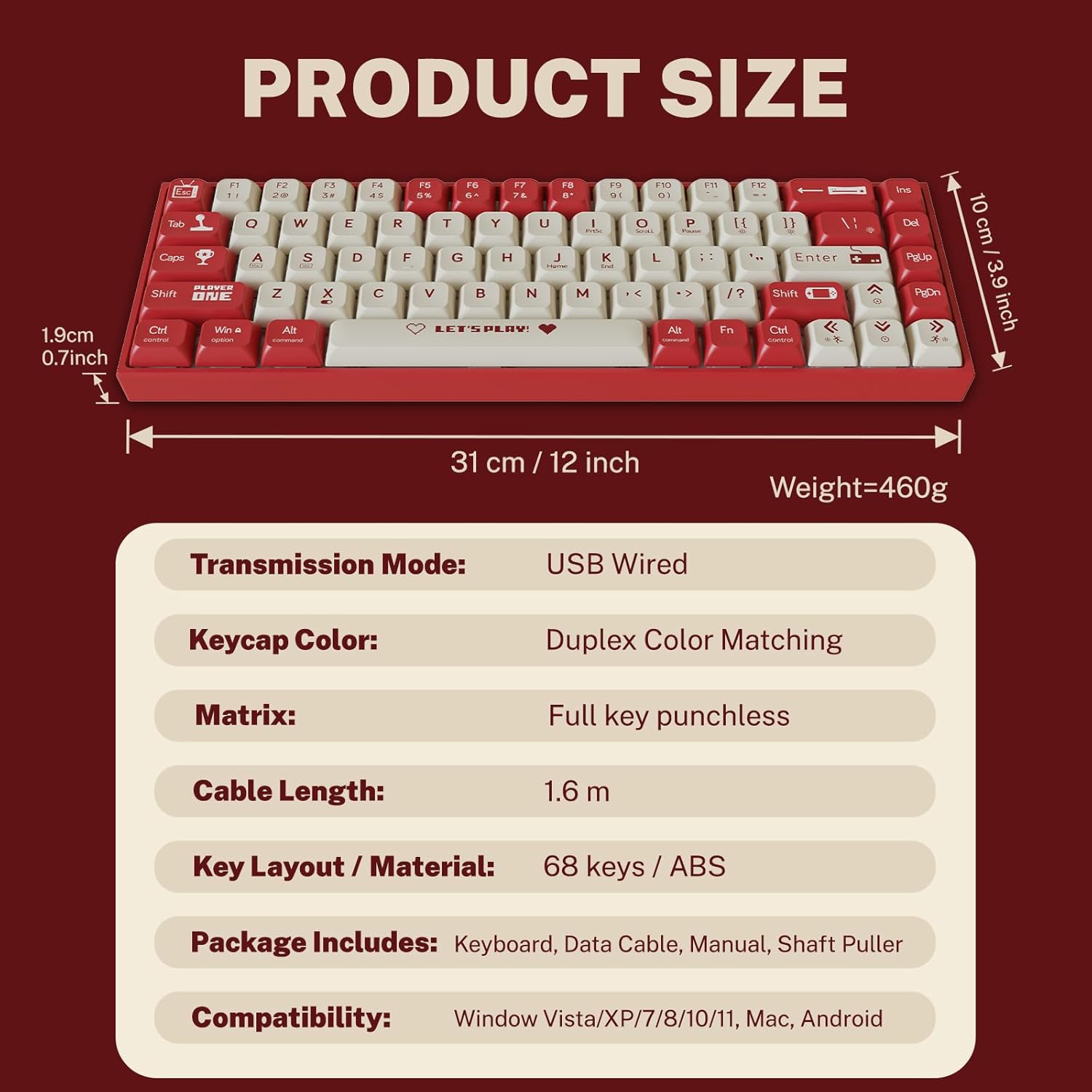
Figura 2: Contido do paquete e dimensións do produto.
3. Instrucións de configuración
3.1 Conexión do teclado
- Localiza o porto USB-C na parte traseira ou lateral do teclado.
- Conecta un extremo do cable USB-C fornecido ao porto USB-C do teclado.
- Connect the other end of the USB-A connector to an available USB port on your computer.
- O teclado será recoñecido automaticamente polo teu sistema operativo. Normalmente non se requiren controladores adicionais para a funcionalidade básica.
3.2 Compatibilidade do sistema
The Attoe AK680 keyboard is compatible with the following operating systems:
- Windows Vista / XP / 7 / 8 / 10 / 11
- macOS
- Android

Figure 3: Multi-system compatibility of the keyboard.
4. Instrucións de funcionamento
4.1 Funcións básicas do teclado
The AK680 features a 68-key layout, providing essential keys while maintaining a compact form factor. All keys support anti-ghosting, ensuring accurate input even during rapid key presses.

Figure 4: The 68-key layout for efficient use.
4.2 Retroiluminación RGB
The keyboard features 16.8 million color RGB backlighting with various effects. Specific key combinations (often involving the Fn key) are used to cycle through lighting modes, adjust brightness, and change colors. Refer to the quick start guide or product page for detailed key combinations for lighting control.

Figure 5: RGB Backlighting in operation.
4.3 Interruptores intercambiables en quente
The AK680 supports hot-swappable 3-pin and 5-pin mechanical switches. This allows you to easily change switches without soldering, customizing the typing feel to your preference. Use the included switch puller for safe removal and installation.
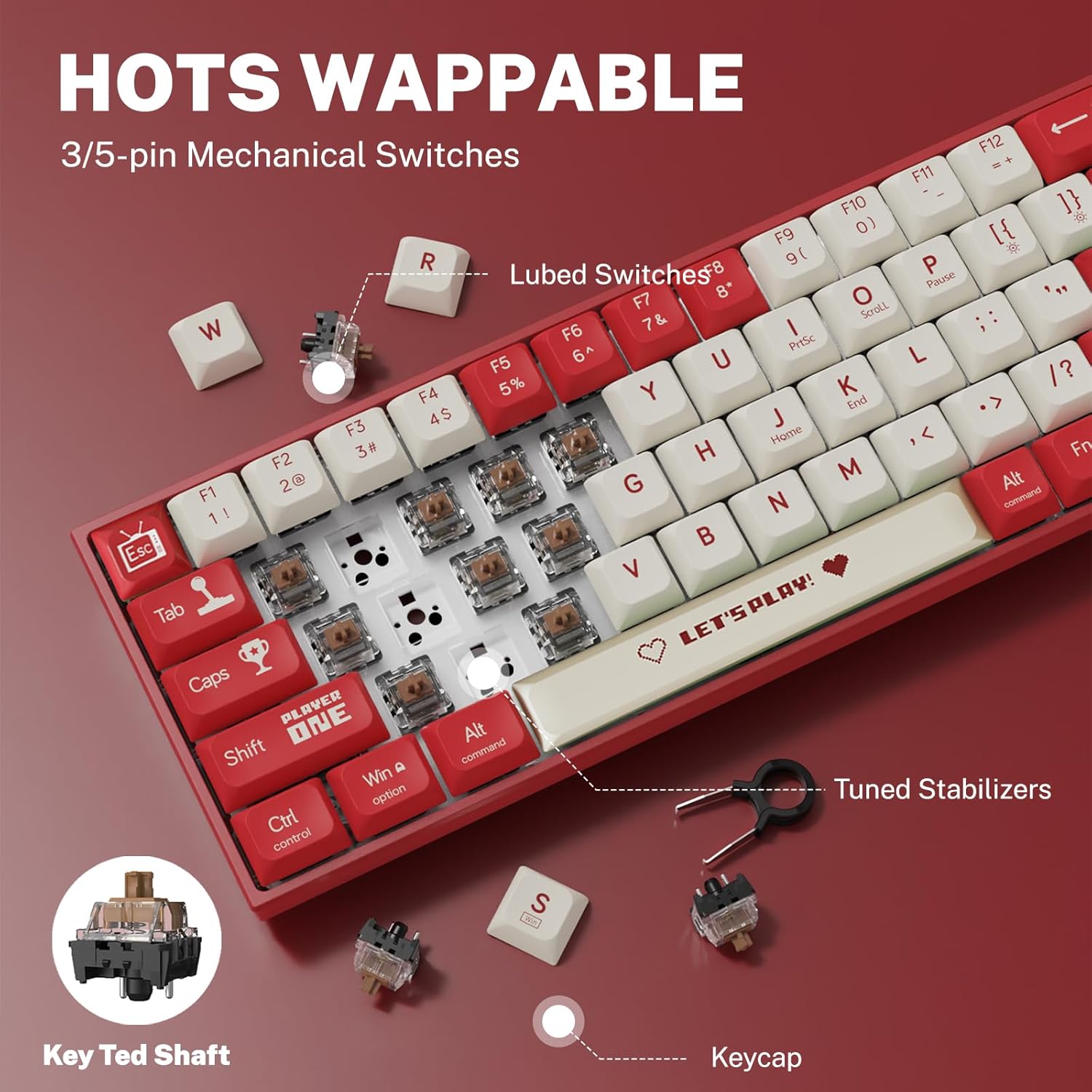
Figura 6: Mecanismo de conmutación intercambiable en quente.
5. Mantemento
5.1 Limpeza do teclado
- Limpeza xeral: Usa un pano suave e seco para limpar a superficie do teclado. Para a sucidade persistente, limpa lixeiramenteampgl o pano con auga ou un limpador suave e non abrasivo.
- Between Keycaps: Usa aire comprimido para eliminar o po e os residuos que hai entre as tapas das teclas.
- Limpeza das tapas das teclas: For thorough cleaning, remove keycaps using the provided keycap puller. Wash keycaps with mild soap and water, rinse thoroughly, and ensure they are completely dry before reattaching.
5.2 Replacing Keycaps and Switches
The AK680's hot-swappable design allows for easy replacement of keycaps and switches.
- Eliminación das teclas: Usa o extractor de teclas para agarrar e levantar suavemente as teclas cara arriba.
- Eliminación de interruptores: After removing the keycap, use the switch puller to carefully grip the top and bottom clips of the switch and pull it straight out.
- Instalación de interruptores: Align the new switch's pins with the holes on the PCB. Press down firmly until the switch clicks into place. Ensure pins are not bent.
- Instalación das teclas: Align the keycap with the switch stem and press down gently until it is seated securely.

Figure 7: Components of a mechanical switch and tools for maintenance.
6 Solución de problemas
- O teclado non responde:
- Asegúrate de que o cable USB-C estea conectado correctamente tanto ao teclado como ao ordenador.
- Tenta conectar o teclado a un porto USB diferente do teu ordenador.
- Proba o teclado noutro ordenador para descartar problemas específicos do sistema.
- Chaves sen rexistro:
- Remove the keycap and switch for the affected key. Reinstall the switch, ensuring it is properly seated and its pins are not bent.
- Limpa calquera residuo que poida estar obstruíndo o mecanismo do interruptor.
- RGB Backlighting Not Working:
- Check if the backlighting is turned off or set to minimum brightness using the keyboard's function keys.
- Asegúrate de que o teclado recibe suficiente enerxía do porto USB.
7. Especificacións
| Característica | Detalle |
|---|---|
| Número de modelo | AK680 |
| Marca | Attoe |
| Tipo de conexión | Con cable (USB-C) |
| Número de chaves | 68 teclas |
| Tecnoloxía clave | Mechanical Shaft (Red/Teal Shaft), Hot-Swappable (3-pin/5-pin) |
| Material de chaveiro | Double-Shot PBT |
| Retroiluminación | RGB (16.8 millóns de cores) |
| Anti-Ghosting | Full Keys Anti-Ghosting |
| Lonxitude do cable | 1.6 metros |
| Dimensións do produto | 12 x 3.9 x 0.7 polgadas (31 x 10 x 1.9 cm) |
| Peso do elemento | 1.01 libras (460 g) |
| Compatibilidade | Windows Vista/XP/7/8/10/11, macOS, Android |
| Función impermeable | IPX4 rated protection (splash resistant) |
8. Garantía e soporte
Attoe provides a 12 meses de garantía for the AK680 Mechanical Gaming Keyboard from the date of purchase.
If you encounter any problems or have questions regarding your product, please contact Attoe customer service. We are committed to providing the best service and will respond within 24 hours to assist you.
For support, please refer to the contact information provided with your purchase or visit the official Attoe websitio.