
Introdución
Grazas pola compraasing the UPXNBOR Wireless LED Table Lamp. This manual provides important information for the safe and efficient use of your new lamp. Please read it thoroughly before first use and keep it for future reference.
Este versátil lamp features a durable all-metal casing, touch control, three warm light levels, and IP54 waterproofing, making it suitable for various indoor and outdoor settings.
Instrucións de seguridade
- Le todas as instrucións: Antes de operar o lamp, read and understand all safety and operating instructions.
- Cargando: Use only the provided USB-C cable for charging. Do not use fast chargers, as this may reduce battery lifespan. Ensure the lamp is fully charged before its first use.
- Resistencia á auga: O lamp is IP54 waterproof, meaning it is protected against dust ingress and splashing water from any direction. It is not designed for submersion in water.
- Temperatura: Evite expor a lamp to extreme temperatures. For optimal battery performance, use and charge the lamp within recommended temperature ranges.
- Limpeza: Desconecta o lamp from the power source before cleaning. Use a soft, dry cloth. Do not use abrasive cleaners or solvents.
- Desmontaxe: Non intente desmontar nin modificar o lampIsto anulará a garantía e pode causar danos ou lesións.
- Nenos: Manteña o lamp fóra do alcance dos nenos.
Contido do paquete
Comprobe se o paquete contén os seguintes elementos:
- UPXNBOR Wireless LED Table Lamp (Model UP-WSA)
- USB-C Power Cable (80cm)
- Manual de usuario
Produto rematadoview
The UPXNBOR Wireless LED Table Lamp is designed for convenience and durability. It features a robust all-metal construction and a sleek, minimalist design.
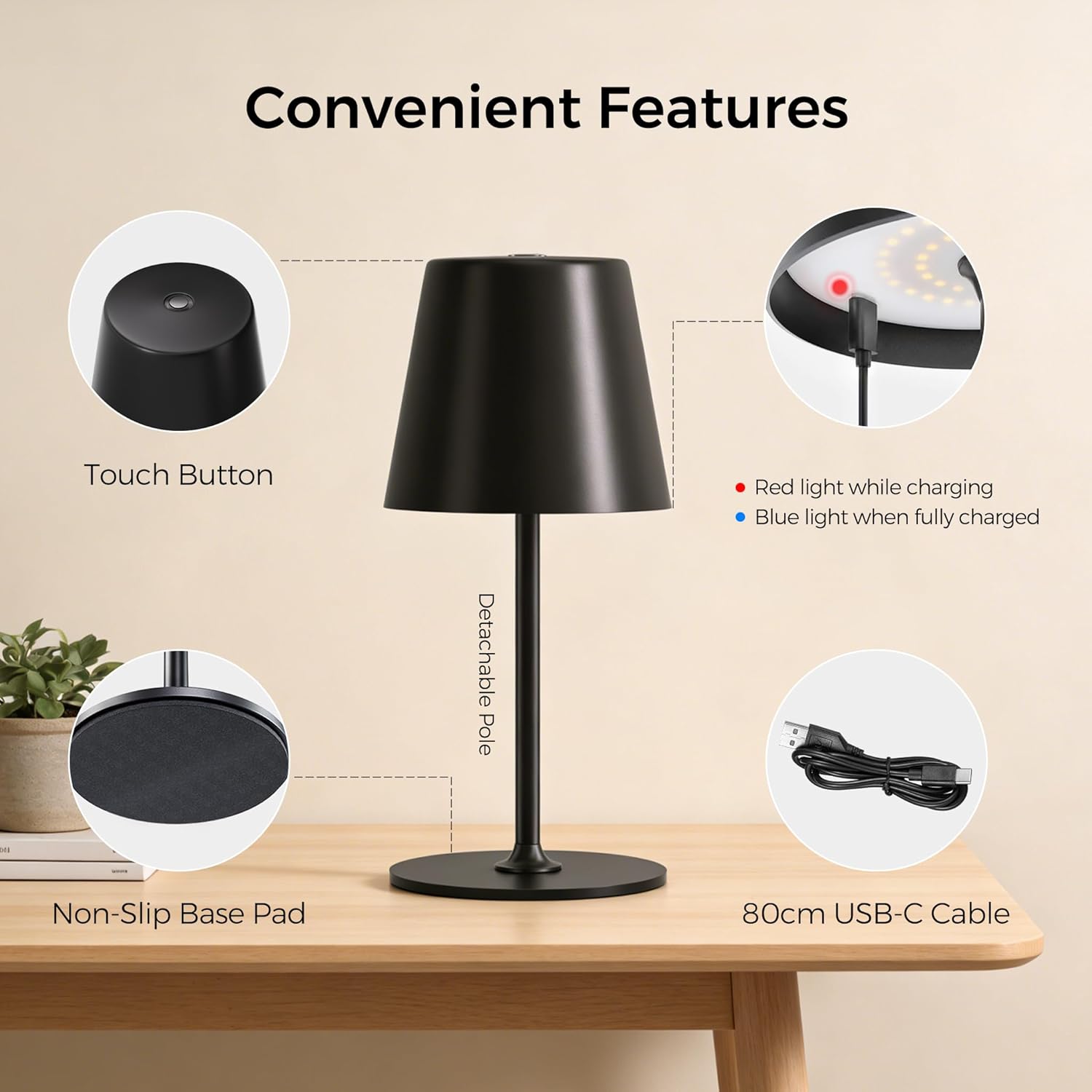
Image: Convenient Features. This image highlights the key components of the lamp, including the touch button on top, the charging indicator light (red for charging, blue for fully charged), the detachable pole for easy assembly, the non-slip base pad for stability, and the included 80cm USB-C charging cable.
Características principais:
- All-Metal Casing: High-quality metal construction for durability and stability.
- 48 LED: Provides uniform illumination with 20 internal and 28 external LEDs.
- 3 niveis de brillo: Easily adjust light intensity to suit different environments and needs.
- Dual Battery Design: Duración prolongada da batería para un uso prolongado.
- Control táctil: Simple and intuitive operation via a touch-sensitive button on the top.
- Impermeable IP54: Suitable for both indoor and outdoor use, resistant to splashing water.
- Base antideslizante: Ensures stability on various surfaces.
- Detachable Pole: Allows for compact storage and easy assembly.

Image: All-New Upgrade. This graphic illustrates the product's enhancements, including an upgrade from single-ring to dual-ring LEDs for improved brightness, a transition from a single-battery to a dual-battery design for extended runtime (6-16 hours), and an upgrade from a plastic top to an all-metal top for enhanced material quality.
Configuración
Your UPXNBOR lamp is designed for easy assembly.
- Desempaquetar: Retire coidadosamente todos os compoñentes da embalaxe.
- Montar o poste: O lamp pole may come in two parts. Gently screw the upper part of the pole into the lower part, then screw the assembled pole into the lamp base. Ensure it is securely fastened.
- Carga inicial: Antes do primeiro uso, cargue completamente o lamp using the provided USB-C cable. Refer to the 'Charging' section for details.
Instrucións de funcionamento
O lamp features simple touch control for power and brightness adjustment.
- Encendido/apagado: Lightly touch the center of the top surface of the lamp to turn it on. Touch it again to turn it off.
- Axustar o brillo: Mentres o lamp is on, tap the touch button repeatedly to cycle through the three brightness levels (Low, Medium, High).

Image: 3 Brightness Levels and Battery Life. This image illustrates the three available brightness settings and their approximate battery runtimes: Level 1 provides 14-16 hours, Level 2 provides 8-9 hours, and Level 3 provides 6-7 hours. Note that in cold conditions (0-5°C), battery capacity may drop to around 70-80%.
Cargando
To charge your UPXNBOR Wireless LED Table Lamp:
- Locate the USB-C charging port, typically on the side or base of the lamp.
- Conecta o cable USB-C fornecido aoampo porto de carga.
- Connect the other end of the USB-C cable to a standard USB power adapter (not included) or a powered USB port.
- The charging indicator light (refer to Product Overview image) will illuminate vermello mentres se carga.
- Unha vez cargada completamente, a luz indicadora acenderase azul.
- Desconecte o cable de carga unha vez que a carga estea completa.
Importante: Cargue completamente o lamp before its first use. Do not use a fast charger to ensure the long-term health and lifespan of the battery.
Mantemento
Proper maintenance ensures the longevity of your lamp.
- Limpeza: Limpe o lamp with a soft, dry cloth. For stubborn marks, a slightly damp cloth can be used, but ensure the lamp is completely dry before use or charging. Do not use harsh chemicals or abrasive materials.
- Almacenamento: Se almacena o lamp for an extended period, ensure it is fully charged and store it in a cool, dry place. Recharge it every 3-6 months to maintain battery health.
- Coidado da batería: To maximize battery life, avoid completely draining the battery frequently. Charge the lamp when the light output becomes noticeably dim.
Resolución de problemas
Se tes problemas co teu lamp, consulte os seguintes problemas e solucións comúns:
| Problema | Causa posible | Solución |
|---|---|---|
| Lamp non acende. | A batería está esgotada. | Carga o lamp plenamente. |
| Lamp non cobra. | O cable ou adaptador de carga está avariado. O porto de carga está sucio. | Proba cun cable USB-C e un adaptador de corrente diferentes. Gently clean the charging port with a dry, soft brush. |
| A saída de luz é débil. | A batería está baixa. Incorrect brightness level selected. | Carga o lamp. Tap the touch button to cycle to a brighter setting. |
| O control táctil non responde. | Surface is wet or dirty. Fallo temporal do software. | Ensure the touch surface is clean and dry. Try turning the lamp off and on again (if possible) or let the battery drain and recharge. |
Especificacións
| Número de modelo | UP-WSA |
| Marca | UPXNBOR |
| Dimensións (L x W x H) | 10.5 x 37.8 x 10.5 cm |
| Peso do elemento | 650 gramos |
| Material | Metal |
| Material de sombra | Metal |
| Cor | Negro |
| Tipo de fonte de luz | LED |
| Número de LEDs | 48 |
| Wattage | 10 vatios |
| Fonte de enerxía | Battery Powered (2 Non-standard batteries included) |
| Tipo de cambio | Toca |
| Características | Regulable, sen fíos |
| Clasificación impermeable | IP54 |
| Ambiente de uso | Interior, Exterior |
| País de Orixe | China |

Image: Two Height Options. This image displays the lamp in two different configurations, illustrating its adjustable height. One configuration shows a height of 23.5 cm (9.3 inches), and the other shows a height of 37.8 cm (14.9 inches).
Información de eliminación
This product contains a built-in rechargeable battery. Do not dispose of this product with general household waste. Please follow local regulations for the disposal of electronic products and batteries. Proper disposal helps prevent potential negative consequences for the environment and human health.
Garantía e Soporte
Para obter información sobre a garantía ou asistencia técnica, consulte a documentación proporcionada no momento da compra ou póñase en contacto co seu vendedor. Garde o comprobante de compra para reclamacións de garantía.