
RASTKY RASTKYxhm9bnta1g
RASTKY Smart Voice Translator User Manual
Model: RASTKYxhm9bnta1g
1. Introdución
Thank you for choosing the RASTKY Smart Voice Translator. This device is designed to facilitate seamless communication across language barriers, offering high-accuracy online, offline, and photo translation capabilities. Its portable design and intuitive interface make it an ideal companion for travelers, language learners, and anyone needing quick and reliable translation.
This manual provides detailed instructions on how to set up, operate, and maintain your translator to ensure optimal performance and longevity.
2. Información de seguridade
Please read all safety instructions carefully before using the device to prevent damage or injury.
- Non expoñas o dispositivo a temperaturas extremas, luz solar directa nin humidade elevada.
- Evite deixar caer ou someter o dispositivo a fortes impactos.
- Non intente desmontar nin reparar o dispositivo vostede mesmo. Consulte persoal de servizo cualificado.
- Manteña o dispositivo lonxe da auga e doutros líquidos.
- Use only the provided or approved charging cable and adapter.
- Desfágase do dispositivo e da súa batería de forma responsable segundo a normativa local.
3. Produto rematadoview
Familiarize yourself with the components and controls of your RASTKY Smart Voice Translator.

Figura 3.1: Fronte View
This image shows the front of the RASTKY Smart Voice Translator, featuring the 2.4-inch touch screen, the "YOU" button (left), the camera button (center), and the "ME" button (right). Below the buttons is the speaker grille.
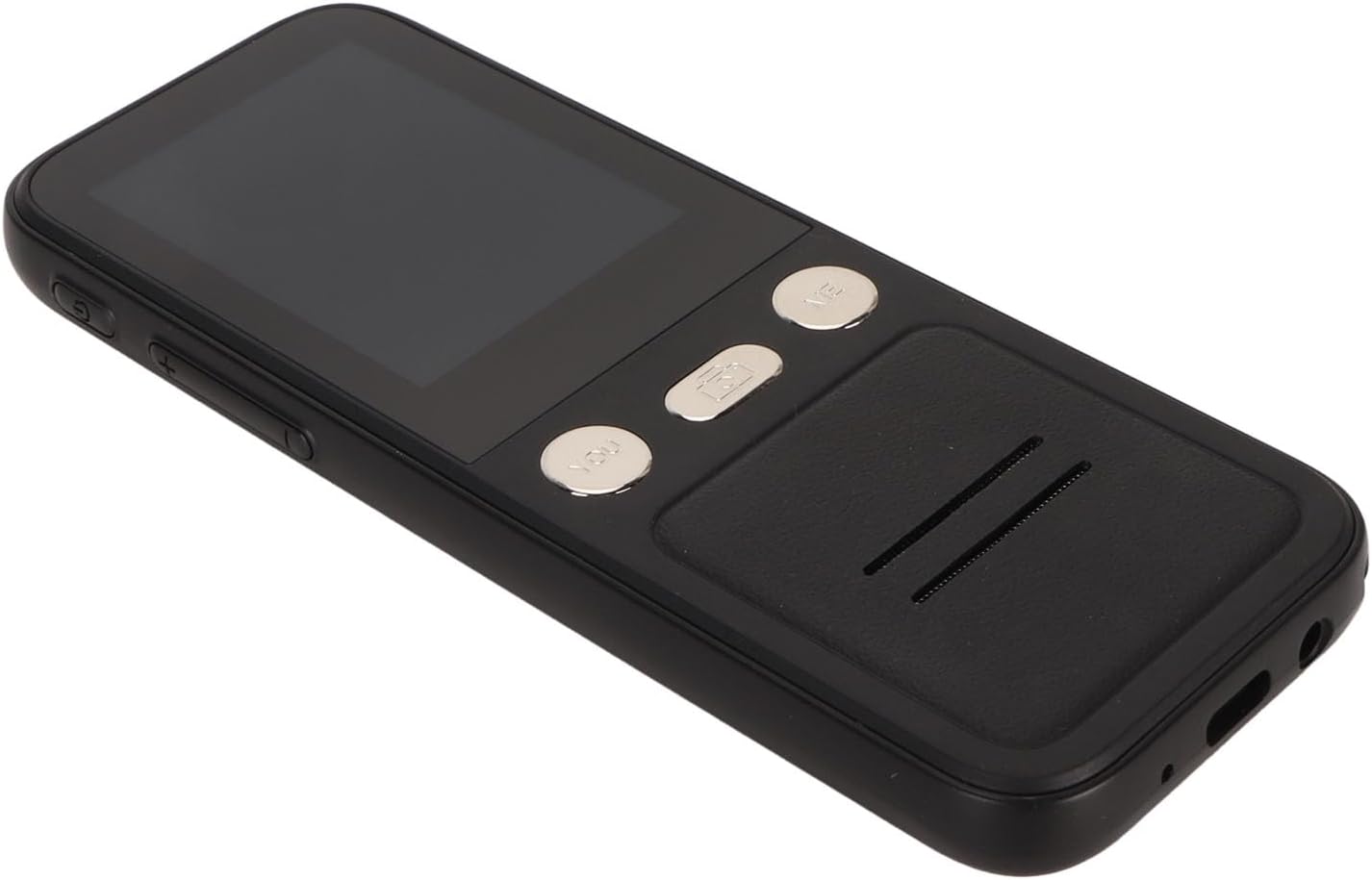
Figura 3.2: Lateral View
This image displays the side of the translator, highlighting the power button and volume control buttons located on the left side of the device.

Figura 3.3: Parte dianteira e traseira View
This image presents both the front and back of the translator. The back shows the "SMART CAMERA" lens and text indicating "charge Type-c USB=1.0Amax", along with compliance markings.

Figure 3.4: Bottom Ports
Un primeiro plano view of the bottom of the device, showing the USB Type-C charging port and a 3.5mm headphone jack.
3.1. Compoñentes do dispositivo
- Pantalla táctil de 2.4 polgadas: For navigation and displaying translations.
- "YOU" Button: Press and hold to speak your language for translation.
- "ME" Button: Press and hold for the other person to speak their language for translation.
- Botón da cámara: Activates the 5MP camera for photo translation.
- Botón de encendido: Acende/apaga o dispositivo e bloquea/desbloquea a pantalla.
- Botóns de volume: Axusta o volume de saída de audio.
- Relator: Outputs translated audio.
- Micrófono: Captures speech for translation.
- Porto USB tipo C: Para cargar o dispositivo.
- Conector para auriculares de 3.5 mm: For private listening of translations.
4. Configuración
4.1. Cargando o dispositivo
Before first use, fully charge your translator. A full charge typically takes approximately 2-3 hours.
- Connect the provided USB Type-C cable to the charging port at the bottom of the device.
- Conecta o outro extremo do cable USB a un adaptador de corrente USB compatible (non incluído) ou ao porto USB dun ordenador.
- O indicador de carga na pantalla mostrará o estado de carga.

Figure 4.1: Device and Charging Cable
This image shows the RASTKY Smart Voice Translator alongside its USB Type-C charging cable, illustrating the components included for charging.
4.2. Acendido/apagado
- Para acender: Press and hold the Power button (located on the side) for approximately 3 seconds until the screen lights up.
- Para apagar: Press and hold the Power button for approximately 3 seconds. A power-off menu will appear on the screen. Select "Power Off" to shut down the device.
- Bloqueo/Desbloqueo da pantalla: Prema brevemente o botón de acendido/apagado para bloquear ou desbloquear a pantalla.
4.3. Configuración inicial e conexión Wi-Fi
Upon first power-on, you may be prompted to select your preferred language and connect to a Wi-Fi network. A Wi-Fi connection is recommended for the most accurate and comprehensive translation services, including access to 112 online languages.
- Follow the on-screen prompts to select your system language.
- Navega ata Configuración > Wi-Fi.
- Select your desired Wi-Fi network from the list and enter the password if required.
- Once connected, the Wi-Fi icon will appear on the status bar.
5. Instrucións de funcionamento
5.1. Online Voice Translation (112 Languages)
This mode provides the highest accuracy and widest range of languages.
- Asegúrate de que o dispositivo estea conectado á wifi.
- On the main translation screen, select the source language (your language) and the target language (the language you want to translate to) by tapping on the language names at the top of the screen.
- To speak your language, press and hold the "YOU" button (left button). Speak clearly into the microphone. Release the button when you finish speaking.
- The device will display and speak the translation in the target language.
- To have the other person speak, press and hold the "ME" button (right button). They should speak clearly into the microphone. Release the button when they finish speaking.
- The device will display and speak the translation in your language.
5.2. Offline Voice Translation (10 Languages)
The device supports 10 default offline languages. Additional offline language packs can be downloaded via Wi-Fi for use without an internet connection.
- Default Offline Languages: Simplified Chinese, Traditional Chinese, English, German, Spanish, French, Japanese, Korean, Russian, and Thai.
- To Download More Offline Languages: Connect to Wi-Fi, navigate to Configuración > Tradución fóra de liña, and select the language packs you wish to download.
- Once downloaded, the offline translation process is similar to online translation, using the "YOU" and "ME" buttons.
5.3. Photo Translation (43 Languages)
The 5MP camera allows you to translate text from images, such as signs, menus, or documents.
- Ensure the device is connected to Wi-Fi for optimal photo translation accuracy.
- Toca o Botón da cámara on the device's front panel or select the Photo Translation option from the main menu on the screen.
- Point the camera at the text you wish to translate. Ensure the text is well-lit and clear within the frame.
- Tap the capture button on the screen to take a photo.
- The device will process the image and display the translated text on the screen. You can select the source and target languages for photo translation.
5.4. Selección da lingua
To change the translation languages:
- On the main translation screen, tap on the language displayed for "YOU" (your language) to open the language list. Select your desired language.
- Tap on the language displayed for "ME" (the other person's language) to open the language list. Select their desired language.
- For photo translation, language selection options will appear within the photo translation interface.
6. Mantemento
Proper care will extend the life of your RASTKY Smart Voice Translator.
- Limpeza: Use a soft, dry, lint-free cloth to clean the device. For stubborn smudges on the screen, slightly dampen the cloth with water or a screen cleaner. Do not use harsh chemicals or abrasive materials.
- Almacenamento: Garde o dispositivo nun lugar fresco e seco, lonxe da luz solar directa e de temperaturas extremas, cando non o use durante períodos prolongados.
- Coidado da batería: Para preservar a duración da batería, evite descargala completamente con frecuencia. Cargue o dispositivo regularmente, mesmo se non o usa de forma constante.
7 Solución de problemas
If you encounter issues with your translator, refer to the following common problems and solutions.
| Problema | Causa posible | Solución |
|---|---|---|
| O dispositivo non se acende. | Batería baixa; dispositivo conxelado. | Charge the device for at least 30 minutes. If still unresponsive, press and hold the Power button for 10-15 seconds to force a restart. |
| A tradución é inexacta ou lenta. | Poor Wi-Fi connection; unclear speech; incorrect language selection. | Ensure a stable Wi-Fi connection. Speak clearly and at a moderate pace. Verify that the correct source and target languages are selected. |
| Photo translation not working. | Poor lighting; blurry image; text not recognized. | Ensure adequate lighting. Hold the device steady to avoid blur. Make sure the text is within the camera frame and clearly legible. |
| Non se escoita son do altofalante. | Volume too low; speaker obstructed. | Increase the volume using the volume buttons. Check if anything is blocking the speaker grille. |
| Non se pode conectar á wifi. | Contrasinal incorrecto; fóra de rango; problema de rede. | Double-check the Wi-Fi password. Move closer to the Wi-Fi router. Restart your router and the translator. |
8. Especificacións
Technical specifications for the RASTKY Smart Voice Translator.
- Modelo: RASTKYxhm9bnta1g
- Tamaño da pantalla: Pantalla táctil de 2.4 polgadas
- Resolución: 240 x 320
- Capacidade da batería: 1500 mAh (integrada)
- Reprodución continua: 6 horas ou máis
- RAM: 1 GB
- ROM: 8 GB
- Cámara: 5MP Pixels
- Método de rede: WIFI Networking
- Interface de datos: Interface tipo C
- Recoñecemento de voz: For Google SR
- Translation Engine: For Google, for iFlytek
- Online Supported Languages: 112
- Offline Supported Languages: 10 (Simplified Chinese, Traditional Chinese, English, German, Spanish, French, Japanese, Korean, Russian, Thai)
- Idiomas de tradución de fotos: 43
- Dimensións: Aproximadamente 6.69 x 3.15 x 1.57 polgadas
- Peso: Aproximadamente 8 onzas
9. Garantía e soporte
RASTKY products are manufactured to the highest quality standards. For warranty information and customer support, please refer to the warranty card included with your purchase or visit the official RASTKY website. Please have your model number (RASTKYxhm9bnta1g) and purchase details ready when contacting support.
Para obter máis axuda, tamén podes contactar co teu vendedor.
Ask a question about this manual
Ask about setup, troubleshooting, compatibility, parts, safety, or missing instructions. Manuals+ will review the question and use this page’s manual context to help answer it.