
1. Introdución
This manual provides detailed instructions for the setup, operation, and maintenance of your Transformers GK01 Wireless Mechanical Keyboard. The GK01 is a versatile keyboard featuring tri-mode connectivity (Bluetooth 5.0, 2.4GHz wireless, and USB-C wired), a 101-key layout, RGB backlighting, and hot-swappable switches for a customizable typing experience.

Figure 1.1: Transformers GK01 Wireless Mechanical Keyboard.
2. Contido do paquete
Verifique que todos os elementos que se indican a continuación estean incluídos no seu paquete:
- Transformers GK01 Wireless Mechanical Keyboard
- Cable USB-C a USB-A
- Dongle USB sen fíos de 2.4 GHz
- Extractor de teclas e interruptor 2 en 1
- Manual de usuario (este documento)
- Interruptores de reposto (2 pezas)
- Funda de teclado
3. Configuración e conexión
3.1. Tri-Mode Connection Overview
The GK01 keyboard supports three connection modes: USB-C wired, 2.4GHz wireless, and Bluetooth 5.0. You can connect to up to five devices simultaneously and switch between them seamlessly.

Figure 3.1: Tri-Mode Connection Capabilities.
3.2. Conexión con cable USB-C
- Localiza o porto USB-C no teclado.
- Conecta un extremo do cable USB-C fornecido ao teclado.
- Conecta o outro extremo do cable USB-C a un porto USB-A dispoñible do teu ordenador.
- O teclado recoñecerase automaticamente e estará listo para o seu uso.
Conexión sen fíos de 3.3 GHz
- Locate the 2.4GHz wireless USB dongle.
- Conecta o dongle a un porto USB-A dispoñible do teu ordenador.
- On the keyboard, ensure the mode switch (usually on the side or back) is set to 2.4GHz mode.
- O teclado debería conectarse automaticamente. Se non, preme Fn + R para iniciar o emparellamento.

Figure 3.2: USB-C Port and 2.4GHz Dongle Location.
3.4. Conexión Bluetooth 5.0
The keyboard supports connecting to up to three Bluetooth devices (BT1, BT2, BT3).
- On the keyboard, set the mode switch to Bluetooth mode.
- To enter pairing mode for a specific Bluetooth channel, press and hold Fn + Q (para BT1), Fn + W (para BT2), ou Fn + E (for BT3) for 3-5 seconds until the indicator light flashes rapidly.
- On your device (PC, tablet, smartphone), open Bluetooth settings and search for new devices.
- Select "Transformers GK01" from the list of available devices.
- Once connected, the indicator light on the keyboard will stop flashing.
- Para cambiar entre dispositivos Bluetooth emparellados, simplemente prema Fn + Q, Fn + W, ou Fn + E.
4. Funcionamento básico
4.1. Keyboard Layout and Anti-Ghosting
The GK01 features a 101-key layout, providing a full set of keys including a numeric keypad. All keys are equipped with anti-ghosting technology, ensuring that every keystroke is registered accurately, even when multiple keys are pressed simultaneously.
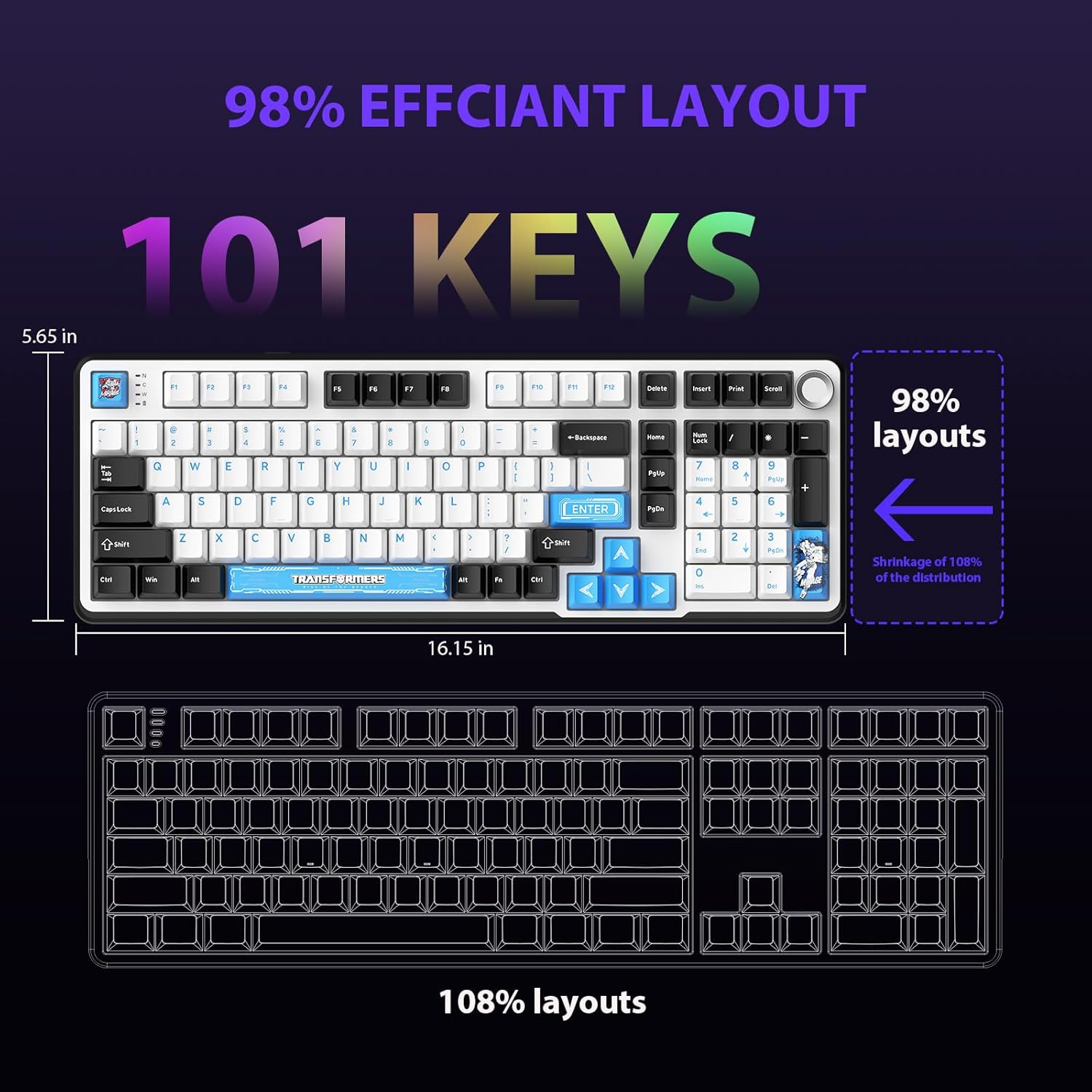
Figure 4.1: 101-Key Layout.
4.2. Botón de control multimedia
The dedicated knob located on the top right of the keyboard provides convenient multimedia control:
- Xirar no sentido das agullas do reloxo: Aumentar o volume.
- Rotate Counter-Clockwise: Diminuír o volume.
- Preme cara abaixo: Silenciar/Activar son.
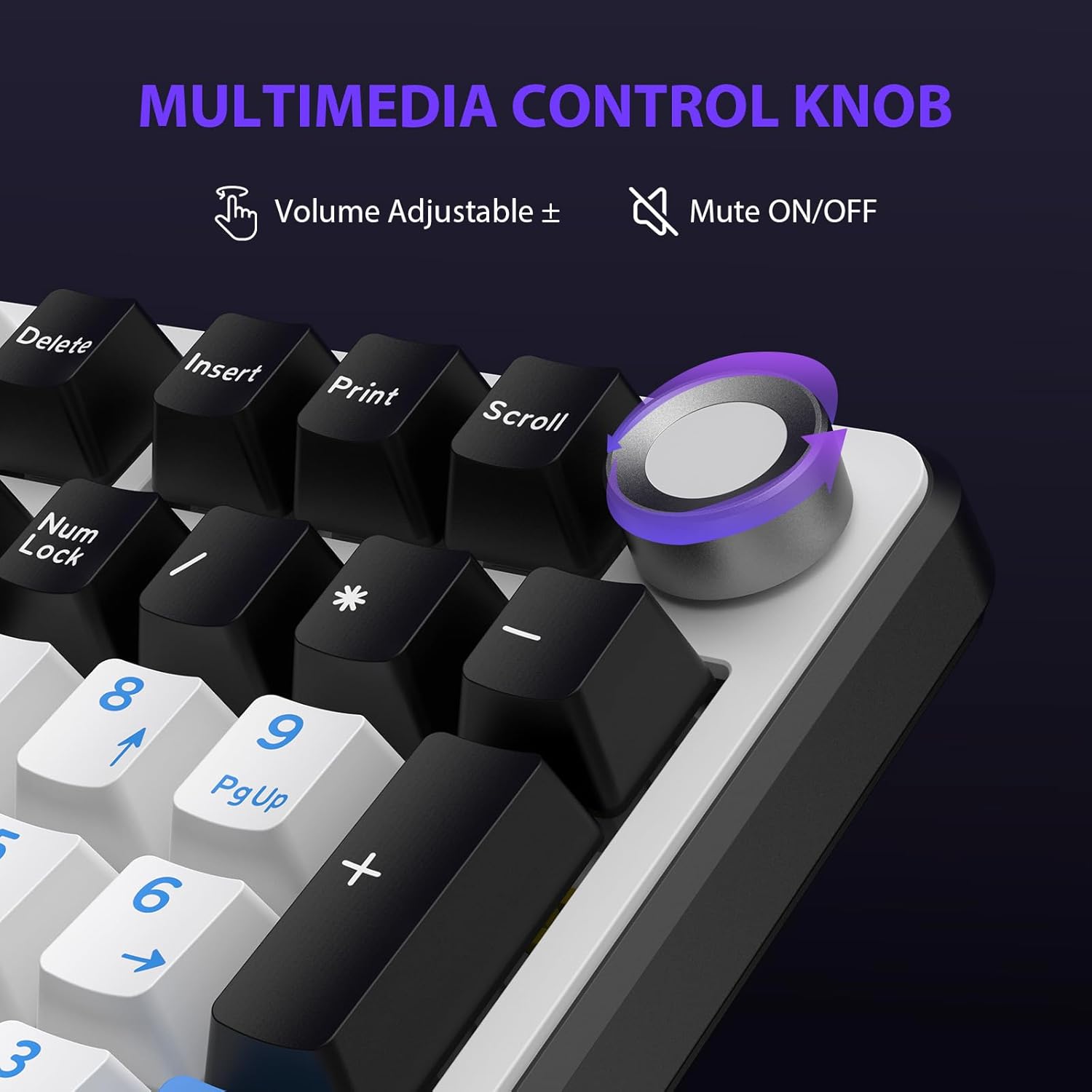
Figure 4.2: Multimedia Control Knob.
4.3. Control da retroiluminación RGB
The GK01 keyboard features 16.8 million color RGB backlighting with various effects.
- Fn + [Right Arrow]: Adjust 5 brightness levels.
- Fn + [Left Arrow]: Adjust 5 speed levels for dynamic effects.
- Fn + [Inserir]: Switch between 20 different backlight modes.
- Fn + [Entrar]: Switch color order within certain modes.
- Fn + [X]: Turn off light / activate power-saving mode.
- Fn + [Retroceso]: Switch color order within certain modes.

Figure 4.3: RGB Backlight Controls.
5. Funcións avanzadas
5.1. Interruptores intercambiables en quente
The GK01 keyboard is equipped with pre-lubricated Cybertron linear switches and supports solder-free hot-swapping. This allows you to easily replace switches with compatible 3-pin or 5-pin mechanical switches without soldering.
Para substituír un interruptor:
- Using the provided 2-in-1 keycap and switch puller, gently remove the keycap from the desired switch.
- Insert the switch puller onto the switch, ensuring it grips the top and bottom clips of the switch.
- Tire suavemente do interruptor cara arriba para retiralo da placa de circuíto impreso.
- Aliña os pines do novo interruptor cos orificios da placa de circuíto impreso. Asegúrate de que os pines estean rectos para evitar que se dobren.
- Prema o novo interruptor firmemente no seu lugar ata que faga clic.
- Volva colocar a tapa das teclas.

Figure 5.1: Hot-Swappable Switch Replacement.
5.2. Software programable
The GK01 supports custom software for advanced customization, including key remapping, macro creation, and detailed RGB lighting effects.
- The software is compatible only with the Windows operating system.
- The keyboard must be connected via USB-C wired mode to use the software.
- For driver download, please visit the official Transformers Keyboard website or refer to the link provided in the product packaging.
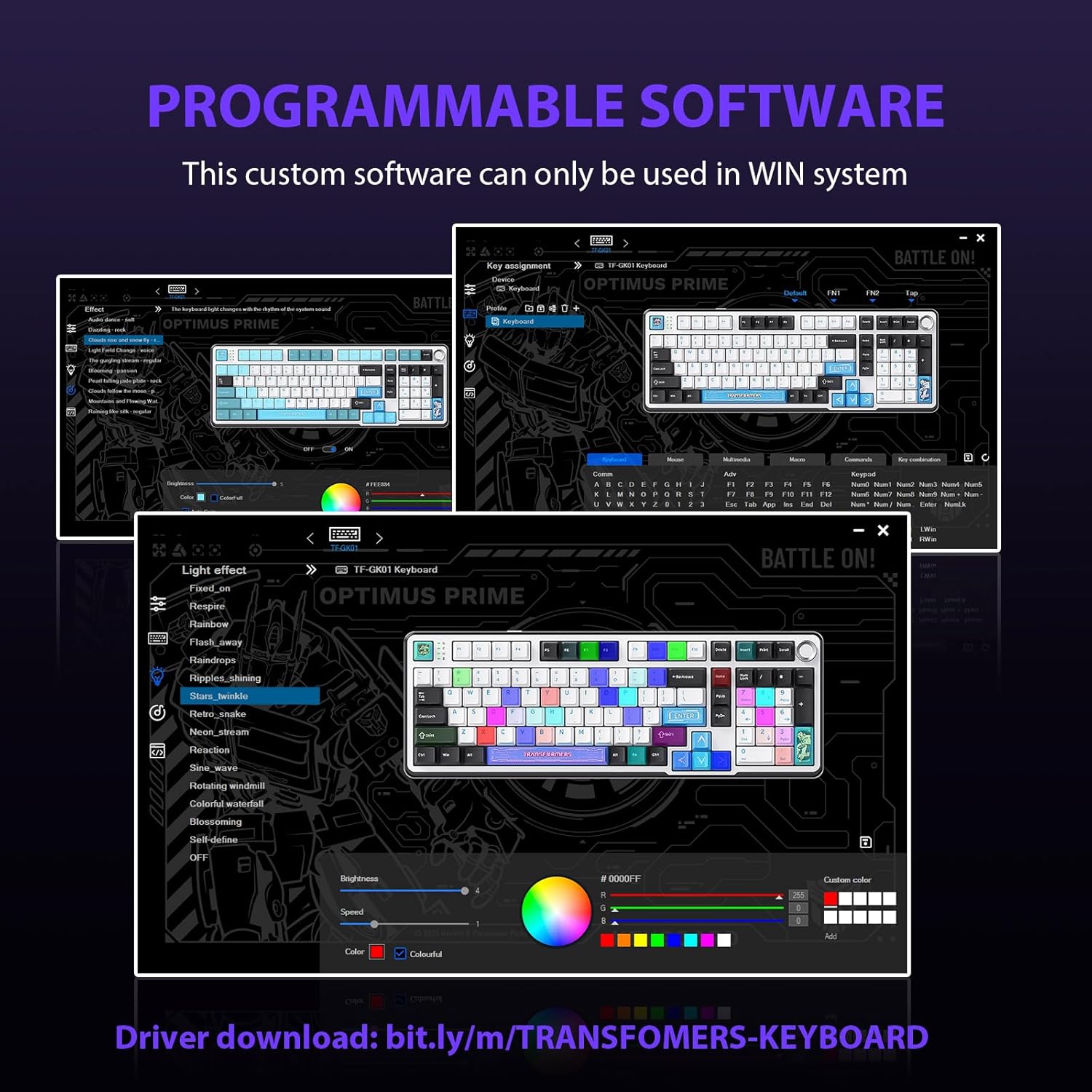
Figure 5.2: Programmable Software Interface.
5.3. Gasket Mounted Structure
The keyboard features a five-layer sound-absorbing and shock-absorbing gasket mounted structure. This design effectively reduces hollow noise and provides a softer, more consistent typing feel by isolating the plate from the case.
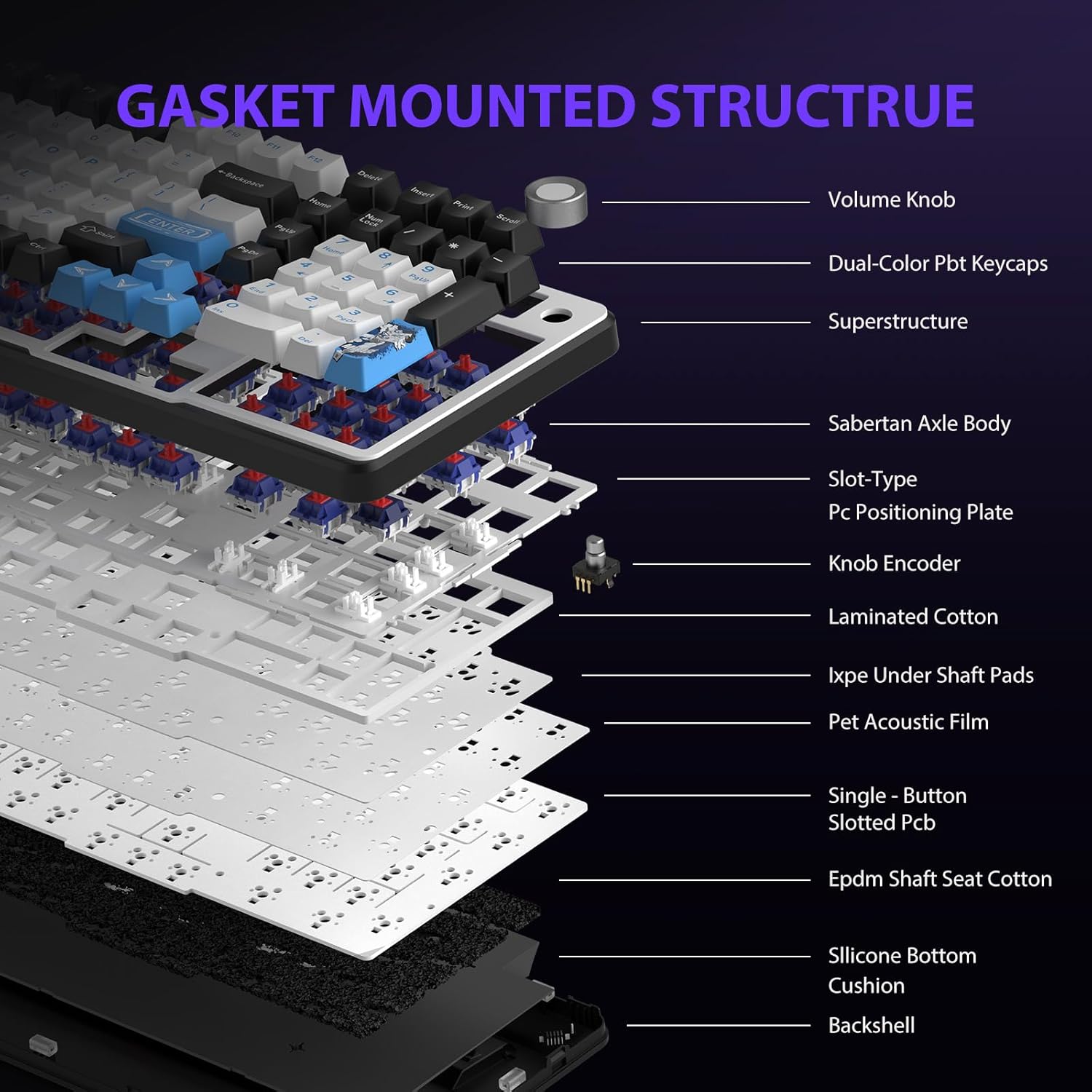
Figure 5.3: Gasket Mounted Structure Components.
6. Xestión da batería
The GK01 keyboard is equipped with a 4000mAh rechargeable battery.
- Cargando: Connect the keyboard to a USB power source using the provided USB-C cable. The indicator light will show charging status.
- Duración da batería: A fully charged battery provides extended usage time. Actual battery life may vary based on usage patterns and RGB lighting intensity.
- Aforro de enerxía: The keyboard will enter a power-saving sleep mode after a period of inactivity to conserve battery. Press any key to wake it up.
7. Mantemento
7.1. Limpeza do teclado
- Desconecte o teclado de todas as fontes de alimentación antes de limpalo.
- Use un pano suave e sen pelusa lixeiramente dampEnxágüe con auga ou unha solución de limpeza suave para limpar as teclas e o chasis.
- Para o po e os residuos entre as tapas das teclas, use aire comprimido ou un cepillo pequeno.
- Evite o uso de produtos químicos agresivos ou materiais abrasivos.
7.2. Coidado das teclas e dos interruptores
- The PBT keycaps are designed for durability and fade resistance.
- Refer to Section 5.1 for instructions on safely removing and replacing keycaps and switches.
- Ensure the keyboard feet are clean and free of debris for stable placement.

Figure 7.1: Adjustable Keyboard Feet.
8 Solución de problemas
| Problema | Causa posible | Solución |
|---|---|---|
| O teclado non responde no modo sen fíos. | Low battery, incorrect mode selected, dongle not connected, Bluetooth not paired. | Charge the keyboard. Ensure the mode switch is set correctly (2.4GHz or BT). Re-insert the 2.4GHz dongle. Re-pair Bluetooth connection. Try wired mode to confirm keyboard functionality. |
| As chaves non se rexistran ou se escriben dúas veces. | Interruptor solto, problema de software, residuos debaixo da tapa da tecla. | Ensure switches are fully seated. Clean under keycaps. If using programmable software, ensure it's updated or try resetting keyboard settings. |
| RGB backlight not working or stuck. | Backlight turned off, software conflict. | Preme Fn + X to toggle backlight. Check programmable software settings. |
| Non se pode conectar por Bluetooth. | Teclado non en modo de emparellamento, Bluetooth do dispositivo desactivado, interferencias. | Ensure keyboard is in Bluetooth pairing mode (Fn + Q/W/E long press). Ensure device Bluetooth is on and discoverable. Move closer to the device. |
9. Especificacións
| Característica | Detalle |
|---|---|
| Número de modelo | TF-GK01 |
| Conectividade | Bluetooth 5.0, sen fíos de 2.4 GHz, USB-C con cable |
| Tipo de teclado | Mecánica |
| Maquetación | 101 teclas (tamaño completo) |
| Interruptores | Pre-lubed Cybertron Linear Switches, Hot-Swappable (3-pin/5-pin compatible) |
| Chaves | Heat-sublimated PBT |
| Retroiluminación | RGB (16.8 Million Colors, 20 modes, music rhythm effects via driver) |
| Capacidade da batería | 4000 mAh |
| Dimensións do produto | 16.15 x 5.65 x 1.63 polgadas (41.02 x 14.35 x 4.14 cm) |
| Peso do elemento | 2.24 libras (1.02 kg) |
| Dispositivos compatibles | Portátil, PC, teléfono intelixente, tableta |
| Características especiais | Anti-Ghosting (all keys), Multimedia Control Knob, Programmable Keys (via software), Rechargeable |
10. Garantía e soporte
For information regarding warranty coverage, technical support, or service inquiries, please refer to the warranty card included with your product or visit the official Transformers Keyboard websitio.
Fabricante: Transformadores