
Introdución
Thank you for choosing the Ledwood ACCESS130 Portable HiFi Speaker. This manual provides essential information for the safe and efficient operation of your device. The ACCESS130 is a versatile portable speaker featuring dynamic RGB LED effects, Bluetooth 5.3 connectivity, USB input, and a karaoke function with an included wireless microphone. It is designed to deliver a powerful audio experience for various occasions.
Información de seguridade
- Lea atentamente todas as instrucións antes de usar o produto.
- Non expoñas o altofalante á auga nin a humidade excesiva. Este produto non é impermeable.
- Manteña o altofalante lonxe de fontes de calor, luz solar directa e materiais inflamables.
- Non intente desmontar, reparar nin modificar o dispositivo. Encargue todo o mantemento a persoal cualificado.
- Use only the provided USB-C charging cable.
- Evite escoitar a volume alto durante períodos prolongados para evitar danos auditivos.
- Manter fóra do alcance dos nenos.
Contido do paquete
Comprobe se o paquete contén os seguintes elementos:
- Altofalante portátil de alta fidelidade Ledwood ACCESS130
- Cable de carga USB-C
- Micrófono sen fíos
- Correa de transporte
Produto rematadoview
Familiarize yourself with the components and controls of your Ledwood ACCESS130 speaker.
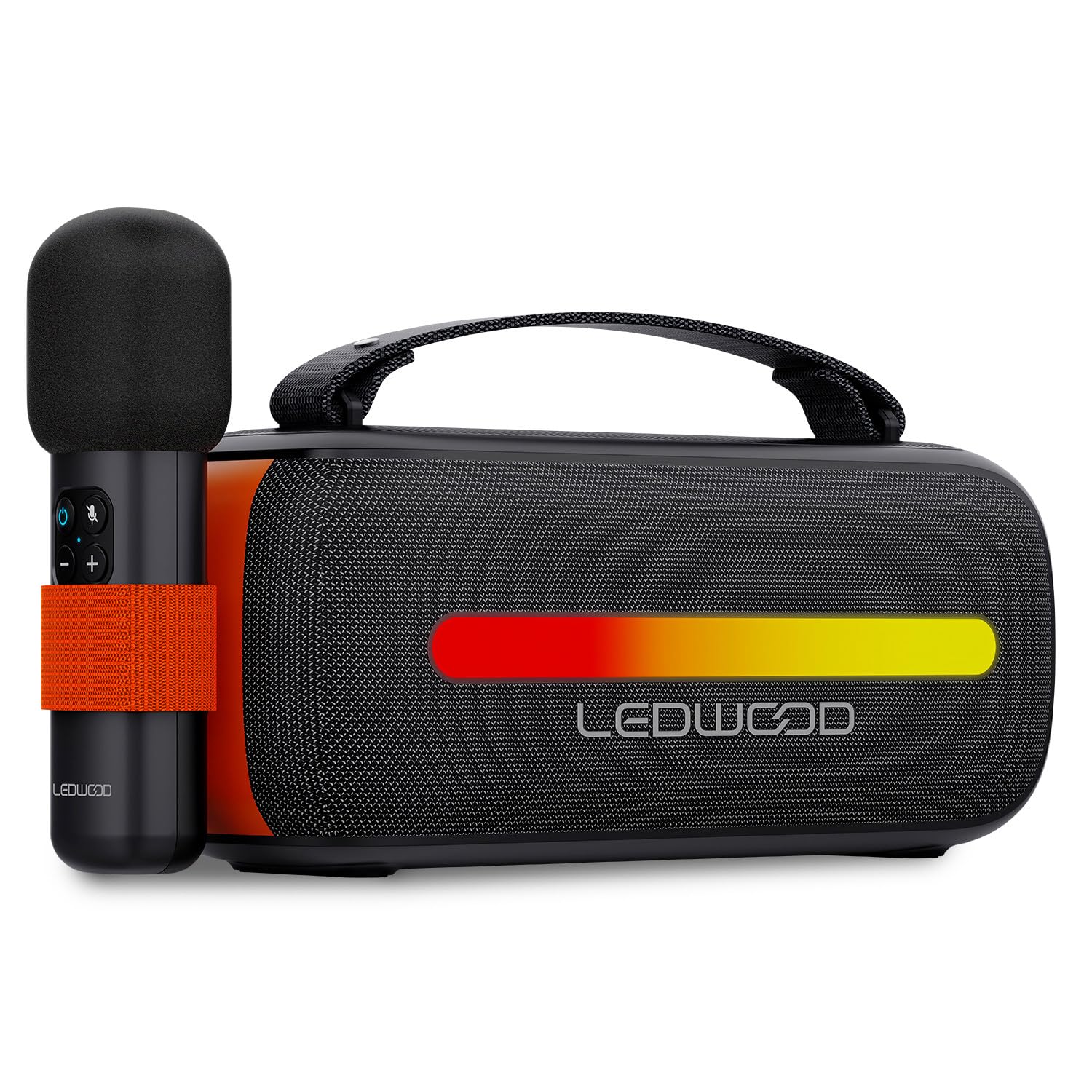
Image: The Ledwood ACCESS130 portable speaker shown with its wireless microphone attached to the side. The speaker features a black mesh grille and an illuminated LED strip on the front.
Controis e portos

Imaxe: De arriba abaixo view of the Ledwood ACCESS130 speaker, highlighting the control panel with buttons for power, volume, mode, and LED effects. Icons for LED colors, microphone, karaoke function, USB-C, and wireless connection are also visible.
- Botón de encendido: Manteña premido para activar/desactivar o altofalante.
- Botón de modo (M): Press to switch between Bluetooth, USB, and other input modes.
- Subir volume (+): Aumentar o volume.
- Baixar o volume (-): Diminuír o volume.
- Botón Reproducir/Pausa: Reproducir ou pausar a reprodución de audio.
- LED Effect Button: Cycle through different LED lighting modes or turn them off.
- Porto USB-C: Para cargar o altofalante.
- Porto USB-A: For USB audio playback.
Configuración
1. Cargando o altofalante
- Conecta o cable de carga USB-C fornecido ao porto USB-C do altofalante.
- Conecta o outro extremo do cable a un adaptador de corrente USB compatible (non incluído) ou ao porto USB dun ordenador.
- The LED indicator will show charging status. A full charge takes approximately [Charging Time - not specified in input, omit if not available].
2. Acendido/apagado
- To power on, press and hold the Power button until the speaker activates.
- Para apagar, manteña premido o botón de acendido/apagado de novo ata que o altofalante se apague.
3. Emparellamento Bluetooth
- Ensure the speaker is powered on and in Bluetooth mode (indicated by a flashing Bluetooth LED). If not, press the 'M' (Mode) button to switch to Bluetooth mode.
- No teu teléfono intelixente, tableta ou ordenador, activa o Bluetooth e busca os dispositivos dispoñibles.
- Select "Ledwood ACCESS130" from the list of devices.
- Once paired, the Bluetooth LED will stop flashing and remain solid, indicating a successful connection.
4. Connecting the Wireless Microphone
- Asegúrate de que o micrófono sen fíos estea cargado e acendido.
- The microphone should automatically connect to the speaker when both are powered on and within range.
- Test the microphone by speaking into it to confirm audio output from the speaker.
En funcionamento
1. Reprodución por Bluetooth
- Despois de realizar o emparellamento Bluetooth correctamente, abra a aplicación de música no dispositivo conectado.
- Start playing audio. The sound will be transmitted wirelessly to the ACCESS130 speaker.
- Usa os botóns de volume do altofalante ou do dispositivo conectado para axustar o nivel do son.
- Press the Play/Pause button on the speaker to control playback.
2. Reprodución USB
- Insira unha unidade flash USB que conteña audio files (e.g., MP3) into the speaker's USB-A port.
- Press the 'M' (Mode) button to switch to USB mode.
- The speaker will automatically begin playing audio from the USB drive.
- Use the speaker's controls to adjust volume and navigate tracks.
3. Función de karaoke
- Ensure the wireless microphone is connected to the speaker as described in the Setup section.
- Play your desired instrumental track via Bluetooth or USB.
- Fala ou canta no micrófono. A túa voz será amplified through the speaker, mixing with the music.
4. Efectos de luz LED
- Press the LED Effect button to cycle through various dynamic RGB lighting modes.
- Continue pressing the button to select your preferred lighting effect or to turn the LEDs off.
Mantemento
- Limpeza: Usa un pano suave e seco para limpar a superficie do altofalante. Non empregues produtos de limpeza abrasivos nin solventes.
- Almacenamento: Garde o altofalante nun lugar fresco e seco, lonxe da luz solar directa e de temperaturas extremas, cando non o use durante períodos prolongados.
- Coidado da batería: To prolong battery life, fully charge the speaker before first use and recharge it at least once every three months if not used regularly. Avoid completely draining the battery.
Resolución de problemas
| Problema | Causa posible | Solución |
|---|---|---|
| O altofalante non se acende. | Batería baixa. | Cargue o altofalante co cable USB-C proporcionado. |
| Sen conexión Bluetooth. | Speaker not in pairing mode; device out of range; previously connected device. | Ensure speaker is in Bluetooth pairing mode. Move device closer. Disconnect from other devices. |
| Non hai son do micrófono. | Microphone not powered on; microphone not paired. | Ensure microphone is charged and powered on. Check if it automatically connects. |
| A reprodución por USB non funciona. | Modo incorrecto; non compatible file formato; unidade USB danada. | Press 'M' button to select USB mode. Ensure files are MP3. Try a different USB drive. |
| As luces LED non funcionan. | LED effects turned off. | Press the LED Effect button to cycle through modes. |
Especificacións
| Nome do modelo: | ACCESO130 |
| Marca: | Ledwood |
| Tipo de altofalante: | Altofalante portátil |
| Potencia máxima de saída do altofalante: | 130 vatios (12 W RMS) |
| Modo de saída de audio: | Estéreo |
| Tecnoloxía de comunicación sen fíos: | Bluetooth 5.3 |
| Potencia máxima Bluetooth: | -6 a 4dBm |
| Relación sinal-ruído: | ≥80 dB |
| Fonte de enerxía: | Alimentado por batería |
| Batería: | 3.7 V - 3600 mAh |
| Total Playtime (50% volume): | 6 horas 30 minutos |
| Método de control: | Application, Touch |
| Conexións: | Bluetooth 5.3, USB-A |
| Dimensions (H x D x L): | 12.04 cm x 9.9 cm x 26.1 cm |
| Peso: | 1 kg |
| Impermeable: | Non |
| Compoñentes incluídos: | USB-C charging cable, Wireless microphone, Carrying strap |
Garantía e Soporte
For warranty information or technical support, please refer to the documentation provided at the time of purchase or contact your retailer. You may also visit the official Ledwood websitio para obter máis axuda.