
1. Introdución
This manual provides detailed instructions for the installation, setup, and operation of your Ctronics 4K Outdoor Security Camera, model CTIPC-950 (950C-4KB). Please read this manual thoroughly before using the product to ensure proper functionality and safety. Keep this manual for future reference.
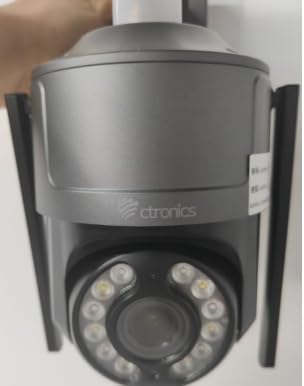
Figure 1: Ctronics 4K Outdoor Security Camera (Model CTIPC-950)
2. Características do produto
- True 4K Ultra HD with Starlight Lens: Experience superior image clarity day and night. Features vivid color night vision up to 30 meters.
- Advanced AI Detection & Auto Tracking: Accurately detects humans, vehicles, and pets. Automatically tracks moving targets to minimize false alarms.
- Powerful Red & Blue Strobe Light with Siren Alarm: Deters intruders effectively with visual and audible alerts.
- 8 Preset Positions & 4 Custom Detection Zones: Configure specific camera positions for quick patrols and define areas for focused surveillance.
- Privacy Masking Feature: Protect sensitive areas by masking them from surveillance.
- Flexible Installation & Multi-Device Remote Access: Supports wall or ceiling mounting. Manage up to 36 cameras via the Ctronics app on mobile or PC, with split-screen viewing, group management, and multi-user sharing.
- Wi-Fi de banda dual: Supports both 2.4GHz and 5GHz Wi-Fi for reliable and stable connection.
- Resistente ás inclemencias do tempo IP66: Durable metal construction ensures reliable operation in various outdoor conditions.
3. Contido do paquete
Verifica que todos os elementos estean presentes no paquete:
- Ctronics 4K Security Camera (CTIPC-950 / 950C-4KB)
- Manual de instrucións (este documento)
- Parafusos de montaxe e tacos de parede
- Adaptador de alimentación
4. Configuración
4.1 Acendido inicial e configuración de rede
- Conectar enerxía: Plug the power adapter into the camera's power jack and then into a power outlet. The camera will power on and perform a self-test.
- Download the Ctronics App: Busca "Ctronics" in your mobile device's app store (iOS or Android) and download the official application.
- Rexistrarse/Iniciar sesión: Abre a aplicación e crea unha conta nova ou inicia sesión cunha xa existente.
- Engadir cámara: Tap the "+" icon in the app to add a new device. Select "Wireless Installation" or scan the QR code located on the camera body.
- Conectar a wifi: Follow the on-screen prompts to connect the camera to your home's dual-band (2.4GHz or 5GHz) Wi-Fi network. Ensure your phone's volume is turned up to maximum during sound-based configuration.
Video 1: Wi-Fi Setting via Sound (S20-G model, similar process for CTIPC-950)
This video demonstrates the Wi-Fi setup process using sound configuration, which is applicable to various Ctronics camera models including the CTIPC-950. It shows how to power on the camera, open the rubber cover, and use the mobile app to connect to your home Wi-Fi network by entering the password and allowing the phone to transmit sound signals to the camera for configuration.
5. Instalación
5.1 Localización de montaxe
Choose a suitable outdoor location for mounting. The camera supports both wall and ceiling installation. Ensure the chosen spot provides a clear view of the area you wish to monitor and has access to a power source.
5.2 Pasos de montaxe
- Marcar os buratos: Use the provided mounting template or the camera's base to mark the positions for drilling on the wall or ceiling.
- Perforación: Drill pilot holes at the marked positions. Insert wall plugs if mounting on masonry or concrete.
- Asegurar a base: Attach the camera's mounting base to the wall or ceiling using the provided screws.
- Engade a cámara: Securely attach the camera unit to the mounted base.
6. Instrucións de funcionamento
6.1 En directo View e control de panorámica/inclinación
Access the live feed through the Ctronics app. Use the on-screen controls to pan the camera horizontally up to 355° and tilt vertically up to 90° to adjust the viewángulo de ing.
Video 2: Ctronics 4K Security Camera Overview (Model 930C, similar features for CTIPC-950)
Este vídeo ofrece un sobreview of a Ctronics 4K security camera, highlighting its 355° pan and 90° tilt capabilities, 4K UHD resolution, starlight lens for night vision, AI detection for humans, pets, and vehicles, and the red and blue alarm light with siren. It also shows the metal body, IP67 weatherproof rating, 24/7 recording, dual-band Wi-Fi, and cloud/SD card storage options.
6.2 AI Detection and Auto Tracking
The camera's advanced AI can differentiate between humans, vehicles, and pets. When motion is detected, the camera can automatically track the moving object and send real-time notifications to your linked devices.
6.3 Modos de visión nocturna
A cámara ofrece varias opcións de visión nocturna:
- Visión nocturna en cor: Utilizes the starlight lens to provide full-color images in low-light conditions up to 30 meters.
- Visión nocturna por infravermellos (IR): Provides clear black-and-white images in complete darkness.
6.4 Funcións de alarma
Upon detection of an intruder, the camera can activate its red and blue strobe lights and a loud siren to deter unwanted visitors. You will also receive instant alerts on your mobile device.
6.5 Preset Positions and Detection Zones
Configure up to 8 preset camera positions for quick navigation to frequently monitored areas. Define up to 4 customizable motion detection zones to focus surveillance on critical areas and reduce irrelevant alerts.
6.6 Audio bidireccional
Use the built-in microphone and speaker to communicate with visitors or deter intruders directly through the app.
7. Especificacións
| Característica | Descrición |
|---|---|
| Nome do modelo | CTIPC-950 (950C-4KB) |
| Uso interior/exterior | Ao aire libre |
| Resolución de captura de vídeo | 3840 (4K UHD) |
| Resolución efectiva de fotografías | 8 MP |
| Range de visión nocturna | 50 Meters (Color Night Vision up to 30m) |
| Tecnoloxía de conectividade | Wireless (Dual-Band Wi-Fi: 2.4GHz, 5GHz), Ethernet, ONVIF, RTSP |
| Fonte de enerxía | Eléctrico con cable (12 voltios, 12 vatios) |
| Tipo de controlador | Ctronics APP |
| Tipo de montaxe | Montaxe de parede, montaxe de teito |
| Clasificación de protección internacional | IP66 (resistente á intemperie) |
| Material | Metal |
| Dimensións do artigo (L x W x H) | 5.91 x 5.91 x 5.91 polgadas |
| Peso do elemento | 2.2 libras |
| Opcións de almacenamento | Micro SD (up to 256GB), FTP, NAS, Cloud Storage |
8. Mantemento
- Limpeza regular: Limpe periodicamente a lente e a carcasa da cámara cun pano suave eamp un pano para garantir unha calidade de imaxe nítida. Non empregue produtos químicos agresivos.
- Actualizacións de firmware: Check the Ctronics app regularly for firmware updates to ensure optimal performance and security.
- Comprobación da fonte de alimentación: Ensure the power adapter and cable are free from damage and properly connected.
- Estabilidade da rede: Verify your Wi-Fi network is stable to maintain continuous camera operation.
9 Solución de problemas
- A cámara non se conecta á wifi:
- Asegúrate de que a cámara estea dentro do alcance do teu enrutador Wi-Fi.
- Verifica que o contrasinal da wifi sexa correcto.
- Try restarting the camera and your router.
- Ensure your router supports 2.4GHz or 5GHz bands and that the camera is attempting to connect to the correct band.
- Mala calidade da imaxe:
- Limpar a lente da cámara.
- Check your network connection speed. A slow connection can affect streaming quality.
- Asegúrate de que non haxa obstáculos que bloqueen a cámara view.
- Falsas alarmas:
- Adjust the sensitivity settings for motion detection in the app.
- Configure detection zones to exclude areas with frequent irrelevant motion (e.g., moving trees).
- Ensure AI detection for humans/vehicles/pets is enabled to filter out other movements.
- Sen enerxía:
- Check if the power adapter is securely plugged into both the camera and the power outlet.
- Proba a toma de corrente con outro dispositivo para asegurarte de que funciona.
10. Garantía e soporte
Your Ctronics 4K Outdoor Security Camera is covered by a manufacturer's warranty. For specific warranty terms and conditions, please refer to the documentation included with your purchase or visit the official Ctronics website. For technical support, troubleshooting assistance, or any product-related inquiries, please contact Ctronics customer service through the contact information provided on their website or within the Ctronics app.