
E-ACE DMMRUTXB
E-ACE 4.3-Inch Dual Lens Car DVR Rearview Manual de usuario de Mirror Dash Cam
Model: DMMRUTXB
1. Produto rematadoview
The E-ACE 4.3-inch Dual Lens Car DVR Rearview Mirror Dash Cam is designed to enhance driving safety by providing comprehensive video recording of your journeys. This device integrates a front-facing camera and supports an optional rear-facing camera, offering a wide field of view and continuous recording capabilities. Its sleek design replaces your existing rearview mirror, providing a discreet and integrated solution for vehicle surveillance.
Key features include a 4.3-inch high-definition display, dual-lens recording, night vision, loop recording, and a G-sensor for automatic incident detection.

Image: The E-ACE rearview mirror dash cam displaying both front and rear camera feeds on its integrated screen.
2. Contido do paquete
Comprobe se o paquete contén os seguintes elementos:
- E-ACE Rearview Mirror Dash Cam Unit
- Cargador de coche
- Fixed Bandages (for mounting)
- Manual de usuario
- Lector de tarxetas
- Optional: Rear View Camera + Cable (6M or 10M, depending on variant)
- Optional: Buck Line (for parking monitoring power)
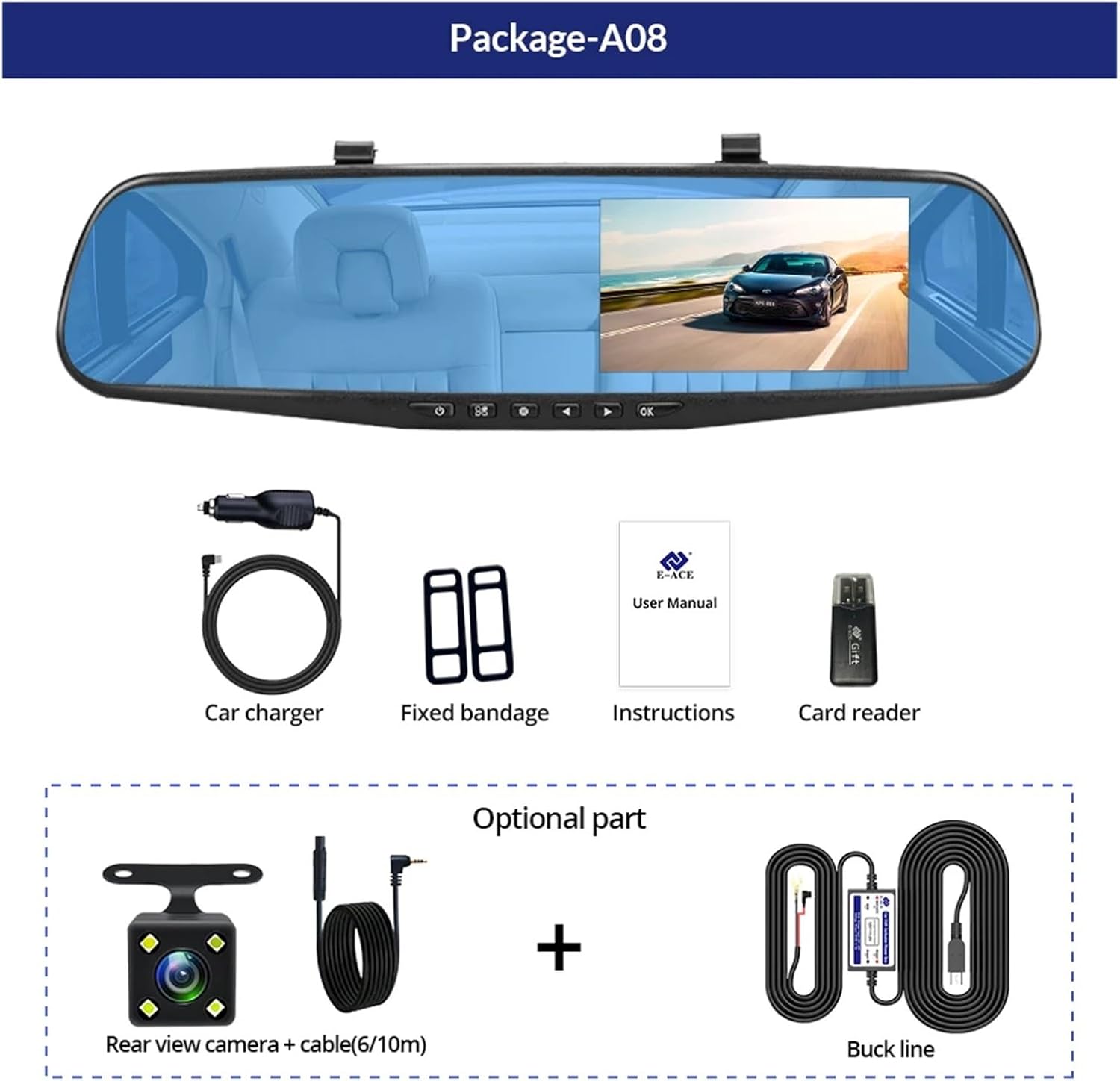
Image: A visual representation of the items included in the E-ACE dash cam package, showing the main unit and accessories.
3. Características do produto
- Pantalla de alta definición de 4.3 polgadas: Provides clear visibility for real-time monitoring and playback.
- Deseño de dobre lente: Captures both front and rear footage simultaneously for comprehensive coverage.
- Built-in Night Vision Technology: Ensures clear recordings in low-light conditions.
- Instalación fácil de usar: Sleek rearview mirror design integrates seamlessly into your vehicle.
- Gravación en bucle: Sobrescribe automaticamente o contido máis antigotage cando a tarxeta de memoria está chea, garantindo a gravación continua.
- G-Sensor Feature: Detects sudden movements or impacts and automatically locks the current video file para evitar que se sobrescriba.
- Monitorización do estacionamento: Records video when motion or impact is detected while the vehicle is parked (requires buck line connection).
- 170-Degree Wide Angle: Ofrece unha ampla view do camiño por diante.
- Imaxe inversa: Displays the rear camera view with parking guidelines when reversing.
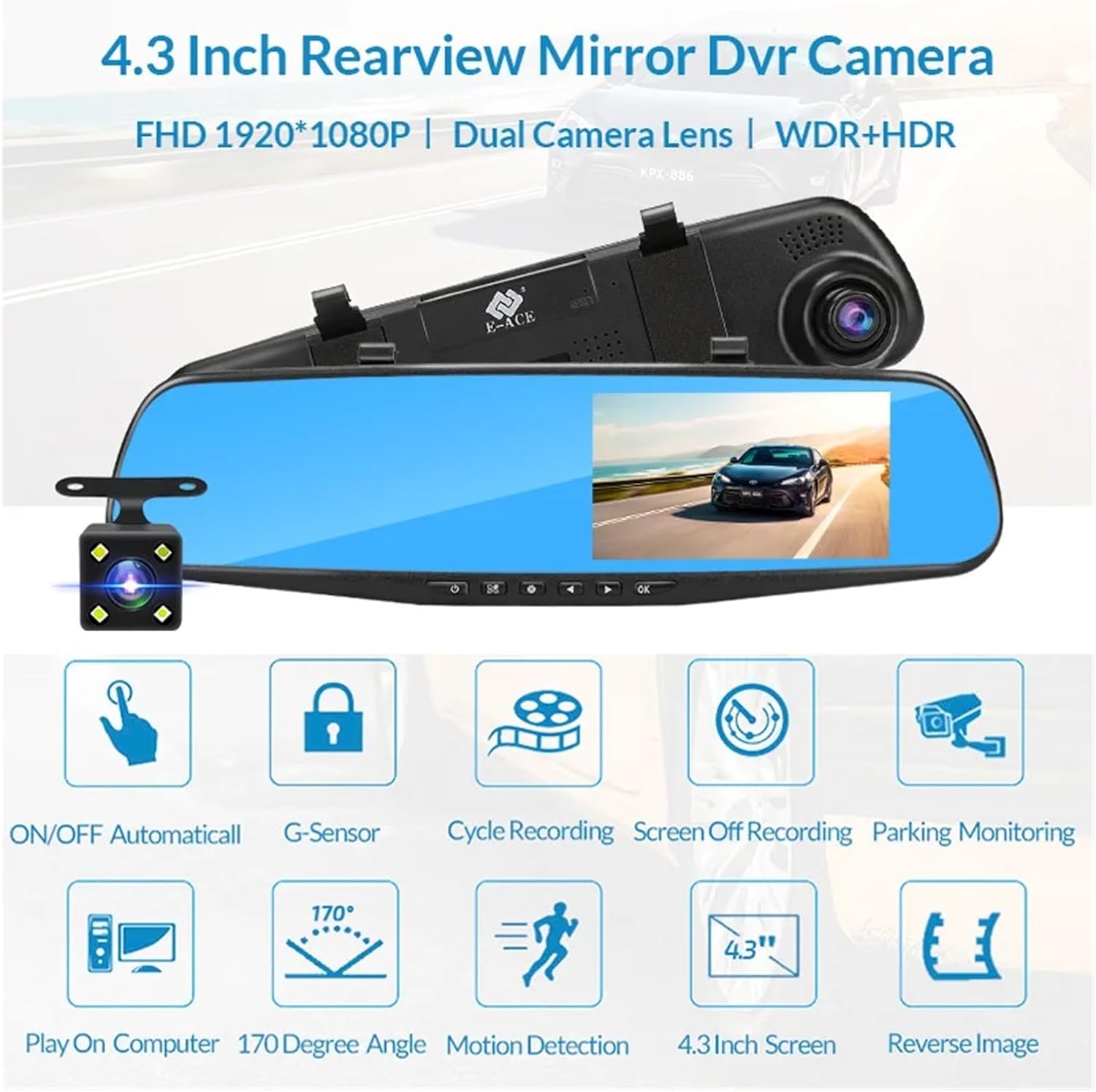
Image: An illustration highlighting the various functional features of the E-ACE dash cam.
4. Identificación de compoñentes
Familiarize yourself with the various parts and controls of your E-ACE dash cam:

Image: A detailed diagram identifying the buttons, ports, and features on the E-ACE dash cam unit.
- Botón ON/OFF: Acende ou apaga o dispositivo.
- Botón de menú: Accede á configuración e ás opcións.
- Botón de modo: Switches between video recording, photo, and playback modes.
- Botón ARRIBA: Navigates up in menus or adjusts settings.
- Botón de abaixo: Navigates down in menus or adjusts settings.
- Botón Aceptar: Confirms selections or starts/stops recording.
- Ranura para tarxetas TF: Insert your MicroSD (TF) card here.
- AV-IN Port: Conecta a cámara traseira.
- Porto USB: Para a subministración de enerxía e a transferencia de datos.
- Botón de reinicio: Restablece o dispositivo á configuración de fábrica (usa un alfinete fino).
- Micrófono: Grava audio dentro do vehículo.
5. Configuración e instalación
5.1 Inserción da tarxeta de memoria
Before installation, insert a high-speed MicroSD (TF) card (Class 10 or higher, up to 64GB recommended) into the TF Card Slot (7) with the contacts facing the screen. Ensure the card is inserted correctly until it clicks into place.
5.2 Montaxe da cámara para o salpicadero
- Attach the fixed bandages to the back of the dash cam unit.
- Securely strap the dash cam over your vehicle's existing rearview mirror using the fixed bandages. Ensure it is centered and stable.
5.3 Conexión da fonte de alimentación
- Connect the car charger to the USB Port (9) on the dash cam.
- Conecta o outro extremo do cargador do coche á toma do acendedor de cigarros do teu vehículo.
- Route the power cable neatly along the windshield trim to avoid obstructing your view.
5.4 Instalación da cámara traseira (opcional)
- Connect the rear camera cable to the AV-IN Port (8) on the dash cam.
- Route the rear camera cable from the dash cam to the rear of your vehicle. This typically involves tucking the cable under the headliner and along the side pillars.
- Mount the rear camera on the rear windshield or near the license plate using its adhesive or screws. Ensure it has a clear view da estrada detrás.
- If using the reverse image function, connect the red wire from the rear camera cable to your vehicle's reverse light power supply.
6. Instrucións de funcionamento
6.1 Encendido/apagado
- Automático: The dash cam will automatically power on and start recording when your vehicle's ignition is turned on (if connected to a switched power source).
- Manual: Press and hold the ON/OFF Button (1) to manually power the device on or off.
6.2 Funcionamento básico
- Cambiar modos: Press the Mode Button (3) to cycle between Video Recording, Photo, and Playback modes.
- Menú de acceso: In any mode, press the Menu Button (2) to enter the settings menu. Use the UP (4) and Down (5) buttons to navigate, and OK (6) to select.
- Iniciar/Deter a gravación: In Video Recording mode, press the OK Button (6) to manually start or stop recording.
6.3 Modos de visualización
While recording, you can typically switch between different display views by pressing the UP or Down buttons:
- Front Camera Only
- Rear Camera Only
- Picture-in-Picture (Front main, Rear sub-window)
- Picture-in-Picture (Rear main, Front sub-window)
6.4 Gravación en bucle
Set the loop recording duration (e.g., 1, 3, or 5 minutes) in the settings menu. When the memory card is full, the oldest unlocked fileAs novas gravacións sobrescribiranse.
6.5 Sensor G
The G-sensor automatically detects collisions or sudden braking. When triggered, it locks the current video file, preventing it from being overwritten by loop recording. Adjust sensitivity in the settings.
6.6 Parking Monitoring (Optional)
If the buck line is installed, the dash cam can monitor your vehicle while parked. When motion or impact is detected, it will automatically record a short video. Enable this feature in the settings.
6.7 Configuración de data e hora
It is important to set the correct date and time in the system settings for accurate timestamps on your recordings.
7. Mantemento
- Limpeza: Usa un pano suave e seco para limpar a lente e a pantalla. Evita produtos de limpeza abrasivos ou solventes.
- Tarxeta de memoria: Format the MicroSD card regularly (e.g., once a month) within the dash cam's settings to maintain optimal performance and prevent data corruption. Back up important files antes de formatar.
- Temperatura: Avoid exposing the device to extreme temperatures, as this can affect battery life and component integrity.
- Actualizacións de firmware: Consulte o do fabricante website periodically for firmware updates that may improve performance or add features.
8 Solución de problemas
| Problema | Causa posible | Solución |
|---|---|---|
| A cámara do salpicadero non se acende. | No power supply; faulty charger; loose connection. | Check car charger connection and vehicle's cigarette lighter. Try a different USB cable/charger. |
| A gravación detense automaticamente. | Memory card full; slow memory card; G-sensor sensitivity too high. | Format the memory card. Use a Class 10 or higher MicroSD card. Lower G-sensor sensitivity in settings. |
| Vídeo footage está borroso. | Película protectora na lente; lente sucia; enfoque incorrecto. | Remove any protective film. Clean the lens with a soft cloth. |
| A cámara traseira non se mostra. | Loose connection; faulty cable/camera. | Check the AV-IN connection. Ensure the rear camera is properly installed. |
| Device freezes or crashes. | Problema de software; erro da tarxeta de memoria. | Press the Reset Button (10) with a thin pin. Format the memory card. |
9. Especificacións
- Nome do modelo: DMMRUTXB
- Visualización: 4.3 polgadas
- Cámara: Dual Lens (Front & Rear support)
- Resolución de vídeo: FHD 1920x1080P (Front)
- Características: Loop Recording, G-Sensor, Night Vision, Parking Monitoring, 170-degree wide angle
- Almacenamento: Supports MicroSD (TF) card, Class 10 or higher (up to 64GB)
- Conectividade: USB, AV-IN (for rear camera)
- Peso do artigo: Aproximadamente 1.76 onzas (50 gramos)
- Dimensións do paquete: Aproximadamente 0.39 x 0.39 x 0.39 polgadas
- Fabricante: DMMRUTXB
10. Garantía e soporte
For warranty information and technical support, please refer to the documentation provided with your purchase or contact the retailer/manufacturer directly. Keep your purchase receipt as proof of purchase.
Ask a question about this manual
Ask about setup, troubleshooting, compatibility, parts, safety, or missing instructions. Manuals+ will review the question and use this page’s manual context to help answer it.