
1. Introdución
Thank you for choosing the Attoe F-18 Wireless Vertical Gaming Mouse. This ergonomic mouse is designed to provide a comfortable user experience, reducing wrist strain during extended use, while offering advanced features for gaming and productivity. It features tri-mode connectivity (2.4GHz wireless, Bluetooth 5.0, and wired USB-C), 12 programmable buttons, a 5-direction rocker, and adjustable DPI up to 24000.

Image 1.1: Attoe F-18 Wireless Vertical Gaming Mouse with USB receiver.
2. Contido do paquete
- Attoe F-18 Vertical Gaming Mouse
- Cable de carga USB-C
- Receptor USB de 2.4 GHz
- Manual de usuario
3. Configuración e conectividade
3.1 Cargar o rato
The Attoe F-18 mouse is equipped with a built-in 800mAh ternary lithium battery. Before first use, or when the low battery warning activates, charge the mouse using the provided USB-C cable.
- Connect the USB-C end of the cable to the mouse and the USB-A end to a power source (e.g., computer USB port, USB wall adapter).
- During charging, the four indicator lights on the mouse will illuminate in sequence.
- All four lights will turn off when the mouse is fully charged.
- A red light flashing quickly indicates the battery level has dropped to 25%, signaling the need for charging.

Image 3.1: Illustration of the 800mAh battery and charging indicators.
3.2 Conexión do rato
The Attoe F-18 supports three connection modes: 2.4GHz Wireless, Bluetooth 5.0, and Wired USB-C.
Conexión sen fíos de 3.2.1 a 2.4 GHz
- Acende o rato usando o interruptor de acendido situado na parte inferior.
- Press the bottom Bluetooth button briefly to select 2.4G mode (red indicator light).
- Remove the USB receiver from its storage slot on the bottom of the mouse.
- Insira o receptor USB nun porto USB dispoñible do seu ordenador. O rato conectarase automaticamente.

Image 3.2: Steps for connecting via 2.4GHz USB wireless.
3.2.2 Conexión Bluetooth 5.0
- Acende o rato usando o interruptor de acendido situado na parte inferior.
- Press the bottom Bluetooth button briefly to select Bluetooth mode (blue indicator light). The mouse can pair with up to two Bluetooth devices.
- No teu ordenador ou dispositivo, activa o Bluetooth e busca novos dispositivos.
- Select "F-18" or "Attoe Mouse" from the list of available devices to pair.
Conexión USB-C con cable 3.2.3
Connect the mouse directly to your computer using the provided USB-C cable. The mouse will function as a wired device and charge simultaneously.
3.3 Instalación do software (só para Windows)
To customize the 12 programmable buttons and macro settings, download the dedicated software driver. This software is compatible with Windows operating systems only; Mac OS lacks programming features.
- Consulte a embalaxe do produto ou as instrucións do fabricante website for the software download link.
- Download and run the installer. If your security program flags the installer, approve the action (e.g., select "Trust") to proceed.
- Siga as instrucións en pantalla para completar a instalación.
- Once installed, launch the software to customize button functions, lighting, and macros. Programmable data is saved directly to the mouse, so settings persist even when connected to a new computer.

Image 3.3: Screenshot of the custom driver programming software interface.
4. Instrucións de funcionamento
4.1 Deseño ergonómico
The vertical design of the Attoe F-18 mouse promotes a natural handshake position, which helps alleviate wrist pain, shoulder fatigue, and tendinitis often associated with traditional horizontal mice. This design is ideal for right-handed users and supports various hand sizes for comfortable extended use.

Image 4.1: Visual comparison of vertical mouse grip versus common horizontal mouse grip.
4.2 Button Functions and 5-Direction Rocker
The mouse features 12 programmable buttons, including a unique 5-direction rocker for enhanced control.
- Botóns esquerda/dereita: Clics estándar do rato.
- Roda de desprazamento: Para desprazamento vertical e función de clic co botón central.
- Botóns Adiante/Atrás: Located on the left side for navigation.
- Botón DPI: Adjusts sensitivity (see section 4.3).
- 5-Direction Rocker: Located near the thumb, this rocker replaces five traditional keys (W, A, S, D, and Space/Click) for agile in-game navigation. It allows movements forward, backward, left, right, and a central click.
- BT/2.4G Button: For switching between connectivity modes.
All buttons, except the BT/2.4G button, can be customized using the programming software.

Image 4.2: Close-up of the 5-way joystick, curved buttons, and side function keys.

Image 4.3: Keystroke analysis chart detailing button assignments.
4.3 Axuste de DPI
The mouse features 5 adjustable DPI presets (1600/2400/3200/4800/24000) powered by a high-precision PMW3325 sensor. Press the DPI button to cycle through the settings. The DPI indicator lights will change to reflect the current setting:
- 1st light: 1600 DPI
- 2nd light: 2400 DPI
- 3rd light: 3200 DPI
- 4th light: 4800 DPI
- All 4 lights: 24000 DPI

Image 4.4: DPI indicators and RGB lighting on the mouse.
Iluminación RGB de 4.4
The side RGB strips feature 5 dynamic effects (Neon, Marquee, Streamer, etc.) to enhance your gaming atmosphere. Lighting modes can be customized via the software.
4.5 Device/Mode Switching
Para cambiar entre dispositivos ou modos conectados:
- Briefly press the Bluetooth button on the bottom of the mouse.
- The indicator light will show red for 2.4GHz mode and blue for Bluetooth mode.
- The mouse can switch between up to two paired Bluetooth devices and one 2.4GHz receiver connection.

Image 4.5: Diagram illustrating the device/mode switching function on the mouse bottom.
5. Mantemento
To ensure the longevity and optimal performance of your Attoe F-18 mouse, follow these maintenance guidelines:
- Limpeza: Usa un pano suave e seco para limpar a superficie do rato. Para a sucidade persistente, limpa lixeiramenteampEnxágüe o pano con auga ou unha solución de limpeza suave. Evite produtos químicos agresivos ou materiais abrasivos.
- Almacenamento: Cando non o use durante períodos prolongados, apague o rato para aforrar batería. Gardeo nun lugar fresco e seco, lonxe da luz solar directa e de temperaturas extremas.
- Anti-slip Pads: Ensure the protective film is removed from the Teflon anti-slip pads on the bottom of the mouse for smooth movement.
6 Solución de problemas
If you encounter issues with your Attoe F-18 mouse, refer to the following common solutions:
- O rato non responde:
- Asegúrese de que o rato estea acendido.
- Comprobe o nivel da batería e cárguea se é necesario.
- Verify the correct connection mode (2.4GHz, Bluetooth, or Wired) is selected.
- For 2.4GHz, ensure the USB receiver is securely plugged into a working USB port. Try a different USB port.
- For Bluetooth, ensure Bluetooth is enabled on your device and the mouse is paired correctly.
- If using wired mode, ensure the USB-C cable is properly connected.
- Cursor lag or erratic movement:
- Asegúrate de que o rato estea sobre unha superficie limpa e non reflectante.
- Interference can affect wireless performance. Move the mouse closer to the receiver or try a different USB port for the receiver.
- Check for other wireless devices operating on the same frequency.
- Asegúrese de que a batería estea suficientemente cargada.
- Programmable buttons not working:
- Ensure the customization software is installed and running on a Windows PC.
- Verify that the buttons have been correctly programmed and saved within the software.
- Remember that Mac OS does not support programming features for this mouse.
- Os DPI non cambian:
- Press the DPI button firmly to cycle through the settings. Observe the indicator lights.
7. Especificacións
| Característica | Especificación |
|---|---|
| Marca | Attoe |
| Número de modelo | F-18 |
| Tecnoloxía de conectividade | Sen fíos de 2.4 GHz, Bluetooth 5.0, USB-C con cable |
| Tecnoloxía de detección de movemento | Óptico (sensor PMW3325) |
| Niveis de DPI | 1600/2400/3200/4800/24000 |
| Número de botóns | 12 (programable) |
| Capacidade da batería | 800mAh Ternary Lithium Battery |
| Dimensións do produto | 4.3 x 2.8 x 0.04 polgadas (110 x 72 x 76.5 mm) |
| Peso do elemento | 3.88 onzas (105 ± 5 g) |
| Vida útil do botón | ≥20 millóns de clics |
| Scroll Wheel Lifespan | ≥1.2 million rotations |
| Rango efectivo | ≥ 10 m |
| Vol. Operativotage / Actual | 3.7 V === 15 mA |
| 2.4GHz Rolling Rate | 125-1000 Hz |
| Bluetooth Rolling Rate | 133 Hz |
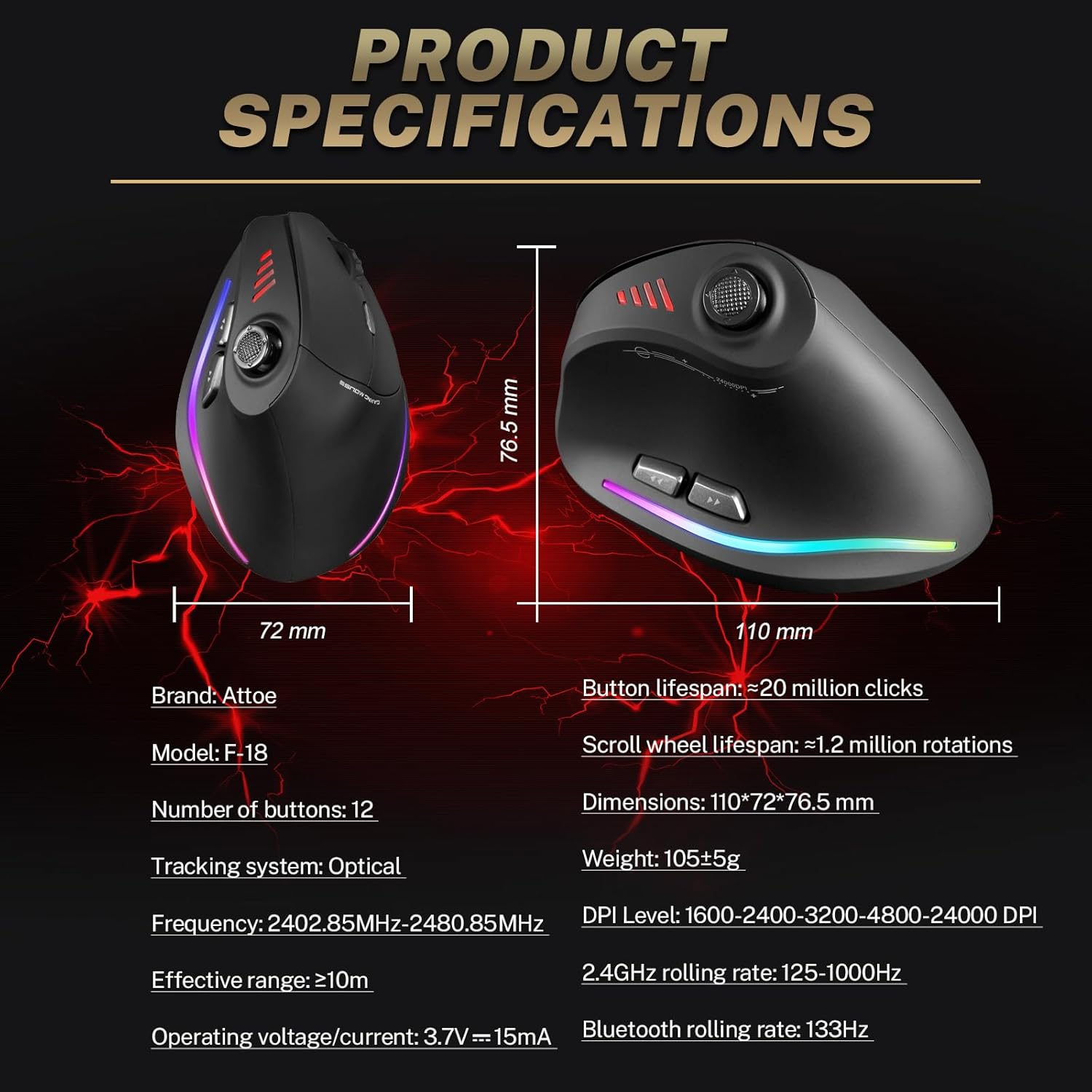
Image 7.1: Diagram showing product dimensions and key specifications.
8. Garantía e soporte
For warranty information or technical support, please refer to the documentation included with your product or visit the official Attoe website. If you require further assistance, contact Attoe customer service.