
1. Produto rematadoview
The CUBOT GT 3 Smartwatch is a robust and feature-rich device designed for active lifestyles. It integrates advanced GPS positioning, comprehensive health monitoring, and a wide array of sports modes, all housed within a durable, water-resistant design.
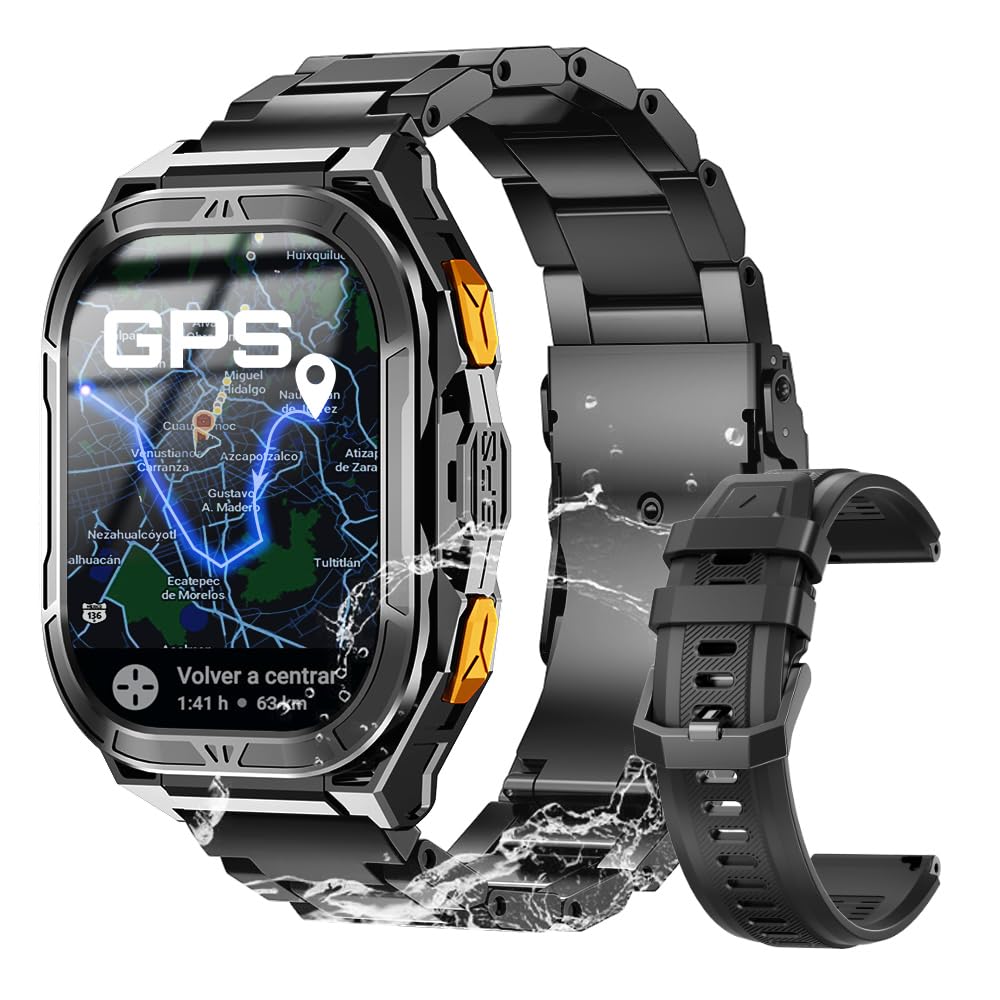
Figura 1: Principal view of the CUBOT GT 3 Smartwatch.
2. Configuración e uso inicial
2.1 Desembalaxe e compoñentes
Ao abrir o paquete, asegúrese de que estean presentes todos os compoñentes:
- CUBOT GT 3 Smartwatch
- Cable de carga
- Manual de usuario
- Additional strap (if included)
Vídeo 1: Desempaquetado e primeira impresiónview of a similar smartwatch model.
2.2 Cargar o reloxo intelixente
Before first use, fully charge the smartwatch. Connect the magnetic charging cable to the charging points on the back of the watch and plug the USB end into a power adapter (not included) or a computer's USB port. A full charge typically takes approximately 2 hours.

Figure 2: The smartwatch displaying battery information and charging status.
2.3 Instalación e emparellamento da aplicación
To unlock the full potential of your CUBOT GT 3, download and install the companion app on your smartphone. Scan the QR code displayed on the watch or in the manual to find the correct app (e.g., GloryFitPro or FitCloudPro, depending on the specific version). Follow the on-screen instructions to create an account and pair your smartwatch via Bluetooth.
Video 2: Tutorial on connecting a smartwatch via Bluetooth on iOS.
Video 3: Demonstrates Bluetooth connection steps for a smartwatch.
2.4 Axuste da correa
The smartwatch comes with interchangeable straps. To adjust or change the strap, use the provided tool to remove the pins holding the strap in place. Insert the new strap and secure it with the pins. Ensure the strap is comfortably snug on your wrist for accurate health monitoring.
Video 4: Shows unboxing, strap adjustment, and app connection for a smartwatch.
3. Funcionamento do reloxo intelixente
3.1 Navegación básica
The CUBOT GT 3 features a 1.96" HD AMOLED touchscreen display. Swipe left/right, up/down to navigate through menus and functions. Use the physical buttons for quick access to specific features or to return to the home screen.

Figure 3: The smartwatch display showing resolution and AMOLED screen type, along with button functions.
3.2 Facer e recibir chamadas
Once connected to your phone via Bluetooth, you can make and receive calls directly from your smartwatch. Access the call function from the main menu, dial numbers, or select contacts. The watch also supports SOS calls by pressing a designated button in emergencies, provided emergency contacts are set up in the companion app.

Figure 4: The smartwatch demonstrating Bluetooth call functionality and SOS feature.
Video 5: Shows Bluetooth calling features on a smartwatch.
3.3 Notificacións
Receive notifications for calls, messages, and various apps directly on your watch. Ensure notification permissions are enabled in the companion app settings on your smartphone.
3.4 Personalización das esferas do reloxo
Personalize your smartwatch with a variety of pre-installed watch faces or download more from the companion app. You can also set custom wallpapers using your own photos.

Figure 5: The smartwatch showing various customizable watch faces and themes.
3.5 Smart Tools
The CUBOT GT 3 includes several smart tools for daily convenience:
- Alarma: Configura alarmas directamente desde o reloxo.
- Control de música: Controla a reprodución de música no teu smartphone.
- Control da cámara: Activa a cámara do teu teléfono de forma remota.
- Pronóstico do tempo: Obtén actualizacións meteorolóxicas en tempo real.
- Lanterna: Use the watch screen as a flashlight.
- Calculadora: Realiza cálculos básicos.
- Buscar teléfono: Localiza o teu teléfono intelixente emparellado.
- Asistente de voz: Interact with your phone's voice assistant.

Figura 6: Máisview of various smart tools available on the smartwatch.
4. Monitorización da saúde
The CUBOT GT 3 provides 24-hour health monitoring using bio-optical sensors.

Figure 7: The smartwatch displaying various health metrics including heart rate, blood oxygen, and stress levels.
4.1 Monitorización da frecuencia cardíaca
Monitoriza continuamente a túa frecuencia cardíaca ao longo do día. View real-time data and historical trends in the companion app.
4.2 Blood Oxygen (SpO2) Monitoring
Measures your blood oxygen saturation levels. This feature helps you understand your body's oxygen absorption capacity.
4.3 Monitorización do sono
Automatically tracks your sleep patterns, including deep sleep, light sleep, and REM cycles. Provides insights into your sleep quality and helps set sleep goals.

Figure 8: The smartwatch illustrating automatic sleep monitoring and sleep staganálise electrónica.
4.4 Stress Test and Breathing Training
The watch offers stress level assessments and guided breathing exercises to help manage stress and promote relaxation.
Video 6: Demonstrates health monitoring features including heart rate, SpO2, and blood pressure on a smartwatch.
5. Modos deportivos e GPS
The CUBOT GT 3 supports over 100 sports modes and features advanced GPS capabilities.

Figure 9: The smartwatch displaying various sports modes and activity tracking.
5.1 Posicionamento GPS
Equipped with dual-band L1 and L5 GPS for precise and rapid positioning. Features include real-time route tracking, return planning, and automatic return reminders, ideal for outdoor sports.

Figure 10: The smartwatch showcasing its dual-band GPS positioning system for accurate outdoor tracking.
Video 7: Highlights GPS tracking and route monitoring for outdoor activities.
5.2 Monitorización ambiental
Features a built-in compass for real-time navigation, and measures altitude and atmospheric pressure. This provides crucial environmental data for outdoor enthusiasts.

Figure 11: The smartwatch displaying environmental data such as compass, altitude, and barometer readings.
5.3 Resistencia á auga
With IP68 and 5ATM water resistance, the watch can be used for swimming and diving up to 50 meters. It includes a drainage function to remove water from the microphone and speaker after water exposure.

Figure 12: The smartwatch highlighting its 5ATM water resistance and swimming features.
6. Duración da batería
The CUBOT GT 3 is equipped with a 480 mAh battery, offering up to 30 days of standby time and 15 days of daily use, depending on usage patterns and feature activation.

Figure 13: The smartwatch emphasizing its 480 mAh battery capacity and extended usage times.
7. Especificacións
| Característica | Especificación |
|---|---|
| Marca | CUBOT |
| Nome do modelo | GT 3 |
| Tamaño da pantalla | 1.96 polgadas |
| Tipo de visualización | AMOLED |
| GPS | Integrated GPS (Dual-band L1+L5) |
| Resistencia á auga | IP68, 5ATM (up to 50 meters) |
| Capacidade da batería | 480 mAh |
| Duración media da batería | 15 días (uso diario), 30 días (en espera) |
| Conectividade | Bluetooth |
| Características especiais | SOS Button, GPS, Weather Forecast, Compass, Altimeter, Barometer, Health Monitoring (HR, SpO2, Sleep, Stress), 100+ Sports Modes |
| Capacidade de almacenamento da memoria | 256 MB |
8. Mantemento
To ensure the longevity and optimal performance of your CUBOT GT 3 Smartwatch, follow these maintenance guidelines:
- Limpeza: Limpe regularmente o reloxo e a correa cun pano suave eamp cloth. For water-resistant models, ensure the drainage function is used after exposure to water.
- Cargando: Use only the provided charging cable. Avoid exposing the charging contacts to water or corrosive liquids.
- Almacenamento: Garda o reloxo nun lugar fresco e seco, lonxe da luz solar directa e de temperaturas extremas.
- Evitar produtos químicos: Do not expose the watch to strong chemicals, detergents, or solvents, as these can damage the materials.
- Impacto: While durable, avoid unnecessary drops or impacts to prevent damage to the screen or internal components.
9 Solución de problemas
If you encounter issues with your CUBOT GT 3 Smartwatch, try the following steps:
- O reloxo non se acende: Asegúrate de que o reloxo estea completamente cargado. Conéctao ao cargador durante polo menos 30 minutos.
- Non se pode emparellar co teléfono: Make sure Bluetooth is enabled on your phone and the watch. Ensure the watch is within range and not paired with another device. Restart both the watch and phone.
- Datos sanitarios inexactos: Asegúrate de levar o reloxo ben axustado ao pulso, nin demasiado axustado nin demasiado solto. Limpa o sensor da parte traseira do reloxo.
- Notificacións non recibidas: Check app permissions on your phone to ensure the companion app has access to notifications. Verify that notifications are enabled within the companion app settings.
- GPS sen conectar: Asegúrate de estar nunha zona aberta ao aire libre con clara view of the sky. Wait a few minutes for the watch to acquire a GPS signal.
If the issue persists, consult the detailed troubleshooting section in the full user manual or contact customer support.
10. Garantía e soporte
Your CUBOT GT 3 Smartwatch comes with a standard manufacturer's warranty. Please refer to the warranty card included in your product packaging for specific terms and conditions. For technical support, product inquiries, or warranty claims, please visit the official CUBOT website or contact their authorized customer service channels.