
1. Introdución
The Walker's Isolator Electronic Ear Plugs are advanced in-ear devices engineered to provide both hearing protection and sound enhancement. They are specifically designed for environments where sudden loud noises occur, such as shooting ranges or hunting, while still allowing users to hear ambient sounds and conversations. The digital sound processing amplifies low-level sounds for improved situational awareness and suppresses harmful noises to protect your hearing.
This manual provides essential information for the proper setup, operation, and maintenance of your Isolator Electronic Ear Plugs. Please read it thoroughly before use.
2. Información de seguridade
Always prioritize your safety. Improper use of hearing protection devices can lead to hearing damage.
- Proper Fit is Crucial: Ensure the ear plugs are correctly inserted and sealed in your ear canal to achieve the stated Noise Reduction Rating (NRR). An improper fit will reduce effectiveness.
- Seguridade da batería: Use only the specified #10 batteries. Do not mix old and new batteries, or different types of batteries. Dispose of batteries according to local regulations.
- Limpeza: Regularly clean the ear plugs and tips to prevent ear infections and maintain performance. Do not immerse the entire unit in water.
- Almacenamento: Store the ear plugs in a cool, dry place away from direct sunlight and extreme temperatures.
- Nenos: Keep out of reach of small children due to small parts (ear tips, batteries) which may pose a choking hazard.
3. Contido do paquete
Verifica que todos os elementos estean presentes no teu paquete:
- Walker's Isolator Electronic Ear Plugs (1 Pair)
- Assorted Foam Ear Tips (Multiple Sizes)
- Assorted Silicone Ear Tips (Multiple Sizes)
- #10 Batteries (4 included)
- Removable Lanyard
- Manual de usuario
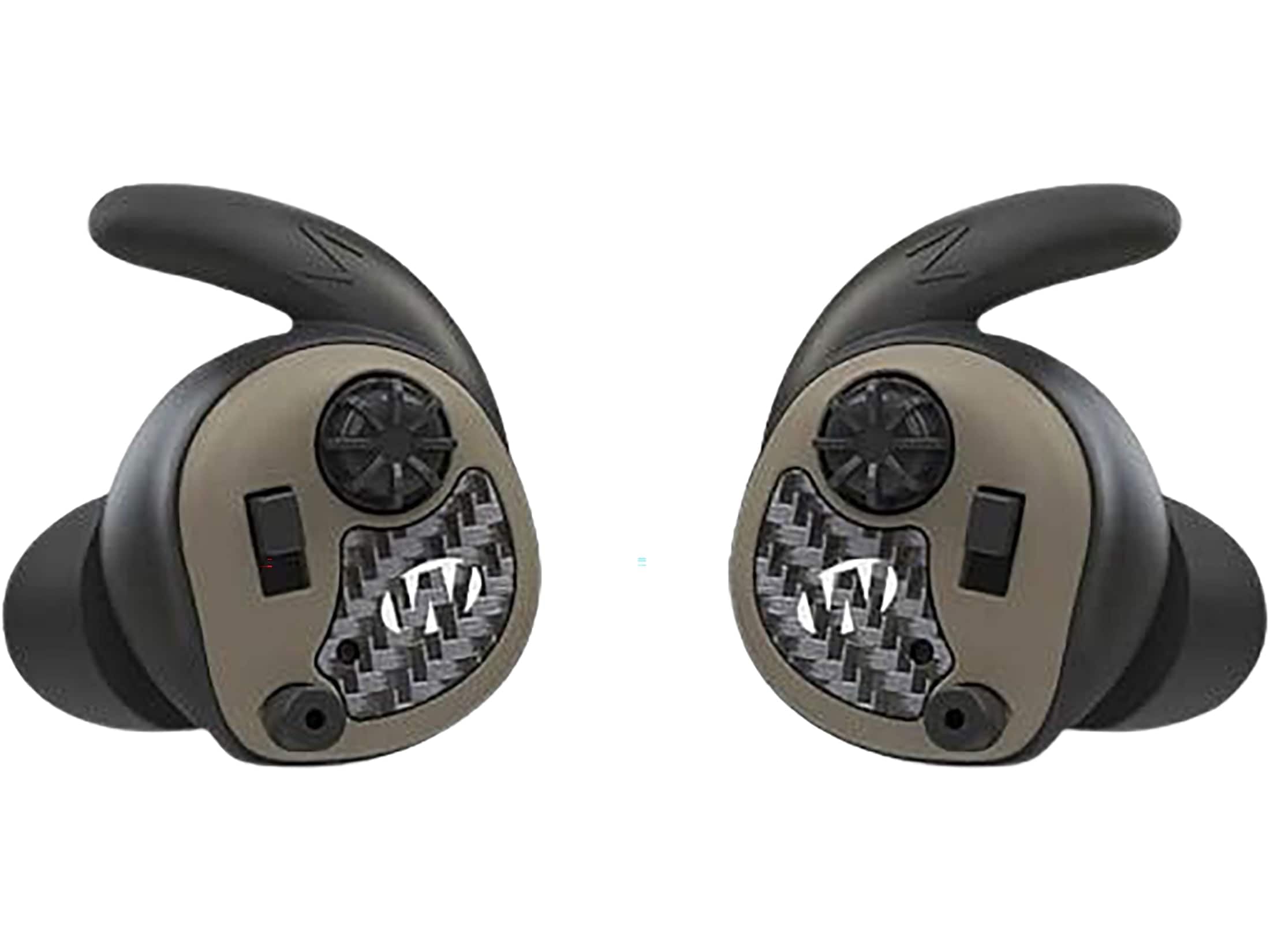
Image: Walker's Isolator Electronic Ear Plugs, Flat Dark Earth color, displayed with included accessories like ear tips and lanyard.
4. Configuración
4.1 Instalación da batería
The Isolator Ear Plugs use #10 batteries. Follow these steps to install them:
- Gently remove the foam or silicone ear tip from the ear plug.
- Carefully peel back the entire rubber shell that covers the earbud body. This will expose the battery compartment.
- Open the small battery door.
- Insert a fresh #10 battery with the positive (+) side facing up (as indicated by a small marking inside the compartment).
- Pecha ben a porta da batería.
- Re-position the rubber shell over the earbud body, ensuring it fits snugly.
- Attach your preferred ear tip (foam or silicone).
Nota: The ear plugs will not function if the batteries are inserted incorrectly or if the battery door is not fully closed.
4.2 Choosing and Fitting Ear Tips
A proper fit is essential for both comfort and effective hearing protection. Experiment with the included ear tips to find the best seal for your ear canal.
- Foam Tips: Compress the foam tip by rolling it between your fingers until it is small enough to insert into your ear canal. Insert quickly and hold in place for a few seconds while it expands to create a seal.
- Consellos de silicona: Select a size that fits snugly without causing discomfort. Gently insert the tip into your ear canal and adjust until a good seal is achieved.
You should notice a significant reduction in ambient noise when the ear plugs are properly sealed, even before they are powered on.
5. Instrucións de funcionamento
5.1 Acendido/Apagado
To power on the Isolator Ear Plugs, ensure batteries are installed and the battery door is closed. The device typically powers on automatically when the battery door is fully closed. To power off, open the battery door slightly to disconnect the power.
5.2 Control de volume
The Isolator Ear Plugs feature integrated controls for adjusting the amplification level. Locate the small push button on the body of each ear plug.
- Aumentar o volume: Press the button briefly to increase the amplification of ambient sounds.
- Diminuír o volume: Press and hold the button to decrease the amplificación.
Adjust the volume to a comfortable level that allows you to hear important sounds (e.g., voices, game movement) without discomfort.
5.3 Funcionalidade de redución de ruído
The Isolator Ear Plugs are designed with advanced digital sound processing. They continuously monitor ambient sound levels. When a loud noise, such as a gunshot, occurs, the system instantly compresses or cuts off the sound to protect your hearing, then quickly returns to normal amplificación.
This adaptive noise cancellation ensures that you are protected from harmful impulse noises while maintaining awareness of your surroundings.
6. Mantemento
6.1 Limpeza
Regular cleaning is important for hygiene and performance.
- Consellos para oídos: Remove foam and silicone ear tips. Foam tips should be replaced regularly as they cannot be effectively cleaned. Silicone tips can be washed with mild soap and water, then thoroughly dried before reattaching.
- Ear Plug Body: Wipe the body of the ear plugs with a clean, damp cloth. Do not use harsh chemicals or abrasive cleaners. Ensure no moisture enters the microphone or speaker openings.
- Wax Guards: Check for earwax buildup in the sound port. If present, gently clean with a small brush or wax removal tool (not included).
6.2 Almacenamento
When not in use, store your Isolator Ear Plugs in their protective case (if included) or a clean, dry environment. Remove batteries if the device will not be used for an extended period to prevent battery leakage.
6.3 Substitución da batería
Replace batteries when sound becomes weak or distorted, or if the device fails to power on. Refer to Section 4.1 for battery installation instructions. Always replace both batteries simultaneously for optimal performance.
7 Solución de problemas
If you experience issues with your Isolator Electronic Ear Plugs, consult the following table:
| Problema | Causa posible | Solución |
|---|---|---|
| Sen son ou son moi baixo | Dead or incorrectly installed batteries; clogged sound port; ear tip not sealed. | Replace batteries; ensure batteries are correctly oriented and door is closed; clean sound port; re-fit ear tip for a proper seal. |
| Son estático ou distorsionado | Low batteries; moisture in the unit; damaged microphone/speaker. | Replace batteries; ensure unit is dry; if problem persists, contact support. |
| Poor noise reduction | Improper ear tip fit; incorrect ear tip size. | Ensure ear tip creates a tight seal in the ear canal; try a different size or type of ear tip. |
| Ear plugs uncomfortable | Incorrect ear tip size or type. | Experiment with different ear tip sizes and materials (foam vs. silicone) to find the most comfortable fit. |
8. Especificacións
| Característica | Especificación |
|---|---|
| Número de modelo | 888151099100 |
| Clasificación de redución de ruído (NRR) | 25 dB |
| Colocación do oído | En Orella |
| Método de control | Pulsador |
| Control de ruído | Cancelación adaptativa de ruído |
| Tipo de controlador de audio | Driver dinámico |
| Rango de frecuencias | 20 Hz - 20,000 Hz |
| Impedancia | 25 ohmios |
| Material do recinto | Silicona |
| Nivel de resistencia á auga | Impermeable |
| Tecnoloxía de conectividade | Wired (for internal components, not external connection) |
| Tipo de batería | #10 (Zinc-Air) |
9. Garantía e soporte
Walker's products are manufactured to high-quality standards. For specific warranty information, please refer to the warranty card included with your product or visit the official Walker's website. If you encounter any issues not covered in the troubleshooting section, or require further assistance, please contact Walker's customer support.
Walker's Customer Support:
- Refer to your product packaging or the official Walker's websitio para obter a información de contacto máis actualizada.