
Introdución
This manual provides comprehensive instructions for the Romoss PRC Series 20000mAh 15W Power Bank. Please read this guide carefully before using the product to ensure safe and optimal performance.
The Romoss PRC Series 20000mAh 15W Power Bank is designed to provide a substantial power reserve for extended device usage. With a 20,000mAh capacity, it can charge multiple devices simultaneously through its various output ports. It supports 15W bidirectional fast charging for quick energy replenishment. Its sleek white design and portability make it suitable for everyday use and travel.
O que hai na caixa
- 1 x Romoss PRC Series 20000mAh 15W Power Bank
- Manual de usuario (este documento)
Produto rematadoview
Disposición do banco de enerxía
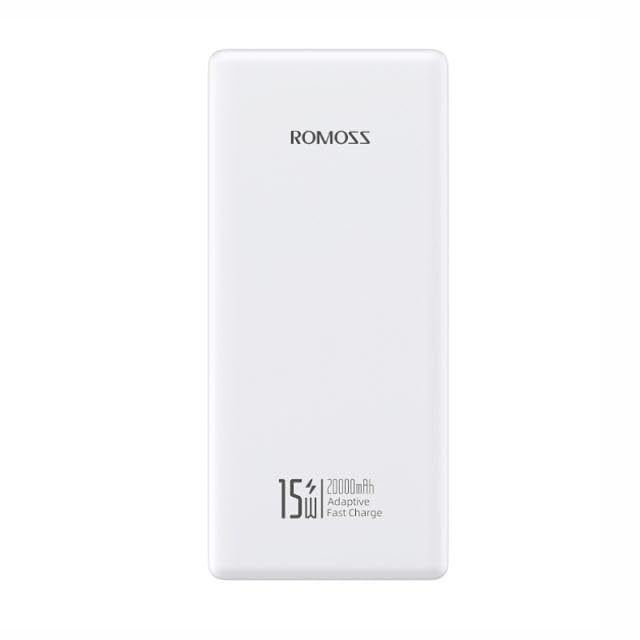
Fronte view of the Romoss PRC Series 20000mAh 15W Power Bank, showing the Romoss logo, 15W, 20000mAh, and Adaptive Fast Charge text, along with the power button on the side.
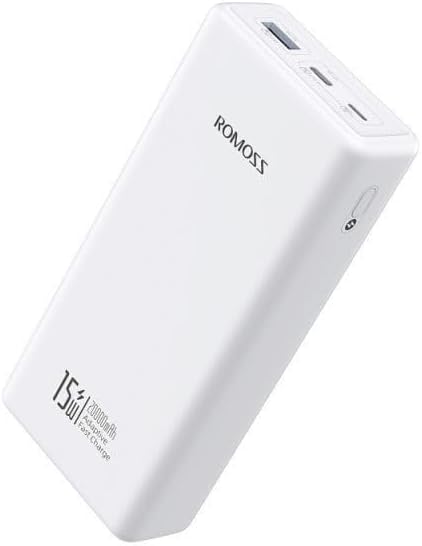
En ángulo view of the Romoss PRC Series 20000mAh 15W Power Bank, highlighting the USB-A output ports and the power button.

Traseira view of the Romoss PRC Series 20000mAh 15W Power Bank, showing the integrated charging cables neatly stored within the device.

Ángulo de arriba abaixo view of the Romoss PRC Series 20000mAh 15W Power Bank, displaying the Romoss branding and the various charging ports.
Compoñentes clave
- Botón de encendido: Activates the power bank and checks battery level.
- Indicador LED de batería: Four LEDs display the remaining power.
- Portos de saída USB-A: Para cargar dispositivos externos.
- Input Port (Micro USB): For recharging the power bank.
- Integrated Charging Cables: For convenient device charging.
Configuración
Carga inicial
Before first use, fully charge your Romoss Power Bank. Connect the power bank to a suitable USB wall charger (not included) using a compatible charging cable. The LED indicators will illuminate to show the charging progress.
The 4-level LED battery indicator will show the current charge status. When all four LEDs are solid, the power bank is fully charged.
Instrucións de funcionamento
Cargando os teus dispositivos
- Connect your device's charging cable to one of the power bank's USB-A output ports.
- Conecte o outro extremo do cable ao dispositivo.
- A batería externa comezará a cargar o dispositivo automaticamente. Se non, preme o botón de acendido unha vez para iniciar a carga.
- Os indicadores LED mostrarán o nivel restante da batería do banco de enerxía durante a descarga.
Comprobando o nivel da batería
Press the power button once. The LED indicators will light up to show the current battery level:
- 1 LED: 0-25 %
- 2 LED: 25-50 %
- 3 LED: 50-75 %
- 4 LED: 75-100 %
Bidirectional Fast Charging
The power bank supports 15W bidirectional fast charging. This means it can charge compatible devices quickly and can also be recharged quickly when connected to a 15W or higher power source.
Mantemento
- Manteña o banco de enerxía seco e lonxe da humidade.
- Non expoña a temperaturas extremas (quentes ou frías).
- Limpa a superficie cun pano suave e seco. Non empregues produtos químicos agresivos nin materiais abrasivos.
- Almacene nun lugar fresco e seco cando non se use durante períodos prolongados.
- Recharge the power bank at least once every three months to maintain battery health.
Resolución de problemas
O banco de enerxía non se carga
- Ensure the charging cable and wall adapter are functioning correctly and properly connected.
- Proba cun cable de carga ou adaptador de parede diferente.
- Verify the input port on the power bank is clean and free of debris.
O dispositivo non se carga desde o banco de enerxía
- Asegúrate de que o banco de enerxía teña carga suficiente (comproba os indicadores LED).
- Press the power button once to activate charging.
- Try a different USB-A output port.
- Proba cun cable de carga diferente para o teu dispositivo.
- Asegúrate de que o teu dispositivo sexa compatible coas especificacións de saída do banco de enerxía.
Carga lenta
- Ensure both the power bank and your device support fast charging.
- Check if the charging cable is suitable for fast charging.
- Evita usar o dispositivo mentres se está a cargar, xa que isto pode ralentizar o proceso.
Especificacións
| Característica | Detalle |
|---|---|
| Nome do modelo | PRC20-141-1133H |
| Marca | Romoss |
| Capacidade da batería | 20000 mAh |
| Potencia de saída | 15 W |
| Característica especial | Carga rápida |
| Cor | Branco |
| Peso do elemento | 540 g |
| Dimensións do paquete | 18 x 10.6 x 4 cm |
| Tipo de conector | Micro USB (entrada) |
| Voltage | 5 voltios |
| Composición da pila da batería | Ion de litio |
Información de seguridade
- Non desmonte, modifique nin repare o produto.
- Non expoña a lume nin a altas temperaturas.
- Non mergullo en auga ou outros líquidos.
- Manter fóra do alcance dos nenos.
- Evite deixar caer ou someter o banco de enerxía a fortes impactos.
- Dispose of the power bank according to local regulations. Do not dispose of with household waste.
Garantía e Soporte
Garantía
This Romoss Power Bank comes with a 12-month warranty from the date of purchase. The warranty covers manufacturing defects. It does not cover damage caused by misuse, accidents, unauthorized modifications, or normal wear and tear.
Atención ao cliente
For technical support or warranty claims, please contact Romoss customer service through their official website or the retailer where the product was purchased. Please have your model number (PRC20-141-1133H) and proof of purchase ready.