
1. Introdución
This manual provides detailed instructions for the installation, operation, and maintenance of the Generic SF-205 Digital Display Thermostat. The SF-205 is an electronic temperature controller designed for precise temperature management in display cabinets, refrigerators, and freezers, featuring a digital display and a 30A relay output.
2. Produto rematadoview
The SF-205 is a versatile temperature controller equipped with a clear digital display for real-time temperature monitoring and easy parameter adjustments. It is suitable for various refrigeration applications requiring accurate temperature control.
2.1 Compoñentes
- Main Controller Unit: Houses the control circuitry and wiring terminals.
- Digital Display Panel: Front-facing interface with temperature display and control buttons.
- Temperature Sensors: Typically includes a cold-room evaporator sensor and an AC sensor.
- Wiring Harness: Pre-wired connections for various functions.
- Power Transformer (optional/external): For specific voltage requisitos.
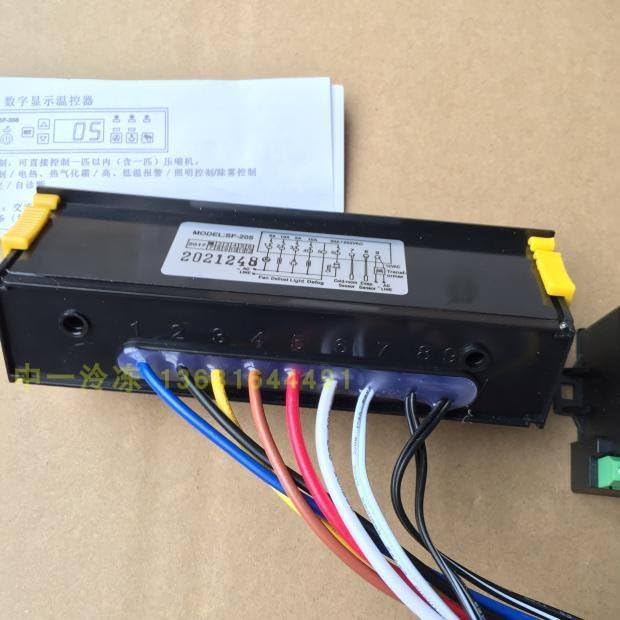
Image: The SF-205 main controller unit with various colored wires connected to its terminals. This view shows the overall physical structure of the device and its primary wiring points.
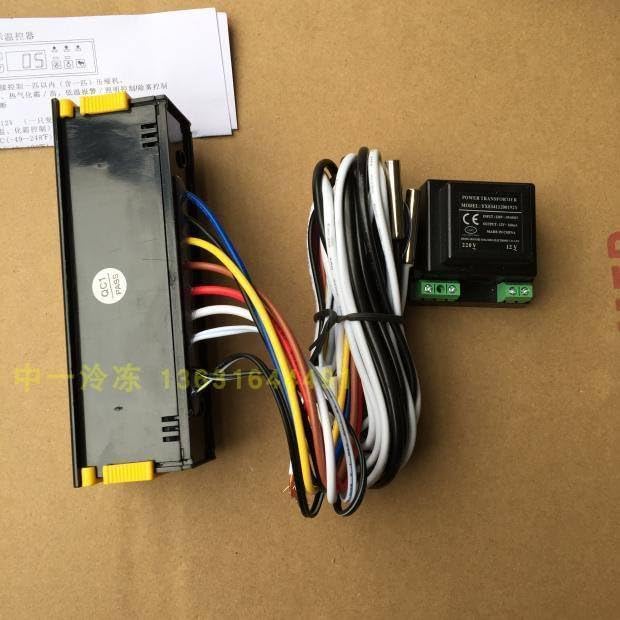
Imaxe: Un lado view of the SF-205 controller, illustrating the wiring bundle and an external power transformer. This provides a perspective on the complete setup including auxiliary components.
3. Información de seguridade
AVISO: Electrical installation should only be performed by qualified personnel. Failure to follow these safety instructions may result in electric shock, fire, or damage to the product.
- Desconecte sempre a alimentación antes da instalación, o mantemento ou a resolución de problemas.
- Asegúrese de que todas as conexións de cableado estean seguras e cumpran cos códigos eléctricos locais.
- Do not operate the device in environments with excessive moisture or extreme temperatures outside its specified operating range.
- Comprobe a fonte de alimentación voltage cumpre cos requisitos do dispositivo.
4. Instalación e cableado
Careful wiring is crucial for the correct and safe operation of the SF-205 thermostat. Refer to the wiring diagram below and ensure all connections are made accurately.
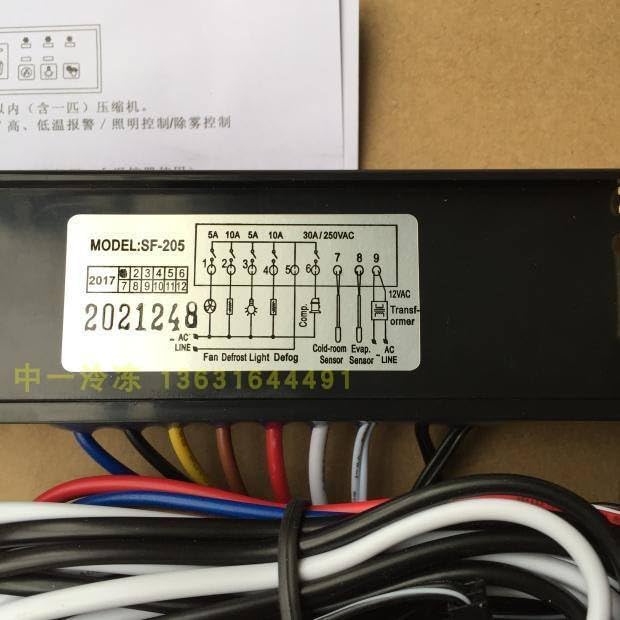
Image: A close-up of the wiring diagram label on the SF-205 unit. This diagram details the terminal connections for power input, sensors, and controlled outputs such as fan, defrost, light, and compressor.
4.1 Wiring Terminals
| Terminal No. | Función | Descrición |
|---|---|---|
| 1, 2 | LIÑA AC | Main AC power input. |
| 3 | Ventilador | Output for controlling the fan. (5A) |
| 4 | Desconxelar | Output for controlling the defrost heater. (10A) |
| 5 | Luz | Output for controlling internal lighting. (10A) |
| 6 | Compresor | Output for controlling the compressor. (30A/250VAC) |
| 7 | Cold-room Evap. Sensor | Input for the cold-room evaporator temperature sensor. |
| 8 | AC Sensor | Input for the ambient AC temperature sensor. |
| 9 | Transformador 12VAC | Output for connecting a 12VAC transformer. |
Nota: Ensure proper grounding and insulation for all connections. Consult a professional electrician if you are unsure about any wiring procedures.
5. Instrucións de funcionamento
The SF-205 features a user-friendly interface for setting and monitoring temperature. Familiarize yourself with the display and buttons.
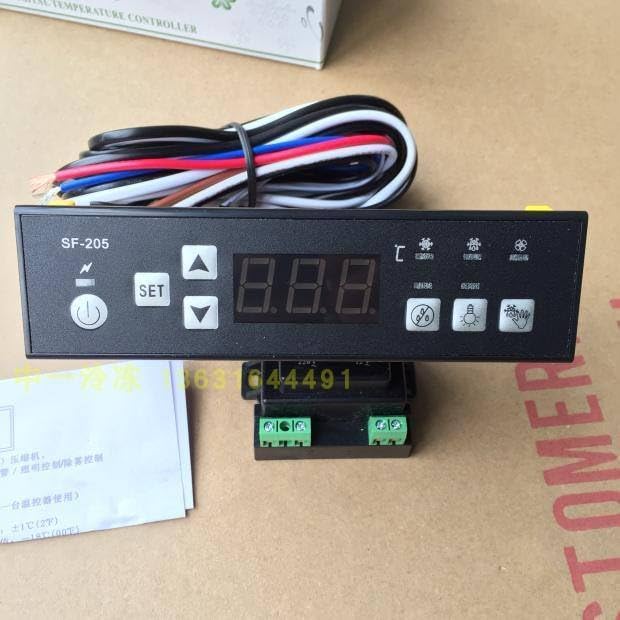
Image: The front panel of the SF-205 thermostat, showing the digital temperature display, power button, SET button, and up/down arrow buttons, along with various indicator icons.
5.1 Pantalla e botóns
- Pantalla dixital: Shows the current temperature and parameter values.
- ⏻ Power Button: Prema para acender ou apagar a unidade.
- Botón SET: Úsase para entrar no modo de configuración de parámetros e confirmar as seleccións.
- ▲ Up Button: Increases parameter values or navigates through menu options.
- ▼ Down Button: Decreases parameter values or navigates through menu options.
- Iconas indicadoras: Various icons may illuminate to indicate compressor status, defrost cycle, fan operation, or alarms.
5.2 Axustar a temperatura
- Preme o SET button once. The display will show the current set temperature.
- Usa o ▲ Arriba or ▼ Abaixo botóns para axustar a temperatura desexada.
- Preme o SET button again to confirm the new setting and exit. If no button is pressed for a few seconds, the display will revert to showing the current temperature.
5.3 Configuración avanzada de parámetros
To access advanced parameters (e.g., defrost cycle duration, temperature differential, alarm settings), typically a long press of the SET button or a combination of buttons is required. Refer to the specific parameter codes and their functions, which are usually provided in a separate parameter table (not included in this general manual).
6. Mantemento
Regular maintenance ensures the longevity and optimal performance of your SF-205 thermostat.
- Limpeza: Periodically wipe the display panel and exterior with a soft, dry cloth. Do not use abrasive cleaners or solvents.
- Comprobación do sensor: Ensure temperature sensors are clean and properly positioned. Avoid physical damage to the sensor probes and cables.
- Inspección de cableado: Annually inspect all wiring connections for tightness and signs of wear or corrosion.
7 Solución de problemas
If you encounter issues with your SF-205 thermostat, refer to the following common problems and solutions:
| Problema | Causa posible | Solución |
|---|---|---|
| A pantalla está en branco | No power, loose wiring, faulty unit. | Check power supply. Verify AC LINE connections. If problem persists, contact support. |
| Lectura incorrecta da temperatura | Faulty sensor, sensor not properly installed, sensor cable damage. | Check sensor connections. Inspect sensor cable for damage. Replace sensor if necessary. |
| O compresor non se acende/apaga | Temperature setting issue, faulty compressor relay, wiring error. | Verify set temperature. Check compressor wiring. Consult a technician. |
| Amosouse o código de erro | Fallo específico do sistema. | Refer to the product's full technical manual for specific error code meanings and troubleshooting steps. |
8. Especificacións
- Modelo: SF-205
- Marca: Xenérico
- Número de peza do fabricante: ZBTS_NQOD_12774
- Aplicación: Display Cabinet, Refrigerator, Freezer Temperature Control
- Compressor Relay Capacity: 30 A / 250 VCA
- Defrost Relay Capacity: 10A
- Fan Relay Capacity: 5A
- Light Relay Capacity: 10A
- Entrada de enerxía: CA (Volumen específico)tage not provided, refer to device label)
- Tipo de sensor: NTC (Common for such devices, specific type not provided)
- Rango de control de temperatura: (Specific range not provided, refer to device label or full manual)
9. Garantía e soporte
Specific warranty terms and direct support contact information are not provided within the available product details. For warranty claims or technical assistance, please refer to the retailer or vendor from whom the product was purchased.