
1. Instrucións de seguridade importantes
Lea atentamente todas as instrucións antes de usar este aparello e gárdeas para futuras consultas. O incumprimento destas instrucións pode provocar descargas eléctricas, incendios ou lesións persoais graves.
- Asegúrate sempre de colocar o ventilador sobre unha superficie estable e plana para evitar que se volque.
- Do not operate the fan with a damaged cord or plug. If the cord or plug is damaged, contact customer service for assistance.
- Keep fingers and other objects away from the fan grilles during operation. The fan features pinch-proof grilles for safety, but caution is still advised.
- Desconecte o ventilador da toma de corrente antes de limpalo ou realizar calquera mantemento.
- Non use o ventilador en lugares húmidos ou damp lugares como baños ou zonas de lavandería.
- This appliance is equipped with overload protection. If the fan automatically shuts off, unplug it, wait a few minutes, and then plug it back in.
- Asegurar o voltagA indicación no ventilador coincide coa súa fonte de alimentación local antes de conectala.
- Este ventilador está deseñado só para uso en interiores.
2. Produto rematadoview
The Sweetcrispy Tower Fan (Model TS35INGYZZ) is designed to provide efficient and quiet cooling for various indoor spaces. It features multiple speed settings, operating modes, and a convenient timer function.

Image: Sweetcrispy Tower Fan with its remote control, illustrating the sleek design and primary components.
Contido do paquete:
- Sweetcrispy Tower Fan Unit
- Control remoto
- Manual de usuario
3. Configuración e montaxe
Follow these steps to assemble and prepare your tower fan for first use.
- Desempaquetar o ventilador: Carefully remove all components from the packaging. Ensure all parts listed in the package contents are present.
- Montar a base: The fan base typically requires minor assembly. Align the two halves of the base (if applicable) and attach them to the bottom of the fan unit. Secure with the provided screws.
- Coloca o ventilador: Position the fan on a firm, level surface. Ensure there is adequate space around the fan for optimal airflow and oscillation.
- Conectar enerxía: Enchufe o cable de alimentación nunha toma eléctrica estándar.
Video: This video demonstrates the assembly process, including how to tighten the screws for the fan base, and provides an overview of the fan's features and operation.
4. Instrucións de funcionamento
Your Sweetcrispy Tower Fan can be operated using the control panel on top of the unit or the included remote control.
Panel de control e control remoto:
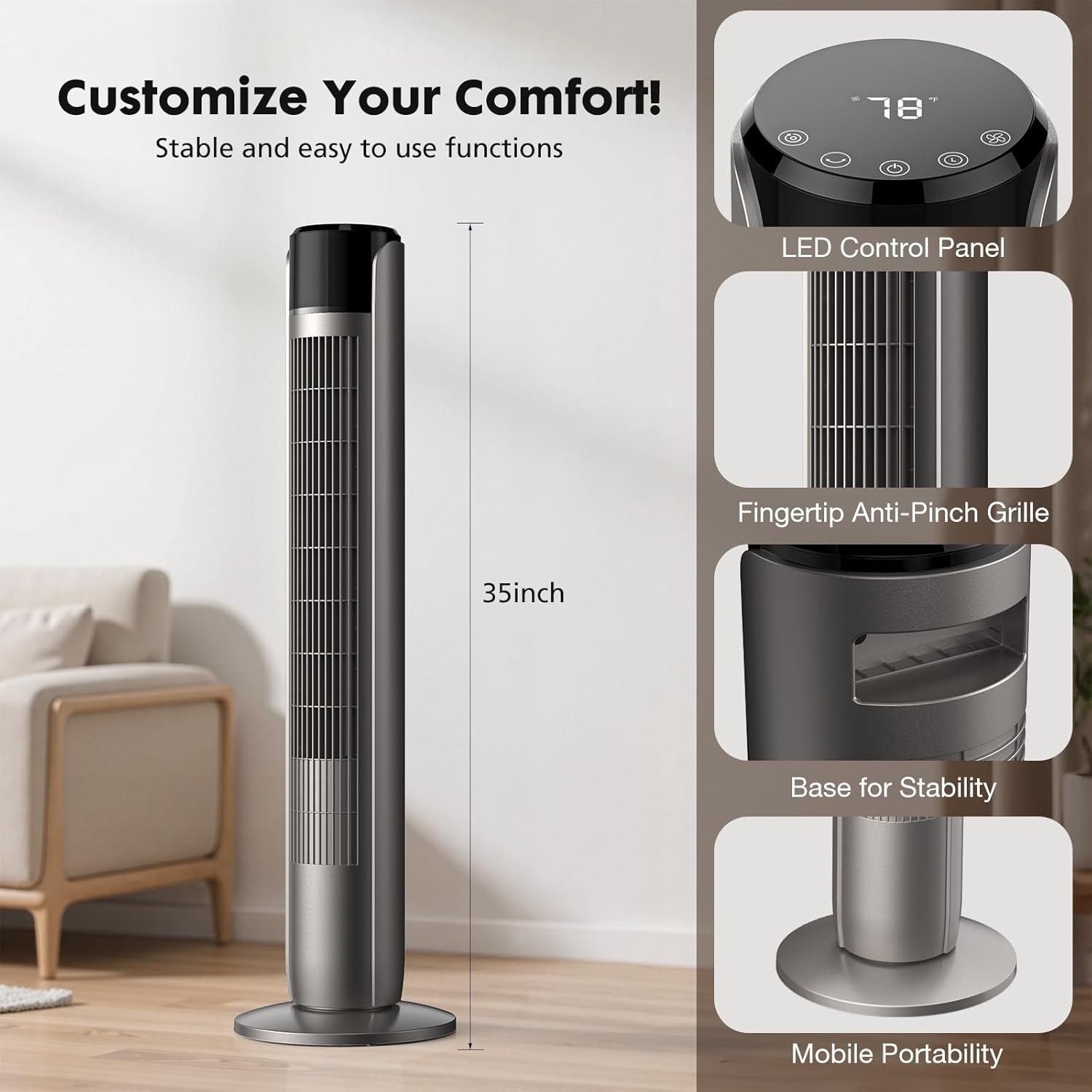
Imaxe: Detallada view of the fan's LED control panel, showing buttons for Mode, Oscillation, Power, Timer, and Wind Speed.
- Botón de encendido (U): Prema para acender ou apagar o ventilador.
- Wind Speed Button (F): Press to cycle through 5 speed settings (Level 1 to Level 5).
- Botón de modo (O): Press to select one of the 4 operating modes: Normal, Natural, Auto, or Sleep.
- Oscillating Button (~): Press to activate or deactivate the 60-degree oscillation feature.
- Botón do temporizador (L): Press to set the auto-off timer from 1 to 12 hours. Each press increases the timer by one hour.
Modos de funcionamento:

Image: Visual representation of the four operating modes (Normal, Natural, Auto, Sleep) and five adjustable speed settings.
- Modo normal: Provides a constant airflow at your selected speed.
- Modo natural: Simula unha brisa natural variando a velocidade do ventilador de forma intermitente.
- Modo automático: Adjusts the fan speed automatically based on the ambient room temperature.
- Modo de suspensión: Operates at a low, quiet speed (as low as 28 dB) and gradually decreases fan speed over time to ensure an undisturbed sleep environment. The display light may dim or turn off in this mode.

Image: Illustrates the fan operating in Sleep Mode, highlighting its 28dB low noise level and 1-12 hour timer function for a peaceful night's sleep.
Oscilación:

Image: Depicts the fan's 60-degree oscillation feature, showing how it distributes airflow across a wider area in a room.
Press the oscillation button to enable the fan to rotate horizontally, distributing air across a wider area. Press again to stop oscillation at the current position.
5. Mantemento e Limpeza
Unha limpeza regular axuda a manter o rendemento do ventilador e alonga a súa vida útil.
- Antes da limpeza: Desconecte sempre o ventilador da toma de corrente antes de limpalo.
- Limpeza exterior: Use un suave, damp un pano para limpar as superficies exteriores do ventilador. Non empregue produtos de limpeza abrasivos nin disolventes, xa que poden danar o acabado.
- Limpeza da reixa: Use a vacuum cleaner with a brush attachment to gently remove dust and debris from the air intake and outlet grilles. Do not attempt to disassemble the fan for internal cleaning.
- Almacenamento: If storing the fan for an extended period, clean it thoroughly, then place it back in its original packaging or cover it to protect from dust. Store in a cool, dry place.
6 Solución de problemas
Se tes problemas co teu ventilador, consulta os seguintes problemas e solucións comúns.
| Problema | Causa posible | Solución |
|---|---|---|
| O ventilador non se acende. | No power supply; Power cord not securely plugged in; Overload protection activated. | Ensure the fan is plugged into a live outlet. Check the power cord connection. If overload protection activated, unplug, wait 5 minutes, then plug back in. |
| Fluxo de aire débil ou nulo. | Air intake/outlet blocked; Fan speed set too low. | Clear any obstructions from the grilles. Increase the fan speed setting. |
| O ventilador fai un ruído estraño. | Fan not on a level surface; Debris inside the fan. | Place the fan on a flat, stable surface. Unplug the fan and gently check grilles for any visible debris. Do not attempt to open the fan. |
| O control remoto non funciona. | As pilas están gastadas ou inseridas incorrectamente; Obstrución entre o mando a distancia e o ventilador. | Replace batteries with new ones, ensuring correct polarity. Remove any obstructions between the remote and the fan's sensor. |
If the problem persists after trying these solutions, please contact Sweetcrispy customer support.
7. Especificacións
| Marca | Doce crocante |
| Nome do modelo | Ventilador de torre para dormitorio |
| Número de modelo | TS35INGYZZ |
| Dimensións do produto | 9.8" D x 9.8" W x 35" H |
| Fonte de enerxía | AC |
| Wattage | 85 vatios |
| Número de velocidades | 5 |
| Modos de funcionamento | Normal, Natural, Auto, Sleep (4 Modes) |
| Velocidade máxima | 1520 RPM |
| Nivel de ruído | Tan baixo como 28 dB (modo de repouso) |
| Temporizador | 1-12 horas |
| Ángulo de oscilación | 60 graos |
| Características especiais | Bladeless design, Pinch-proof grilles, Overload protection, Child lock switch |
| Método de control | Push Button / Remote Control |
| Uso interior/exterior | Interior |
8. Garantía e soporte
For warranty information and customer support, please refer to the warranty card included with your product or contact Sweetcrispy directly through their official websitio web ou o vendedor onde se comprou o produto.
Please have your model number (TS35INGYZZ) and purchase date available when contacting support.