
1. Instrucións de seguridade importantes
Lea atentamente todas as instrucións antes de usar este aparello e gárdeas para futuras consultas. O incumprimento destas instrucións pode provocar descargas eléctricas, incendios ou lesións persoais graves.
- Asegúrate sempre de colocar o ventilador sobre unha superficie estable e plana para evitar que se volque.
- Non fagas funcionar o ventilador cun cable ou enchufe danados. Se o cable ou o enchufe están danados, ponte en contacto co servizo de atención ao cliente.
- Keep fingers and other objects away from the fan grilles when in operation. The fan features a fingertip anti-pinch grille for safety.
- Desconecte o ventilador da toma de corrente antes de limpalo ou realizar calquera mantemento.
- Non use o ventilador en lugares húmidos ou damp lugares como baños ou zonas de lavandería.
- Este aparello ten un enchufe polarizado (unha lámina é máis ancha que a outra). Para reducir o risco de descarga eléctrica, este enchufe está pensado para encaixar nunha toma polarizada só dun xeito. Se o enchufe non encaixa completamente na toma, invírteo. Se aínda non encaixa, póñase en contacto cun electricista cualificado. Non intente derrotar esta función de seguridade.
- Ensure the fan is not covered during operation to prevent overheating.
- This fan is equipped with built-in circuit protection design for enhanced safety.
2. Produto rematadoview
The Sweetcrispy Tower Fan TS35INGYZZ is designed to provide efficient and quiet cooling for various indoor spaces. It features multiple modes, adjustable speeds, and a convenient timer function.

Figure 2.1: Sweetcrispy Tower Fan and Remote Control. This image shows the sleek design of the tower fan along with its included remote control, highlighting its modern aesthetic and ease of use.
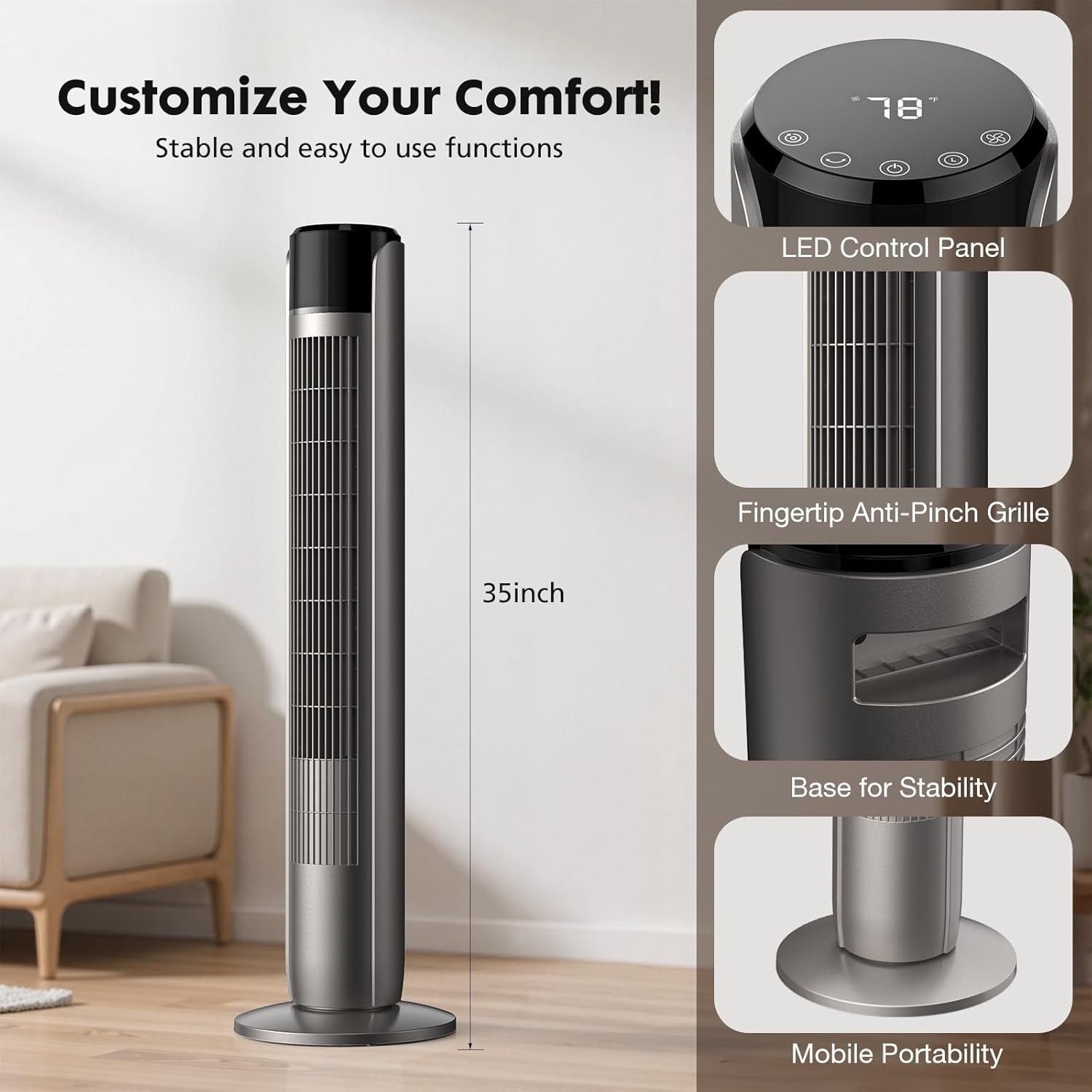
Figure 2.2: Key Features and Dimensions. This image details the fan's LED control panel, fingertip anti-pinch grille, stable base, and overall 35-inch height, emphasizing its user-friendly and safe design.

Figure 2.3: Large LED Control Panel. A close-up view of the fan's intuitive touch control panel, clearly labeling the Mode, Oscillating, Power, Timer, and Wind Speed buttons for easy operation.
3. Configuración
Follow these steps to assemble and set up your Sweetcrispy Tower Fan.
3.1 Asemblea
- Retire coidadosamente todos os compoñentes da embalaxe.
- Attach the base to the main body of the fan. Ensure the power cord is routed correctly through the base.
- Secure the base to the fan body using the provided screws and a screwdriver. Tighten the screws firmly to ensure stability.
Video 3.1: Sweetcrispy Tower Fan Assembly. This short video demonstrates the process of attaching and securing the fan base, including tightening the screws for a stable setup.
3.2 Colocación
- Coloque o ventilador sobre unha superficie firme e nivelada.
- Ensure there is adequate space around the fan for optimal airflow and oscillation.
- Keep the fan away from curtains, drapes, or any objects that could obstruct airflow or get caught in the fan.
4. Instrucións de funcionamento
Your Sweetcrispy Tower Fan can be operated using the touch control panel on top of the unit or the included remote control.
4.1 Encendido/apagado
- Enchufe o ventilador nunha toma eléctrica estándar.
- Preme o Botón de encendido () no panel de control ou no mando a distancia para acender ou apagar o ventilador.
4.2 Axustar a velocidade do ventilador
The fan offers 5 adjustable speed settings.
- Preme o Botón de velocidade do vento () repeatedly to cycle through the 5 speed levels.
4.3 Selección do modo de funcionamento
Choose from four distinct operating modes: Normal, Natural, Auto, and Sleep.

Figure 4.1: Fan Modes and Speeds. This image visually represents the four available modes (Normal, Natural, Auto, Sleep) and indicates the five adjustable speed settings, allowing users to customize their comfort.
- Preme o Botón de modo () repeatedly to switch between modes.
- Modo normal: Provides a constant, steady airflow at your selected speed.
- Modo natural: Simula unha brisa natural variando a velocidade do ventilador de forma intermitente.
- Modo automático: The fan speed automatically adjusts based on the ambient room temperature.
- Modo de suspensión: Operates at a low, quiet speed (as low as 28 dB) and gradually decreases speed over time to ensure an undisturbed sleep environment. The display light may also dim or turn off automatically.

Figure 4.2: Sleep Mode Features. This image highlights the fan's quiet 28dB operation in Sleep Mode and the 1-12 hour timer function, ideal for a full night's sleep.

Figure 4.3: Automatic Wind Adaptation. This graphic illustrates how the fan's wind speed automatically adjusts to the room temperature in Auto Mode, providing optimal comfort.
4.4 Función de oscilación
The fan can oscillate up to 60 degrees to distribute air across a wider area.

Figure 4.4: Wider Oscillation. This image demonstrates the fan's 60-degree oscillation, showing how it distributes airflow across a room for broader cooling coverage.
- Preme o Botón oscilante () to start or stop the oscillation function.
4.5 Función de temporizador
Set the fan to automatically turn off after a specified period, from 1 to 12 hours.
- Preme o Botón do temporizador () repeatedly to select the desired operating duration. The display will show the set time.
4.6 Control remoto
The remote control allows you to operate all fan functions from a distance.
- Asegúrese de que o control remoto teña pilas que funcionen.
- Point the remote control towards the fan's receiver when pressing buttons.
5. Mantemento
Regular cleaning and maintenance will help ensure optimal performance and longevity of your fan.
5.1 Limpeza
- Desenchufe sempre o ventilador antes de limpar.
- Use un suave, damp pano para limpar as superficies exteriores do ventilador. Non empregue produtos de limpeza abrasivos nin disolventes.
- For dust accumulation on the grilles, use a vacuum cleaner with a brush attachment or compressed air to gently remove dust.
- Non mergullo o ventilador na auga nin deixe que gotee a auga na carcasa do motor.
5.2 Almacenamento
- If storing the fan for an extended period, clean it thoroughly and place it back in its original packaging or cover it to protect it from dust.
- Garda o ventilador nun lugar fresco e seco.
6 Solución de problemas
If you encounter any issues with your fan, refer to the following common problems and solutions.
| Problema | Causa posible | Solución |
|---|---|---|
| O ventilador non se acende. | Sen fonte de alimentación. Non se premeu o botón de acendido/apagado. | Asegúrate de que o ventilador estea conectado correctamente a unha toma de corrente que funcione. Press the Power Button on the unit or remote. |
| Fluxo de aire débil. | Axuste de baixa velocidade. Entrada/saída de aire bloqueada. | Aumenta a velocidade do ventilador. Limpar calquera obstrución das reixas. |
| O ventilador é ruidoso. | O ventilador non está sobre unha superficie nivelada. Obstrución interna. | Coloque o ventilador nunha superficie plana e estable. Unplug and check for any foreign objects inside the grilles. |
| O control remoto non funciona. | Baterías agotadas. Obstrución entre o mando a distancia e o ventilador. | Cambie as pilas do mando a distancia. Ensure a clear line of sight to the fan's receiver. |
Se o problema persiste despois de probar estas solucións, póñase en contacto co servizo de atención ao cliente.
7. Especificacións
Detailed technical specifications for the Sweetcrispy Tower Fan TS35INGYZZ.
| Característica | Especificación |
|---|---|
| Marca | Doce crocante |
| Nome do modelo | Ventilador de torre para dormitorio |
| Número de modelo | TS35INGYZZ |
| Cor | Classical Grey |
| Deseño de ventiladores eléctricos | Ventilador de chan |
| Estilo | Torre |
| Dimensións do produto (P x A x A) | 9.8" D x 9.8" W x 35" H |
| Fonte de enerxía | AC |
| Wattage | 85 vatios |
| Número de velocidades | 5 |
| Velocidade (RPM) | 1520 RPM |
| Característica especial | Sen espada |
| Método de control | Push Button (Touch Panel) / Remote Control |
| Temporizador | 1-12 horas |
| Nivel de ruído (modo de suspensión) | Tan baixo como 28 dB |
| Ángulo de oscilación | 60 graos |
| Uso interior/exterior | Interior |
| UPC | 781434688155 |
8. Información da garantía
Sweetcrispy products are manufactured to the highest quality standards. This product is covered by a limited warranty from the date of purchase against defects in materials and workmanship. Please retain your proof of purchase for warranty claims. The warranty does not cover damage caused by misuse, accident, unauthorized modifications, or normal wear and tear.
9. Atención ao cliente
For any questions, assistance, or to report issues with your Sweetcrispy Tower Fan, please contact our customer support team. You can typically find contact information on the product packaging or on the official Sweetcrispy websitio.
Please have your model number (TS35INGYZZ) and proof of purchase ready when contacting support.