
Ledwood PLAYKARAOKE
Ledwood PLAYKARAOKE Portable Karaoke Speaker
Manual de instrucións
Introdución
Grazas pola compraasing the Ledwood PLAYKARAOKE Portable Karaoke Speaker. This manual provides essential information for the safe and efficient operation of your device. Please read it thoroughly before use and retain it for future reference.
Información importante de seguridade
- Non expoñas o dispositivo á auga nin a humidade excesiva.
- Evita temperaturas extremas.
- Non intente desmontar nin reparar o dispositivo vostede mesmo. Encargue todo o mantemento a persoal cualificado.
- Manter fóra do alcance dos nenos.
- Use só o cable de carga e o adaptador fornecidos.
- Asegúrese de que haxa unha ventilación axeitada durante o uso e a carga.
Contido do paquete
Comprobe que estean presentes todos os elementos:
- Ledwood PLAYKARAOKE Portable Karaoke Speaker
- 2 micrófonos sen fíos
- Cable de carga (USB-C)
- Manual de usuario
- 32GB USB Key
Produto rematadoview
The Ledwood PLAYKARAOKE is a compact and powerful portable karaoke speaker designed for entertainment. It features a 120W output, dynamic RGB LED lighting, and multiple connectivity options.
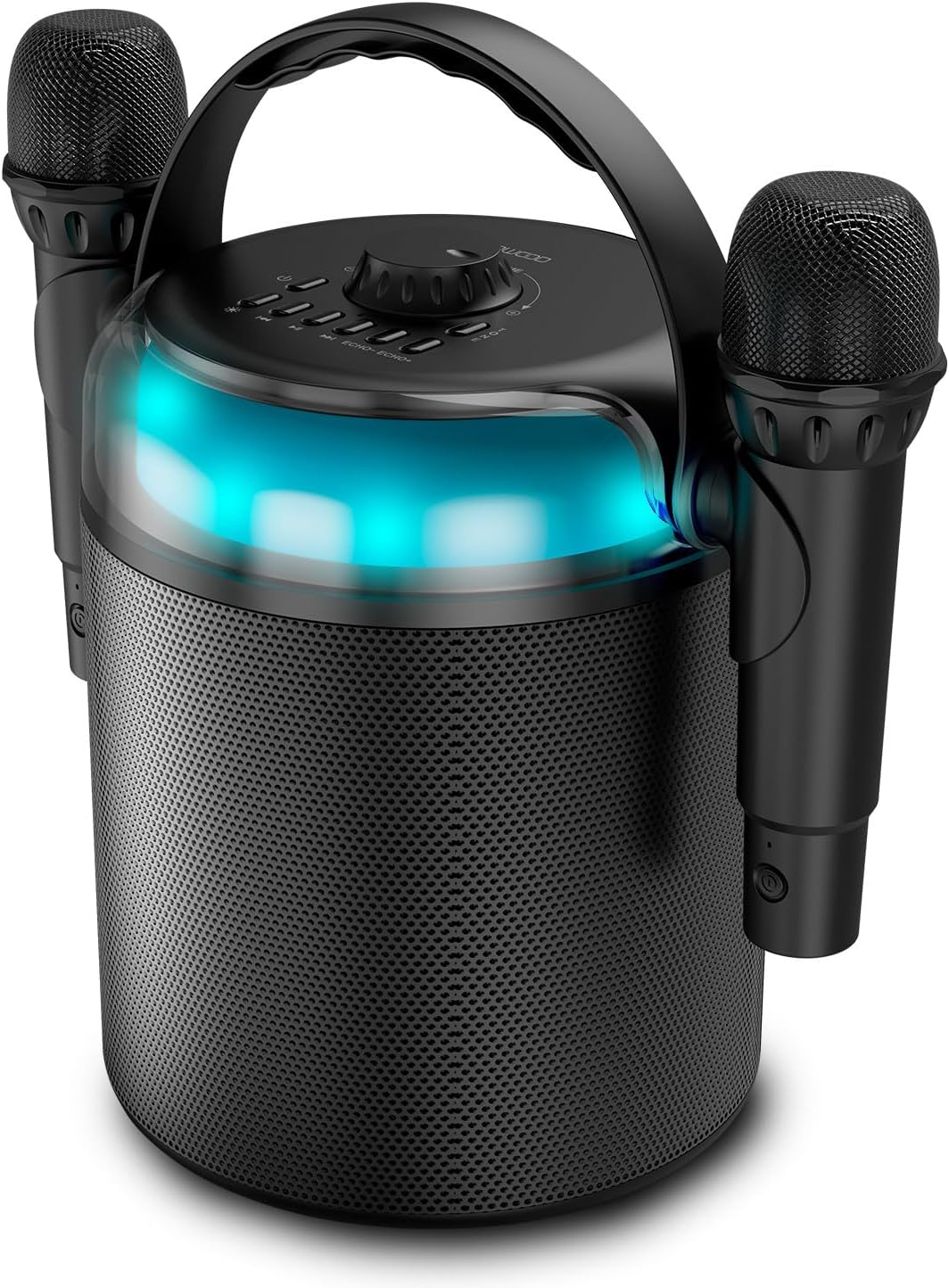
Figure 1: Ledwood PLAYKARAOKE Speaker with Microphones
This image shows the main unit of the Ledwood PLAYKARAOKE speaker, a cylindrical black device with a handle on top. Two wireless microphones are securely attached to the sides of the speaker. A blue LED light band is visible around the top section of the speaker.
Panel de control

Figura 2: Panel de control superior
Esta imaxe ofrece unha vista de arriba abaixo view of the speaker's control panel. It features a large central volume knob, a power button, buttons for LED light control, playback controls (play/pause, skip), and echo adjustment for the microphones.
Familiarize yourself with the buttons and ports on the device:
- Botón de volume: Axusta a saída de son xeral.
- Botón de encendido: Activa ou desactiva o altofalante.
- Botón de luz LED: Cycles through LED light effects or turns them off.
- Controis de reprodución: Reproducir/Pausa, Pista anterior, Pista seguinte.
- Echo Controls (Echo-, Echo+): Adjusts the echo effect on the microphones.
- Botón de modo: Switches between input sources (Bluetooth, USB, MicroSD, AUX, COAX).
- Vocal Effects Button: Cycles through different vocal effects (Man, Woman, Monster, Child, Reverb).
- Porto USB: Para a reprodución desde unha unidade USB.
- Ranura para tarxetas MicroSD: For microSD card playback.
- Entrada AUX: Entrada de audio de 3.5 mm para dispositivos externos.
- COAX Input: Coaxial audio input.
- Porto de carga: Porto USB-C para cargar o altofalante.
Configuración
1. Cargando o altofalante
- Connect the provided USB-C charging cable to the charging port on the speaker.
- Conecta o outro extremo do cable a un adaptador de corrente USB axeitado (non incluído) ou a un porto USB con alimentación.
- A luz indicadora de carga acenderase. Unha carga completa tarda aproximadamente 4 horas.
- Unha vez cargado por completo, desconecte o cable de carga.
2. Acendido/apagado
- Para acender, manteña premido o botón Botón de encendido until the LED lights illuminate and you hear an audible prompt.
- Para apagalo, manteña premido o botón Botón de encendido again until the LED lights turn off.
3. Pairing Wireless Microphones
The two wireless microphones are typically pre-paired with the speaker. If they do not connect automatically:
- Asegúrate de que o altofalante estea acendido.
- Insert batteries into the microphones (if not already installed).
- Power on each microphone. They should automatically connect to the speaker.
- If connection issues persist, refer to the Troubleshooting section.
Instrucións de funcionamento
1. Conexión Bluetooth
- Power on the speaker. It will automatically enter Bluetooth pairing mode (indicated by a flashing LED).
- No teu teléfono intelixente, tableta ou outro dispositivo con Bluetooth, activa Bluetooth e busca os dispositivos dispoñibles.
- Select "Ledwood PLAYKARAOKE" from the list.
- Once connected, the speaker will emit an audible confirmation, and the LED will stop flashing.
- Agora podes reproducir audio desde o teu dispositivo conectado a través do altofalante.
2. Reprodución por USB/MicroSD
- Insert a USB drive or microSD card (with audio files) no porto/ranura correspondente do altofalante.
- The speaker should automatically switch to USB/MicroSD mode and begin playing audio. If not, press the Botón de modo para seleccionar a entrada correcta.
- Usa o Controis de reprodución (Play/Pause, Previous Track, Next Track) to manage your music.
3. AUX/COAX Input
- Connect an external audio device (e.g., TV, PC) to the speaker using a 3.5mm AUX cable or a coaxial cable (not included).
- Preme o Botón de modo repeatedly until the speaker switches to AUX or COAX input mode.
- Play audio from your external device. The speaker will output the sound.
4. Axuste do volume
Xira o grande Botón de volume on the top panel clockwise to increase volume and counter-clockwise to decrease volume.
5. Using Vocal Effects
While using the microphones:
- Preme o Vocal Effects Button to cycle through the available vocal effects: Man, Woman, Monster, Child, and Reverb.
- Usa o eco- e Eco+ buttons to adjust the intensity of the echo effect on your voice.
6. Efectos de luz LED
Preme o Botón de luz LED to cycle through different dynamic RGB LED light patterns or to turn the lights off.
Mantemento
- Limpeza: Limpe o altofalante cun pano suave e seco. Non empregue produtos de limpeza abrasivos nin disolventes.
- Almacenamento: Garde o dispositivo nun lugar fresco e seco, lonxe da luz solar directa e de temperaturas extremas.
- Coidado da batería: For optimal battery life, charge the speaker fully before long periods of storage and recharge it every few months.
Resolución de problemas
| Problema | Posible Solución |
|---|---|
| O altofalante non se acende. | Asegúrate de que a batería estea cargada. Conecta o cable de carga e inténtao de novo. |
| Non se escoita son do altofalante. |
|
| Os micrófonos non funcionan. |
|
| Conexión Bluetooth inestable. |
|
Especificacións
- Modelo: Ledwood PLAYKARAOKE
- Potencia de saída: 120 W
- Controladores de altofalantes: 4" (10 cm) Woofer, 1.25" Tweeter
- Versión Bluetooth: 5.1
- Duración da batería: Ata 3 horas (ao 70 % do volume)
- Tempo de carga: Aproximadamente 4 horas
- Portos de entrada: USB, MicroSD, AUX (3.5mm), COAX
- Micrófonos: 2 micrófonos sen fíos
- Efectos vocais: Man, Woman, Monster, Child, Reverb (5 effects)
- Luces LED: RGB dinámico
- Dimensións do altofalante (H x W x D): 215 x 168 x 168 mm
- Microphone Dimensions (H x Dia): 175 x 50 mm
- Accesorios incluídos: 32GB USB Key
Garantía e Soporte
Para obter información sobre a garantía e asistencia técnica, consulte a tarxeta de garantía incluída co produto ou visite o sitio web oficial de Ledwood. websitio. Garda o comprobante de compra para calquera reclamación de garantía.
Ask a question about this manual
Ask about setup, troubleshooting, compatibility, parts, safety, or missing instructions. Manuals+ will review the question and use this page’s manual context to help answer it.