
1. Introdución
This manual provides comprehensive instructions for the operation and maintenance of your BAOFENG UV-32 Ham Radio. Please read this manual thoroughly before using the device to ensure proper function and safety.

Image: The BAOFENG UV-32 Ham Radio, showcasing its display and robust design.
2. Características do produto
- Dual GPS/BeiDou Tracking: Share and request location coordinates in real-time, essential for off-grid communication.
- Programación da aplicación Bluetooth: Wirelessly configure up to 1000 channels using a mobile application.
- Potencia de saída axustable: Select between 10W, 5W, or 1W to optimize range and battery life.
- One-touch Frequency Scan: Quickly clone channels for efficient setup.
- Son de alta definición: Equipped with a 40mm speaker for clear communication in noisy environments.
- Multi-band Monitoring: Supports AM/FM/VHF/UHF bands, including 108-136MHz for aviation.
- 1000-Channel Storage: Organize channels across 10 zones for various operational needs.
- Carga USB-C: Convenient charging via USB-C ports, power banks, or car adapters.
- Dual Display/Dual Guard: Monitorizar dúas frecuencias simultaneamente.

Image: Visual representation of the BAOFENG UV-32's key functions and features.
3. Contido do paquete
Verifica que todos os elementos estean presentes no teu paquete:
- BAOFENG UV-32 Radio Unit
- Antena
- Batería (batería non estándar)
- Charger (Desktop Dock and AC Adapter)
- Acollador
- Manual de usuario (este documento)
- Back Clip (for "1 Pack Black+Back Clip" variant)

Image: The BAOFENG UV-32 radio with its back clip, demonstrating portability.
4. Guía de configuración
4.1 Instalación da batería
- Aliñe a batería coas ranuras da parte traseira da radio.
- Deslice a batería cara arriba ata que encaixe no seu lugar.
- Para retirala, prema o pestillo de liberación da batería (se a hai) e deslícea cara abaixo.
4.2 Conexión da antena
- Atornille a antena no conector da parte superior da radio en sentido horario ata que estea apertada cos dedos. Non a aperte demasiado.
4.3 Carga da batería
The UV-32 supports two charging methods:
- Cargador de escritorio: Place the radio (with battery installed) into the charging dock. Ensure the charging contacts align. The indicator light will show charging status.
- Carga directa por USB-C: Connect a USB-C cable to the port on the side of the radio and to a power source (e.g., computer, wall adapter, power bank, car charger).
Charge the battery fully before first use. A full charge typically takes several hours.

Image: Demonstrates the versatility of Type-C charging for the BAOFENG UV-32.
5. Instrucións de funcionamento
5.1 Acendido/apagado e volume
- Encendido: Xire o POTENCIA/VOLUME knob clockwise until you hear a click.
- Axustar o volume: Continue rotating the knob to increase or decrease the volume.
- Apagado: Xire o botón en sentido antihorario ata que escoite un clic.
5.2 Selección de canles
Usa o ARRIBA/ABAIXO arrow keys or the numeric keypad to select a channel. The display will show the current channel number and frequency.
5.3 Transmitting (PTT)
Para transmitir, manteña premido o botón PTT (Push-To-Talk) button on the side of the radio. Speak clearly into the microphone. Release the PTT button to receive.
5.4 Dual Display / Dual Guard
The UV-32 can monitor two frequencies simultaneously. Activate the Dual Guard function through the radio's menu or a dedicated button (refer to the on-screen interface for specific options).

Image: The radio's screen displaying the Dual Watch feature, allowing simultaneous monitoring of two channels.
5.5 APP Programming (Bluetooth)
- Download the "Radio Frequency Programmer" mobile application from your device's app store.
- Enable Bluetooth on your mobile device and the UV-32 radio.
- Abre a aplicación e segue as instrucións que aparecen na pantalla para conectar a radio.
- You can then wirelessly edit channel information, frequencies, and other settings.

Image: The BAOFENG UV-32 in programming mode, with a smartphone displaying the channel programming application.
5.6 One-touch Frequency Scan / Copy Frequency
This feature allows for quick cloning of frequencies from another radio. Press and hold the designated scan button (e.g., SK1) to initiate the smart scan and copy process. The radio will detect and store the active frequency.

Image: Illustration of the one-key frequency pairing feature between two BAOFENG UV-32 radios.
5.7 Adjustable Power Output
Access the menu to select your desired power output: 10W (High), 5W (Mid), or 1W (Low). Higher power provides greater range but consumes more battery. Lower power conserves battery for shorter distances.
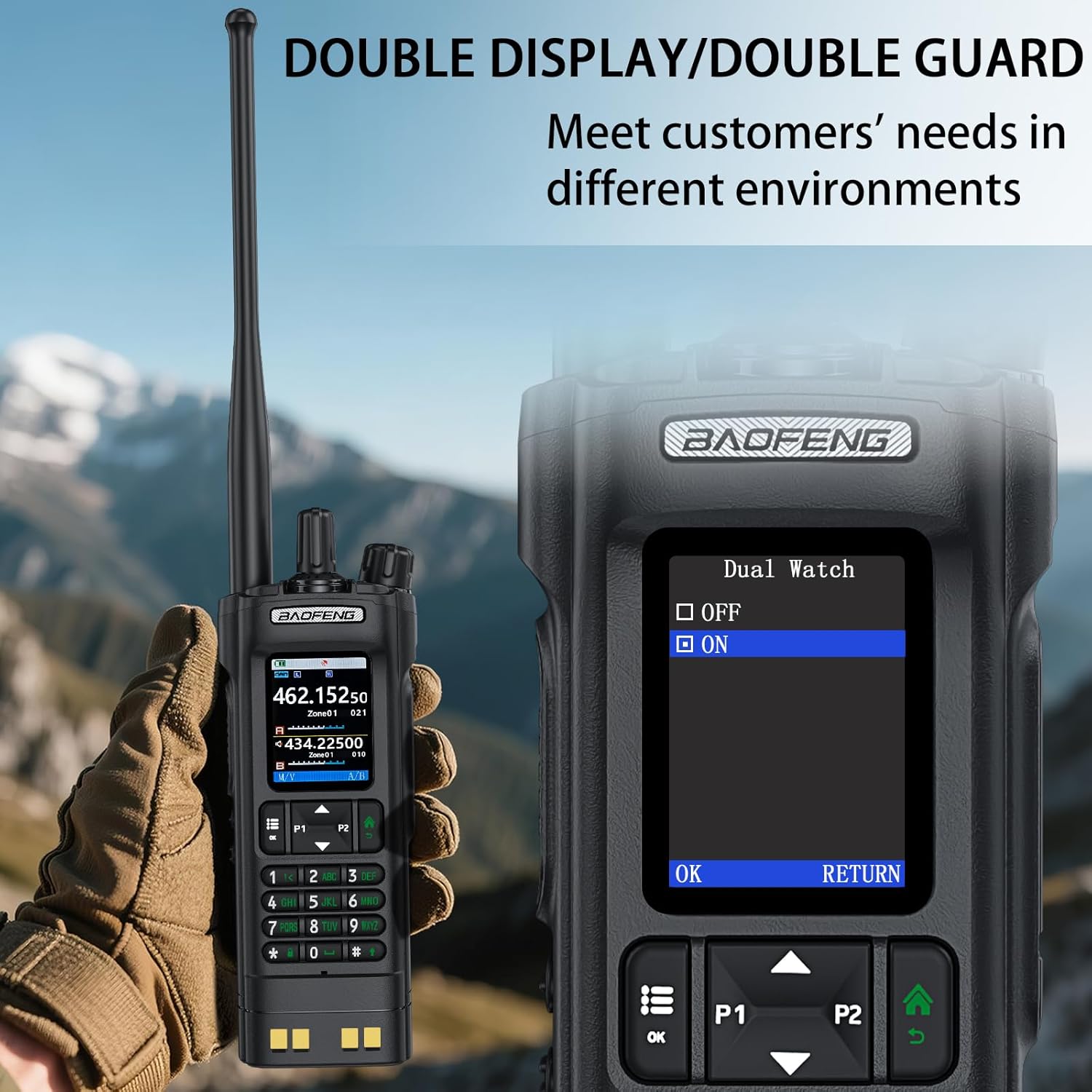
Image: The BAOFENG UV-32's power adjustment menu, showing options for 10W, 5W, and 1W output.
5.8 GPS/BeiDou Tracking
The integrated GPS/BeiDou module allows for real-time location sharing. Refer to the radio's menu for GPS functions, including sending your coordinates and requesting those of other UV-32 users.
6. Mantemento
- Limpeza: Use un suave, damp pano para limpar o exterior da radio. Non empregue produtos químicos agresivos nin disolventes.
- Coidado da batería: Evite descargar completamente a batería con frecuencia. Garde a radio e a batería nun lugar fresco e seco cando non as use durante períodos prolongados.
- Antena: Asegúrate de que a antena estea fixada de forma segura pero sen apertala demasiado. Evita dobrala nin someterla a tensión.
- Resistencia á auga: Este dispositivo é Non resistente á auga. Protect it from rain, splashes, and immersion in water.
7 Solución de problemas
| Problema | Causa posible | Solución |
|---|---|---|
| A radio non se acende. | A batería está baixa ou non está instalada correctamente. | Cargue a batería ou volva a instalala de forma segura. |
| Non se pode transmitir nin recibir. | Incorrect frequency/channel, low battery, or antenna issue. | Verify frequency, charge battery, check antenna connection. Ensure you are within range of other radios. |
| Mala calidade de audio. | Low signal strength, interference, or incorrect squelch setting. | Move to an area with better signal, adjust squelch level, check for sources of interference. |
| APP programming fails to connect. | Bluetooth not enabled, app not updated, or radio not in programming mode. | Ensure Bluetooth is on for both devices, update the app, and follow app instructions to put the radio in programming mode. |
8. Especificacións
| Marca | BAOFENG |
| Número de modelo | UV-32 |
| Número de canles | 1000 |
| Rango de frecuencias | UHF350-390/400-520MHz, VHF136-174MHz/220-260MHz |
| Rango de conversación máximo | 10 quilómetros (aprox. 6.2 millas) |
| Potencia de saída | 10 W / 5 W / 1 W (axustable) |
| Voltage | 7.4 voltios (DC) |
| Nivel de resistencia á auga | Non resistente á auga |
| Protocolo de conectividade | Bluetooth |
| Tipo de carga | USB-C, Desktop Dock |
| Dimensións (aprox.) | Altura: 6.26 cm, Anchura: 2.28 cm, Profundidade: 1.57 cm |
| Peso (aprox.) | 13.58 oz |

Image: Detailed dimensions and weight of the BAOFENG UV-32 radio.
9. Garantía e soporte
Your BAOFENG UV-32 Ham Radio comes with a 1 ano de garantía desde a data de compra. Esta garantía cobre defectos de fabricación en condicións de uso normal.
For technical support, warranty claims, or service inquiries, please contact BAOFENG customer service through their official websitio web ou o vendedor onde se comprou o produto. Garde o comprobante de compra para a validación da garantía.