
1. Introdución
This manual provides essential information for the safe and efficient use of your LKTOP 100W USB-C Power Adapter. Please read this manual thoroughly before operating the device and retain it for future reference. This power adapter is designed for fast charging of various devices, including DJI drones, charging hubs, remote controllers, and cameras.
2. Información de seguridade
- Non expoñas o adaptador á auga, á humidade nin a temperaturas extremas.
- Evite deixar caer o adaptador nin sometelo a impactos fortes.
- Do not disassemble or attempt to repair the adapter. Contact customer support if service is required.
- Asegúrese de que o voltaxe da toma de correntetage is compatible with the adapter's input voltage (100V-240V).
- Use only the provided or certified USB-C cables to prevent damage to the adapter or connected devices.
- Desconecte o adaptador da toma de corrente cando non o use ou durante tormentas eléctricas.
- Manter fóra do alcance dos nenos.
3. Contido do paquete
Verifica que todos os elementos estean presentes no teu paquete:
- LKTOP 100W USB-C Power Adapter (x1)
- 100W USB-C to USB-C Cable (x1)
- Cable de alimentación CA (x1)
- Manual de instrucións (x1)

4. Produto rematadoview
The LKTOP 100W USB-C Power Adapter features a compact design with dual USB-C ports for versatile charging. It supports PD/QC/PPS protocols for super-fast charging and includes intelligent temperature control for safety.


5. Configuración
- Desdobrar o enchufe: Gently pull out the foldable AC plug from the adapter body.
- Conectar á enerxía: Insert the AC plug into a standard wall outlet (100V-240V).
- Conectar o cable USB-C: Plug one end of the USB-C to USB-C cable into either USB-C port (C1 or C2) on the adapter.
- Conectar ao dispositivo: Plug the other end of the USB-C cable into your device or charging hub.
6. Instrucións de funcionamento
The LKTOP 100W USB-C Power Adapter can charge a variety of devices. When using both USB-C ports simultaneously, the adapter intelligently distributes power. USB-C1 can provide up to 82W, and USB-C2 can provide up to 18W, with a total maximum output of 100W.
6.1. Charging Drones
Connect your drone directly to the adapter using a USB-C cable. Charging times vary by drone model.

Video 6.1: Demonstrates charging a DJI Mavic 4 Pro drone with the LKTOP 100W USB-C Power Adapter (2C), showing 62W output and 115 minutes charging time for a single body.
6.2. Charging Hubs
Connect your charging hub to the adapter. The adapter supports various LKTOP and DJI charging hubs.
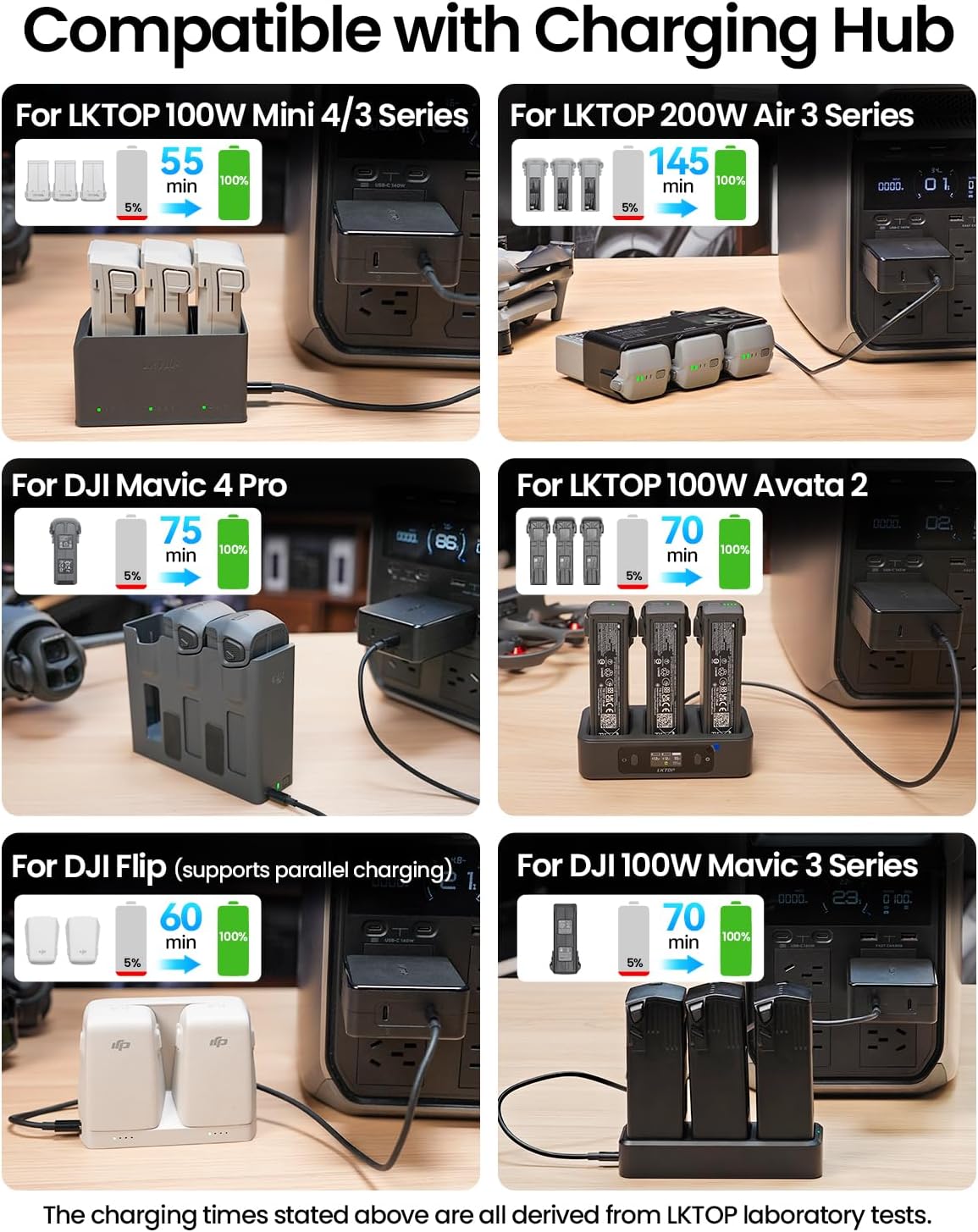
Video 6.2: Demonstrates charging an LKTOP 65W Neo Charging Hub with the LKTOP 100W USB-C Power Adapter (3C1A), showing 64W output and 45 minutes charging time for 3 batteries.
Video 6.3: Demonstrates charging an LKTOP Mini 4/3 Series Charging Hub with the LKTOP 100W USB-C Power Adapter (3C1A), showing 100W output and 47 minutes charging time for 3 batteries.
Video 6.4: Demonstrates charging a DJI Neo Charging Hub with the LKTOP 100W USB-C Power Adapter (2C), showing 57W output and 60 minutes charging time for 3 batteries.
Video 6.5: Demonstrates charging an LKTOP Air 3 Series Charging Hub with the LKTOP 100W USB-C Power Adapter (3C1A), showing 185W output and 70-80 minutes charging time for 3 batteries.
Video 6.6: Demonstrates charging an LKTOP Avata 2 Charging Hub with the LKTOP 100W USB-C Power Adapter (2C), showing 97W output and 70 minutes charging time for 3 batteries.
6.3. Charging Remote Controllers
Connect your DJI remote controller to the adapter using a USB-C cable.

6.4. Charging Cameras
Connect your compatible camera to the adapter using a USB-C cable.
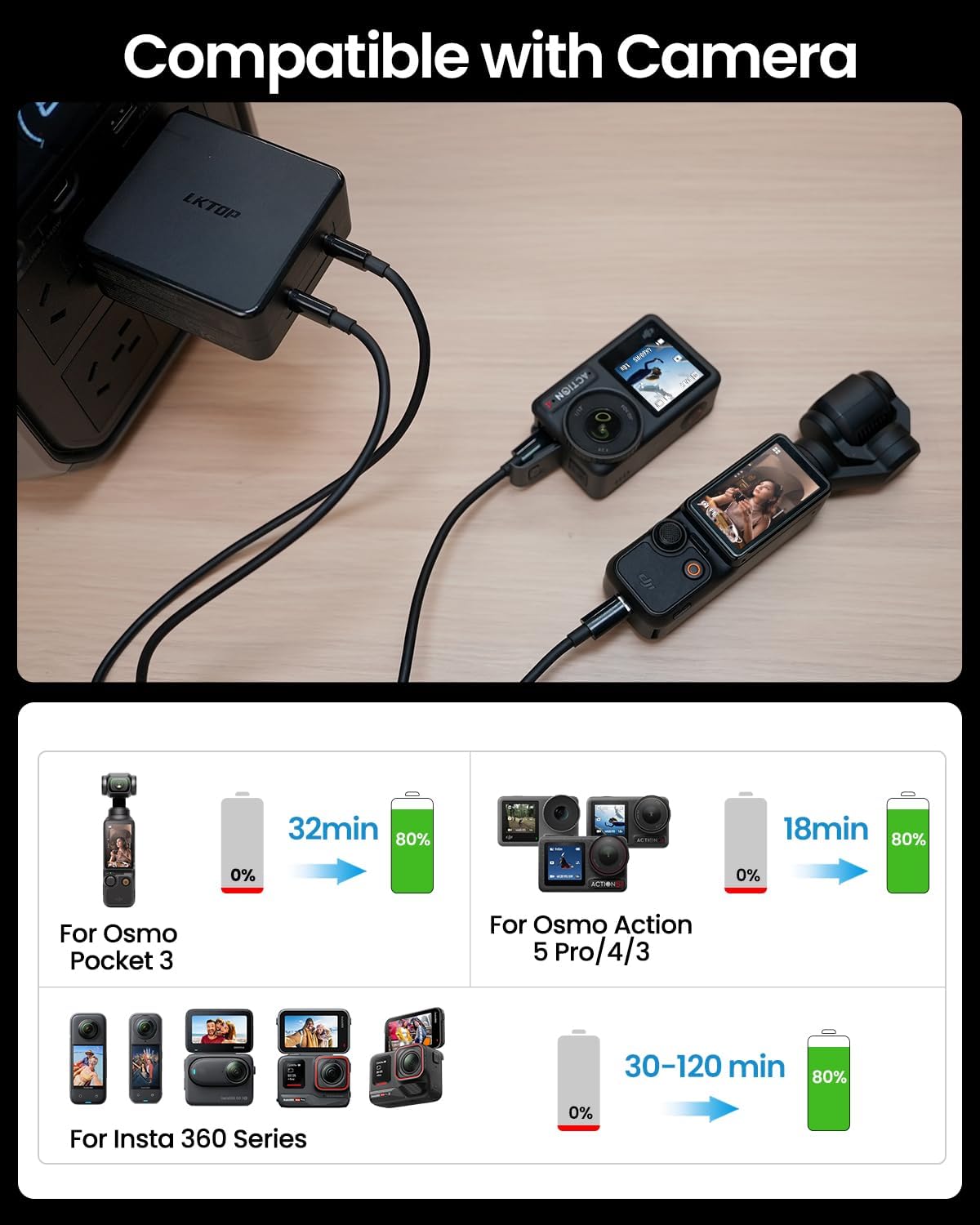
Video 6.7: Demonstrates charging an Insta 360 X3 with the LKTOP 100W USB-C Power Adapter (3C1A), showing 13W output and 90 minutes charging time for a single body.
Video 6.8: Demonstrates charging a DJI Pocket 3 with the LKTOP 100W USB-C Power Adapter (3C1A), showing 35W output and 32 minutes charging time for a single body.
Video 6.9: Demonstrates charging a DJI Pocket 3 with the LKTOP 100W USB-C Power Adapter (2C), showing 34W output and 32 minutes charging time for a single body.
7. Compatibilidade
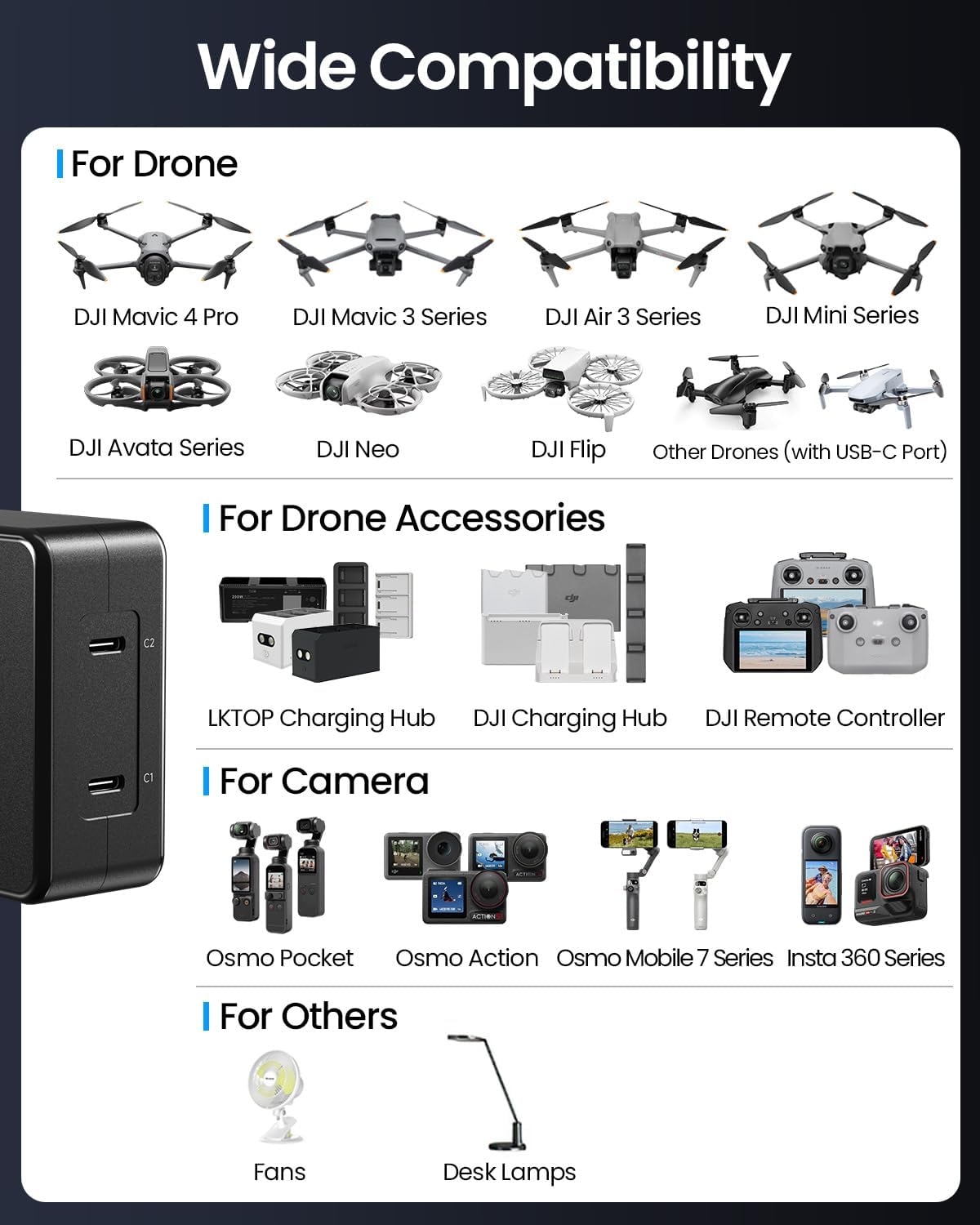
The LKTOP 100W USB-C Power Adapter is compatible with a wide range of devices, including:
- DJI Drones: Mini 5 Pro, Mini 4 Pro, Mini 3 Pro, Mini 3, Mini 4K, Mini 2 SE, Mini 2, Mini SE, Mavic Mini, Air 3, Air 3S, Mavic 3 Pro, Mavic 3 Cine, Mavic 3 Classic, Mavic 3, Mavic 3 Enterprise Series, Mavic 4 Pro, Avata/Avata 2, Neo/Neo 2, Flip.
- DJI/LKTOP Charging Hubs: Mini 5/4/3 Series Charging Hub, Air 3 Series Charging Hub, Mavic 3 Series Charging Hub, Avata 2 Charging Hub, Neo Charging Hub, Flip Charging Hub.
- DJI Remote Controllers: All USB-C compatible models.
- Cámaras de acción DJI: All USB-C compatible models.
- Other USB-C Port Devices: Any device compatible with PD/QC/PPS protocols.
8. Especificacións
| Característica | Detalle |
|---|---|
| Marca | LKTOP |
| Nome do produto | LKTOP 100W USB-C Power Adapter |
| Modelo de produto | AD1-100FCP |
| Vol. De entradatage | 100-240 V CA, 50-60 Hz, 2.5 A |
| Saída de porto único | USB-C1: 100W (Max), USB-C2: 100W (Max) |
| Dual Port Output | USB-C1 + USB-C2: Single port 82W (Max), Total power 100W (Max) |
| Vol. De saídatage | 20 voltios |
| Valoración actual | 5 Amps |
| Número de portos | 2 (USB Tipo C) |
| Dimensións do produto | 73.5 x 70 x 32mm (2.89"D x 1.26"W x 2.76"H) |
| Peso do produto | 286 ± 5g (excluding cable weight) |
| Temperatura de funcionamento | 0 ° a 40 °C (32 ° a 104 °F) |
| Certificacións | CCC, FCC, RoHS |

9 Solución de problemas
- O dispositivo non se carga: Ensure the adapter is securely plugged into a working power outlet. Check that the USB-C cable is properly connected to both the adapter and the device. Verify device compatibility.
- Carga lenta: Ensure you are using a 100W compatible USB-C cable. If charging two devices, power distribution may reduce individual port output. Disconnect one device to maximize power to the other.
- Adapter overheating: The adapter features intelligent temperature control. If it feels excessively hot, disconnect it immediately and allow it to cool down. Ensure adequate ventilation around the adapter during use.
- No power indicator: Some devices or cables may not have a visible power indicator. Refer to your device's manual for charging status.
10. Mantemento
- Clean the adapter with a soft, dry cloth. Do not use liquid cleaners or aerosols.
- Garde o adaptador nun lugar fresco e seco cando non o use.
- Avoid bending or stressing the USB-C cables excessively to prevent internal damage.
11. Garantía e soporte
The LKTOP 100W USB-C Power Adapter comes with a 1-year warranty. For warranty claims, technical support, or any inquiries, please contact LKTOP customer service through the retailer where you purchased the product or visit the official LKTOP websitio.
Garde o comprobante de compra para validar a garantía.