
1. Introdución e finalview
Thank you for choosing the Mcezdy M5C-2(BLE)-6-Pin Ebike LCD Display. This advanced cycling computer is designed to provide essential riding data, smart connectivity, and convenient features for your electric bicycle. Please read this manual thoroughly before installation and use to ensure proper function and safety.

Figure 1: Mcezdy M5C-2 Ebike LCD Display showing current speed, pedal assist level, and battery voltage.
2. Características clave
- Pantalla de cores vibrantes: Provides clear and easy-to-read riding data.
- Personalized Control: Features walk-assist mode, cruise control, real-time trip and total mileage tracking, voltage display, and adjustable bike parameters (wheel diameter, speed limits).
- Conectividade intelixente: Syncs with cycling applications via Bluetooth for route recording and statistics.
- Carga en movemento: Integrated Type-C charging port (5V/500mA output) for mobile devices.
- Construción duradeira: IPX65 waterproof rating, rugged ABS and PC housing, tempered glass screen, and nylon bracket for all-weather use.
- Ancho Voltage Compatibilidade: Supports 24V, 36V, 48V, and 60V battery systems.

Figura 2: Máisview of M5C-2 display functions.
3. Nota importante sobre a compatibilidade
This Ebike LCD display operates exclusively with controllers using the Protocolo UART nº 2. It is not compatible with other UART protocols. Ensure your Ebike controller supports UART No. 2 to avoid compatibility issues.
How to Determine Your Ebike's Communication Protocol:
- Consult your Ebike's user manual or technical documentation.
- Check your existing Ebike display for protocol information.
- Contact your Ebike manufacturer for specific details.

Figure 3: Compatibility warning and connector types (5-Pin and 6-Pin).
4. Especificacións do produto
| Especificación | Detalle |
|---|---|
| Marca | Mcezdy |
| Nome do modelo | M5C-2(BLE)-6-Pin |
| Tipo de visualización | LCD |
| Tecnoloxía de conectividade | Bluetooth |
| Protocolo | UART nº 2 |
| Voltage Compatibilidade | 24V, 36V, 48V, 60V |
| Clasificación impermeable | IPX65 |
| Material | ABS, PC, Tempered Glass, Nylon |
| Tipo de montaxe | Handlebar Mount (22.2mm, 25.4mm, 28.6mm, 31.8mm) |
| Compoñentes incluídos | Pantalla LCD, manual do usuario, descrición do código de erro |
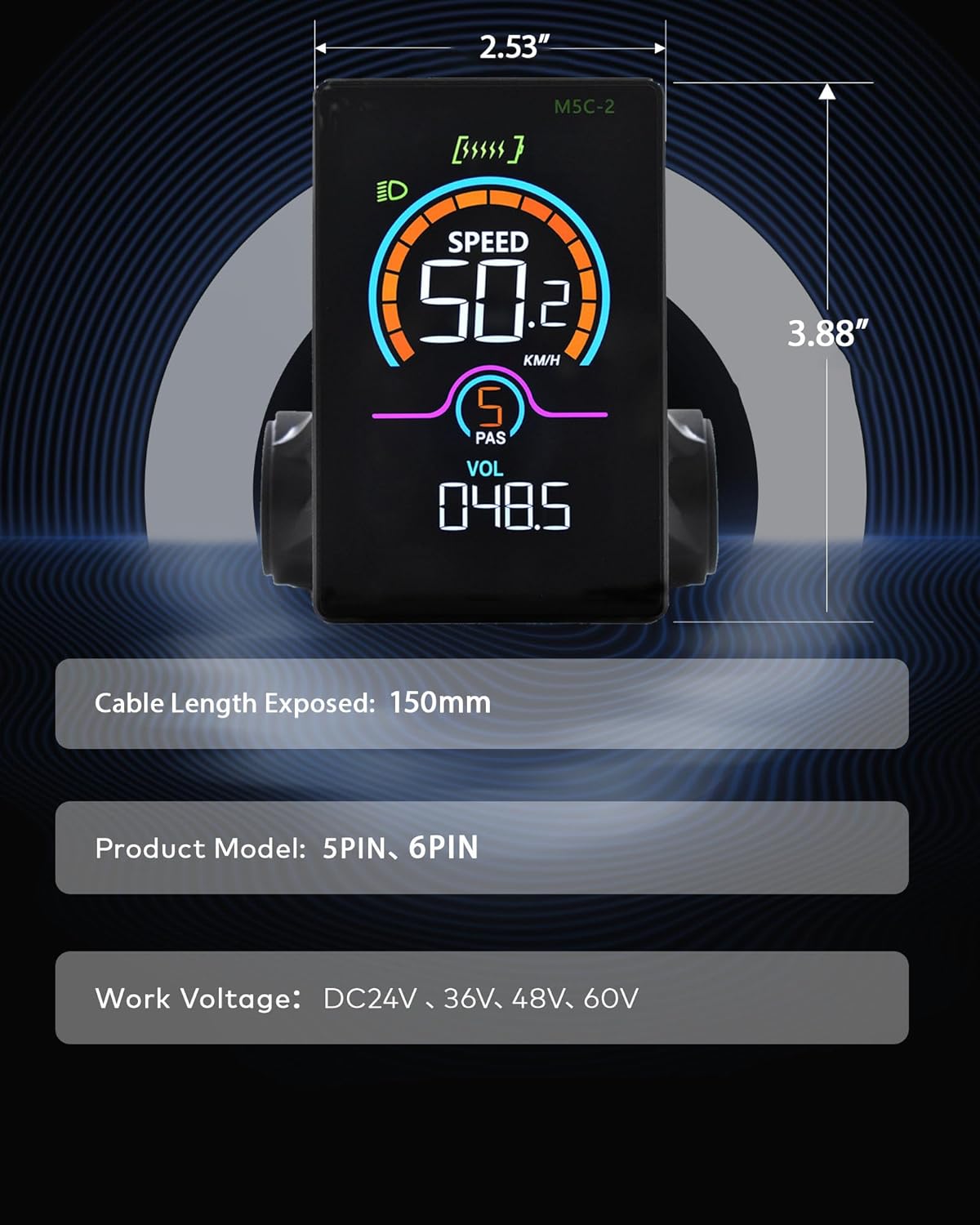
Figure 4: M5C-2 display dimensions and cable length.
5. Configuración e instalación
Follow these steps to properly install your Mcezdy LCD Display on your Ebike.
5.1 Montaxe da pantalla
- Loosen the screws on the display's handlebar mount.
- Position the display on your Ebike's handlebar. The adjustable mount accommodates handlebar diameters of 22.2mm, 25.4mm, 28.6mm, and 31.8mm.
- Tighten the screws securely to prevent movement during riding.

Figure 5: Display mounted on a handlebar, demonstrating adjustable fit.
5.2 Conexión dos cables
- Identify the display's cable connector (either 5-Pin or 6-Pin).
- Locate the corresponding connector on your Ebike's controller or wiring harness.
- Carefully align and connect the display cable to the Ebike's system. Ensure a firm connection.
Video 1: This video demonstrates the physical installation and initial power-on sequence of the Mcezdy Ebike Display, including mounting and cable connections.
6. Instrucións de funcionamento
Familiarize yourself with the display's controls and functions.
6.1 Encendido/apagado
- Para acender: Press and hold the power button (usually marked with a power symbol) on the control pad for a few seconds until the display illuminates.
- Para apagar: Prema e manteña premido o botón de acendido de novo ata que a pantalla se apague.
6.2 Switching Assistance Modes (PAS Levels)
Use the '+' and '-' buttons on the control pad to adjust the pedal assist (PAS) level. Higher numbers indicate more motor assistance.
6.3 Alternar os parámetros de visualización
Briefly press the power button to cycle through different display parameters such as Trip Distance, Odometer (ODO), Max Speed, Average Speed, Range, Calorie Consumption, and Cadence.
6.4 Conexión da aplicación (Bluetooth)
The M5C-2 display supports Bluetooth connectivity for integration with cycling applications. This allows you to record routes, track stats, and potentially adjust settings via your smartphone.
- Download the recommended cycling app (e.g., 'LINGHUI' as indicated in product images) from your smartphone's app store.
- Asegúrate de que o Bluetooth estea activado no teu smartphone.
- Power on the Ebike display.
- Open the cycling app and follow the in-app instructions to connect to your M5C-2 display.
Video 2: This video demonstrates the Bluetooth connection process between the Mcezdy Ebike Display and a smartphone application.

Figure 6: Smartphone app interface for M5C-2 display.
7. Configuración avanzada
The display allows for customization of various parameters to suit your riding preferences.
7.1 Accessing the Main Menu
To enter the main menu, press and hold the '+' and '-' buttons simultaneously for a few seconds. Navigate through the menu using the '+' and '-' buttons, and confirm selections with the power button.
7.2 Customizable Parameters (ExampOS)
- Diámetro da roda: Adjust for accurate speed and distance readings.
- Límite de velocidade: Set the maximum assisted speed according to local regulations or personal preference.
- Brillo: Adjust display backlight intensity.
- Tempo de apagado automático: Configure the time before the display automatically shuts off due to inactivity.
- Selección de unidades: Cambiar entre unidades métricas (km/h) e imperiais (mph).
- Reinicio da viaxe: Reset trip distance data.
8. Mantemento
Un mantemento axeitado garante a lonxevidade e o rendemento óptimo da túa pantalla.
- Limpeza: Wipe the display screen with a soft, damp pano. Evite produtos de limpeza abrasivos ou solventes.
- Exposición á auga: While IPX65 rated for water resistance, avoid prolonged submersion or high-pressure water jets. Ensure the Type-C charging port cover is securely closed when not in use.
- Almacenamento: Store the Ebike and display in a dry, cool place away from direct sunlight when not in use.
- Inspección de cables: Periodically check all cables and connectors for any signs of wear, damage, or loose connections.
9 Solución de problemas
Consulta esta sección para ver os problemas comúns e as súas solucións.
9.1 A pantalla non se acende
- Ensure the Ebike battery is charged and properly connected.
- Check all cable connections between the display and the controller for looseness or damage.
- Verify that the power button is being pressed and held for the required duration.
9.2 Incorrect Speed/Distance Readings
- Access the advanced settings menu and verify that the wheel diameter is correctly set for your Ebike.
- Ensure the speed sensor on your Ebike is properly installed and functioning.
9.3 Displaying Error Codes
If the display shows an error code, refer to the 'Fault Code Description' document included with your product for specific meanings and troubleshooting steps. Common issues may include motor, controller, or sensor malfunctions.
9.4 Problemas de conectividade Bluetooth
- Ensure the display is powered on and within range of your smartphone.
- Restart both the display and your smartphone.
- Check the app's settings to ensure it has permission to use Bluetooth.
10. Garantía e soporte
The Mcezdy M5C-2(BLE)-6-Pin Ebike LCD Display comes with a 1 ano de garantía do fabricante.
For technical support, warranty claims, or further assistance, please contact Mcezdy customer service through the retailer where you purchased the product or visit the official Mcezdy websitio.