
1. Produto rematadoview
The SEUNKWANG EWEADN Q5 Wireless Mouse offers versatile connectivity and ergonomic comfort for various computing needs. It features dual-mode connectivity (Bluetooth and 2.4G wireless), adjustable DPI settings, and a quiet click design, making it suitable for diverse environments.
- Deseño portátil: Lixeiro e compacto para facilitar o transporte.
- DPI axustable: Three DPI settings (800, 1200, 1600) for precise tracking.
- Forma ergonómica: Contoured for comfortable, long-term use.
- Conectividade dual: Seamlessly switch between Bluetooth and 2.4G connections.
- Funcionamento silencioso: Designed for minimal clicking noise.
- Pantalla de nivel de batería: Integrated indicator for battery status.
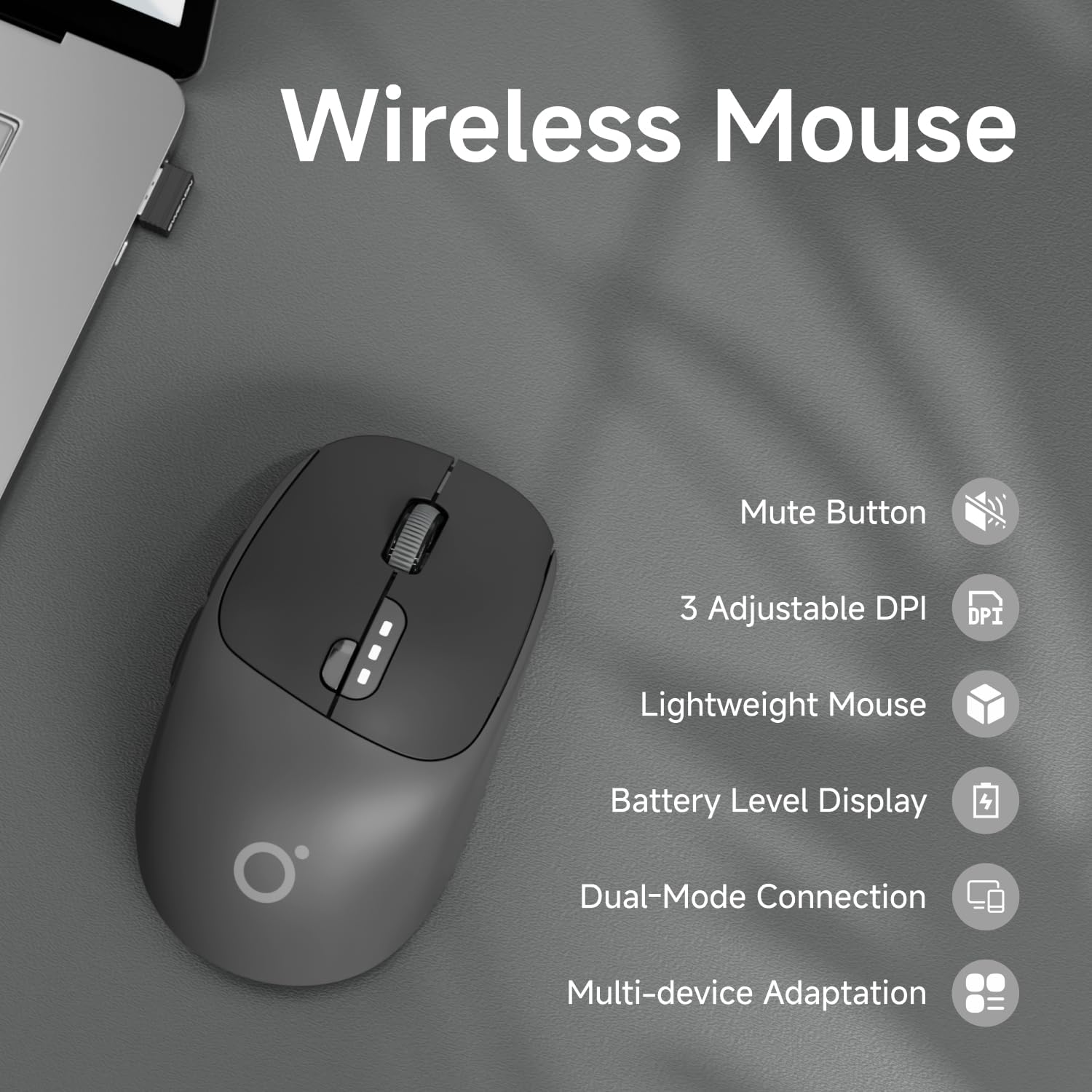
Figure 1: Key features of the EWEADN Q5 Wireless Mouse.
2. Contido do paquete
Comprobe o contido do paquete ao desembalar:
- 1 x SEUNKWANG EWEADN Q5 Wireless Mouse
- 1 x USB Receiver (stored in the mouse's bottom compartment)
- 1 x cable de carga USB-C
- 1 x Manual de usuario
3. Guía de configuración
3.1 Cargar o rato
The mouse is rechargeable via the included USB-C cable. A full charge takes approximately 2 hours and provides up to 60 days of usage (based on 2 hours/day). The battery level display on the mouse indicates charge status:
- Below 75%: 2 lamps on
- Below 50%: 1 lamp on
- Below 25%: Flashing lamps

Figura 2: Información sobre a carga e a duración da batería.
3.2 Conexión do rato
The Q5 mouse supports dual connection modes: 2.4G Wireless and Bluetooth.
Conexión sen fíos 2.4G:
- Locate the USB receiver stored in the bottom compartment of the mouse.
- Conecte o receptor USB a un porto USB dispoñible no seu ordenador.
- Turn on the mouse using the power switch on the bottom. The indicator light will turn green for 2.4G mode.
- O rato debería conectarse automaticamente ao teu dispositivo.
Video 1: Demonstrating the storage and use of the USB receiver for 2.4G connection.
Conexión Bluetooth:
- Acende o rato usando o interruptor de acendido situado na parte inferior.
- Press and hold the scroll wheel button for more than three seconds until the indicator light turns blue. This switches the mouse to Bluetooth (BT) mode.
- On your device (laptop, PC, Mac, tablet, phone), go to Bluetooth settings and search for available devices.
- Select "EWEADN Q5" or similar from the list to pair.
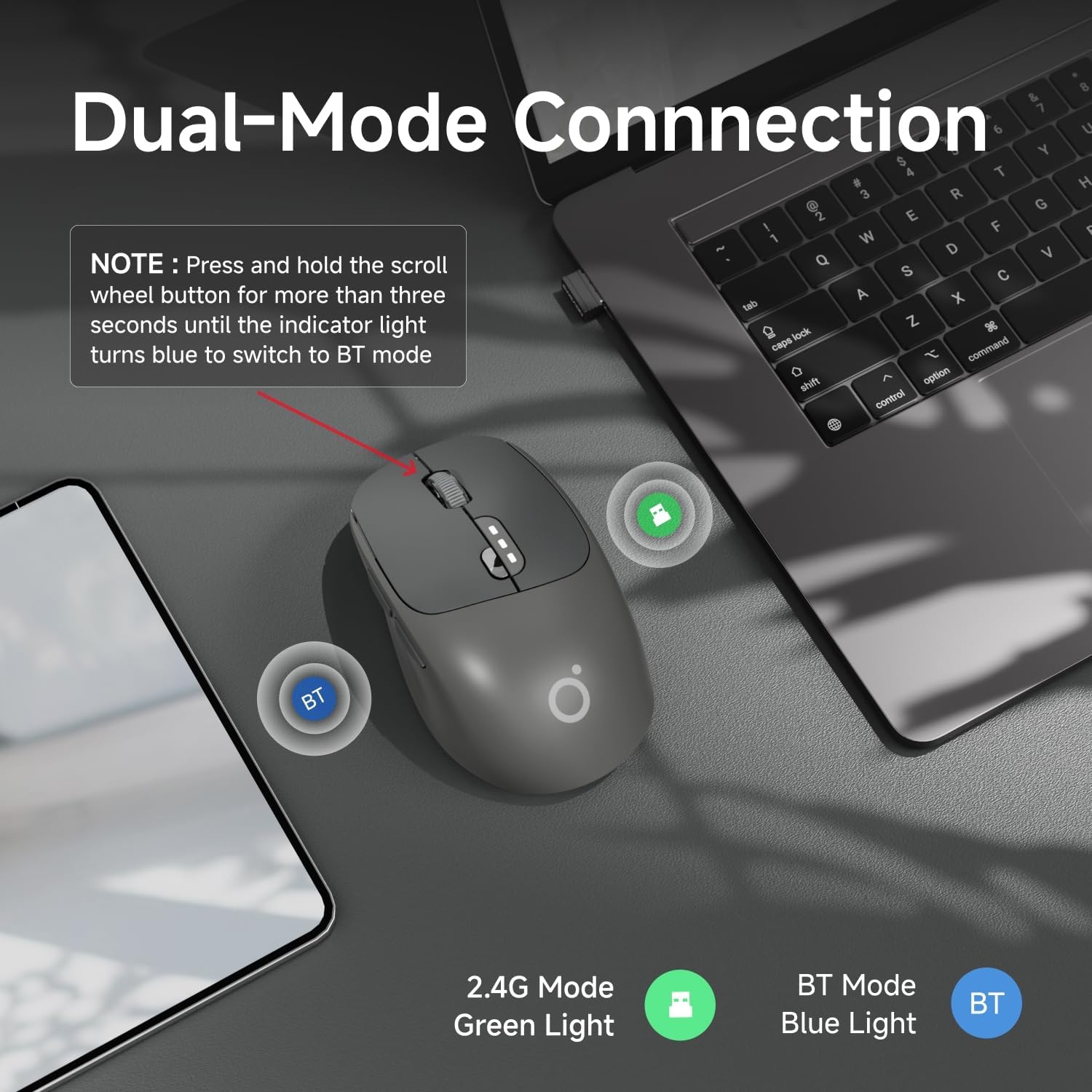
Figure 3: Visual guide for switching between 2.4G and Bluetooth modes.
Video 2: Demonstration of the mouse's on/off switch and DPI button, also showing quiet clicks.
4. Instrucións de funcionamento
4.1 Mouse Buttons and Functions
The EWEADN Q5 mouse features 6 buttons for enhanced productivity and gaming:
| Non. | Nome do botón | Función |
|---|---|---|
| 1 | Fai clic esquerdo | Standard selection and interaction. |
| 2 | Botón de avance | Navigate forward in web navegadores ou aplicacións. |
| 3 | Botón Atrás | Navigate backward in web navegadores ou aplicacións. |
| 4 | Botón de encendido | Turns the mouse on/off. |
| 5 | Fai clic co botón dereito | Access context menus. |
| 6 | Track Roller (Scroll Wheel) | Scroll up/down. Press and hold to switch between 2.4G and Bluetooth modes. |
| 7 | Indicador de nivel de batería | Indica a carga restante da batería. |
| 8 | Return To Desktop | Quickly minimize all windows to show desktop. |
| 9 | Interruptor de alimentación | Main power control for the mouse. |
| 10 | Botón de cambio de DPI | Adjust mouse sensitivity (800/1200/1600 DPI). |
| 11 | Luz indicadora | Shows connection mode (Green for 2.4G, Blue for BT). |
| 12 | Almacenamento do receptor | Secure compartment for the USB receiver. |

Figure 4: Labeled diagram of mouse components.
4.2 Axustar a sensibilidade dos DPI
To change the mouse sensitivity (DPI), press the DPI Switching Button (labeled 10 in Figure 4) located on the bottom of the mouse. Cycle through 800, 1200, and 1600 DPI settings to find your preferred tracking speed.

Figure 5: DPI adjustment settings.
4.3 Ergonomía e confort
The mouse is designed with an ergonomic contour to fit the natural curve of your hand, providing lasting comfort and productivity during extended use. It features curved side-grips for a secure and comfortable hold.

Figure 6: Ergonomic design for comfortable grip.
5. Mantemento
To ensure optimal performance and longevity of your EWEADN Q5 Wireless Mouse, follow these maintenance tips:
- Limpeza: Usa un pano suave e seco para limpar a superficie do rato. Para a sucidade persistente, limpa lixeiramenteampEnxágüe o pano con auga ou unha solución de limpeza suave. Evite produtos químicos agresivos.
- Almacenamento: When not in use, especially during travel, store the USB receiver in its designated compartment at the bottom of the mouse to prevent loss.
- Coidado da batería: Avoid fully discharging the battery frequently. Recharge the mouse when the battery indicator shows low charge.
- Evita condicións extremas: Non expoñas o rato a temperaturas extremas, luz solar directa ou humidade elevada.
6 Solución de problemas
If you encounter issues with your EWEADN Q5 Wireless Mouse, please refer to the following common solutions:
- O rato non responde:
- Ensure the mouse is turned on using the power switch on the bottom.
- Comprobe o nivel da batería e cárguea se é necesario.
- For 2.4G connection, ensure the USB receiver is securely plugged into your device. Try a different USB port.
- For Bluetooth connection, ensure Bluetooth is enabled on your device and the mouse is in BT mode (blue indicator light). Try re-pairing the mouse in your device's Bluetooth settings.
- O movemento do cursor é errático ou lento:
- Adjust the DPI setting using the DPI switching button on the bottom of the mouse.
- Asegúrate de usar o rato sobre unha superficie limpa e non reflectante.
- Limpa o sensor óptico da parte inferior do rato.
- Buttons are not clicking quietly:
- While the mouse is designed for quiet clicks, individual perception may vary. Ensure no debris is obstructing the buttons.
7. Especificacións
| Característica | Detalle |
|---|---|
| Número de modelo | Q5 |
| Dimensións do produto | 3.66 x 2.52 x 0.04 polgadas (110 x 65 x 40 mm) |
| Peso do elemento | 6.4 onzas (aprox. 87.5 g) |
| Tecnoloxía de conectividade | 2.4 GHz sen fíos, Bluetooth |
| Configuración de DPI | 800, 1200, 1600 |
| Número de botóns | 6 |
| Detección de Movemento | Óptica |
| Capacidade da batería | 500 mAh (recargable) |
| Compatibilidade | Windows 7/8/10/XP, Vista 7/8, Mac, Linux, Laptops, Desktops, PCs, MacBooks, other devices. |
| Fabricante | EWEADN |
8. Garantía e soporte
For any product inquiries, technical support, or warranty claims, please contact SEUNKWANG customer service directly. Refer to the contact information provided in your product packaging or visit the official SEUNKWANG store on Amazon.
Soporte por correo electrónico: eweadnkeyboard@outlook.com
For additional support and resources, you may visit the SEUNKWANG Store on Amazon: SEUNKWANG Amazon Store