1. Introdución
This manual provides detailed instructions for the SatelliteSale Notus M2 Remote Control, a voice-activated Bluetooth replacement designed for Optimum Stream Devices. It covers setup, operation, maintenance, and troubleshooting to ensure optimal performance and user experience.

Imaxe: Fronte view of the SatelliteSale Notus M2 Remote Control.
2. Contido do paquete
Verifica que todos os elementos estean presentes no paquete:
- 1 x SatelliteSale Notus M2 Remote Control
- 2 pilas AAA (preinstaladas ou incluídas por separado)
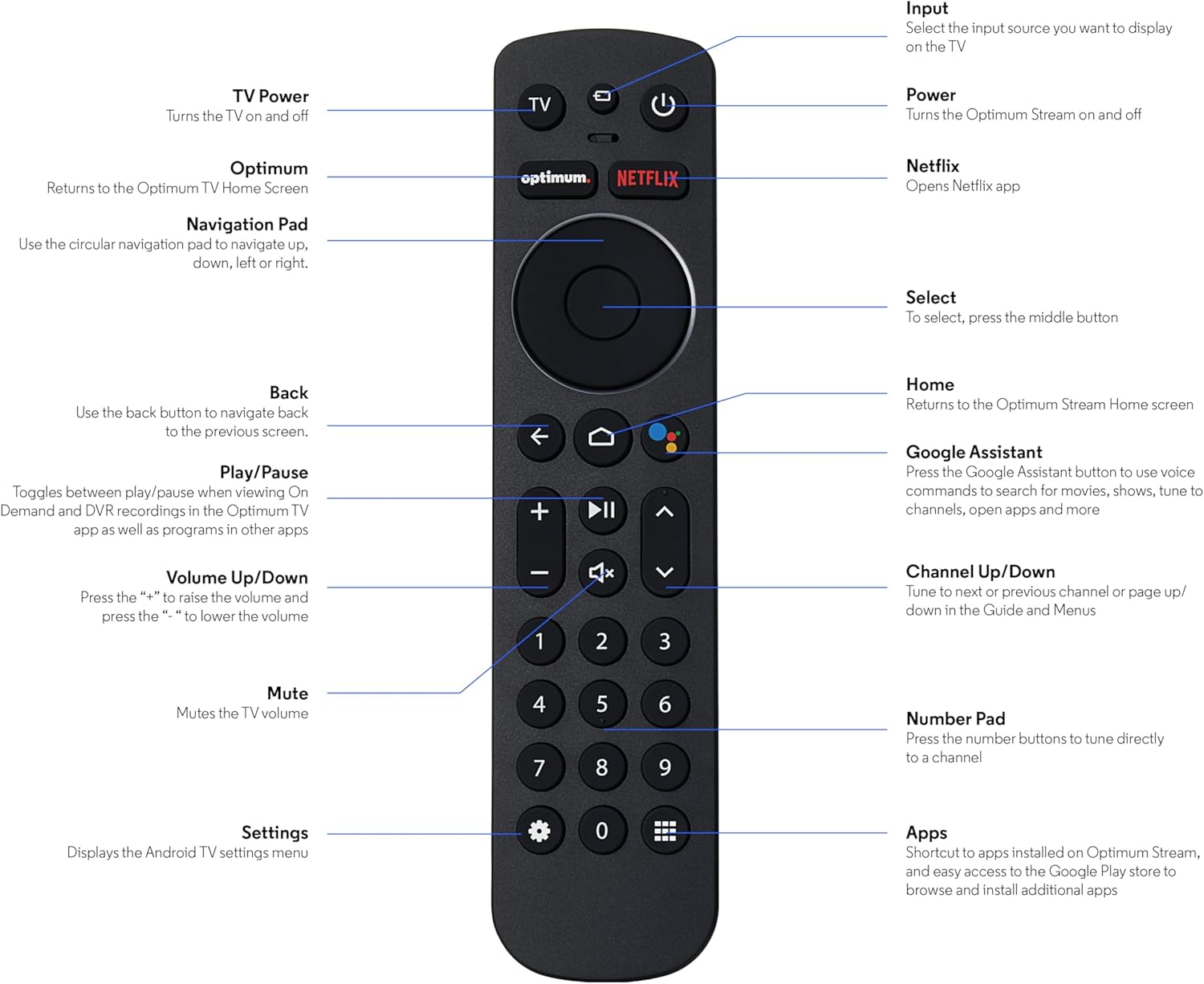
Image: The SatelliteSale Notus M2 Remote Control shown alongside two AAA batteries.
3. Remote Control Layout and Functions
Familiarize yourself with the buttons and their functions on your SatelliteSale Notus M2 Remote Control.

Image: Detailed diagram of the SatelliteSale Notus M2 Remote Control with labels for each button and its corresponding function.
- Potencia de TV: Acende e apaga o televisor.
- Entrada: Selects the input source to display on the TV.
- Potencia: Turns the Optimum Stream device on and off.
- Óptimo: Returns to the Optimum TV Home Screen.
- Netflix: Opens the Netflix application directly.
- Panel de navegación (circular): Use to navigate up, down, left, or right within menus.
- Select (Middle Button of Nav Pad): Confirma unha selección.
- Volver: Volve á pantalla anterior.
- Casa: Returns to the Optimum Stream Home screen.
- Google Assistant (Microphone Icon): Activates voice commands for search, playback control, and hands-free assistance.
- Reproducir/Pausa: Toggles between play and pause for content.
- Subir/Baixar o volume (+/-): Axusta o volume do televisor.
- Silenciar: Mutes the TV volume.
- Canle arriba/abaixo (frechas): Tunes to the next or previous channel, or navigates pages in guides and menus.
- Teclado numérico (0-9): Directly tunes to a channel or enters numerical input.
- Configuración (icona de engrenaxe): Displays the Android TV settings menu.
- Apps (Grid Icon): Provides shortcuts to installed apps on Optimum Stream and access to the Google Play Store.
4. Configuración
4.1 Instalación da batería
The remote requires two AAA batteries. Ensure correct polarity when inserting.
- Localice o compartimento da batería na parte traseira do control remoto.
- Deslice a tapa da batería cara abaixo para abrila.
- Insira dúas pilas AAA, facendo coincidir os terminais (+) e (-) como se indica no interior do compartimento.
- Replace the battery cover by sliding it back into place until it clicks.

Imaxe: View of the remote control with the battery compartment open, showing the correct orientation for AAA battery insertion.
4.2 Pairing Your Remote with Optimum Stream Device
Your remote is designed to be paired with your Optimum Stream device for full functionality, including Bluetooth connectivity and voice control. If your remote becomes unpaired or if you are setting up a new remote, follow these steps:

Image: An illustration explaining the importance of direct line of sight for initial pairing and the flexibility of remote placement after pairing.
Nota importante: For initial pairing, the Optimum Stream box needs to be in direct line of sight of the remote. If your box is behind a TV or in a cabinet, you may need to temporarily relocate it so the remote can be directly pointed at the Stream box. Once pairing is complete, the Stream box can be moved out of sight as the remote uses Bluetooth.
- Ensure batteries are correctly installed in your remote.
- Turn on your TV and your Optimum Stream cable box.
- Press any button on the Stream remote to ensure you are on the Home Screen.
- Na pantalla de inicio, selecciona Configuración (gear icon).
- Seleccione Device and Remote Settings > Remotos e accesorios.
- Seleccione Add Stream Remote.
- Siga as instrucións en pantalla para completar o proceso de vinculación.
- You will see an on-screen confirmation once the remote is successfully paired.

Image: Visual representation of pairing steps 1 through 5, showing the remote and on-screen prompts.

Image: Visual representation of pairing steps 6 through 9, detailing the final stages of the pairing process.
5. Instrucións de funcionamento
5.1 Control por voz
The SatelliteSale Notus M2 remote features voice control for convenient operation. Press the microphone button (Google Assistant icon) and speak your command clearly. You can use voice commands to:
- Busca content (movies, TV shows, actors).
- Controlar a reprodución (reproducir, pausar, avanzar, retroceder).
- Abrir aplicacións.
- Tune to specific channels.
- Get information (weather, sports scores).

Image: A person using the voice control feature of the remote, with sound waves emanating from the remote towards the TV screen.

Imaxe: Un example of a voice command, "Hey Google, turn on the Spider-Man movie," displayed on screen with the remote.
5.2 Bluetooth Wireless Connectivity
Once paired, the remote utilizes Bluetooth for communication with your Optimum Stream device. This means you do not need a direct line of sight to operate the device, allowing for greater flexibility in remote usage and device placement.
5.3 Dedicated Streaming App Buttons
The remote includes dedicated buttons for popular streaming applications, such as Netflix. Pressing these buttons provides one-touch access to your favorite entertainment platforms.
6. Mantemento
- Limpeza: Usa un pano suave e seco para limpar o mando a distancia. Non empregues produtos de limpeza líquidos nin aerosois.
- Substitución da batería: Replace batteries when the remote's response becomes sluggish or it stops functioning. Always replace both batteries at the same time with new AAA batteries.
- Almacenamento: Garde o mando a distancia nun lugar fresco e seco, lonxe da luz solar directa e de temperaturas extremas.
7 Solución de problemas
| Problema | Causa posible | Solución |
|---|---|---|
| Remote is unresponsive. | Pilas esgotas ou baixas. | Substitúa as dúas pilas AAA por unhas novas. |
| Remote not controlling Optimum Stream device. | Remote is unpaired or pairing failed. | Follow the pairing instructions in Section 4.2. Ensure direct line of sight during initial pairing. |
| O control por voz non funciona. | Remote not paired via Bluetooth, or microphone issue. | Ensure the remote is properly paired via Bluetooth (Section 4.2). Speak clearly and close to the microphone. |
| Os botóns están pegañentos ou non responden. | Suciedade ou residuos debaixo dos botóns. | Limpa o mando a distancia cun pano suave e seco. Evita derramamentos. |
8. Especificacións
| Característica | Detalle |
|---|---|
| Número de modelo | SS-RC-NOTUS-M2 |
| Conectividade | Bluetooth sen fíos |
| Características especiais | Voice Activated (Google Assistant), Dedicated App Buttons, Ergonomic Design |
| Dispositivos compatibles | Optimum Stream Box (powered by Android TV) |
| Fonte de enerxía | 2 pilas AAA (incluídas) |
| Cor | Negro Mate |
| Peso do elemento | 3.66 onzas |
| Dimensións do paquete | 7.28 x 1.89 x 1.22 polgadas |
9. Garantía e soporte
For warranty information or technical support, please refer to the official SatelliteSale websitio web ou póñase en contacto directamente co servizo de atención ao cliente. Garde o recibo de compra para reclamacións de garantía.
Fabricante: Venta por satélite
Websitio: Visit the SatelliteSale Store on Amazon