
Introdución
This manual provides detailed instructions for the installation, operation, and maintenance of your Ctronics 4K Hybrid Zoom 10x Outdoor WiFi Surveillance Camera, Model 930-4KD. This camera is designed for outdoor security, featuring dual lenses, 10x hybrid zoom, auto-tracking, human detection, color night vision, two-way audio, and an IP66 weatherproof rating.
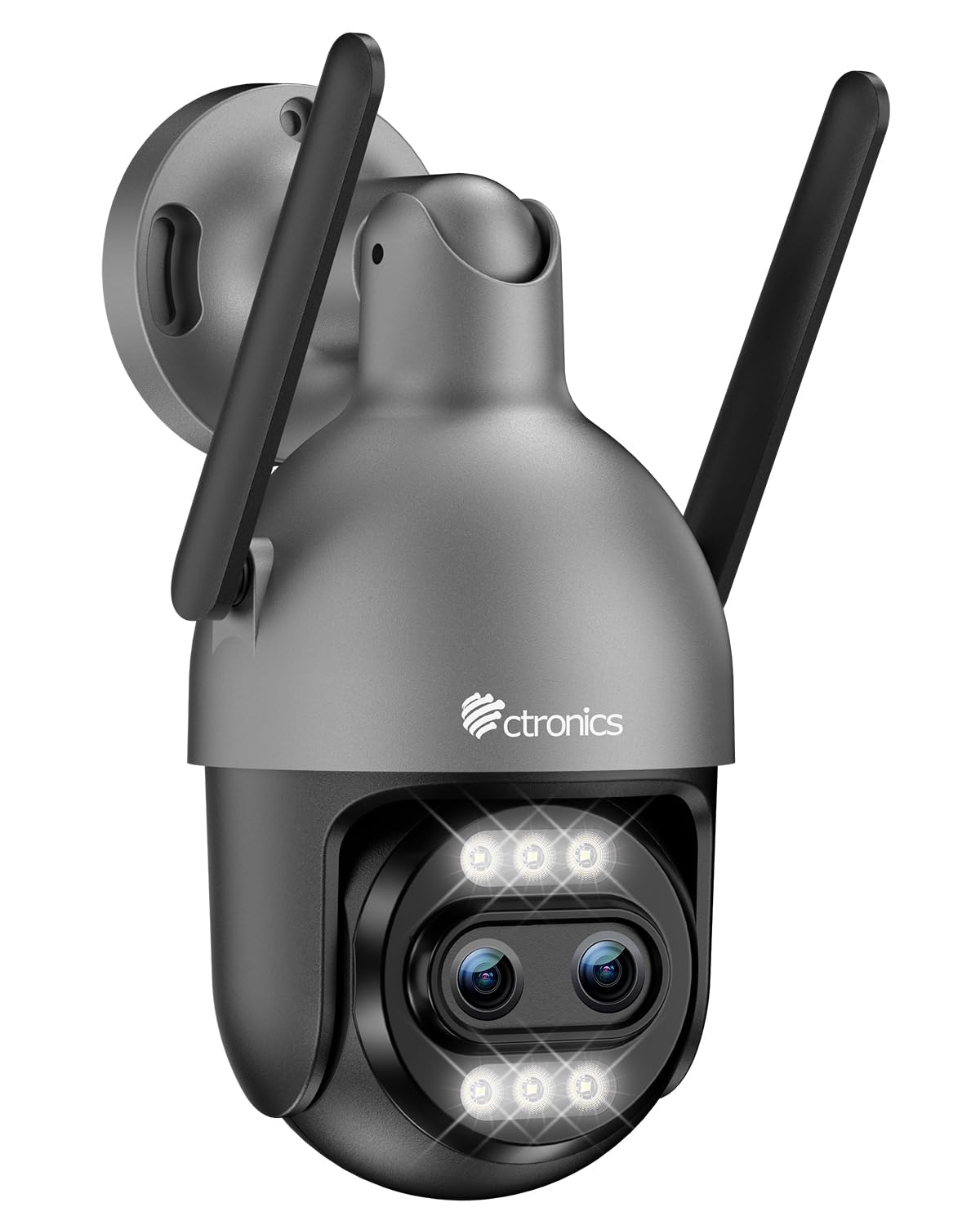
Image: Ctronics 4K Hybrid Zoom 10x Outdoor WiFi Surveillance Camera, Model 930-4KD.
1. Configuración e instalación
1.1 Contido do paquete
Verifica que todos os compoñentes estean presentes no paquete:
- Ctronics 4K Hybrid Zoom 10x Outdoor WiFi Surveillance Camera (Model 930-4KD)
- Adaptador de alimentación
- Parafusos e ancoraxes de montaxe
- Waterproof Kit for Network Cable
- Manual de usuario (este documento)
1.2 Instalación física
The camera is designed for outdoor use and ceiling mounting. Choose a location that provides optimal surveillance coverage and has a stable surface for mounting. Ensure the camera is within range of your Wi-Fi network or close to an Ethernet connection point.
- Mark the drilling positions on the wall or ceiling using the mounting template (if provided, otherwise use the camera base).
- Drill holes and insert the wall anchors.
- Fixe a base da cámara á superficie cos parafusos proporcionados.
- Adjust the camera angle as needed before final tightening.

Imaxe: Example of a Ctronics dual-lens PTZ camera, similar to Model 930-4KD, mounted for outdoor surveillance.
1.3 Conexión de enerxía e rede
Connect the camera to power using the provided power adapter. For network connectivity, you have two options:
- Conexión Wi-Fi: Ensure your Wi-Fi network is 2.4GHz or 5GHz compatible. Follow the in-app instructions for Wi-Fi setup.
- Conexión por cable: Connect an Ethernet cable from your router to the camera's network port. Use the waterproof kit to protect the connection if installed outdoors.
1.4 App Installation and Configuration
Download the official Ctronics Pro app from your smartphone's app store (iOS or Android). Alternatively, use the HiP2P Client software for Windows or Mac OS.
- Install the Ctronics Pro app on your smartphone or HiP2P Client on your computer.
- Rexistra unha conta e inicia sesión.
- Follow the on-screen prompts to add your camera. This typically involves scanning a QR code on the camera or manually entering its ID.
- Configura os axustes iniciais, como a zona horaria, as preferencias de gravación e as notificacións de alerta.

Image: The Ctronics multi-platform software interface, showing compatibility with desktop, laptop, tablet, and smartphone devices.
2. Instrucións de funcionamento
2.1 En directo View e Gravación
Once connected, access the live feed through the Ctronics Pro app or HiP2P Client. You can view real-time video, initiate manual recordings, and capture screenshots.
2.2 Funcións avanzadas
- Zoom híbrido 10x: Utilize the digital controls in the app to zoom in and out, combining optical and digital zoom for detailed views.
- Auto Zoom Tracking: Enable this feature to allow the camera to automatically track detected human movement and zoom in for clearer identification.
- Detección humana: Configure motion detection zones and sensitivity. The camera will send alerts upon detecting human shapes, reducing false alarms.
- Visión nocturna en cor: The camera employs Starlight vision technology and LED lights to provide full-color video even in low-light conditions, up to 30 meters.
- Audio bidireccional: Use the built-in microphone and speaker to communicate with visitors or deter intruders remotely.
- Control PTZ: Pan, Tilt, and Zoom the camera remotely via the app to adjust the viewing angle and cover a 360-degree area.

Image: The Ctronics 10x Hybrid Zoom camera, highlighting its advanced optical capabilities.
2.3 Opcións de almacenamento
The camera supports local recording to a Micro SD card (up to 256GB). Ensure the card is inserted correctly and formatted through the app. Cloud storage options may also be available through the Ctronics service.
3. Mantemento
- Limpeza: Limpe regularmente a lente e a carcasa da cámara cun pano suave eamp un pano para garantir unha calidade de imaxe nítida. Non empregue produtos químicos agresivos.
- Actualizacións de firmware: Check the Ctronics Pro app periodically for firmware updates. Keeping your camera's firmware updated ensures optimal performance and security.
- Fonte de alimentación: Asegúrate de que o adaptador de corrente e o cable non presenten danos.
4 Solución de problemas
| Problema | Solución |
|---|---|
| A cámara non se conecta á wifi | Ensure the camera is within Wi-Fi range. Check Wi-Fi password. Try resetting the camera and re-adding it to the app. Verify your router supports 2.4GHz/5GHz. |
| No image or black screen | Check power connection. Ensure network connection is stable. Restart the camera and the app. |
| As alertas de detección de movemento son demasiado frecuentes/pouco frecuentes | Adjust motion detection sensitivity and detection zones in the app settings. |
| O audio bidireccional non funciona | Check microphone and speaker permissions in the app. Ensure volume levels are adequate. |
| A tarxeta SD non grava | Ensure the SD card is inserted correctly and formatted within the app. Check if the card is full or corrupted. Replace if necessary. |
5. Especificacións
| Característica | Detalle |
|---|---|
| Nome do modelo | 930-4KD |
| Marca | Ctronics |
| Tecnoloxía de conectividade | Wired, WiFi |
| Características especiais | Two-Way Audio, Local Recording, UHD Resolution, PTZ Technology, Night Vision |
| Uso | Ao aire libre |
| Dispositivos compatibles | Computer, Laptop, Smartphone, Tablet |
| Fonte de enerxía | Electric Cable (12 Volts) |
| Tipo de montaxe | Montaxe no teito |
| Cor | Silver (argenté) |
| Factor de forma | Cúpula |
| Material | Metal |
| Tipo de alerta | Audio e movemento |
| Tipo de fonte de luz | LED |
| Effective Capture Resolution | 8 megapíxeles |
| Clasificación de protección internacional | IP66 |
| Método de control | Aplicación |
| Tecnoloxía sen fíos | Bluetooth (for initial setup/pairing, likely) |
| Screen Capture Resolution | 4K |
| Resolución efectiva de vídeo | 3840.0 (likely 3840x2160 for 4K) |
| Range de visión nocturna | 30 metros |
| Tipo de visión nocturna | Luz das estrelas |
| Dimensións (L x W x H) | 15 x 15 x 15 cm |
| Formato de captura de vídeo | MP4 |
| Zoom óptico | 6x |
| Tipo de foco | Enfoque automático |
| Tipo de zoom | 6x Optical Zoom + 4x Digital Zoom (10x Hybrid) |
| Tecnoloxía de sensores ópticos | CMOS |
| Tipo de memoria flash | Micro SD |
| Max Flash Memory Supported | 256 GB |
6. Garantía e soporte
For warranty information, technical support, or further assistance, please refer to the official Ctronics website or contact their customer service directly. Details are typically provided on the product packaging or the official Ctronics support page.
You can also find additional resources and FAQs on the Ctronics official websitio: www.ctronics.com