
1. Introdución
This manual provides instructions for the setup, operation, and maintenance of your Retroid Pocket Classic handheld gaming console. The Retroid Pocket Classic is a portable Android-based gaming device featuring a 3.92-inch OLED touchscreen, designed for a versatile gaming experience.

Image 1.1: Retroid Pocket Classic consoles in white and yellow.
2. Que hai na caixa
Verifica que todos os elementos estean presentes no paquete:
- Retroid Pocket Classic Gaming Console
- Cable de carga (USB-C)
- Manual de usuario (este documento)
3. Dispositivo rematadoview
Familiarize yourself with the physical components and controls of your Retroid Pocket Classic.
3.1 Fronte View

Imaxe 3.1: Fronte view of the Retroid Pocket Classic.
- 3.92-inch OLED Touchscreen: The primary display for all operations and gaming.
- D-Pad: Entrada direccional para navegación e xogo.
- Botóns de acción: (A, B, X, Y or similar layout) for in-game actions.
- Botóns de inicio/seleccionar: For game and system functions.
- Reixas dos altofalantes: Saída de audio.
3.2 Top and Back View

Imaxe 3.2: Arriba view showing shoulder buttons and ports.
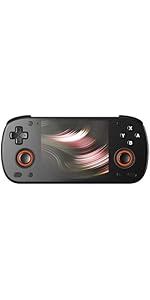
Image 3.3: Curved back design and trigger buttons.
- Botóns de ombreiro (L1, R1): Located on the top edge.
- Botóns de disparo (L2, R2): Located on the back, below the shoulder buttons.
- Porto USB-C: Para carga e transferencia de datos.
- Conector de audio de 3.5 mm: Para conectar auriculares.
- Ranura para tarxeta Micro SD: Para ampliar o almacenamento.
- Botón de encendido: Para acender/apagar o dispositivo ou poñelo en modo de repouso.
- Botóns de volume: Para axustar a saída de son.
3.3 Internal Components (Cooling)

Image 3.4: Integrated active cooling system.
The Retroid Pocket Classic features an integrated active cooling system designed to maintain optimal performance and manage heat during extended use.
4. Configuración
4.1 Carga inicial
Before first use, fully charge the device. Connect the provided USB-C charging cable to the console's USB-C port and the other end to a compatible USB power adapter (not included). The device has a 5000mAh battery.
4.2 Acendido/Apagado
- Para acender: Manteña premido o botón de acendido/apagado ata que a pantalla se ilumine.
- Para apagar: Press and hold the Power button, then select "Power Off" from the on-screen options.
- Para durmir/espertar: Preme brevemente o botón de acendido.
4.3 Conexión Wi-Fi
To access online features and download applications, connect to a Wi-Fi network:
- Ir a Configuración.
- Seleccione Rede e internet.
- Toca Wi-Fi e acéndeo.
- Selecciona a rede desexada da lista e introduce o contrasinal se se che solicita.
4.4 Configuración da conta de Google
The Retroid Pocket Classic runs Android 14 and supports the Google Play Store. To download apps and games, you will need to sign in with a Google account during the initial setup process or later via the Settings menu.
4.5 Instalación da tarxeta Micro SD
To expand the device's storage (128GB internal), insert a Micro SD card into the designated slot. Ensure the card is inserted correctly until it clicks into place. The device supports various Micro SD card capacities.
5. Instrucións de funcionamento
5.1 Navegando pola interface de Android
The device operates on Android 14. Use the touchscreen for navigation, tapping icons to open applications, swiping to scroll, and using gestures for system controls. The D-pad and action buttons can also be used for navigation within compatible applications and games.
5.2 Downloading and Installing Applications
Applications and games can be downloaded from the Google Play Store. Open the Play Store app, search for your desired content, and follow the on-screen prompts to download and install.
Note: The Retroid Pocket Classic does not come with preloaded games. Users are responsible for acquiring and installing their own game content.
5.3 Xestión do almacenamento
Para view and manage internal and external storage, go to Configuración > Almacenamento. Here you can see storage usage and manage files. For optimal performance, ensure sufficient free space is available.
5.4 Conectividade Bluetooth
The device supports Bluetooth 5.1 for connecting wireless accessories such as headphones or external controllers.
- Ir a Configuración.
- Seleccione Dispositivos conectados.
- Toca Vincular novo dispositivo e selecciona o teu accesorio da lista.
6. Mantemento
6.1 Limpeza do dispositivo
Use a soft, dry, lint-free cloth to clean the device's exterior. For the screen, a screen cleaner specifically designed for electronics can be used. Avoid using harsh chemicals or abrasive materials.
6.2 Coidado coa batería
Para prolongar a duración da batería:
- Evita temperaturas extremas.
- Non descargues completamente a batería con frecuencia.
- Garda o dispositivo cunha carga parcial se non o usas durante períodos prolongados.
6.3 Actualizacións de software
Comprobe e instale regularmente actualizacións do sistema para garantir un rendemento e unha seguridade óptimos. Vaia a Configuración > Sistema > Actualización do sistema para comprobar se hai actualizacións dispoñibles.
7 Solución de problemas
7.1 O dispositivo non se acende
- Ensure the device is sufficiently charged. Connect it to a power source for at least 30 minutes.
- Try holding the Power button for 10-15 seconds to force a restart.
7.2 Problemas de conectividade Wi-Fi
- Verify that Wi-Fi is enabled in Settings.
- Reinicia o teu enrutador Wi-Fi.
- Forget the network and reconnect, ensuring the password is correct.
7.3 As aplicacións fallan ou conxélanse
- Pecha e volve abrir a aplicación.
- Limpar a caché e os datos da aplicación mediante Configuración > Aplicacións > [Nome da aplicación] > Almacenamento e caché.
- Asegúrate de que a aplicación estea actualizada á súa última versión.
- Reinicie o dispositivo.
7.4 A pantalla non responde
- Reinicia o dispositivo mantendo premido o botón de acendido/apagado.
- Asegúrate de que a pantalla estea limpa e libre de residuos.
8. Especificacións

Image 8.1: Retroid Pocket Classic detailed specifications.
| Característica | Detalle |
|---|---|
| Nome do modelo | RP CLASSIC |
| Procesador | G1 Gen2 (8-Core Kryo CPU, 2 Performance Cores, 6 Efficiency Cores) |
| GPU | Adreno A12 |
| RAM | 6GB LPDDR4x @2133M |
| Almacenamento | 128GB EMMC 5.1 (expandable via Micro SD card) |
| Pantalla | 3.92-inch AMOLED, 1240x1080 @60fps |
| Sistema Operativo | Android 14 |
| Wi-Fi | Wi-Fi 5 |
| Bluetooth | Bluetooth 5.1 |
| Interface | USB-C / 3.5mm Audio Jack / TF Card Slot |
| Saída de vídeo | N/A |
| Batería | 5000 mAh |
| Velocidade de carga | 27 Watts |
| Dimensións | 138 x 89.8 x 26 mm (5.43 x 3.53 x 1 polgadas) |
| Peso | 223 g (7.9 onzas) |
9. Garantía e soporte
For warranty information and technical support, please refer to the official Retroid Pocket websitio web ou póñase en contacto co servizo de atención ao cliente. Garde o comprobante de compra para reclamacións de garantía.
Online resources and community forums may also provide helpful information and troubleshooting tips.