
1. Introdución
The Hushing Sound Machine Alarm Clock F4 is a versatile 3-in-1 device designed to enhance sleep and simplify daily routines. It combines a sound machine with 30 soothing sounds, a dual alarm clock with 15 wake-up sounds, and a night light with 12 color options. This device features a backup battery for alarm functionality during power outages, a memory function to retain settings, and adjustable display brightness.

Figura 1: Fronte view of the Hushing Sound Machine Alarm Clock F4.
2. Características do produto
- Funcionalidade 3 en 1: Integrates a sound machine, dual alarm clock, and night light.
- Máquina de son: Offers 30 soothing sounds, including white noise, pink noise, brown noises, lullabies, and natural sounds (rain, thunderstorm, sea waves, river, campfire, water drop, singing birds).
- Alarmas dobres: Two independent alarms for different schedules.
- Wake-up Sounds: 15 options, including classic beeps, light music, and ambient sounds.
- Función de Snooze: Provides an additional 9 minutes of rest.
- Luz nocturna: 12 colors with 10 adjustable brightness levels. Can be turned off independently.
- Visualización do tempo: 12/24-hour mode with 4 levels of adjustable brightness.
- Control de volume: 32 niveis de volume axustables.
- Sleep Timers: Auto-off options for 30, 60, 90, or 120 minutes, or continuous playback.
- Función de memoria: Retains last settings after power failure or reboot.
- Batería de respaldo: Ensures alarm functionality during power outages (device requires constant power for full operation).

Figura 2: Máisview of the 3-in-1 functionality.

Figure 3: Detailed list of 30 soothing sounds available.
3. Configuración
- Conexión de alimentación: Connect the device to a power source using the provided USB cable and adapter. The device requires continuous power for full operation. The internal battery serves as a backup for the alarm function only.
- Carga inicial: For optimal performance, ensure the device is fully charged before first use.
- Configuración da hora:
- Press and hold the "12/24H Time Set" button to enter time setting mode.
- Use os botóns "+" ou "-" para axustar a hora.
- Press the "Next Song" button (right arrow) to move to minute adjustment.
- Use the "+" or "-" buttons to adjust the minutes.
- Press the "Next Song" button again to confirm and exit time setting.
- Formato 12/24 horas: Short press the "12/24H Time Set" button to toggle between 12-hour (AM/PM) and 24-hour formats.
Video 1: Guide on how to set the alarm clock and other settings.
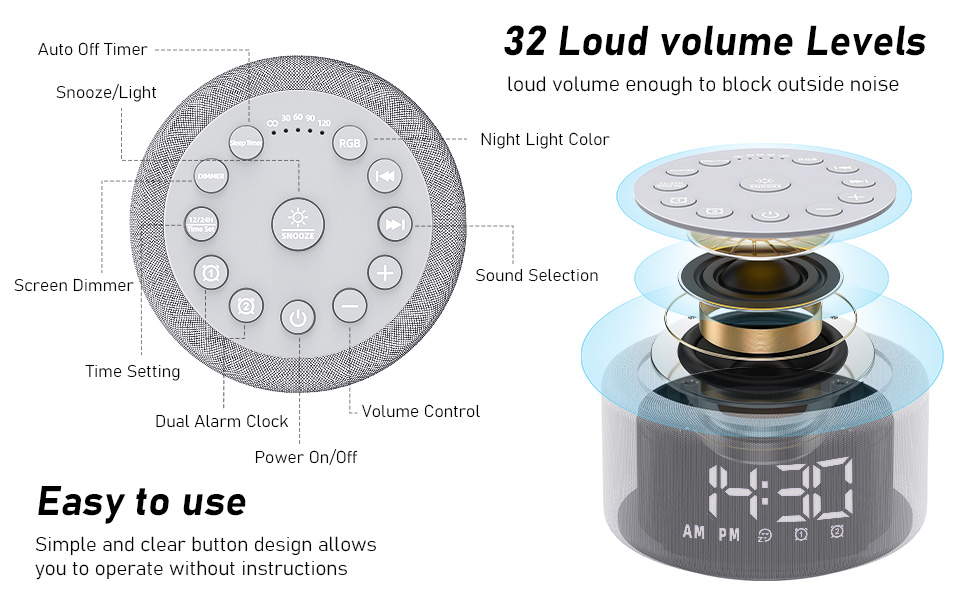
Figure 4: Button layout and functions for easy operation.
4. Instrucións de funcionamento
4.1. Configuración de alarmas
- Set Alarm 1 or 2:
- Press and hold the "Alarm 1" or "Alarm 2" button to enter alarm setting mode.
- Use the "+" or "-" buttons to adjust the alarm hour.
- Press the "Next Song" button (right arrow) to move to minute adjustment.
- Use the "+" or "-" buttons to adjust the alarm minutes.
- Press the "Next Song" button again to select the alarm sound (15 options). Use "+" or "-" to cycle through sounds.
- Press the "Next Song" button again to adjust alarm volume. Use "+" or "-" to set the volume.
- Press the "Next Song" button again to confirm and exit alarm setting. The alarm icon will appear on the display.
- Activar/desactivar a alarma: Short press the "Alarm 1" or "Alarm 2" button to activate or deactivate the alarm. The alarm icon will appear/disappear on the display.
- Repetición: When the alarm sounds, press the "Snooze" button to temporarily silence it for 9 minutes.
- Parar a alarma: To turn off the alarm completely, press any button other than "Snooze" when the alarm is sounding.
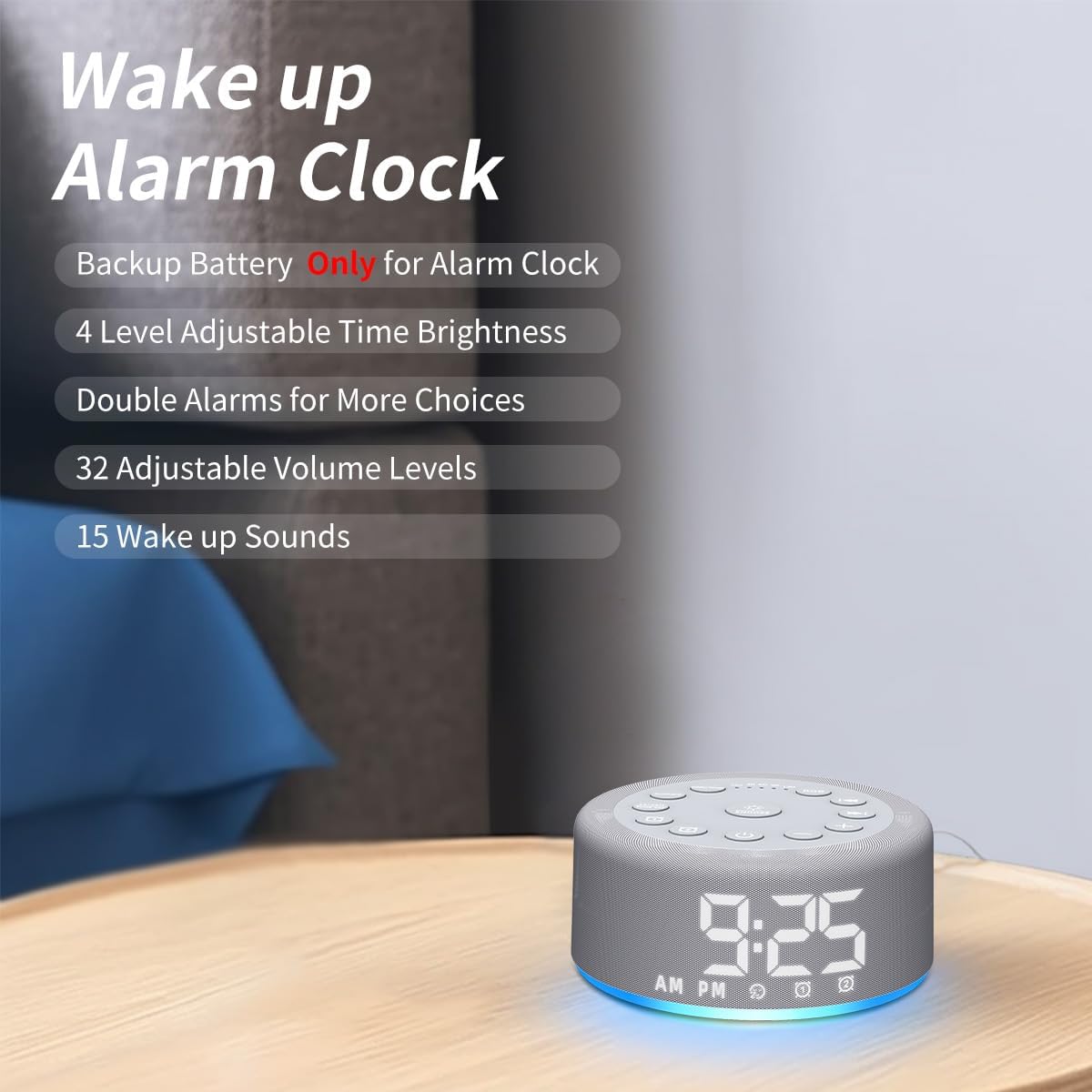
Figure 5: Key features of the alarm clock function.

Figura 6: Examples of wake-up sounds.
4.2. Using the Sound Machine
- Activar/Desactivar: Press the power button (bottom center) to turn the sound machine on or off.
- Seleccionar son: Use the "Previous Song" (left arrow) or "Next Song" (right arrow) buttons to cycle through the 30 available sounds.
- Axustar o volume: Use the "+" or "-" buttons to increase or decrease the volume (32 levels).
- Establecer o temporizador de suspensión: Short press the "Sleep Timer" button to set an auto-off timer for 30, 60, 90, or 120 minutes. Press repeatedly to cycle through options or select continuous play (indicated by "CO").

Figure 7: Internal speaker design and volume capabilities.
4.3. Funcionamento da luz nocturna
- Activar/Desactivar: Press the "RGB" button to turn the night light on or off.
- Cambiar cor: Short press the "RGB" button to cycle through 12 different colors.
- Axustar o brillo: Use the "+" or "-" buttons to adjust the brightness of the night light (10 levels).

Figure 8: Night light features and benefits.
4.4. Brillo da pantalla
- Axustar o brillo da pantalla: Short press the "Dimmer" button to cycle through 4 levels of display brightness (low, medium, high, off).
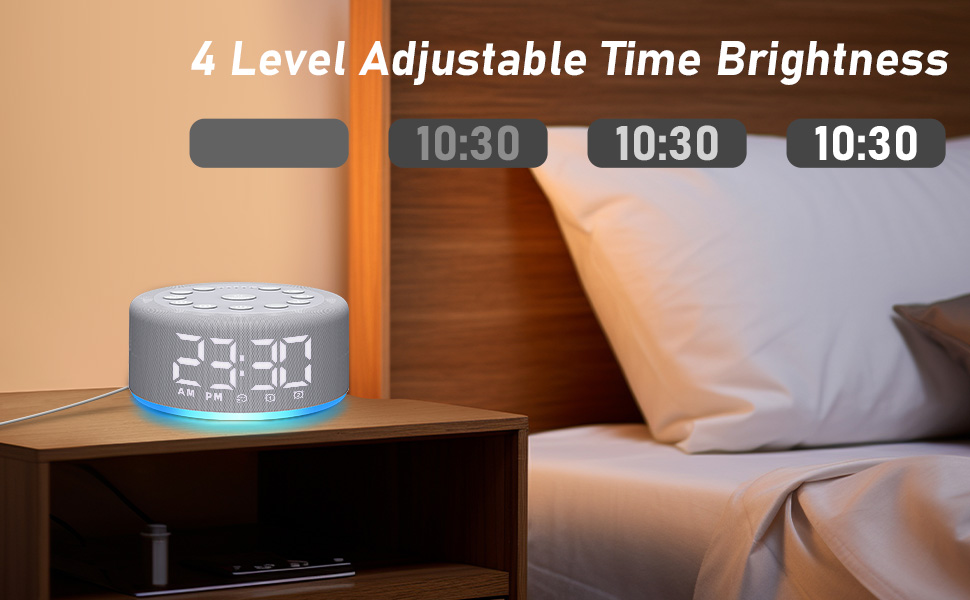
Figure 9: Adjustable time display brightness levels.
5. Mantemento
- Limpeza: Limpe o dispositivo cun pano suave e seco. Non empregue produtos de limpeza líquidos nin materiais abrasivos.
- Almacenamento: Almacene nun lugar fresco e seco cando non se use durante períodos prolongados.
- Potencia: Ensure the device remains plugged into a power source for continuous functionality, especially for the sound machine and night light features. The backup battery is solely for the alarm function during power interruptions.
6 Solución de problemas
- O dispositivo non se acende: Ensure the device is properly plugged into a working power outlet. Check the USB cable and adapter for damage.
- A alarma non soa: Verify that the alarm is set and activated (alarm icon visible on display). Check the alarm volume setting. Ensure the device is plugged in, as the backup battery only supports the alarm function for a limited time during power outages.
- Problemas de calidade do son: Ensure the device is placed on a flat, stable surface. The speaker is located on the bottom of the unit, so avoid placing it on soft surfaces that might muffle the sound.
- Pantalla demasiado brillante/escura: Use the "Dimmer" button to adjust the display brightness to your preference.
- Settings not saving: The device has a memory function. If settings are not retained, ensure the device is not completely losing power for extended periods beyond the backup battery's capacity.
7. Especificacións
- Dimensións do produto: 4.25 x 4.25 x 2.2 polgadas
- Peso do artigo: 7.68 onzas
- Nome do modelo: HAC-F4
- Baterías: 1 Lithium Polymer battery required (included, for backup alarm function)
- Fabricante: Silencio
8. Garantía e soporte
For warranty information or technical support, please refer to the contact details provided with your purchase or visit the official Hushing websitio. Garde o recibo de compra para calquera reclamación de garantía.