
1. Introdución
The PWAYTEK Wireless CarPlay Adapter converts your car's wired CarPlay or Android Auto system into a wireless connection. This device allows for seamless integration of your smartphone's features directly onto your car's infotainment screen without the need for cables. It supports 5GHz WiFi and Bluetooth 5.0 for stable and fast connectivity.
2. Características clave
- Conectividade sen fíos: Converte CarPlay/Android Auto con cable a sen fíos.
- Datos de alta velocidade: Utilizes 5GHz WiFi for fast and stable data transmission.
- Bluetooth 5.0: Enhanced Bluetooth for reliable pairing and audio performance.
- Plug & Play: Simple setup with no additional drivers or software required.
- Conexión automática: Automatically connects to your paired smartphone upon car startup.
- Deseño compacto: Miniaturized for easy portability and discreet placement.
- Original Control Support: Retains full functionality of your car's original controls, including voice assistant, touch screen, scroll wheel, and OEM knobs.
3. Compatibilidade
This adapter is compatible with most cars manufactured in 2016 or later that feature a factory-installed wired CarPlay or Android Auto system. It supports iPhones running iOS 10 and above, and Android phones running Android 11 and above.
To check specific car compatibility for Apple CarPlay, visit: Modelos compatibles con Apple CarPlay
To check specific car compatibility for Android Auto, visit: Android Auto Compatible Vehicles
4. Contido do paquete
- PWAYTEK Wireless CarPlay Adapter Unit
- USB-A to USB-C Adapter Cable
- Manual de usuario

5. Instrucións de configuración
Follow these steps for initial setup of your PWAYTEK Wireless CarPlay Adapter:
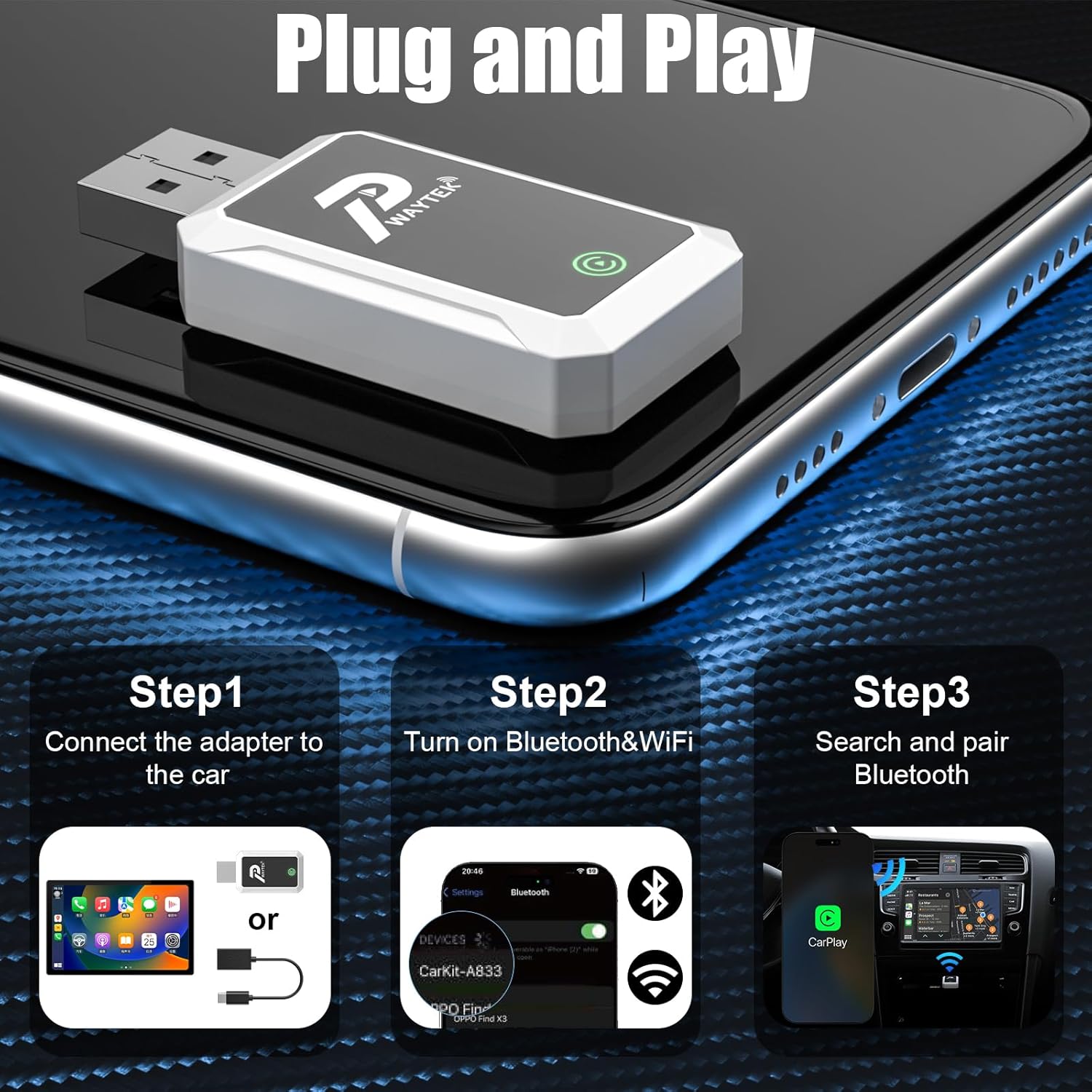
- Conecte o adaptador: Plug the PWAYTEK Wireless CarPlay Adapter into your car's USB port that supports wired CarPlay or Android Auto. If your car has a USB-C port, use the included USB-A to USB-C adapter cable. The adapter's indicator light will illuminate.
- Enable Bluetooth & WiFi: On your iPhone or Android phone, ensure both Bluetooth and WiFi are turned on.
- Vincular mediante Bluetooth: On your phone, go to Bluetooth settings and search for available devices. Select the device named "SmartBox-FA03" (or similar, as indicated by the adapter). Confirm the pairing request on both your phone and your car's infotainment screen.
- Conexión automática: Once paired, your car's infotainment system should automatically launch CarPlay or Android Auto. For subsequent uses, the adapter will automatically connect to your phone when you start your car.
6. Instrucións de funcionamento
Once connected, your car's display will mirror your smartphone's CarPlay or Android Auto interface. You can interact with your phone's apps and features using your car's built-in controls.
- Navegación: Use your preferred navigation apps (e.g., Apple Maps, Google Maps, Waze) directly on the car screen.
- Música e audio: Access your music, podcasts, and audiobooks through apps like Spotify, Apple Music, YouTube Music, etc.
- Comunicación: Make and receive calls, send messages, and access your contacts.
- Asistente de voz: Activate Siri or Google Assistant using your car's voice command button for hands-free control.
- Controis do coche: Utilize your car's touch screen, scroll wheel, and physical buttons (OEM knobs) to navigate the interface.

7. Mantemento
To ensure the longevity and optimal performance of your PWAYTEK Wireless CarPlay Adapter, please follow these maintenance guidelines:
- Manteña o dispositivo seco e lonxe da humidade.
- Evite expoñer o adaptador a temperaturas extremas.
- Limpa o dispositivo cun pano suave e seco. Non empregues produtos químicos agresivos nin produtos de limpeza abrasivos.
- Handle the adapter and cables gently to prevent damage to connectors.
8 Solución de problemas
If you encounter issues with your PWAYTEK Wireless CarPlay Adapter, try the following solutions:
| Problema | Solución |
|---|---|
| Adapter does not power on. | Ensure the adapter is securely plugged into a functional USB port in your car. Try a different USB port if available. |
| Cannot connect to CarPlay/Android Auto. |
|
| Conexión intermitente ou atraso. |
|
| Audio issues (no sound, distorted). |
|
If the problem persists, please contact PWAYTEK customer support for further assistance.
9. Especificacións
| Característica | Detalle |
|---|---|
| Marca | PWAYTEK |
| Número de modelo | B0FDF48GCJ |
| Conectividade | Wireless (5GHz WiFi, Bluetooth 5.0) |
| Sistemas Soportados | Apple CarPlay, Android Auto |
| Compatibilidade do coche | Cars with factory wired CarPlay/Android Auto (2016+) |
| Compatibilidade telefónica | iPhone (iOS 10+), Android (Android 11+) |
| Peso do elemento | 0.04 quilogramos |
| Cor | Branco |
| Número de portos | 2 (USB-A, USB-C via adapter) |
| UPC | 717331823856 |
10. Garantía e soporte
PWAYTEK products are designed for reliability and performance. For warranty information, product registration, or technical support, please refer to the documentation included with your purchase or visit the official PWAYTEK website. If you require assistance, please contact PWAYTEK customer service directly.